



 Resources
 Feature overview

 Alani
Alani 2026-05-11 11:42
Traffic is clearly increasing, but orders are not growing at the same pace. Especially as mobile users continue to rise, this situation of “seeing the traffic but failing to convert it” has become even more obvious.
In most cases, the problem is not a lack of traffic, but two often-overlooked issues — mobile conversion capability and the stability of the overall operating environment.
Today, we’ll break down the conversion issue step by step, from mobile traffic structure and page optimization to environment and data stability.

1. First, Understand Why Mobile Traffic Is So Important
Whether it’s an independent website or a marketplace-based cross-border store, mobile traffic now accounts for around 60%–80% of total traffic. User behavior is also very clear:
• Browsing time is fragmented
• Decision-making time is shorter
• Users leave immediately if the page loads slowly
• Users are more sensitive to visual design and experience
So if your store is still built around “PC-first thinking,” low conversion rates are almost inevitable. Mobile optimization is not an optional upgrade — it is the foundation.
2. Mobile Traffic Is Not About “Attracting” Traffic — It’s About “Converting” It
Many people focus immediately on advertising or SEO, while overlooking one key question: once the traffic arrives, can your site actually handle it?
To improve mobile traffic performance, the core factors are actually these three points:
• Page loading speed
• Smooth browsing flow
• Reducing user decision-making costs
Especially for cross-border users, whose network environments are often more complicated, if page loading exceeds 3 seconds, the bounce rate can become extremely high.
3. Browser Environment Setup — A Hidden Optimization Factor
• When operating a cross-border e-commerce business, many people focus only on the frontend pages while ignoring backend and testing environment stability.
• Simply put, browser environment setup refers to the type of browser environment you use to access, test, and operate your store.
• Common issues include: chaotic multi-account environments, cookie conflicts causing abnormal ad attribution, and inconsistent access results across different regions.
• Many teams now use environment isolation tools for management, helping avoid data contamination and improving advertising decision accuracy.
4. 📱 Cross-Border E-commerce Mobile Optimization Checklist (Practical Version)
| Optimization Module | Checklist Item | Common Issues | Optimization Suggestions |
|---|---|---|---|
| Page Structure | Whether a single-column layout is used | Multi-column layouts causing mobile misalignment | Prioritize single-column + card-style layouts |
| Above-the-Fold Content | Whether core information appears within 3 seconds | Blank first screen or slow loading | Compress images + reduce JS requests |
| Button Design | Whether CTA buttons are noticeable | Buttons are too small or lack contrast | Increase button size + use high-contrast colors |
| Font Adaptation | Whether fonts are suitable for mobile reading | Fonts too small or line spacing too tight | Use 14–16px base font sizes |
| User Interaction | Whether smooth scrolling is supported | Page lag or delayed transitions | Reduce complex animations |
| Form Filling | Whether autofill is supported | Too many input steps | Simplify fields + enable autofill |
| Loading Performance | Whether images are compressed | Images are too large | Use WebP format + lazy loading |
| Conversion Path | Whether the checkout flow is clear | Too many steps causing drop-offs | Complete conversions within 3 steps |
5. Browser Fingerprint Detection — An Important Factor
Browser fingerprinting refers to how systems identify the “uniqueness” of your device through information such as resolution, fonts, plugins, time zone, and Canvas characteristics.
In cross-border e-commerce advertising, account matrix operations, and independent site testing, unstable fingerprint environments can easily cause:
• Advertising accounts being misjudged
• Store risk-control abnormalities
• Incorrect data attribution
That’s why many operation teams now use ToDetect tools for browser fingerprint detection and environment analysis, helping avoid abnormal account associations or restrictions.
6. ToDetect and Its Practical Role in Cross-Border Operations
ToDetect is mainly used to help operators check the stability and uniqueness of their current browser environment.
In practice, it can help detect whether your browser fingerprint is unique and determine whether the environment contains duplication or abnormalities.
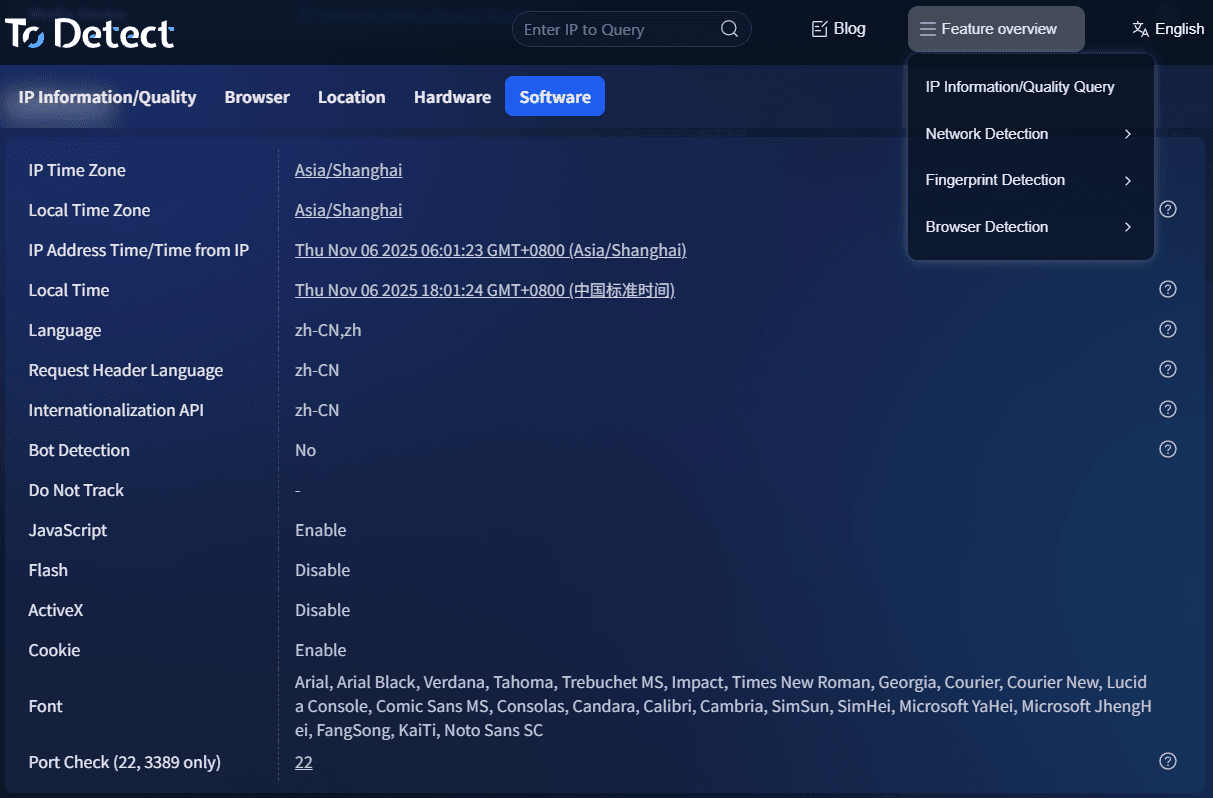
It also helps isolate multi-account operations and improve advertising account security. In many cases, it’s not that you don’t know how to run ads — it’s that the account environment itself has already been flagged as abnormal by the system.
7. Practical Ways to Improve Mobile Conversion Rates
1. Optimize Above-the-Fold Loading Logic
Mobile users will not wait for slow loading. Your first screen must load instantly while displaying useful information.
2. Simplify the Purchase Path
Reduce click layers as much as possible. For example: Homepage → Product Page → Checkout Page (no more than 3 steps).
3. Strengthen Trust Elements
Cross-border users especially value trust. You can add shipping timelines, secure payment badges, and customer review displays.
4. Lightweight Images and Videos
Many independent websites suffer from low conversion rates simply because images are too heavy and slow-loading, driving users away.
5. A/B Test Different Mobile Layouts
User preferences vary by region. For example, European and American users often prefer minimalist designs, while Southeast Asian users prefer more content-rich layouts.
8. Common Questions About Mobile Conversion in Cross-Border E-commerce ❓
1. Why is mobile conversion still low even with high traffic?
Usually, the issue is not traffic itself, but poor “conversion capability” — such as slow page loading, messy structure, or overly long purchase paths. Once users hesitate, they leave.
Prioritize optimizing these three factors: first-screen loading speed, simplified checkout flow, and clearer CTA buttons. These directly affect conversions.
2. Do I need to rebuild my site specifically for mobile optimization?
Not necessarily. Most systems already support responsive design, but the key is whether the experience is truly optimized for mobile users.
Many responsive websites still follow PC-first thinking in fonts, buttons, and layouts. The focus should be on user experience optimization, not rebuilding the entire site.
3. Is browser environment setup really necessary for cross-border e-commerce?
If you only operate a single store, the impact may be limited. But for multi-account operations, ad testing, or matrix strategies, it becomes extremely important.
Stable browser environments can reduce data confusion, avoid incorrect ad attribution, and even lower account risk.
4. What problems do browser fingerprint detection tools like ToDetect solve?
Their core function is helping you determine whether an environment is “clean” and unique.
If multiple accounts use similar environments, systems can easily identify them as connected. ToDetect helps detect risky environments in advance, reducing future problems.
Conclusion: “Environment + Experience + Data”
Cross-border e-commerce used to focus on “products + advertising.” Now, success depends on who can better optimize mobile traffic conversion and build stable account environments.
If you’re still operating in cross-border e-commerce, try changing your perspective — instead of focusing only on “how to get more traffic,” first ask yourself whether you can actually convert and retain that traffic.
Tools like ToDetect often help identify “invisible risks” in advance, making your advertising and operations more stable and reliable.
