


 Resources
 Feature overview
Breaking Down Core Security: Chrome vs. Edge vs. Firefox Tested
 bonnie
 2026-01-09 04:21


Google Chrome, Microsoft Edge, and Mozilla Firefox are the three most popular browsers today. Each is based on a different browser engine, and their security performance also varies.
This article compares the engine architectures and security mechanisms of these three browsers, combined with real-world use of browser detection tools, to help you fully understand which browser is more secure.

I. What Is a Browser Engine? What Are the Differences?
A browser engine, also known as a rendering engine, is the core component responsible for parsing web content, executing scripts, and rendering pages. The engines used by these three browsers are:
• Chrome and the new Edge: Based on Google’s Blink engine. Blink evolved from WebKit and focuses on performance and security optimization.
• Firefox: Uses Mozilla’s independently developed Gecko engine, which emphasizes open standards compatibility and privacy protection, while also supporting multi-process architecture and content isolation.
These three engines differ in design philosophy, performance, and security strategy, directly affecting browser security behavior.
II. Security Mechanisms of the Three Major Browser Engines
1. Multi-Process Architecture and Sandboxing
• Blink (Chrome / Edge)
The Blink engine adopts a strict multi-process architecture, running page rendering, plugins, and extensions in separate processes. Combined with OS-level sandbox restrictions, it minimizes inter-process privileges.
This design effectively prevents malicious code from performing privilege escalation and helps protect the system.
• Gecko (Firefox)
Firefox’s Electrolysis project introduced multi-process support, gradually improving page isolation. Its sandbox mechanism also restricts process privileges.
Compared to Blink, it is slightly more permissive, mainly to maintain compatibility with certain extensions and plugins. Mozilla also uses features such as “Container Tabs” to enhance privacy and security isolation.
2. Memory Safety and Vulnerability Patching
• Blink Engine
The Blink engine benefits from a large development and security team that conducts regular security audits and vulnerability fixes. Chrome and Edge maintain a rapid update cycle of about 6 weeks, delivering security patches promptly to prevent exploitation of known vulnerabilities.
• Gecko Engine
The Gecko engine introduces memory-sensitive modules written in Rust, reducing security risks caused by memory errors. Firefox also responds quickly to vulnerabilities, though its overall team size is smaller than Google’s.
3. Privacy Protection and Security Features
• Firefox
Firefox leads in privacy protection by default, blocking third-party trackers and fingerprinting. Users can flexibly adjust privacy settings to balance security and user experience.
• Chrome and Edge
Both browsers support Content Security Policy (CSP), anti-phishing, and malware protection.
Edge integrates Microsoft Defender SmartScreen for additional protection, while Chrome has a more mature security ecosystem and supports Safe Browsing.
III. Which Is More Secure: Chrome, Edge, or Firefox?
Chrome and Edge (Blink Engine)
• As the browser with the largest global market share, Chrome offers industry-leading sandbox security, rapid vulnerability response, and comprehensive security features.
• The new Edge inherits the strengths of the Blink engine and integrates deeply with the Microsoft ecosystem, providing additional intelligent protection—especially suitable for Windows users.
• However, some users believe that Chrome and Edge’s data collection policies may impact privacy.
Firefox (Gecko Engine)
• Firefox has clear advantages in privacy protection and open-source transparency, continuously improving memory safety and strengthening user control.
• Although its engine design is slightly weaker than Blink in isolation, features such as Container Tabs and anti-fingerprinting effectively enhance security.
• For users who prioritize privacy and security autonomy, Firefox is the better choice.
IV. Practical Tips: How to Improve Browser Fingerprint Security ?
Keep your browser and extensions up to date
No matter which browser you choose, always install official security patches promptly.
Properly configure privacy and security settings
Enable anti-tracking, restrict third-party cookies, and turn on safe browsing features.
Install extensions cautiously
Choose trusted sources and avoid malicious extensions that could become attack vectors.
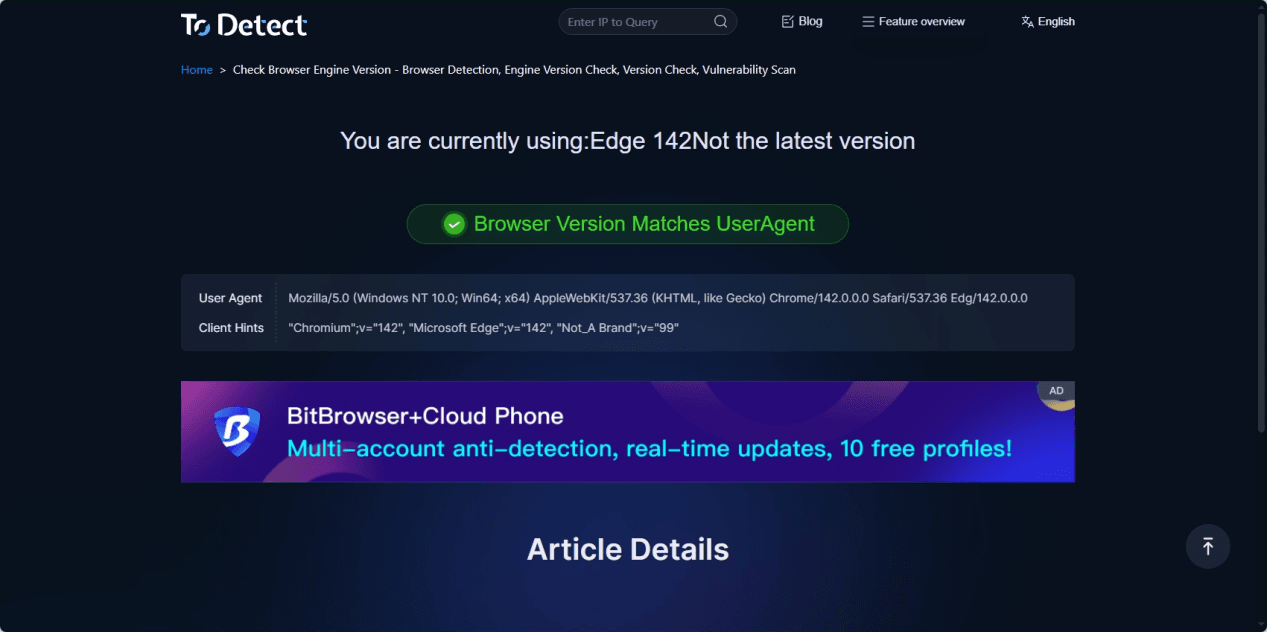
Use ToDetect to check your environment
• ToDetect’s browser engine version detection automatically identifies the current browser engine version, operating system, and environment parameters—simply open the page to detect the real browser environment.
• By analyzing underlying browser characteristics, it avoids misjudgment caused by relying solely on the User-Agent, making it especially useful for identifying disguised or tampered browsers.
Conclusion
Chrome and Edge, based on the Blink engine, rely on mature multi-process architecture, strict sandboxing, and frequent security updates to deliver stable and reliable overall protection and rapid vulnerability response.
Firefox, powered by the Gecko engine, emphasizes privacy-first security through enhanced privacy protection, memory safety optimizations, and container-based isolation—offering an alternative path for users who value data control.
Regardless of which browser you choose, it is strongly recommended to keep your browser updated and configure security settings appropriately.
 AD
AD


