



 Resources
 Feature overview

 browser
 2026-05-22 11:53
Even though I'm using Chrome, my account login is constantly asked for verification, or even directly blocked? I've tried changing IPs, clearing cache, switching accounts, but the problem persists.
Many people think changing a proxy IP, clearing cache, or switching accounts can solve this. But in reality, the platform's risk control logic now focuses on "browser engine detection" and "browser fingerprint detection."
Next, let me help you comprehensively understand why Chrome engine often triggers risk control, and how to deal with it.

1. Why is browser engine detection becoming stricter?
In the past, website risk control was relatively simple, mainly looking at IP address, login location, cookies, and login frequency.
But now, Chrome has a high market share, and many studios, bulk accounts, and automation tools are developed based on Chrome. This leads platforms to focus on analyzing Chrome engine versions.
In other words, whether you are using Chrome is no longer the key. The important thing is whether your Chrome resembles a version used by real users.
2. What is browser engine detection?
• The browser engine is the underlying runtime environment of a browser. For example, Chrome uses the Chromium engine; Edge now also uses Chromium.
• Many fingerprint browsers are also based on Chromium. Platforms can read low-level browser parameters through scripts to determine whether your browser environment is genuine, complete, and natural.
• Parameters such as Chrome engine version, User-Agent, Canvas fingerprint, WebGL info, GPU rendering parameters, AudioContext, and font lists are all part of the browser fingerprint detection system.
If any of these parameters “don’t look like a normal user,” the system may directly trigger risk control.
3. Probability of risk control triggering for different Chrome engine versions
| Chrome Engine Version Range | Common Usage | Probability of Risk Trigger | Recommended Action |
|---|---|---|---|
| Latest Stable Version (e.g., 114+) | High | Low | Keep auto-updates enabled and ensure plugin compatibility |
| Versions within the last year (e.g., 112-113) | Medium | Medium | Update regularly and ensure system matches engine version |
| Over a year old (110-111) | Low | High | Upgrade as soon as possible to avoid being flagged |
| Old versions (109 and below) | Very Low | Very High | Not recommended, may frequently trigger verification |
| Custom or modified Chromium | Uncertain | Medium to High | Check fingerprint parameter consistency, try to mimic native Chrome |
4. Why many Chrome engines are easily detected?
Not all Chrome browsers are truly “native” Chrome.
Many tool browsers, fingerprint browsers, and automated browsers may appear as Chrome, but the underlying environment has been altered.
1. Outdated Chrome engine version
Many users don’t update their browsers to maintain plugin compatibility. But the platform may notice your system is Windows 11, while Chrome is two years old. Such an environment is highly suspicious.
Normal users’ browsers update automatically, so outdated Chrome engines are easily flagged as abnormal.
2. Conflicting browser parameters
For example, UA shows Mac, WebGL shows Windows GPU, timezone is US, and fonts are Chinese. Such “patched environments” are now easily detected.
Previously, simply changing UA could help, but now engine detection cross-checks multiple parameters, so modifying one alone is ineffective.
3. Exposed Headless features
Many automation tools use Headless Chrome.
• Although many tools now hide Headless features, many underlying traces still exist.
• For example: webdriver fields, special rendering behavior, GPU anomalies, consistent Canvas output—all enter browser fingerprint detection.
• Platforms don’t need 100% certainty that you are a bot; if the suspicion is high enough, risk control may trigger.
5. Why browser fingerprint detection is getting harder to bypass?
The system knows what normal Chrome users do, which Chrome engine versions are most common, which GPU combinations are typical, and which font distributions look natural. So many “fake environments” are easily detected.
If dozens of accounts use the same Chrome version, same resolution, same fonts, same GPU parameters, even with different IPs, they may still be linked.
That’s why more people now focus on isolating browser environments.
6. ToDetect and why it is gaining attention?
Many in cross-border business are starting to use ToDetect environment detection tools. The era of just checking IP is gone. Now it is more important to check if the browser environment is genuine.
The core functions of ToDetect include:
• Checking if browser fingerprints are abnormal
• Detecting Chrome engine issues
• Checking for parameter conflicts
• Detecting automation features
• Determining the likelihood of being recognized by the platform
Many people think account risk is an IP issue, but the real problem often lies in the browser engine.
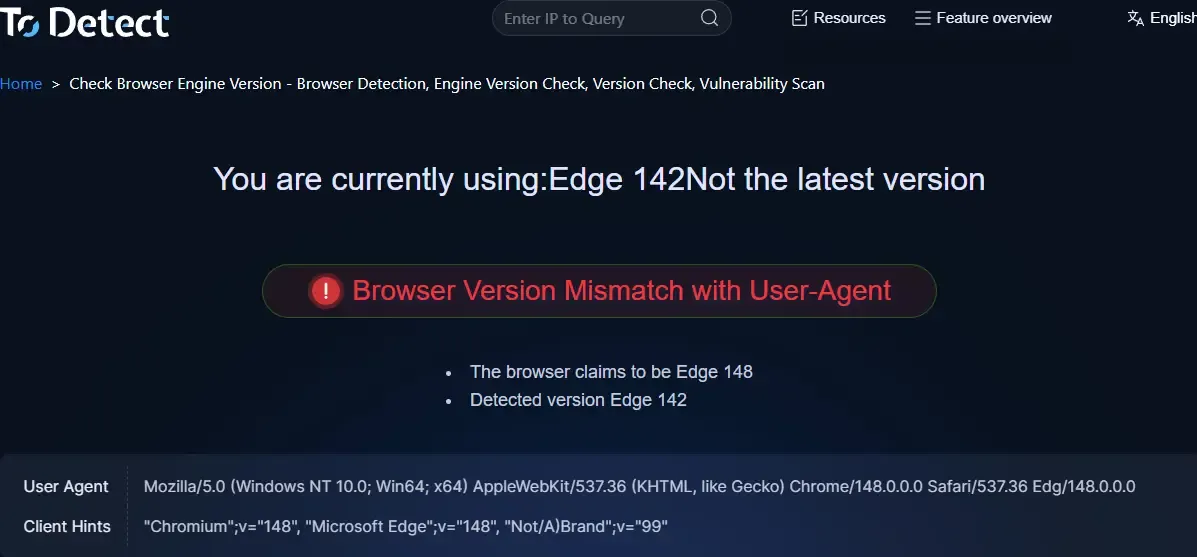
Especially modifying UA without adjusting low-level parameters, incomplete fingerprint browser configurations, mismatched Chrome and system versions, and highly repetitive browser environments—all are high-risk.
7. How to reduce the probability of Chrome engine triggering risk control?
1. Keep Chrome engine updated
Do not use outdated versions for a long time. Especially in cross-border business, Chrome engine should be close to mainstream versions; old versions are easily flagged.
2. Ensure environment parameter consistency
Many only change IP and UA, but the whole browser environment must be consistent, including system version, timezone, language, GPU, resolution, and fonts—all need to match.
3. Avoid over-“masking”
Many people modify fingerprints excessively, but the more modifications, the bigger the problem. Real user environments have randomness; overly perfect or uniform setups are easily detected.
4. Use a real browser environment
Platforms now emphasize low-level browser engine detection. Many are abandoning traditional emulators for setups closer to real user environments.
Especially native Chromium environments, independent browser configuration, isolated cookies, and independent fingerprint parameters—all are more effective than simply modifying UA.
8. Common issues in browser engine detection
Q1: Why does Chrome keep showing “device abnormal”?
A1: Your Chrome engine version may be too old, or browser parameters are inconsistent (e.g., system, GPU, fonts, timezone), triggering browser fingerprint detection. Keeping Chrome updated and ensuring environment consistency with real users can significantly reduce risk.
Q2: Changing IP didn’t work. Is my account permanently banned?
A2: Not necessarily. Risk control now analyzes browser engine and fingerprints as well. If the environment is abnormal, changing IP alone won’t stop verification. Optimizing the browser environment is the solution.
Q3: Can changing User-Agent completely bypass risk control?
A3: No. Platforms cross-check multiple parameters, including WebGL, Canvas, fonts, system info, etc. Changing UA alone is easily detected and may increase risk.
Q4: Is using a fingerprint browser really safe?
A4: It helps to some extent, but the key is complete configuration. If fingerprint browser parameters are repetitive or unnatural, risk control may still be triggered. The most reliable method is using a native Chrome setup with consistent, natural parameters.
In summary
Modern risk control no longer relies solely on IP or login behavior. It now heavily depends on browser engine detection and browser fingerprinting to judge whether your environment is genuine.
To reduce the risk of being flagged, you can use the ToDetect tool to identify problems in advance and optimize your browser environment, making your accounts more stable and secure.
In the future, browser engine detection and fingerprinting will only become stricter. Those who master these details can maintain an advantage in complex risk control systems.
