


 Resources
 Feature overview
What are the four major web browsers at home and abroad using for their cores? Latest 2026 review
 bonnie
 2026-01-13 04:05


In daily internet use, software testing, cross-border e-commerce operations, and account security scenarios, many people are accustomed to judging the environment type based on the browser name.
In fact, what truly determines browser behavior, webpage rendering methods, and risk-control identification results is the browser engine.

1. What Is a Browser Engine ?
A browser engine is the core component of a browser responsible for processing web content. Its main tasks include:
• Parsing HTML and CSS code and converting it into page layouts and styles visible to users;
• Executing JavaScript scripts on webpages to enable interactivity and dynamic effects;
• Managing network requests between the browser and servers to ensure proper loading of webpage data.
In addition, the browser engine handles low-level details of the browser environment, such as cache management, rendering optimization, and security policies.
Different browsers use different engines, which can lead to subtle differences in how the same webpage behaves across browsers. In other words, the browser engine acts like an engine that drives the display and operation of webpages, forming the foundation of the browsing experience.
2. The Four Mainstream Browser Engines
1. Google Chrome: Blink Engine
Chrome is currently the most widely used browser globally and the primary representative of the Blink engine.
• Blink originates from the Chromium project and evolves rapidly in terms of rendering performance, JavaScript execution efficiency, and support for new standards. As a result, many websites prioritize optimization for the Chrome environment.
• From a platform risk-control perspective: Blink-based environments are mature and easier for systems to understand and model, meaning their fingerprint characteristics are relatively clear and stable.
2. Mozilla Firefox: Gecko Engine
Firefox is the only one among the four major browsers that still insists on using a fully self-developed engine.
• Characteristics: Gecko has clear advantages in standards compatibility, privacy protection, and controllability, with fundamental differences in underlying implementation logic compared to Blink.
• Application value: In certain detection scenarios, Gecko exhibits environment characteristics different from Chromium-based browsers, making it irreplaceable for users who require multi-environment testing or engine behavior comparison.
3. Apple Safari: WebKit Engine
Safari is the official browser built on the WebKit engine and holds a central position within the macOS and iOS ecosystems.
• Mobile advantage: On iOS, all browsers are required to use WebKit, giving Safari absolute representativeness at the mobile engine level.
• Characteristics: WebKit excels in power consumption control and system resource scheduling, but is relatively conservative in adopting some new features—one of its main differences from Blink and Gecko.
4. Microsoft Edge: Blink Engine
The new version of Edge has fully transitioned to the Chromium architecture and uses the same Blink engine as Chrome.
• Rendering and execution: The two are highly consistent in webpage rendering and script execution.
• Differences: Mainly reflected in product features, system integration, and default configurations. From a technical standpoint, Edge is no longer an independent-engine browser but an important member of the Blink ecosystem.
Summary Table of Common Browser Engine Detection
| Browser | Engine |
|---|---|
| Google Chrome | Blink |
| Mozilla Firefox | Gecko |
| Apple Safari | WebKit |
| Microsoft Edge | Blink |
3. How to Identify a Browser Engine
Many users believe that knowing whether they are using Chrome, Firefox, or Safari means they understand their browser environment. However, in real-world scenarios, the engine claimed by a browser does not always fully match the engine characteristics it actually exposes.
For example:
• Customized browsers or repackaged products
• Engine simulation in anti-detection environments
• Interference with engine characteristics by extensions or scripts
• Mismatch between User-Agent and underlying behavior
These situations can all lead to deviations in platform judgments based on browser engines, thereby affecting account security or business stability.
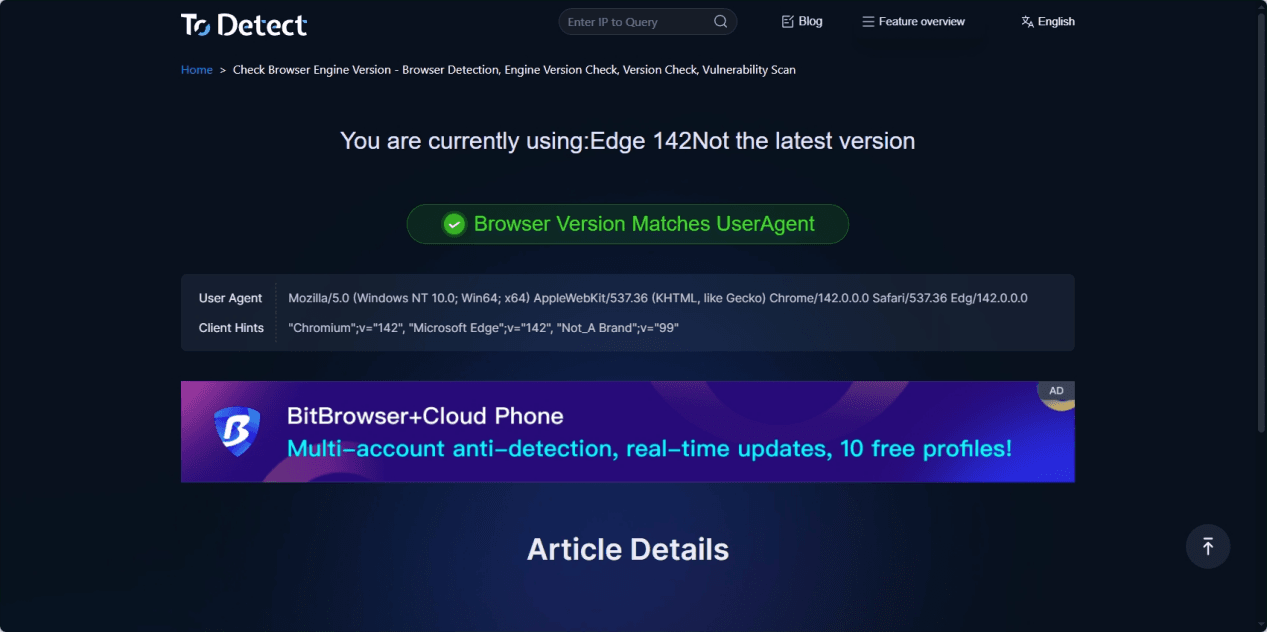
You can use the ToDetect browser engine version detection feature to check:
• The actual engine version currently used by the browser
• Whether engine behavior matches the browser identification
• Whether there are abnormal engine characteristics or signs of spoofing
Final Thoughts
Relying solely on the browser name is not enough to fully understand its true engine environment. Customized versions, extensions, or anti-detection technologies may disguise or interfere with engine characteristics, introducing account security risks.
With professional tools like ToDetect, you can accurately detect the actual browser engine version and behavior, helping identify potential risks and ensure a secure and stable online environment.
 AD
AD


