



 Resources
 Feature overview

 browser
 2026-06-03 10:09
Many people assume that browser engine detection simply means identifying whether they are using Chrome or Edge when they first hear about it.
In reality, it goes far beyond recognizing whether you're using Chrome or Edge. It can further infer your device type, operating system environment, and even detect potential abnormal behavioral characteristics.
Today, let's take a closer look at what browser engine detection actually checks, how it affects device identification, and which key parameters are truly critical and should never be overlooked.

1. What Is Browser Engine Detection?
A browser engine is the core component responsible for parsing web code and rendering page content. Most modern browsers are built on the Chromium engine, including Chrome, Edge, Opera, and Brave.
When users visit a platform, servers can perform browser engine detection through various methods to collect browser environment information, including:
• Browser engine type
• Browser version
• Rendering engine information
• JavaScript execution environment
• WebGL parameters
• Canvas fingerprint
• User-Agent information
Although these data points may appear ordinary, when analyzed together they can create a fairly complete device fingerprint. Therefore, browser engine detection is not merely about identifying which browser a user is using—it is an important component of modern fingerprinting technology.
2. Why Can Browser Engine Detection Identify Device Types?
Many users believe that modifying the User-Agent (UA) is enough to hide device information. In reality, this approach is no longer sufficient because modern risk-control systems examine multiple dimensions simultaneously.
Browser engine detection plays a crucial role in this process. Different devices typically have distinct browser engine characteristics:
• Windows devices primarily use Chromium and Edge-based engines
• Mac devices exhibit specific Safari WebKit characteristics
• Android devices display mobile Chromium features
• iPhones and iPads must use the WebKit engine
By examining engine versions, platforms can quickly determine whether an environment is logically consistent with the claimed device. For example, if a UA claims to be an iPhone but the detected engine version belongs to a Windows Chrome environment, the session may be flagged as high risk.
3. Browser Engine Detection: Key Dimensions Comparison Table
| Detection Dimension | Exposes Device Type? | Risk Level | Practical Purpose |
|---|---|---|---|
| TLS / Network Fingerprint | High | High | Verifies consistency between device and operating environment through network handshake characteristics. |
| WebRTC Information | Medium | Medium | May reveal real IP addresses and local network details to assist environment identification. |
| GPU Rendering Characteristics | High | High | Used to identify GPU types and infer device categories. |
| Font Rendering Differences | Medium | Medium | Different operating systems have distinct font libraries that help identify OS types. |
| Timezone & Language Settings | Low | Low | Limited value on their own but useful for cross-validation. |
| Browser Engine Consistency | High | High | Core verification point used to determine whether the browser environment is genuine and internally consistent. |
| Multi-Parameter Behavioral Matching | Very High | Very High | Combines multiple dimensions to create a device profile and serves as the foundation of risk-control systems. |
4. Browser Engine Parameters Most Likely to Expose Device Information
1. Engine Version
Engine version detection is one of the most fundamental and important checks. For example, Chrome 137 corresponds to a specific Chromium engine version.
If a user modifies browser identifiers while the underlying engine version does not match the claimed device, obvious inconsistencies emerge.
Many platforms verify whether browser versions, Chromium versions, JavaScript engine versions, and WebAPI support are consistent. Any mismatch can easily expose spoofing attempts.
2. User-Agent Information
Although the importance of User-Agent strings has declined, they remain an important reference point in browser engine detection.
A standard UA typically contains the browser name, browser version, operating system version, device type, and engine information.
For example, Chrome UAs contain Chromium-related characteristics. If the UA does not match the actual engine, the discrepancy can be detected.
3. WebGL GPU Parameters
WebGL is a major source of browser fingerprinting data. Through WebGL detection, websites can obtain GPU models, graphics driver information, renderer details, and graphics processing capabilities.
For example, Windows computers often reveal NVIDIA or AMD GPUs, while mobile devices commonly display Adreno or Mali GPU information. Even if browser information is modified, these low-level characteristics may still reveal the true device type.
4. Canvas Fingerprinting
Canvas fingerprinting identifies devices based on subtle rendering differences generated when browsers draw graphics.
Differences in GPUs, fonts, operating systems, and browser engines produce distinct image hash values.
As a result, Canvas detection is frequently combined with browser engine detection to improve identification accuracy.
5. Navigator Object Information
Websites also read parameters from the browser's Navigator object.
Examples include platform, language, hardwareConcurrency, deviceMemory, and maxTouchPoints.
These values help determine whether a device is mobile, how many CPU cores it has, how much memory is available, and whether touch input is supported.
5. Why Is ToDetect Gaining Attention?
As browser environment detection technologies continue to evolve, more people are paying attention to professional tools like ToDetect. It can quickly identify:
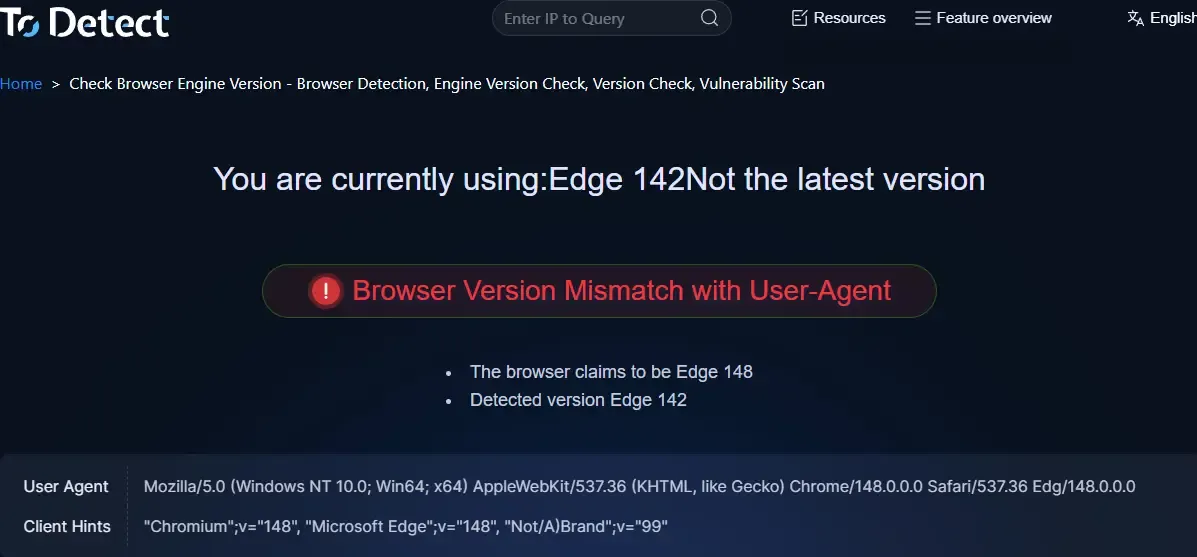
• Browser engine detection
• Browser engine inspection
• Engine version analysis
• Fingerprint consistency analysis
• Browser environment evaluation
Through its reports, users can clearly identify abnormal parameters within their browser environment.
For cross-border e-commerce operations, multi-account management, advertising campaigns, and automation-related business scenarios, conducting checks in advance can significantly reduce risks caused by abnormal environments.
6. How to Reduce Information Exposure Caused by Browser Engine Detection?
If you want to reduce device information exposure, you should focus on maintaining overall environment consistency.
◇ Keep browser versions synchronized
Do not arbitrarily modify browser identifiers. Ensure that browser versions, engine versions, and User-Agent information remain consistent.
◇ Maintain system environment consistency
Windows environments should present Windows browser characteristics, while Mac environments should present Mac browser characteristics. Avoid cross-platform inconsistencies.
◇ Pay attention to browser fingerprint parameters
Beyond UA strings, monitor Canvas, WebGL, AudioContext, font information, and timezone settings, as all of these participate in device identification.
◇ Verify using professional detection tools
Using tools such as ToDetect for browser engine inspection and environment testing can help identify potential issues before deployment and reduce the likelihood of platform detection.
Conclusion
Many people think browser engine detection simply identifies browser types. In reality, it has become a core component of modern device fingerprinting systems.
Especially in cross-border e-commerce and overseas social media account operations, browser environment consistency is becoming increasingly important. Ignoring engine versions, device parameters, and fingerprint data can lead to environment exposure and even trigger platform risk-control mechanisms.
Therefore, it is advisable to regularly use professional tools like ToDetect to evaluate your browser environment, gain a comprehensive understanding of its status, and improve both privacy protection and operational stability.
