


 Resources
 Feature overview
Time for a New Browser? 3-Second Test to See If It Handles the Latest CSS/JS
 Ganesh
 2026-02-25 04:17


Many people have encountered this situation: everything works perfectly when tested in Chrome on your own computer, but users see rendering issues on certain devices.
In most cases, this happens because the browser engine does not support the latest CSS or JavaScript features.
So how can we accurately determine whether a browser engine supports these new features? Today, let’s talk about practical techniques for browser engine detection, browser fingerprint detection, and related tools.

1. Why Browser Engines and Versions Matter
First, we need to understand one concept: a browser’s “engine” determines how it parses HTML, CSS, and JavaScript. Common browser engines include:
• Blink: Chrome, Edge (new versions), Opera
• WebKit: Safari
• Gecko: Firefox
• Trident / EdgeHTML: Legacy IE and Edge
Different engines support different CSS/JS features. Even within Chrome, different Blink versions may not support the latest CSS properties or JavaScript APIs. Therefore, knowing the browser engine version is extremely important.
By identifying the browser engine version, we can determine whether users can safely use certain cutting-edge features without blindly downgrading or introducing polyfills.
Tip: In frontend projects, combine @supports in CSS and JavaScript feature detection to dynamically check support instead of relying solely on browser version numbers.
2. Browser Engine Detection Practical Methods
1. User-Agent Detection
The traditional approach is to parse the browser’s User-Agent string. For example:
const ua = navigator.userAgent; if (/Chrome\/(\d+)/.test(ua)) { const version = parseInt(RegExp.$1); console.log('Chrome engine version:', version); }
Disadvantages: Easy to spoof and not fully reliable
2. Feature Detection
The recommended frontend practice is: “Check features, not browser names.”
For example, to detect CSS Grid support:
if ('grid' in document.body.style) { console.log('CSS Grid supported'); } else { console.log('CSS Grid not supported'); }
if (typeof Promise !== 'undefined') { console.log('Promise supported'); } else { console.log('Promise not supported'); }
This method is more reliable because it directly checks functionality instead of depending on engine versions.
3. Browser Fingerprint Detection
• Browser fingerprint detection can obtain not only engine and version information, but also system details, fonts, plugins, and more—forming a unique “fingerprint” for more accurate compatibility analysis.
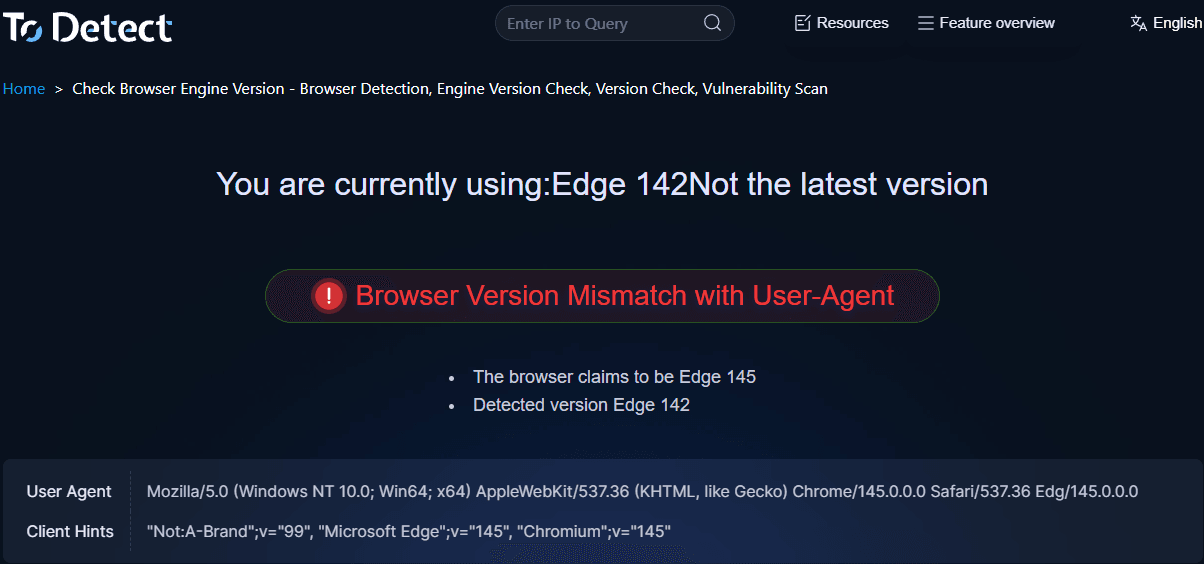
• Recommended Tool: ToDetect Fingerprint Checker — helps detect browser engine, JavaScript support, WebGL version, and more.
• With simple steps, you can generate a detailed report, making it ideal for frontend developers and QA teams.
3. Practical Strategy: Combine Engine and Feature Detection
In real-world development, you can combine browser engine detection with feature detection. This approach ensures compatibility with older browsers while fully leveraging modern features.
const ua = navigator.userAgent; const isOldChrome = /Chrome\/(5[0-9]|6[0-4])/.test(ua); if (isOldChrome) { console.log('Old Chrome version, downgrade animation effects'); } else if ('grid' in document.body.style) { console.log('CSS Grid supported, use modern layout'); } else { console.log('Fallback styling applied'); }
Here, we first make a broad judgment based on the browser engine version, then refine it with CSS/JS feature detection for more robust compatibility handling.
4. Improve Efficiency with the ToDetect Fingerprint Checker
If your project serves a large number of users, manually checking each browser is inefficient. This is where the ToDetect Fingerprint Checker becomes highly practical:
• Comprehensive Engine Detection: Supports Blink, WebKit, Gecko, Trident/EdgeHTML
• JS/CSS Feature Detection: Quickly verify support for ES6, CSS Grid, Flexbox, and more
• Report Generation: Export JSON reports for data analysis or automated compatibility strategies
With such a tool, you can proactively plan compatibility strategies and reduce post-launch issues.
Summary: How to Approach Browser Engine Detection
• Understand your users’ browsers: Analyze your target audience’s engine types and versions first
• Feature first: Use feature detection to verify CSS/JS availability
• Tool assistance: Use browser fingerprint detection tools like the ToDetect Fingerprint Checker for precise information
• Layered compatibility: Provide fallbacks for older engines and leverage modern features for newer ones
In short, browser engine detection provides the big picture, feature detection offers precision, and tools enable scalable analysis. Master these three steps, and you can confidently use modern CSS/JS features across browsers while minimizing compatibility issues.
 AD
AD


