



 Resources
 Feature overview

 browser
 2026-05-19 11:30
Browser fingerprinting is being mentioned more and more frequently, especially Canvas fingerprinting technology, and many users are already being tracked without even realizing it.
It doesn’t rely on accounts or Cookies. Instead, it generates a nearly unique identifier based on the subtle differences created when your browser “draws an image.”
Next, let’s walk through how to detect whether your browser is being identified through Canvas fingerprinting, along with several practical methods to quickly determine whether your browser can be recognized or tracked.

1. What Is Canvas Fingerprinting?
Canvas fingerprinting is a type of browser fingerprinting technology that creates a relatively unique “device identifier” based on subtle rendering differences when drawing images using the HTML5 Canvas element.
Common browser fingerprinting methods include: Canvas fingerprints, WebGL fingerprints, font list fingerprints, screen resolution fingerprints, and system information combinations.
Among them, Canvas fingerprinting is widely used by advertising platforms and anti-fraud systems because of its high stability and recognition accuracy.
2. Why Should You Care About Canvas Fingerprint Detection?
Many people don’t realize this issue at first, but if you’ve experienced situations like these:
• The same account being recognized as the same device across different websites
• Ads following you right after searching for something
• Multiple accounts getting linked together by platforms
• Anti-bot or risk-control systems flagging your environment as “abnormal”
There’s a good chance Canvas fingerprinting is involved. That’s why “Canvas fingerprint detection methods” are essentially tools to help users determine whether their browsers are being tracked.
3. Canvas Fingerprint Detection Dimensions (Practical Guide)
| Detection Dimension | Description | Risk Meaning | Common Behavior |
|---|---|---|---|
| Canvas Rendering Differences | Pixel-level differences when rendering the same image on different devices | Used to generate unique device identifiers | Results remain mostly consistent per device |
| Fingerprint Hash Value | A unique string generated after Canvas output | Determines whether a device is “unique” | Long-term consistency or high stability |
| Font Rendering Environment | Differences in system fonts and anti-aliasing | Enhances fingerprint uniqueness | Clear differences between Windows and macOS |
| GPU Image Processing | Differences in graphics drivers and WebGL rendering | Improves identification accuracy | Similar among devices with the same configuration |
| Browser Engine Differences | Different rendering mechanisms in Chrome, Edge, and Firefox | Affects overall fingerprint structure | Different engines produce different results |
| Fingerprint Consistency | Whether repeated visits produce the same result | Determines whether tracking can persist over time | The more stable it is, the easier it is to identify |
4. How to Detect Whether Your Browser Is Being Identified by Canvas Fingerprinting? (Core Methods)
Method 1: Manually Test Canvas Fingerprint Changes
You can perform a basic verification using your browser’s developer tools:
□ Open Chrome or Edge
□ Press F12 to open Developer Tools
□ Open the Console panel
□ Enter a Canvas test script (search for “canvas fingerprint test”)
□ Refresh multiple times or switch environments to see whether the hash output remains stable
If the result remains exactly the same every time, it means your Canvas output is highly stable, which also means it has a higher recognition probability.
If the result changes noticeably, it suggests your browser environment has some anti-fingerprinting capability. However, this method is relatively technical and may not be beginner-friendly.
Method 2: Use Online Browser Fingerprint Detection Tools (Recommended)
For most users, the easiest way is to use professional browser fingerprint detection tools.
• ToDetect lets you directly check whether your Canvas fingerprint is unique, your browser fingerprint score, WebGL information, screen resolution data, and whether there is a “high identification risk.”
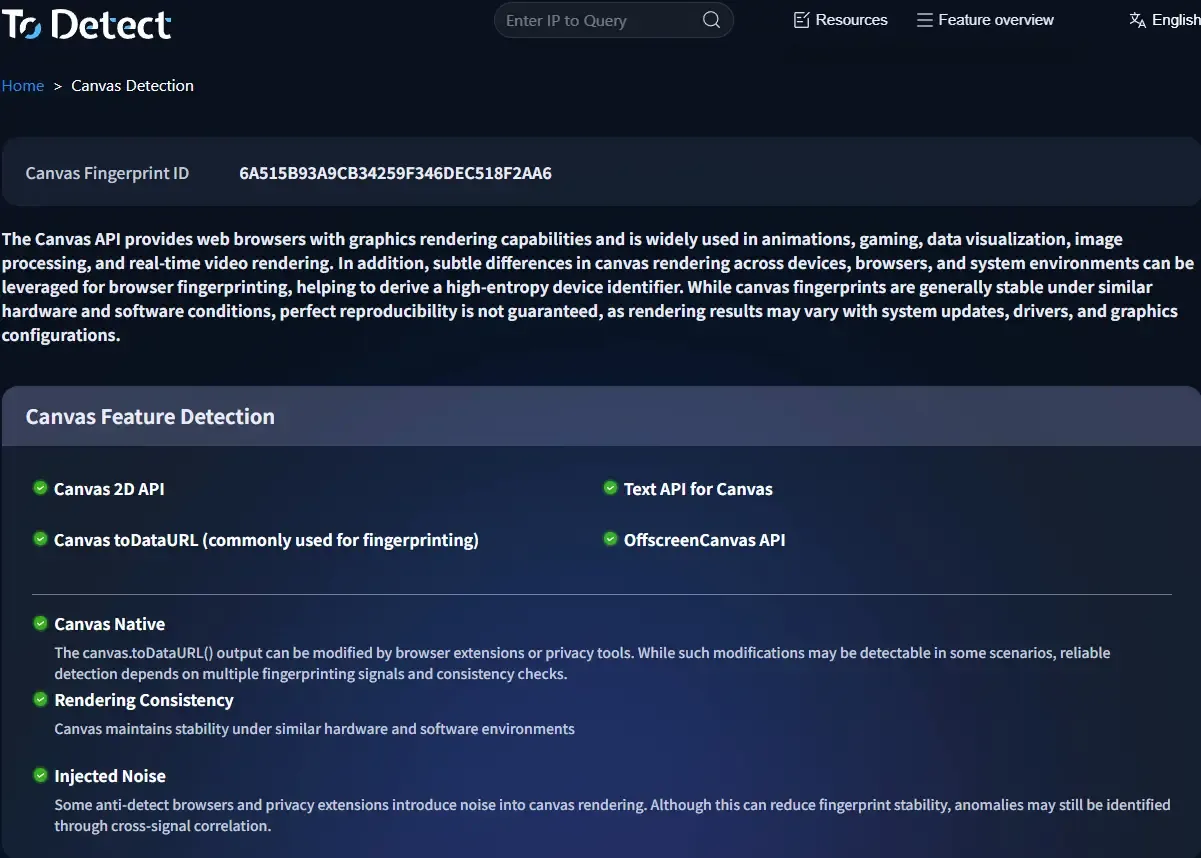
• These tools essentially visualize complex browser fingerprint detection data, allowing you to quickly see whether your browser is easy to track.
If you search for terms like “Canvas fingerprint detection online tool” or “browser fingerprint checker,” you’ll usually find tools like these for fast verification.
Method 3: Browser Extensions for Fingerprint Detection
Besides online tools, you can also use privacy-focused browser extensions:
• CanvasBlocker (commonly used in Firefox)
• Trace / Privacy Badger
• Anti Fingerprinting browser extensions
These extensions usually support features such as randomizing Canvas output (making fingerprints unstable) and blocking scripts from reading Canvas data.
After installation, revisit a Canvas fingerprint detection page and compare the before-and-after results to determine whether your browser fingerprint has been “masked” or “obfuscated.”
5. How to Tell Whether You’re Being Identified by Canvas Fingerprinting?
1. Is Your Canvas Fingerprint Stable and Unique?
If your test results remain nearly identical across different times and network environments, your device characteristics are highly stable.
2. Is Your Browser Fingerprint Score Too High?
Many browser fingerprint detection tools provide a risk score. Generally, the higher the score, the easier it is for your browser to be identified.
3. Is There Cross-Site Consistency?
For example, if you log into different websites and they still recognize you as the same device, Canvas fingerprinting is likely involved.
6. How to Reduce Canvas Fingerprint Exposure Risks?
1. Use Privacy-Focused Browsers
Some browsers include anti-fingerprinting protection by default.
2. Enable Randomized Canvas Output
Use browser settings or extensions to slightly alter Canvas rendering every time.
3. Limit Fonts and Extensions
The more fonts and plugins you have installed, the more unique your fingerprint becomes, making it easier to identify.
4. Avoid Using Multiple Accounts in the Same Environment Long-Term
This is especially important in marketing, e-commerce, and automation-related scenarios where risk-control systems are stricter.
7. The Core of Canvas Fingerprint Detection Is How Easily You Can Be Identified
• Many people mistakenly believe that simply having a Canvas fingerprint means there’s a risk. That’s not entirely accurate.
• A more accurate understanding is that Canvas fingerprinting itself is a normal technology — the real issue is how unique your fingerprint is.
• If your browser environment differs significantly from most users, then you become easier to track.
Conclusion
Canvas fingerprint detection isn’t really about whether the technology exists — it’s about how easily your browser can be uniquely identified.
If you’ve tested your browser fingerprint and found that your device score is relatively high, there’s no need to panic. It doesn’t necessarily mean you’re being “monitored”; it may simply mean your browser environment is highly consistent.
Regularly using online tools like ToDetect can help you quickly check your browser fingerprint status. In today’s internet environment, understanding your “digital identity” is more important than most people realize.
