



 Resources
 Feature overview

 browser
 2026-05-21 10:15
Even though the IP has changed, the browser has changed, and the devices are separated, accounts still get restricted frequently — sometimes multiple accounts are even banned together.
To put it simply, platforms no longer only care about “where you log in from,” but whether “you are actually the same person.” Among these signals, Canvas Fingerprint Detection plays a critical role.
In this article, we’ll explain what Canvas fingerprinting really is, why it affects multi-account anti-detection strategies, and how to reduce risks in real-world operations.

1. What Is Canvas Fingerprint Detection? More “Invisible” Than IP
Canvas fingerprint detection refers to websites using browser rendering capabilities (Canvas API) to generate a unique “device rendering signature.”
Because graphics cards and driver environments vary across devices, even if you change your IP address or clear cache, identical or abnormal Canvas rendering results may still identify you as the same device.
This is the core logic behind Canvas fingerprinting — it’s not a parameter users can directly see, but it is an important basis platforms use to determine whether the same person is operating multiple accounts.
2. Why Does Canvas Fingerprinting Affect Multi-Account Anti-Detection?
Preventing account association is no longer as simple as switching browsers. Modern platforms evaluate multiple dimensions together.
• As long as part of the information combination appears highly consistent, accounts can easily be grouped under the same “digital identity.”
• Canvas fingerprints are especially important because they are highly stable identifiers. In other words, they are harder to disguise than IPs and harder to clear than cookies.
• A common mistake is using the same computer + different IPs + multiple browsers to log into multiple accounts.
Accounts still get banned because Canvas fingerprints and browser fingerprint detection have already exposed the connection.
3. Why Are Cross-Border Marketing Accounts Increasingly Flagged?
In recent years, platform risk-control systems have become significantly stricter. Several trends are obvious:
• Bulk account behavior is heavily monitored
• Multiple accounts under the same IP
• Multiple logins from the same device
• Consistent login time patterns
• Browser fingerprint detection dimensions are becoming more detailed
Platforms used to mainly look at IP addresses. Now they use “device-level identification,” and even marketing automation tools are included in risk-control models.
Many automation plugins leave behind unified environment signatures. So if you still believe “changing IP = safety,” that approach is already outdated.
4. How ToDetect Helps With Browser Fingerprint Detection
The core purpose of the ToDetect browser fingerprint detection tool is not to “prevent bans,” but to help you identify potential problems in advance:
□ Whether the current browser Canvas fingerprint is unique
□ Whether duplicate historical environment features exist
□ Whether WebRTC, fonts, and WebGL expose real device information
□ Whether there are association risks across multiple account environments
In simple terms, it works more like a “risk-control diagnostic tool,” allowing you to evaluate environment safety before operation rather than trying to fix problems after accounts get banned.
5. Practical Strategies for Preventing Canvas Fingerprint Association
1. Account = Environment = Identity: Build a Binding Logic First
Many people fail because they treat accounts merely as “login objects” instead of “digital identities.” A safer approach is:
• One account should correspond to one dedicated browser environment
• One environment should not be mixed with other accounts over time
• Environments should not share cache, plugins, or login states
The key here is not technical complexity, but “long-term consistency.” Browser fingerprint systems care more about stable behavioral patterns.
2. Canvas Fingerprints Shouldn’t Change Frequently — But They Also Shouldn’t Be Completely Identical
Many people think Canvas fingerprints must be completely different. That’s not necessarily true.
A more reasonable approach is for each environment to maintain a stable and independent Canvas fingerprint without showing signs of “mass-generated identical models.”
3. Browser Fingerprint Dimensions Need Overall Consistency Management
Canvas is only one part of browser fingerprinting. What truly triggers risk-control systems is the “combined feature profile.”
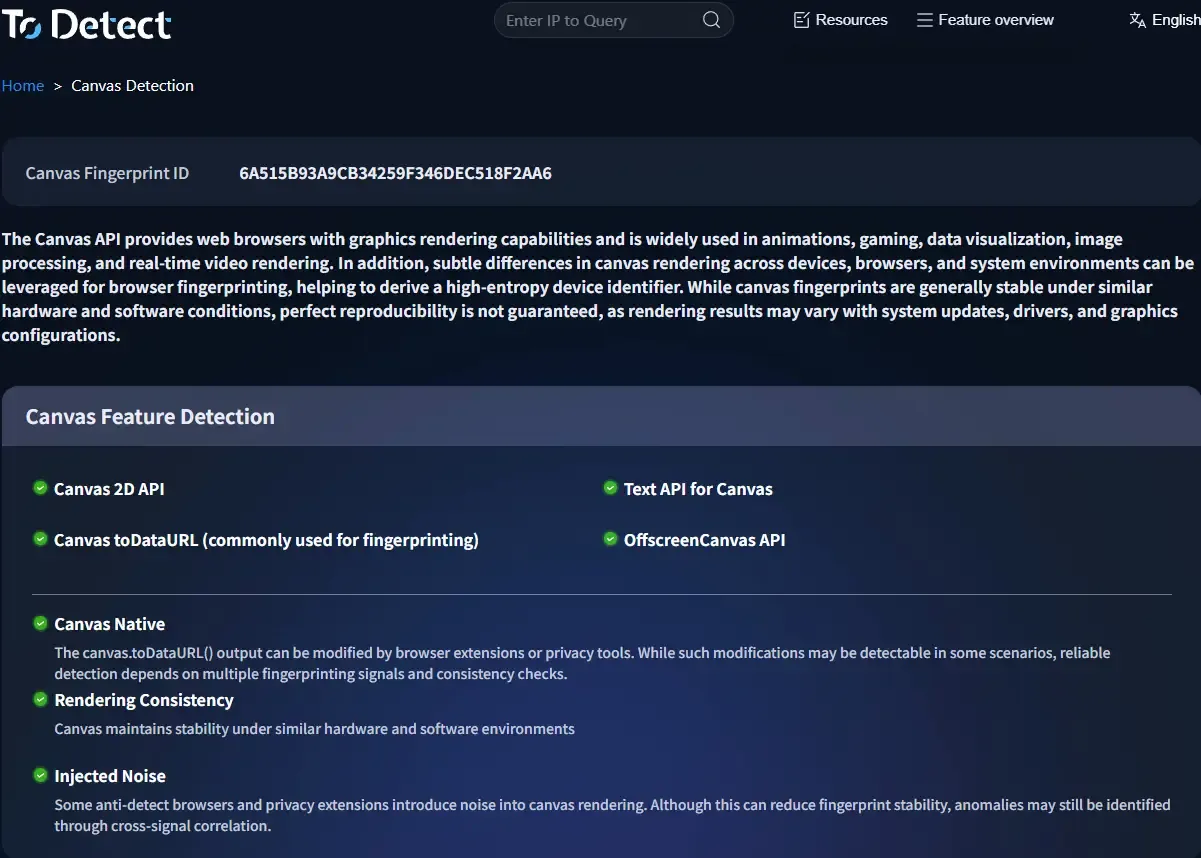
Recommended dimensions to manage include:
• Canvas fingerprint
• WebGL rendering information
• Font lists (Font fingerprint)
• Resolution & device scaling ratio
• Operating system language & timezone
• Hardware information (CPU/GPU simulated features)
The point is not to make every parameter intentionally “different,” but to ensure each environment remains internally “logically consistent” rather than artificially stitched together.
4. Regularly Check Browser Fingerprint Consistency
Use tools like ToDetect to inspect whether an environment appears “too clean and identical,” which itself can become a risk signal.
5. Use Plugins and Automation Tools Sparingly
Plugins themselves can also form fingerprints, especially marketing automation plugins, bulk-login tools, and synchronized-operation extensions.
These tools can create highly consistent browser behavior patterns: repeated Canvas + WebGL + API call behaviors.
From a risk-control perspective, this kind of “behavioral consistency” is more dangerous than a single Canvas fingerprint alone.
It’s recommended to minimize plugins in each account environment, avoid sharing plugin configurations across environments, and prevent identical automation rhythms at scale.
6. Common Misconceptions: Many People Expose Themselves
◇ Thinking Incognito Mode is enough for safety
◇ Thinking changing browsers prevents association
◇ Thinking avoiding the same plugin across accounts solves the issue
◇ Ignoring low-level signals like Canvas fingerprints
The reality is that browser fingerprint detection systems are already mature enough that determining “whether you are the same person” no longer depends solely on changing IP addresses.
Conclusion:
Many cross-border accounts are not suddenly banned overnight. Instead, they are gradually flagged after operating in the same environment for a long period of time.
Canvas fingerprint detection, in particular, is not as easy to replace as IP addresses, nor as easy to clear as cookies. It functions more like an underlying “device identity label.”
When operating multi-account matrices or managing stores at scale, Canvas Fingerprinting + ToDetect Browser Fingerprint Detection has already become an unavoidable challenge.
