



 Resources
 Feature overview

 Charles
 2026-05-28 10:31
Many beginners in Amazon cross-border e-commerce focus heavily on product selection, advertising, and operations, while overlooking one very basic yet critical issue — DNS leaks.
Simply put, no matter how refined your account operations are, if your network environment is “unclean,” the system can identify abnormalities instantly. Many accounts run into unexplained issues, and the root cause is often an unclean DNS routing chain.
If you are currently running Amazon cross-border business or planning to manage multiple accounts, this article is worth reading carefully because many people run into problems simply by ignoring DNS leak detection.

1. What Is a DNS Leak? Most People Misunderstand It
A DNS leak means that although you are using a proxy IP or overseas network, your DNS requests are still being routed back through your local ISP.
It’s like appearing to operate in a “US environment,” while the system sees your DNS resolution path coming from China. Platforms like Amazon do not only check your IP address — they also analyze your DNS routing chain. If the DNS environment does not match, your account can easily be flagged as abnormal.
Many beginners think “as long as I use a US IP, I’m safe,” but in reality, DNS leaks are the hidden risk factor.
2. Why Must Amazon Cross-Border Sellers Care About DNS Leaks?
Amazon’s risk-control system has become increasingly sophisticated. It no longer only checks “where you log in from,” but whether your environment resembles a real local user. DNS leaks can cause:
1. Inconsistent Account Environment and Risk Flags
Your IP may appear to be in the US, while your DNS resolves through China. This contradiction is highly suspicious.
2. Advertising Accounts Becoming Restricted
Many sellers experience sudden traffic limitations or stricter reviews when running off-site ads or Sponsored Products campaigns, often related to environment consistency issues.
3. Multi-Account Operations Becoming Linked
If multiple stores share an unclean network environment, DNS abnormalities may lead the system to assume bulk account operations.
3. What Does DNS Leak Detection Actually Check?
Many people know they “should test for DNS leaks,” but do not understand what is actually being analyzed. A complete DNS leak test usually checks:
Whether the DNS resolution servers match the target country, whether local ISP DNS servers are present, whether IPv6 exposes your real location, and whether WebRTC leaks your real network information. Combined together, these factors determine whether your “network identity” appears authentic.
4. Cross-Border Account Environment Check Priority Table (Practical Version)
| Check Item | Frequency | Risk Level | Recommended Tool / Method | Purpose |
|---|---|---|---|---|
| DNS Resolution Consistency | Before Every Login | High | DNS Leak Detection Tool / ToDetect | Verify whether DNS routing matches the target country environment |
| IP Reputation / Cleanliness | After Changing Nodes | High | Residential IP Detection Platforms | Avoid blacklisted or data-center IPs |
| Browser Fingerprint Consistency | Required for New Devices / Accounts | High | Browser Fingerprint Detection Tools | Prevent device-feature linkage between accounts |
| Time Zone & Language Matching | During Initial Setup | Medium | Manual System Settings Check | Ensure regional behavior consistency |
| WebRTC Information Exposure | Regularly | Medium | Online Leak Detection Websites | Prevent real IP exposure through browsers |
| Cookie & Cache Isolation | Before Multi-Account Operations | Medium | Fingerprint Browsers | Avoid historical data crossover between accounts |
5. Browser Fingerprinting: A More Hidden Risk-Control Factor Than DNS
If DNS represents a “network path issue,” then browser fingerprint detection represents a “device identity issue.”
Amazon identifies users through browser versions, installed fonts, screen resolution, time zone, language settings, Canvas fingerprints, and WebGL fingerprints.
Many people only focus on fixing IP issues while ignoring fingerprint consistency. As a result, the IP may appear fine, but the account still gets linked. True cross-border environment setup requires DNS + IP + Fingerprint integration, not just single-point optimization.
6. ToDetect: One of the Professional Environment Detection Tools
In real operations, many cross-border sellers rely on tools for environment self-checks, such as ToDetect.
It helps quickly identify DNS leaks, verify whether IP locations truly match the target region, detect abnormal browser fingerprints, and determine whether WebRTC exposes real information.
This step is extremely important because these problems are invisible to the naked eye. Many people only investigate their environment after account issues occur — often too late.
7. DNS Leak Detection FAQ
1. If DNS leak detection shows “abnormal,” will my account definitely be suspended?
Not necessarily, but it is considered a high-risk signal. It indicates inconsistencies in your network environment (such as DNS backflow or local DNS resolution), which may increase Amazon’s risk-control scrutiny. It is recommended to fix the issue immediately and retest your environment.
2. If I already use a stable overseas IP, do I still need DNS leak testing?
Yes. Many people mistakenly believe a clean IP alone is enough, but DNS is the “hidden routing path” that more easily exposes your real location. Even with a clean IP, a DNS leak can still trigger environment anomalies.
3. What is the difference between browser fingerprint detection and DNS leak detection?
DNS leak detection checks whether your network route is clean, while browser fingerprint detection verifies whether your device identity appears authentic. These are different layers of risk control, and both must be optimized simultaneously.
4. If ToDetect shows no issues, can I safely operate my accounts?
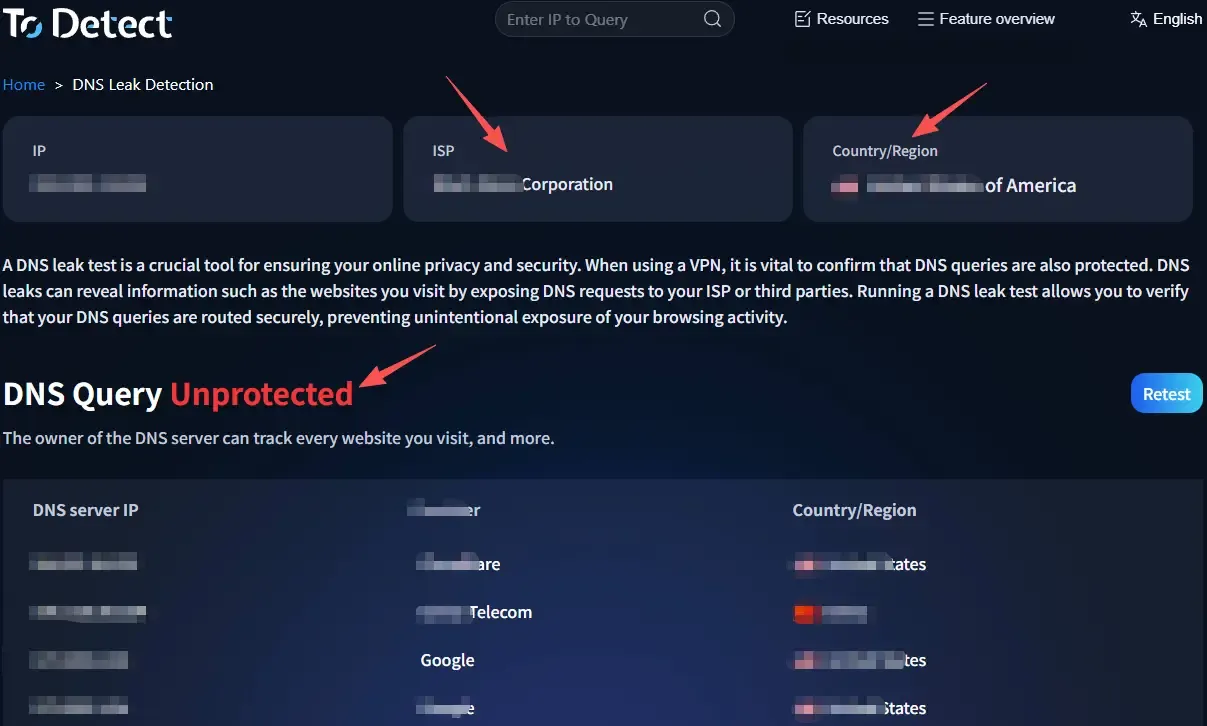
It can significantly reduce risk, but it does not guarantee 100% safety. ToDetect only checks your current environment status. It is recommended to test before changing IPs, devices, or opening new accounts to build a stable operational habit.
8. How to Reduce DNS Leak Risks: Practical Recommendations
1. Prioritize a “Clean” Network Environment
The first step to reducing DNS leak risks is not fixing DNS — it is choosing the right network.
Use residential IPs or high-quality proxy nodes whenever possible, as these environments usually come with matching DNS resolution paths. This reduces the risk of “IP abroad, DNS local” inconsistencies. Cheap shared proxies often have chaotic DNS structures and are major risk sources.
2. Run a DNS Leak Test Before Every Login
Many people find this troublesome, but it is extremely important. Build the habit of running a DNS leak test before logging into your Amazon seller account.
Verify whether the DNS servers match the target country, whether local ISP DNS servers exist, and whether WebRTC exposes your real network. Tools like ToDetect are ideal for quick pre-checks and can identify problems within seconds.
3. Keep Browser Environments Properly Isolated
Many people focus only on network settings while overlooking browser risks. Browser fingerprint detection should also be part of your process. Key practices include:
Use separate browser environments for different accounts, never share cookies or cache, and ensure time zones, language settings, and IP regions remain consistent. Do not let the system perceive one person rapidly switching between accounts.
4. Disable or Restrict WebRTC Leaks
WebRTC is a hidden source of many DNS leak issues.
It is recommended to disable WebRTC or limit local IP exposure within your browser or fingerprint management tool. Anti-leak plugins and environment isolation features can provide additional protection.
5. Keep Environments Stable and Avoid Frequent Switching
Many beginners constantly switch between US IPs, UK IPs, and other nodes, which can easily trigger Amazon’s risk-control systems.
The correct approach is to assign one stable country environment to each account and maintain long-term consistency. As your DNS structure stabilizes, the system’s trust level in your account also increases. Once network setup, browser management, and testing become routine, most risks can be avoided proactively.
Final Thoughts: Environment Stability Matters More Than Operations
Many Amazon cross-border sellers fail not because they lack product selection skills or advertising knowledge, but because they ignore the underlying environment setup.
DNS leaks, low-quality IPs, and abnormal browser fingerprints may sound highly technical, but they directly determine your account’s “trustworthiness” in Amazon’s system.
Mature cross-border sellers do not settle for environments that are merely “usable.” Instead, they continuously manage DNS leak testing, ToDetect environment checks, and network consistency verification as part of a systematic operational process.
