


 Resources
 Feature overview
A perfect DNS leak test score isn't enough! Follow these steps to stay truly safe
 Charles
 2026-03-11 04:20


Many people run a DNS leak test and feel reassured when the page shows “100 points” or “No leak”.
But in reality, many so-called “perfect scores” do not mean your real network environment is completely secure. Some DNS leaks are simply not detected and may still be quietly exposing your real location.
Today we’ll talk about why some DNS tests look perfect but still have problems, and how to more accurately perform DNS leak detection and browser fingerprint detection.

1. What Is a DNS Leak and Why Should You Test for It?
The purpose of DNS is to resolve domain names into IP addresses. When you visit a website, your system sends a request to a DNS server to resolve the domain.
If you are using a proxy or VPN but the DNS request is still sent to your local ISP’s DNS server, this situation is called a DNS leak.
DNS leaks can cause several issues:
• Your real geographic location may be exposed
• Your ISP can still see your browsing activity
• Some websites may identify your real identity
• Cross-region access may trigger risk controls
Therefore, performing a DNS leak test is a basic practice for many users involved in cross-border business, data collection, advertising operations, and account management.
2. Why Many DNS Leak Tests Show “Fake Perfect Scores”
1. Limited detection dimensions
• Many DNS testing websites only check the DNS server IP, country/region, and ISP.
• If the proxy tool forwards DNS requests to a node in the same region, this simple detection method may fail to identify problems.
• In other words, it only checks the “surface address” without deeper analysis.
2. Some proxy tools disguise DNS
Some proxy software performs DNS forwarding or caching, making test results appear normal.
However, during actual website access, certain requests may still bypass the proxy and use the local DNS. This often happens in:
• Browser extension proxies
• Rule-based proxies
• Incomplete global proxy setups
These situations are quite common.
3. Browser information still exposes the real environment
Many people only run a DNS leak test but ignore another crucial detection — browser fingerprint detection.
Websites can identify your real environment through many parameters, such as:
• WebRTC IP
• Time zone
• Language
• Canvas fingerprint
• WebGL information
• Font list
If these details do not match your proxy IP, you may still be identified even if the DNS test shows a perfect score.
3. How to Perform a Proper DNS Leak Check
Step 1: Basic DNS leak test
First run a standard DNS leak test to see whether the DNS server is located in the proxy region. Focus on:
• DNS server IP
• Country/region
• ISP name
If the DNS still belongs to a local ISP such as:
• China Telecom
• China Unicom
Then a DNS leak likely exists.
Step 2: Use multiple DNS testing platforms
Do not rely on a single testing website. It is recommended to use multiple platforms for DNS leak detection because different sites use different testing methods.
Common detection metrics include:
• DNS resolution path
• Anycast DNS nodes
• EDNS Client Subnet
• WebRTC IP
If results vary greatly across platforms, your network environment may have issues.
Step 3: Browser fingerprint detection
This step is often overlooked.
Even if there is no DNS leak, abnormal browser fingerprint detection results may still allow websites to identify you. For example:
• IP located in the United States
• Browser time zone set to China
• Language set to Chinese
• Fonts from a Chinese system
This type of environment easily triggers risk-control systems.
4. How to Perform a More Comprehensive Network Fingerprint Check
If you want to systematically check your network environment, you can use the ToDetect Fingerprint Query Tool to analyze:
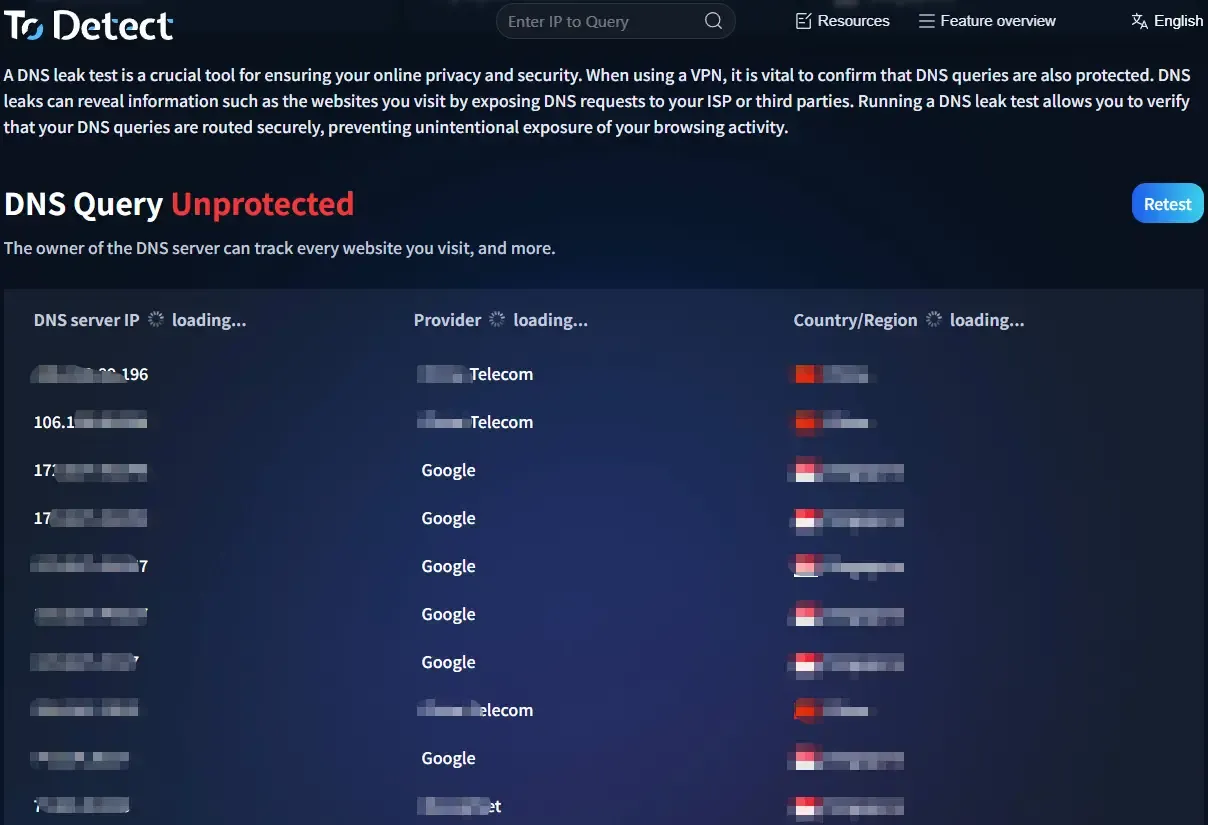
• IP information
• DNS servers
• WebRTC
• Browser fingerprint
• Time zone and language
• Canvas / WebGL
• System environment consistency
Using both browser fingerprint detection + DNS leak detection helps you better determine whether your network environment is truly clean.
This step is especially important for cross-border account management, advertising operations, and web scraping.
5. Practical Tips to Avoid DNS Leaks
1. Use system-level proxies whenever possible
Browser extension proxies are prone to DNS bypass issues. If possible, use:
• Global proxy mode
• TUN mode
• System-level proxy tools
This makes it easier to route all DNS requests through the proxy.
2、Disable WebRTC leaks
• WebRTC can directly expose your real IP.
• You can restrict WebRTC through browser settings, extensions, or privacy-focused browsers.
3. Keep time zone and language consistent
When performing browser fingerprint detection, make sure the following are consistent:
• IP location
• Time zone
• Language
• System region
For example, if you use a U.S. IP, avoid using a Chinese time zone.
4. Regularly test your environment
• Network environments are not permanently secure after one setup.
• It is recommended to regularly run DNS leak tests, DNS leak detection, and browser fingerprint detection, especially after changing proxy nodes or browser environments.
Conclusion
Don’t be fooled by a so-called “100-point score.” Real network security is not just about avoiding DNS leaks — it also involves browser fingerprint detection, IP consistency, and WebRTC leaks.
Regularly perform DNS leak tests and DNS leak detection, and use the ToDetect Fingerprint Query Tool to check your browser environment so you can truly understand your network security status.
Remember: network security is not about scores — it’s about whether the details are consistent. Only when DNS, IP, and browser fingerprints are all aligned can your network environment be considered truly clean.
 AD
AD


