



 Resources
 Feature overview

 Charles
 2026-04-14 11:20
In cross-border business or when accessing overseas platforms, many people choose to use US proxy IPs to “switch identity”. However, one key issue is often overlooked in cross-border access—DNS leakage.
Once DNS leakage occurs, even if your IP has been switched to the United States, your real network environment can still be exposed. In mild cases it affects access quality, and in severe cases it can lead to account risk control or even bans.
Next, let’s explain how to fix DNS leakage in a US proxy IP environment, and how to configure a more secure setup when using US proxy IPs.

1. What is DNS Leakage? Why it must be taken seriously
DNS is used to translate domain names into IP addresses. If you are using a US proxy IP but DNS requests are still sent through your local network (e.g., China or other regions), this is a typical DNS leak.
This situation is especially dangerous in the following scenarios:
• Cross-border e-commerce account operations (e.g., multi-account management)
• Overseas social media registration and account nurturing
• Data scraping and automation operations
Once platforms combine browser fingerprint detection with DNS anomalies, users are often labeled as “high-risk”, making restrictions difficult to avoid.
2. How to perform DNS Leak Detection (Beginner-friendly)
Before optimization, the first step is to perform a DNS leak test. Many people think “turning on a proxy is enough”, but without testing, you don’t actually know if there is a problem.
1. Online tool testing
Open a DNS leak test website. It will show the location of your DNS servers. If you are using a US proxy IP, ideally the DNS location should also be in the United States.
It is recommended to test multiple times across different tools for cross-verification to avoid false results.
2. Using fingerprint tools for verification
Tools like ToDetect not only check DNS leaks but also combine browser fingerprint detection to verify overall environment consistency.
For example, if IP is in the US, DNS is in the US, timezone is US, and browser language is English, high consistency usually indicates a safer environment.
3. Common causes of DNS leaks in US proxy environments
Many users experience DNS leaks even when using a proxy. The common reasons are:
1. System default DNS not changed
Operating systems (Windows/macOS) often use ISP-provided DNS by default. Even with a proxy enabled, DNS requests may still go directly outside.
2. Browser not routing DNS through proxy
Some browsers do not send DNS requests through proxies by default, especially if not explicitly configured.
3. Proxy type does not support DNS forwarding
Some low-quality proxies (especially HTTP proxies) do not handle DNS requests properly, leading to leaks.
4. WebRTC leaks
Browser WebRTC features may also expose real IP and DNS information, which is often overlooked.
4. How to Fix DNS Leaks (Practical steps)
Now let’s focus on how to fix DNS leakage step by step.
1. Use DNS-capable proxies (prefer SOCKS5)
When choosing a US proxy IP, prefer the SOCKS5 protocol, as it natively supports DNS resolution through the proxy and is more secure than HTTP proxies.
2. Change system DNS (critical step)
You can manually set DNS to the following types:
• US local DNS (more realistic)
• Public DNS (such as 1.1.1.1 or 8.8.8.8)
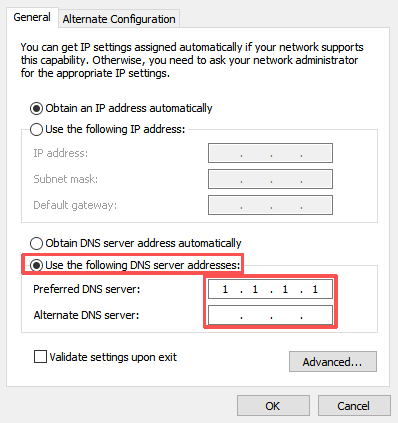
If you want “environment consistency”, using US-based DNS makes leak test results look more natural.
3. Force browser DNS through proxy
Chrome: requires extensions or startup parameters (e.g., --host-resolver-rules)
Firefox: can enable “Resolve DNS through proxy” in settings
This step is critical, otherwise previous configurations may be ineffective.
4. Disable WebRTC leaks
It is recommended to disable WebRTC via extensions or browser settings. Otherwise, real IP may still be exposed even if DNS is properly configured.
5. Use fingerprint browsers for environment isolation
If you are doing account operations, it is strongly recommended to use a browser with environment isolation and verify consistency with fingerprint detection tools.
Key factors: timezone (USA), language (en-US), fonts and resolution, Canvas/WebGL fingerprints.
Using tools like ToDetect for full-chain validation helps avoid “fake US environments”.
5. How to build a secure US proxy IP environment
If you want a complete setup, follow this standard configuration:
• US residential proxy IP (high stability)
• SOCKS5 protocol
• US DNS servers
• Enable proxy DNS resolution in browser
• Disable WebRTC
• Use isolated browser environments (anti-fingerprint linking)
Advanced approach: bind each account to a separate IP, regularly perform DNS leak tests, and use automation tools to monitor environment changes.
Summary: Core idea for avoiding DNS leaks
If you are already using US proxy IPs, it is recommended to spend a few minutes now performing a full DNS leak test to check whether your current environment is truly “clean”.
It is recommended to regularly perform DNS leak checks and combine browser fingerprint tools (such as ToDetect) to ensure overall consistency—aligning IP, DNS, timezone, and language settings.
If you are just starting with US proxy IPs, these steps may seem complex, but once properly configured, you will have a stable and secure environment that saves a lot of trouble in the long run.
