


 Resources
 Feature overview
DNS Leak Test Explained: Results, Real IP Risks, and How to Fix It
 Alani
Alani 2026-01-29 09:52


When using proxy services or VPNs, many users focus on one key question: is my real network information truly hidden? Whether your IP address is secure does not depend solely on successfully connecting to a VPN, but is also closely related to whether DNS requests are leaking.
DNS leaks are a very common yet often overlooked privacy risk. Even if your public IP appears to have switched to another country, if DNS requests are still sent through your local network or ISP, third parties may still be able to identify your real network environment.
This article combines ToDetect’s DNS Leak Detection Tool to systematically explain the following key points:
• How DNS requests work when using a VPN
• How to correctly interpret DNS leak test results
• Whether DNS leaks really expose your real IP
• And most importantly: how to fix DNS leaks step by step

I. VPN DNS Leak Test — How It Works
Before understanding DNS leaks, we first need to clarify a basic concept:
DNS (Domain Name System) is responsible for resolving domain names into IP addresses.
When you visit a website, your browser first asks a DNS server: “What IP address does this domain correspond to?”
Under normal circumstances:
• Without a VPN:
DNS requests are usually handled by your local ISP.
• When correctly using a proxy / VPN:
DNS requests should be sent through the VPN tunnel and resolved by the VPN’s DNS servers or secure public DNS services.
How do DNS leaks occur?
DNS leaks usually occur in the following situations:
1. The operating system or browser forces the use of local DNS
2. IPv6, WebRTC, or other mechanisms bypass the VPN tunnel
3. Improper split tunneling configuration
In these cases, even though your public IP has changed, DNS requests may still expose your real ISP and real country or region.
What does ToDetect’s DNS leak detection do?
When you open ToDetect’s DNS Leak page, the tool will:
1. Trigger multiple DNS query requests
2. Record the DNS servers that actually respond to these requests
3. Display the DNS servers’ IP addresses, ISPs, and countries/regions
Based on this data, you can determine whether DNS requests are truly routed through the VPN or proxy tunnel.
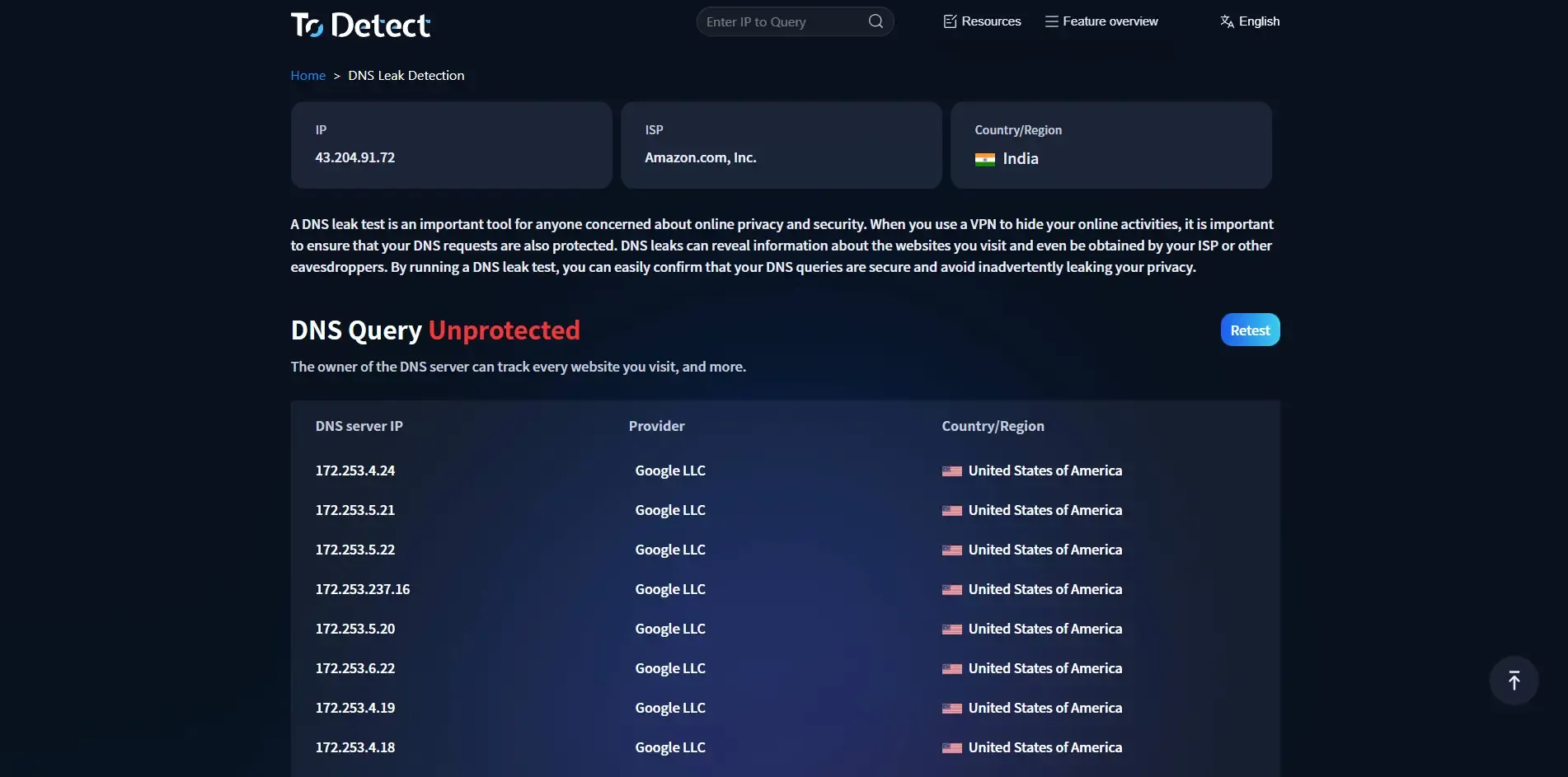
II. DNS Leak Test Results Explained
Many users see results like the following after running a test but are unsure how to determine whether they are safe.
Case 1: DNS shows local ISP or real country (leak detected)
If you are connected to an overseas VPN but ToDetect shows:
• The DNS country is still your local region
• The DNS provider is your local telecom / ISP
This indicates:
• ❌ A DNS leak exists
• ❌ DNS requests are bypassing the VPN
In this case, even if your public IP is hidden, your activity may still be identifiable.
Case 2: DNS servers match the VPN country (safe)
If the test results show:
• DNS server country = VPN connection country
• DNS provider is the VPN service or a neutral public DNS
This usually means:
• ✅ No obvious DNS leak risk
• ✅ DNS requests are successfully routed through the VPN tunnel
This is the ideal state.
III. Do DNS Leaks Expose Your Real IP?
This is one of the questions users care about most. Strictly speaking:
DNS leaks do not necessarily expose your public IP directly, but they do expose your real network identity.
This may include:
• Your real ISP
• Your real country or region
• Network fingerprinting information (highly sensitive for risk-control systems)
DNS leaks are especially dangerous in the following scenarios:
• Multi-account operations (social media, e-commerce, advertising)
• Accessing geo-restricted services
• Situations requiring a high level of privacy and anonymity
Many risk-control systems do not rely solely on IP addresses, but instead evaluate:
IP + DNS + network path consistency
Once DNS information does not match the VPN IP, abnormal behavior may be detected.
IV. How to Fix DNS Leaks (Step-by-Step Guide)
Below are general and effective steps you can follow to troubleshoot and fix DNS leaks.
Step 1: Enable DNS protection in your VPN client
Check whether your VPN settings include options such as:
• DNS Leak Protection
• Use VPN DNS
• Prevent DNS Leak
Make sure these options are enabled, then restart your VPN client.
Step 2: Manually set a secure DNS (optional)
In your system or network settings, set DNS to:
• The DNS provided by your VPN
• Or a trusted public DNS (such as 1.1.1.1 / 8.8.8.8)
Note:
If your VPN provides its own DNS servers, prioritize using the VPN DNS.
Step 3: Disable or properly configure IPv6
IPv6 is one of the most common sources of DNS leaks.
You can either:
• Temporarily disable IPv6 in your system
• Or ensure your VPN fully supports and correctly handles IPv6
After making changes, restart and run a DNS leak test again.
Step 4: Address browser-level leaks (WebRTC)
Some browsers may expose real network information through WebRTC.
Recommended actions:
• Disable WebRTC in your browser
• Or use browser extensions to restrict it
Then use ToDetect again to confirm the results.
Step 5: Retest and confirm the results
After completing all settings:
• Reconnect to your VPN
• Clear your browser cache (optional)
• Visit ToDetect’s DNS Leak page again
If the DNS results match your VPN country, the issue has been successfully resolved.
V. Summary
DNS leaks are not a rare edge case, but a very common privacy vulnerability among VPN users. Simply seeing your IP change does not mean your network environment is secure.
With ToDetect’s DNS leak detection tool, you can:
• Quickly determine whether DNS traffic is routed through the VPN tunnel
• Clearly understand what the test results really mean
• Fix potential risks in a targeted way
Regular DNS leak testing is an essential step in protecting privacy and network security.
VI. Frequently Asked Questions (FAQ)
Q1: Can using public DNS completely prevent DNS leaks?
Not necessarily. Public DNS can reduce some leak risks, but if DNS requests are not routed through the VPN tunnel, even public DNS may still expose your real network path.
Q2: Do DNS leaks affect multi-account or advertising accounts?
Yes, significantly. In multi-account operations, advertising, or platform management scenarios, systems evaluate IP address + DNS source + network consistency. If DNS does not match the VPN IP, it may be identified as an abnormal environment, triggering risk controls, verification, or restrictions.
Q3: When is DNS leak testing necessary?
DNS leak testing is strongly recommended in the following situations:
• Using a VPN or proxy to access sensitive services
• Operating multiple accounts or across regions
• After changing VPNs, proxies, or network environments
• When a high level of privacy or anonymity is required
DNS leak testing should not be a one-time task, but part of good security hygiene.
 AD
AD


