


 Resources
 Feature overview
DNS Leak Detection Guide: How to Check If Your Real IP Is Exposed
 Ganesh
 2025-12-18 07:58


When using a virtual browser or proxy IP service to access the internet, many people believe that "as long as the IP is changed, it's safe". However, in real-world scenarios, your actual network information may still be exposed through DNS requests – this is what's known as DNS Leak.
DNS Leak won't pop up a warning directly, but it can lead to account risk control, abnormal advertising accounts, tracked browsing behavior, and other issues when managing social media or multiple accounts. This article will detail what DNS Leak is, how to detect it, and how to fix it.
1.What is DNS Leak?
Simply put, DNS is a system that "translates website addresses into server IP addresses".
When you enter a website address in your browser, your computer first asks a DNS server: Where is this website's server located? If you're using a proxy IP service, ideally, this request should also be sent through the proxy.
But in some cases:
Website access uses the proxy IP
While DNS queries go through your local network or ISP
This results in DNS Leak.
2. What Risks Does DNS Leak Pose?
DNS Leak is not just a "theoretical risk" – it's a key factor that frequently triggers risk control in real scenarios.
1. Privacy Exposure
DNS servers are typically provided by local ISPs (Internet Service Providers). Once leaked:
Websites can identify your actual network environment
Third parties can infer your geographic location, browsing behavior, etc.
Even if you hide your real IP, you may still be "identified indirectly"
2. Being Tracked to Your Real Region by Platforms
Some websites don't just check the access IP, but also combine:
DNS country of origin
ISP name
Network type (residential / commercial)
If the DNS region doesn't match the proxy IP region, it's easy to trigger anomaly detection.
3. Higher Risk of Multiple Account Association
In cross-border operations, such as managing multiple cross-border store accounts or social media matrix marketing, if multiple accounts:
Have different surface IPs
But their DNS points to the same ISP or region
it will significantly increase the probability of account association
3.Methods to Detect DNS Leak
1. UseOnline DNS Leak Detection Tools
There are many online DNS leak detection tools available, such as ToDetect, BrowserScan, Whoer, etc. Let's take the ToDetect DNS Leak Detection Tool as an example:
1. Connect to a proxy IP or use a virtual browser
2. Open the ToDetect Fingerprint Detection website;
3. Locate the DNS Leak Detection Tool and click to enter;
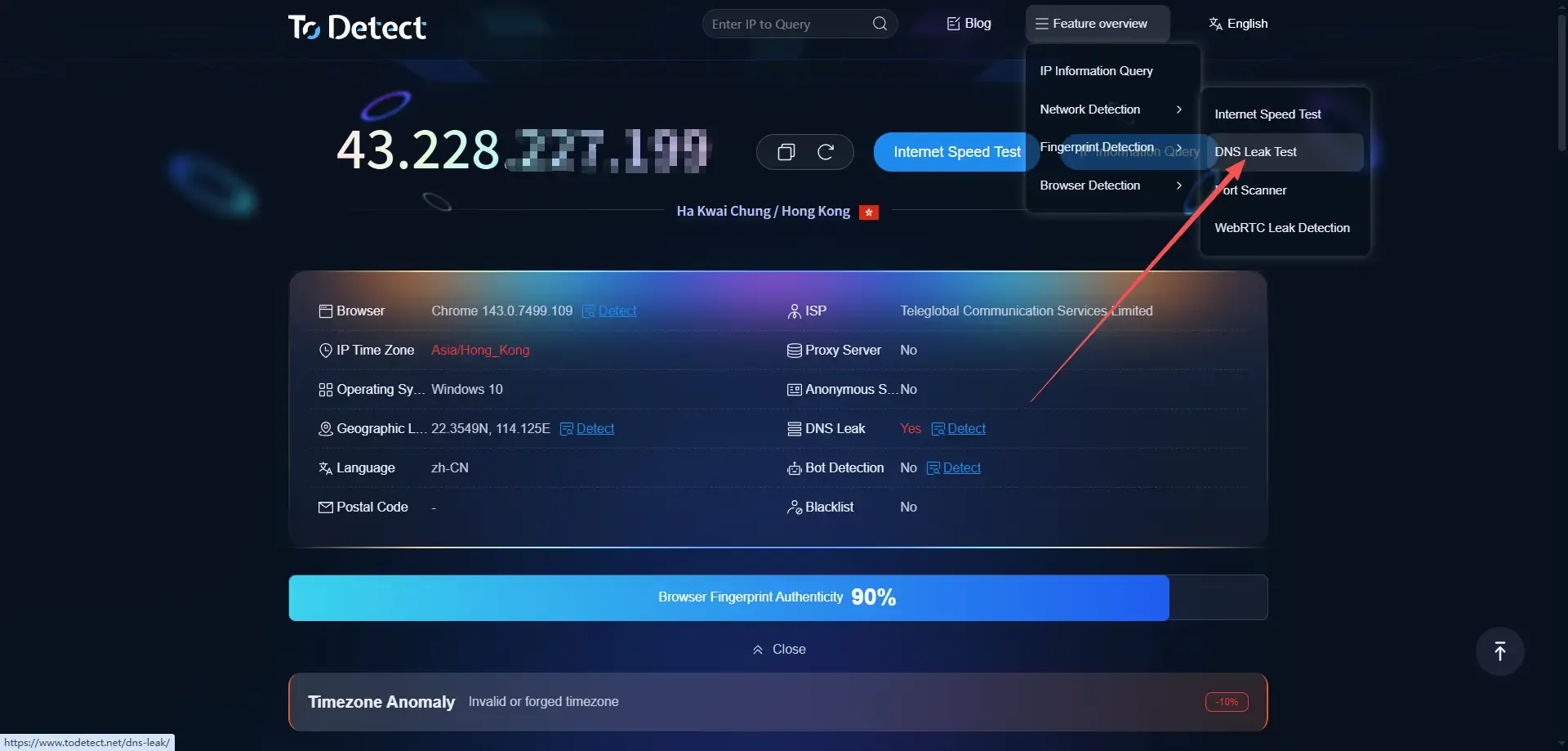
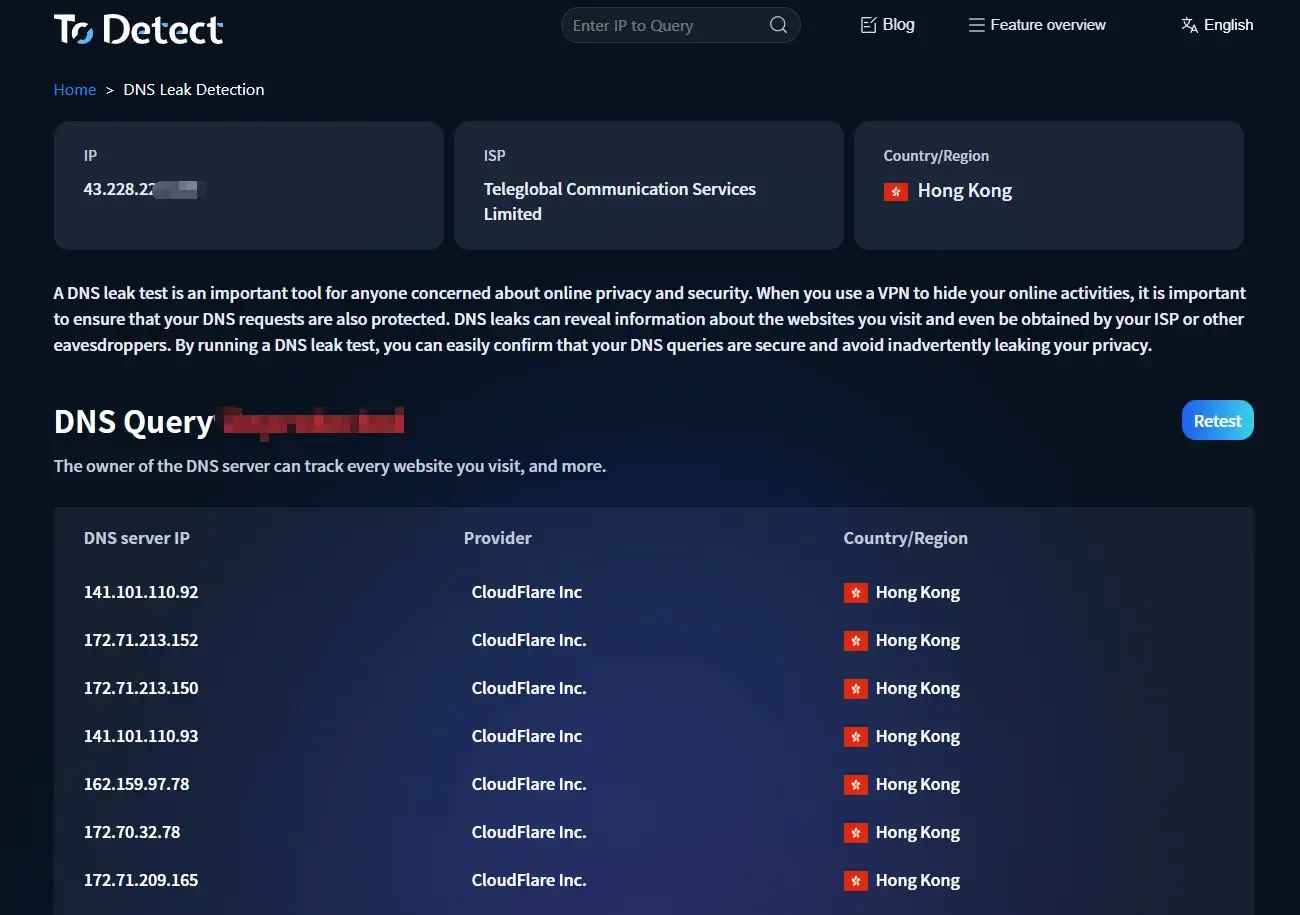
4. Wait for the test to complete and view the results – ToDetect provides a detailed detection report.
2. Detection in Browser + Proxy Scenarios
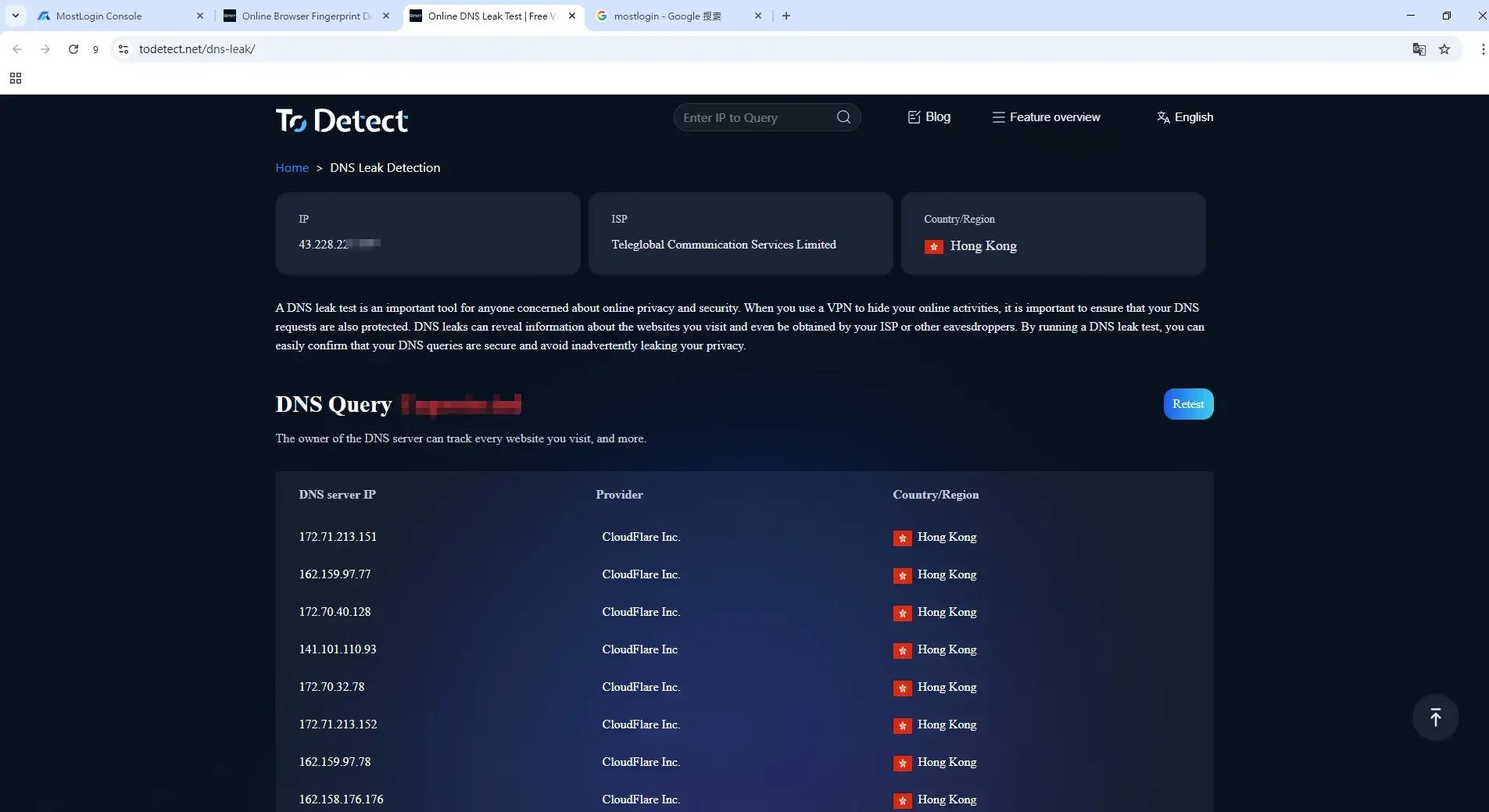
Many people use fingerprint browsers (such as Bitbrowser) for cross-border business operations involving multiple account management. For multi-account operations, different IP addresses and browser environments are required, making DNS leak detection crucial to prevent account association.
Simply open the fingerprint browser environment and enter https://www.todetect.cn/dns-leak/ to perform the detection.
4. How to Correctly Interpret DNS Leak Detection Results
Many people use free online DNS leak detection websites but have only a vague understanding of the results. Below are the key points to determine if a DNS leak exists:
1. Consistency of Country/Region
Compare three pieces of information:
Current access IP country
DNS server country
Your actual physical country
If you see:
IP shows overseas location
DNS shows local location
It can basically be determined that a DNS leak exists.
2. Abnormal ISP Name
Focus on the ISP/Organization field in the detection results:
Presence of local ISP names (e.g., China Telecom, China Unicom, Comcast, etc.)
Mismatch with the proxy service provider's name
This usually means DNS requests are not going through the proxy channel.
5. How to Fix DNS Leak?
1. Modify System DNS (Basic Solution)
You can manually set your system DNS to:
Public DNS (e.g., 1.1.1.1 / 8.8.8.8)
Or DNS recommended by your proxy service provider
Note: Simply changing DNS does not completely prevent leaks, but it can reduce some risks.
2. Use Proxy / Fingerprint Browser
For high-risk control scenarios, we strongly recommend:
Using proxies or fingerprint browsers that support DNS isolation (e.g., Bitbrowser)
Binding independent IP, independent DNS, and independent fingerprint configuration to each browser environment.
This avoids: mixing local DNS and associating DNS across multiple accounts. Meanwhile, try to avoid: browser extension-level proxies and transparent proxy modes.
6. Frequently Asked Questions
Q1: Will DNS Leak Definitely Lead to Account Ban?
Not necessarily, but it is one of the important risk control signals. In multi-account and cross-regional operations, DNS leak often acts as an "additional risk factor".
Q2: Why Does DNS Leak Occur Even After Changing IP?
Because IP and DNS are two separate systems. IP is responsible for "where you're coming from", while DNS is responsible for "who you're asking" – the two are not automatically synchronized.
Q3: Are Fingerprint Browsers Immune to DNS Leak?
Not necessarily. It depends on whether: DNS is isolated per environment and whether requests fully go through the proxy channel. Therefore, detection remains an important step.
7. Conclusion
DNS leak is often overlooked, but it is one of the key indicators to determine if a network environment is clean. If you're using proxies, fingerprint browsers, etc., always detect DNS leaks before using your accounts.
ToDetect is an online browser fingerprint detection tool that requires no installation. It enables direct online detection of IP, DNS, Canvas, WebRTC leaks, helping you quickly assess your network environment. It is suitable for anti-detection testing, multi-account operation testing, and other scenarios.
 AD
AD


