



 Resources
 Feature overview
 Charles
 2026-04-20 14:09
Many people running TikTok accounts often find that others' content is average, yet their accounts remain stable; while your own videos are clearly good, you still get shadowbanned or even suspended frequently.
Most people attribute the problem to "poor operation" or "bad content," but honestly, at least half of the issues stem from an often overlooked point — DNS leaks.
Today, let me explain why TikTok detects DNS leaks, what a DNS leak test actually measures, and how to build a safer, ban-proof environment for TikTok.
1. What is a DNS leak and why does it affect TikTok?
• DNS is like the internet's "navigation system" — it translates the domain names you visit into IP addresses.
• Normally, if you're using a proxy, your DNS requests should match your IP. If a DNS leak occurs, your real network information may be exposed.
This is why many people have IPs that look fine, yet their accounts still get flagged by risk control.
2. Why does TikTok detect DNS leaks?
TikTok's risk control system is much more complex than you think. It doesn't just look at IPs; it evaluates multiple dimensions, including:
• IP stability
• Device environment consistency
• Browser fingerprint detection results
• Abnormal network behavior
• Presence of DNS leaks
In other words, DNS leaks are one of TikTok's key indicators for judging whether an environment is "genuine."
If the system finds that you are "spoofing your environment," this is considered highly sensitive behavior under TikTok's rules and can easily trigger TikTok's anti-ban mechanisms.
3. Ban traps that 90% of people fall into
1. Changing only the IP while ignoring DNS leaks (the most common mistake)
Many people spend money to buy a "clean-looking" overseas IP, such as a US residential IP, and then think everything is fine — immediately logging into accounts, watching videos, and posting content.
The result: the IP shows the US, but DNS requests are local (e.g., within China), and the two don't match at all. In this case, TikTok's system can spot the anomaly at a glance.
To be more realistic, the platform won't tell you "you have a DNS leak." It will simply shadowban, demote, or ban your account.
2. Using the system default DNS (a hidden time bomb)
This trap is more subtle. Many people don't even know that DNS can be configured. Most devices use by default:
• Local ISP DNS or DNS automatically assigned by the network environment.
These DNS servers easily reveal your real geographic location. Here's a simple scenario:
• You use a US IP, but your DNS is from a Malaysian/Chinese local ISP.
• Then, in TikTok's eyes, you are a "spoofing user." This situation is very common because many proxy tools only handle IPs, not DNS.
This is exactly why you must perform a DNS leak test instead of just checking the IP.
3. Ignoring browser fingerprint detection (advanced but fatal)
If DNS leaks are the "first layer of screening," then browser fingerprint detection is the "deep verification."
• TikTok collects a range of information from your device, such as operating system (Windows / macOS / Android, etc.), browser version.
• Screen resolution, timezone, font list, GPU info (WebGL) — combined, this information forms your "browser fingerprint."
4. Multiple accounts sharing one environment (directly "batched and banned")
Many matrix account users, in order to save costs, do the following:
• Multiple accounts use the same IP
• Same browser
• Same environment
This may work in the short term, but once one account has a problem, the risk spreads quickly. Because TikTok performs "association checks," including:
• IP association
• Device fingerprint association
• Behavior pattern association
Once identified as a batch of related accounts, they are likely to be "wiped out together." This is why professional players always emphasize: one account, one environment.
5. Frequently switching IPs and environments (more dangerous than using none)
Another scenario: using a US IP today, switching to the UK tomorrow, then Singapore the day after, or even switching IPs multiple times a day for the same account.
From TikTok's perspective, this looks like the user is "teleporting" around the world. Normal users don't use networks this way, so such behavior easily triggers risk control.
4. How to perform DNS leak testing? (Practical advice)
1. Run a complete DNS leak test
Before officially operating a TikTok account, be sure to run a DNS leak test to verify:
• Whether the DNS address matches the proxy IP
• Whether local DNS requests exist
• Whether any extra nodes are exposed
If the test shows abnormalities, that environment is basically unusable.
2. Use professional tools to optimize the environment
Many people now use tools like ToDetect, which do the following:
• Check for DNS leaks
• Detect browser fingerprint consistency
• Simulate a real user environment
• Reduce the risk of account flagging
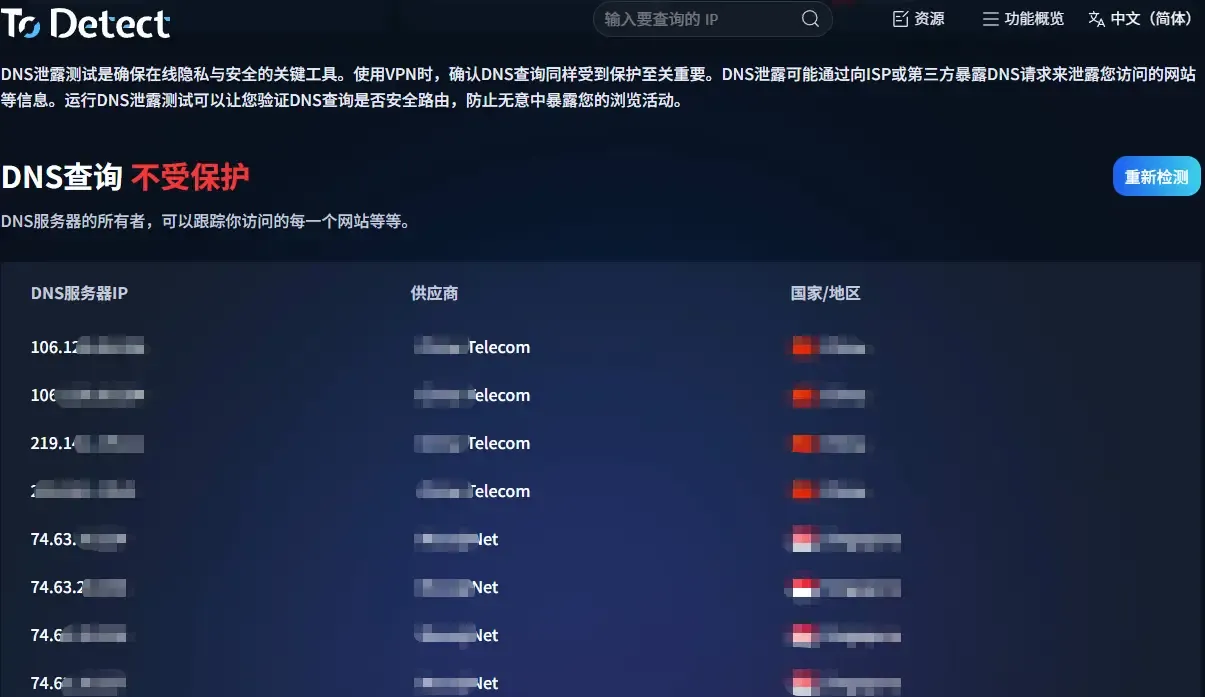
The advantage of such tools is that you don't have to troubleshoot everything manually; you can directly see where the problem lies.
3. Use a clean network environment
In addition to DNS leak detection, pay attention to using stable residential IPs (no frequent switching), ensure IP, DNS, and timezone are consistent, and avoid sharing one environment across multiple accounts.
4. Regular re‑checks (many people overlook this)
The environment is not something you set up once and forget. Sometimes proxy providers change, DNS settings get overridden by the system, or browser updates alter fingerprints.
Therefore, it's recommended to perform DNS leak tests periodically to avoid "failing while using."
5. DNS leak + fingerprint issues = high‑risk ban combination
• Many account bans are not due to a single cause but a "combination punch": DNS leaks, browser fingerprint anomalies, and unstable IPs.
• When these three stack together, it's basically telling TikTok that this is not a normal user.
• So understand this: the core of TikTok anti‑ban is not "hiding" but "acting like a real person."
Conclusion: Don't let small details ruin your account
Many people running TikTok love researching "black tech" and "account growth tricks," but often ignore the most fundamental thing — whether the environment is clean.
DNS leak detection, browser fingerprint detection — these seemingly "technical" things essentially solve one problem: making you more like a real user.
Remember, TikTok ban prevention is never about luck, but about details. You can use tools like ToDetect to eliminate hidden risks first.