



 Resources
 Feature overview

 Charles
 2026-05-13 10:10
Recently, many cross-border e-commerce businesses have experienced situations where ad clicks remain normal, but conversions keep declining; or users report occasional abnormal page redirects. These issues are often related to DNS security.
DNS is like the “navigation system” of your website. Once something goes wrong, where users go and what pages they see are no longer entirely under your control.
Today, let’s talk about what DNS risks are, how DNS leak detection works, and how you can determine within 3 minutes whether your environment may be exposed to hijacking risks.

1. Why Are Cross-Border E-Commerce Businesses Especially Vulnerable to DNS Issues?
The operational chain of cross-border e-commerce is extremely long: domestic operations + overseas servers + multi-region access + third-party tool integrations. This structure naturally relies heavily on DNS.
Once DNS issues occur, such as DNS pollution, DNS resolution tampering, DNS leaks, or local network hijacking, websites may experience:
• Users being redirected to competitor websites
• Advertising traffic hijacking
• Abnormal backend account login behavior
• Unusually slow page loading
Simply put, DNS is the “internet navigation system.” Once it’s manipulated, where users end up is no longer fully up to you.
2. What Is DNS Leak ? Many People Misunderstand It
Many people think DNS leaks are only a “privacy issue,” but in cross-border e-commerce scenarios, they can be far more dangerous.
If your network requests do not go through your configured secure DNS, but are instead secretly taken over by local ISPs or third parties, it can lead to:
• Exposure of browsing paths (privacy risk)
• Potential DNS resolution tampering (security risk)
If you operate independent stores or run online ads, DNS leak detection is no longer optional — it’s essential.
3. Quick DNS Security Self-Check Reference Table
| Check Dimension | Normal Status | Risk Status | Possible Issue |
|---|---|---|---|
| DNS Resolution Source | Using custom DNS or trusted public DNS | Automatically changed to unknown ISP DNS | DNS hijacking or takeover |
| Resolution Path | Stable path with fewer nodes | Multiple redirects or abnormal cross-region routing | DNS pollution or intermediary hijacking |
| Access Consistency | Consistent results across devices | Different results on mobile and desktop | Local network interference or cache pollution |
| HTTPS Access | Normal security lock icon | Occasional certificate warnings or errors | DNS tampering causing redirects |
| Advertising Performance | Stable clicks and conversions | High clicks but abnormally low conversions | Traffic hijacking or redirection |
| Tool Detection Results | DNS servers match configuration | Unknown countries or suspicious nodes detected | DNS leak risk |
4. 3-Minute DNS Leak Detection Guide (Beginner Friendly)
Step 1: Open a DNS Leak Detection Tool
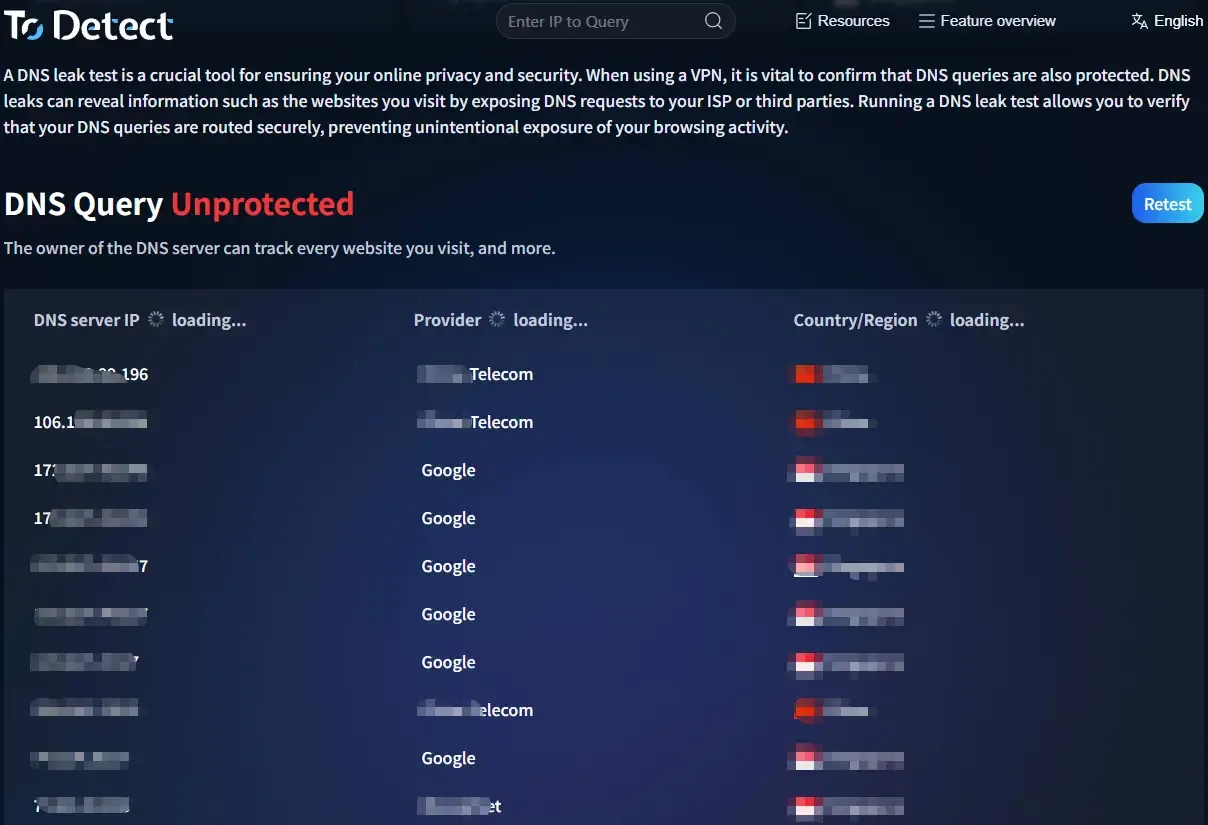
You can use common DNS leak testing tools such as ToDetect, a comprehensive detection platform.
After entering the site, simply click “Start Detection / DNS Leak Test,” and the system will automatically determine:
• Who provides your current DNS server
• Whether abnormal resolution paths exist
• Whether requests pass through third-party relays
If the detected DNS server does not match your current network environment, it’s time to be cautious.
Step 2: Compare with Your Actual Network DNS (New Key Point)
Many people only check the test results, but miss one critical step: manually verifying whether the DNS truly matches.
• Check your local network DNS settings (computer/router), record the DNS addresses currently in use, and compare them with the DNS leak test results.
• If your local setup uses DNS A, but the test result shows DNS B, then there’s a strong possibility of DNS leakage or DNS hijacking.
This is extremely important in cross-border e-commerce because many “invisible hijacking” incidents happen this way.
Step 3: Browser Fingerprint Environment Consistency Check (New Key Point)
DNS issues rarely exist alone. In many cases, they expose risks together with browser fingerprint inconsistencies, so it’s recommended to run a browser fingerprint test as well.
• Focus on whether the timezone is abnormal, whether the language environment matches the IP region, whether WebRTC leaks your real IP, and whether Canvas / WebGL fingerprints appear abnormal.
• If you see a situation like: IP located in the US + DNS located in Asia + chaotic fingerprint environment
Then your network environment can basically be considered “unclean,” making it easy to trigger platform risk controls.
Step 4: Re-Test DNS Stability Across Multiple Networks (New Practical Test)
Many people only test once, but that’s not enough because DNS leak issues can be intermittent.
• It’s recommended to switch between different networks (WiFi / 4G / broadband) and rerun DNS leak tests each time.
• Compare the results from three tests. If you find major DNS differences across networks or suspicious DNS nodes appearing in certain networks,
then your environment likely has unstable DNS resolution or partial hijacking issues. Many unexplained traffic drops originate here.
5. The Relationship Between DNS Leaks and Browser Fingerprint Detection
DNS leak problems rarely exist independently. Today, many platforms combine:
• DNS leak detection
• Browser fingerprint detection
• IP environment analysis to determine whether an account belongs to a “real user.”
For example, your IP may appear to be located in the US, but your DNS resolution shows Asia, while your browser fingerprint environment looks abnormal. In that case, platforms can easily flag your environment as inconsistent.
Therefore, when managing accounts, running ads, or operating multiple stores, browser fingerprint detection and DNS leak testing should ideally be performed together.
6. Signs of DNS Hijacking (Many People Get Affected)
If you encounter any of the following situations, you likely need to perform a DNS leak test:
• Your website occasionally redirects to unfamiliar pages
• Abnormal Google / Facebook ad clicks
• Sudden drops in independent store conversions
• Frequent backend login verification failures
• Different access results across devices on the same network
In many cases, these issues are not server problems, but DNS-layer tampering.
7. How to Reduce DNS Leak Risks? 4 Practical Tips
- Use reliable DNS services
Try to avoid default ISP DNS servers and consider using more stable public DNS services.
- Perform DNS leak tests regularly
It’s recommended to check at least once a week, especially after changing network environments or launching ad campaigns.
- Combine with browser fingerprint management
Avoid chaotic environment information and reduce the chances of being falsely flagged by risk-control systems.
- Use comprehensive detection tools
Tools like ToDetect can simultaneously check DNS, IP, and browser fingerprint environments, making them far more comprehensive than single-purpose tests.
Final Thoughts:
DNS security may not seem like a huge issue at first glance, but it’s definitely not something small either. Unlike advertising metrics, DNS problems are not always visible — but once they occur, they affect the entire conversion chain.
Spending just a few minutes regularly using tools like ToDetect to run DNS leak tests may help uncover hidden risks you’ve never noticed before.
In the cross-border e-commerce industry, many times it’s not that your operations aren’t good enough — it’s that the “underlying environment” failed first. Detecting issues early is always easier than fixing them later.
