



 Resources
 Feature overview

 Charles
 2026-05-29 10:05
Recently, many people have been asking: How often should you perform a DNS leak test? And how can you confirm whether your DNS is leaking?
In fact, this concern is not unnecessary at all. In cross-border business scenarios, DNS requests can “go off route” more easily than expected. Once they are not properly encrypted or routed, DNS leaks may occur.
Today, let’s talk about how often DNS leak testing should be done, how to determine whether your DNS is actually leaking, and what tools can help you quickly detect DNS leaks.
1. What Is a DNS Leak?
DNS stands for “Domain Name System,” and its job is to translate the website addresses we enter into accessible IP addresses.
If your DNS leaks, even when using a proxy or VPN, the websites you visit may still be monitored by your ISP or third parties.
For example, you may think you are anonymous while using a proxy to visit overseas websites, but if your DNS requests still go through your local network, others can still see which sites you are accessing.
That’s why many cybersecurity experts recommend regular DNS leak testing for users who frequently use proxies or VPNs.
2. How Often Should You Perform a DNS Leak Test ?
There is no absolute standard for this. It mainly depends on your internet usage frequency and privacy requirements. Here are some general recommendations:
• Regular Users: If you only occasionally use a proxy for browsing websites or watching videos, testing once every 1–2 months is usually sufficient.
• High-Privacy Users: If you frequently access sensitive websites or work with confidential information, it is recommended to perform a DNS leak test every time you connect to a proxy or VPN.
• Business or Team Users: Companies using proxies or dedicated lines for remote work should ideally perform DNS leak testing weekly to ensure network security across the organization.
The testing frequency can be adjusted according to your habits and privacy needs. The key is identifying issues before they become serious.
3. DNS Leak Testing Frequency & Usage Scenarios
| User Type / Scenario | Recommended Frequency | Suggested Testing Method | Main Concern |
|---|---|---|---|
| Regular users (browsing & streaming) | Once every 1–2 months | Quick DNS leak test using ToDetect | Whether local ISP DNS is still being used |
| Light proxy users (occasional overseas access) | Spot-check after each connection | DNS leak test + browser fingerprint test | Whether DNS requests are fully routed through the proxy |
| Frequent proxy users (cross-border work/study) | Once per week | DNS leak testing across different nodes | Whether DNS security is consistent across nodes |
| Privacy-sensitive users (security research/encrypted communication) | Before every session | Multi-tool verification (ToDetect + other DNS tools) | Hidden DNS fallback or routing leaks |
| Enterprise/team remote work | Weekly or after configuration changes | Centralized DNS testing + router inspection | DNS hijacking or tampering |
4. How to Determine Whether Your DNS Is Leaking?
Detecting DNS leaks is actually quite simple. Here are several common methods:
1. Use Professional Testing Tools
There are many online tools available for quick DNS leak detection. ToDetect is one of the recommended options.
The process is simple:
• Open the ToDetect website
• Click “Start Test”
• Wait a few seconds and review the results
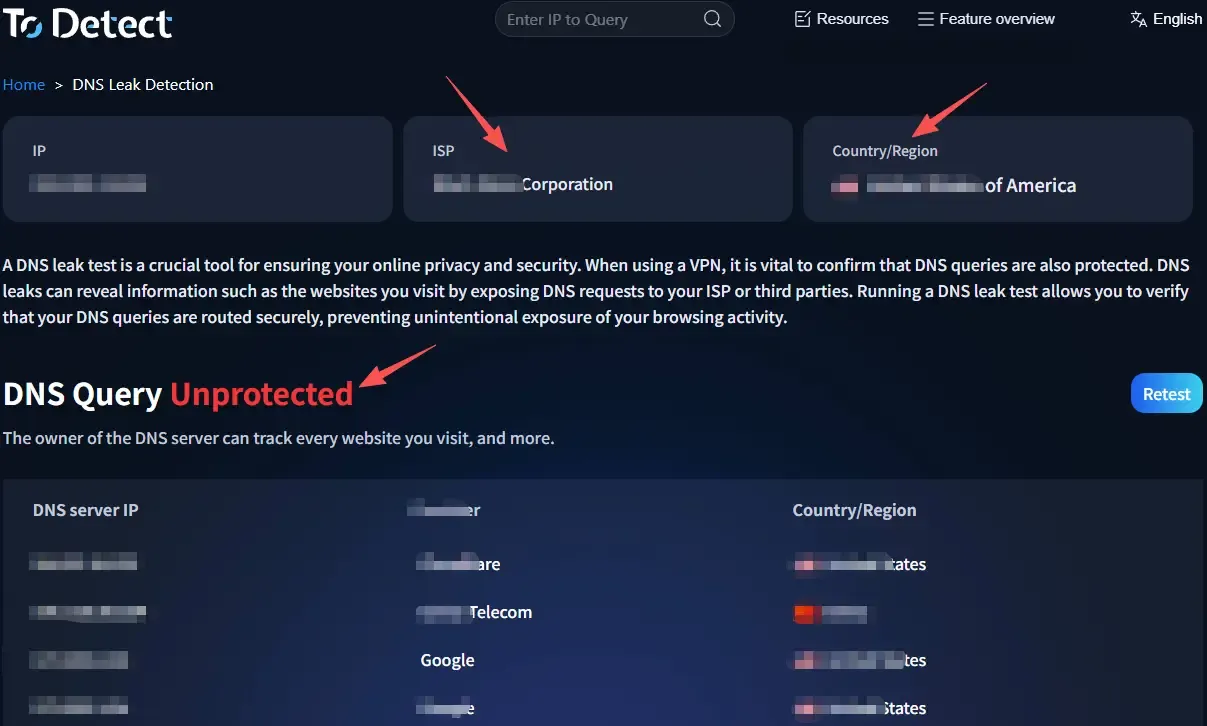
If the results show that DNS requests are going through your local network or display your ISP information, your DNS is likely leaking and you should adjust your proxy settings or switch DNS servers.
2. Use Browser Fingerprint Testing as Additional Verification
Besides DNS leak testing, some users also perform browser fingerprint tests.
Although browser fingerprinting is mainly used to identify devices, combining it with DNS leak testing can help determine whether your online activities are easy to track.
Many privacy-focused websites now provide these tests, and they are easy to use even without technical knowledge.
3. Manually Check DNS Settings
Advanced users can manually inspect DNS settings on their computers or routers to check whether the DNS configuration has been modified.
Review your system network settings and confirm that the DNS server matches the secure DNS provided by your proxy or VPN.
Also inspect your router’s DNS configuration to ensure it has not been overridden by your ISP’s default DNS settings.
5. Tips to Prevent DNS Leaks
Knowing how often to test for DNS leaks is not enough — prevention matters even more. Here are some practical tips:
• Use Trusted Proxies: Choose VPNs or proxies that support DNS leak protection so DNS requests are automatically routed through encrypted tunnels.
• Manually Change DNS Servers: You can use public DNS providers such as Cloudflare 1.1.1.1 or Google 8.8.8.8 to reduce tracking risks.
• Enable Browser Anti-Tracking Features: Modern browsers often include privacy modes and anti-tracking functions that work well alongside DNS leak testing.
• Perform Regular Testing: Even if your DNS settings are secure, regular testing remains the safest practice.
6. DNS Leak Testing FAQ
Q1: Why do DNS leaks still happen even when using a VPN or proxy?
A1: Most DNS leaks happen because the proxy or VPN lacks DNS leak protection, or because the system’s default DNS overrides the VPN tunnel.
Q2: What’s the fastest way to check whether my DNS is leaking?
A2: The easiest method is using an online tool like ToDetect. Simply open the site, click test, and review the results within seconds.
Q3: Can changing DNS servers completely prevent DNS leaks?
A3: Not necessarily. Using public DNS servers can reduce risk, but if the VPN itself lacks DNS leak protection, requests may still bypass the VPN tunnel.
Final Thoughts
There is no fixed standard for how often DNS leak testing should be performed. It depends largely on your usage habits and privacy sensitivity.
However, one thing is certain — not performing DNS leak tests at all is much riskier than testing occasionally.
Network privacy is never a “set it once and forget it” process. The earlier you develop the habit of regular DNS leak testing, the lower your chances of running into future privacy issues.
