


 Resources
 Feature overview
Best DNS Leak Detection Tools of 2026 (Pros and Cons Overview)
 Ganesh
 2025-11-28 06:36


Network privacy protection is becoming increasingly important, and DNS leak detection has become a crucial part of ensuring anonymity and data security. DNS leak refers to DNS queries not being transmitted through encrypted tunnels, exposing the domain information accessed by users.
There are many DNS leak detection tools on the market. When choosing one, you should consider your needs and detection focus. This article mainly introduces several common DNS leak detection tools, their functions, applicable scenarios, and helps you choose the right tool.
1. ToDetect
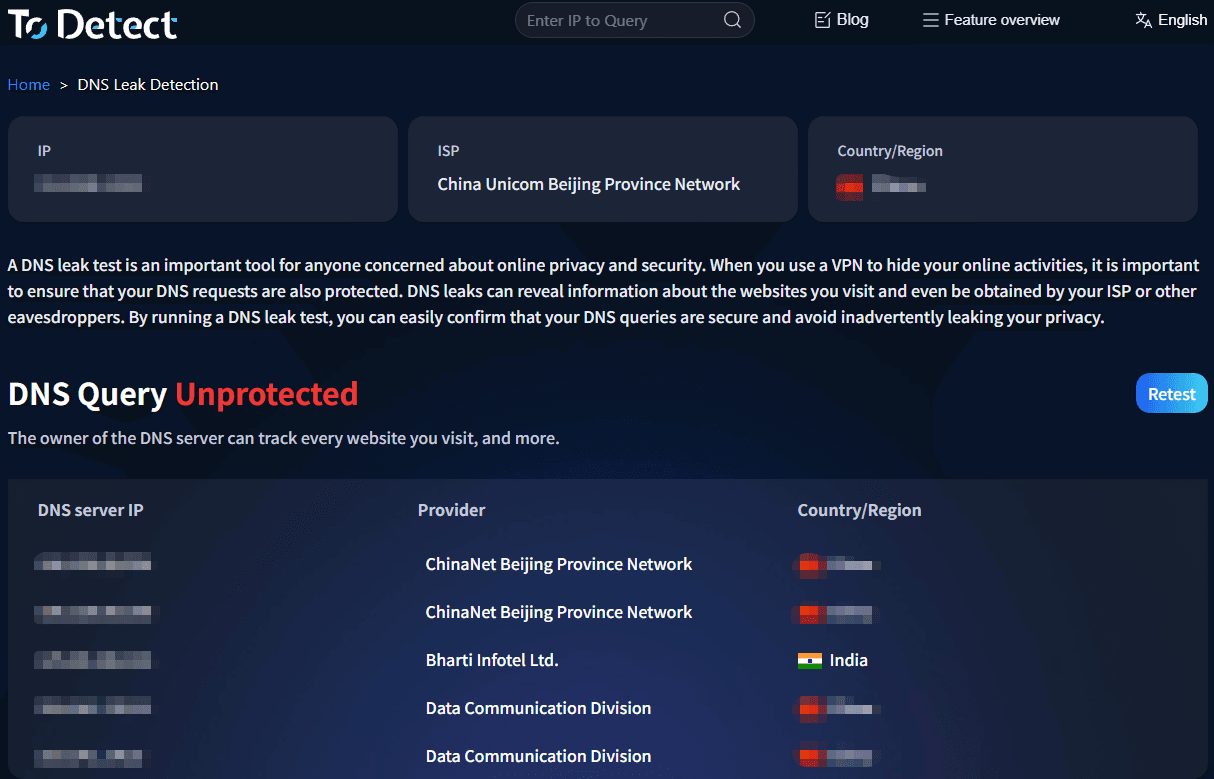
Introduction:
ToDetect is an advanced browser fingerprint detection tool. Its DNS leak detection function can accurately determine whether a user is accessing via a proxy or if there are environmental abnormalities.
Advantages:
Comprehensive Detection: Not only shows DNS leaks but also identifies proxy usage, IP leaks, and browser fingerprint anomalies.
Easy to Use, Beginner-Friendly: Clear interface and intuitive detection process, requiring no complex configuration for quick completion.
Suitable for Various Scenarios: Performs excellently whether for regular users concerned about privacy or professionals conducting cross-region access and anti-crawler detection.
Intuitive Reports: Detection results are clear at a glance, making it easy for users to quickly identify issues and take action.
Applicable Scenarios:
Suitable for any user concerned about network privacy, especially those needing comprehensive network environment assessment and tracking prevention.
2. DNS leak test.com

Introduction:
dnsleaktest.com is one of the widely used DNS leak detection websites, offering quick tests and extended tests, primarily showing the source of DNS resolution servers.
Advantages:
Easy to operate with a user-friendly interface, suitable for quick start.
Fast testing speed, directly displays the DNS server list, easy to determine leak status.
Suitable for most users to basically confirm the DNS channel of encrypted network service connections.
Disadvantages:
Insufficient coverage for complex or hidden leaks.
Applicable Scenarios:
Daily quick check for DNS leaks after encrypted network connection.
3. IPLEAK.NET

Introduction:
Ipleak.net has comprehensive functions, also detecting WebRTC leaks, proxy information, browser headers, etc.
Advantages:
Fine-grained information, covering multiple privacy leak risks.
Suitable for comprehensive privacy "check-ups," revealing privacy weaknesses in complex environments.
Detailed reports, suitable for technical user debugging.
Disadvantages:
Beginners may find it difficult to understand all detection results.
Affected by browser extensions and privacy settings, may lead to misjudgments.
Applicable Scenarios:
Comprehensive detection after modifying DNS or encrypted network configuration; used when debugging proxy and browser settings.
4. Browserleaks.com

Introduction:
browserleaks.com provides multiple privacy detection modules, with DNS detection showing resolution records and possible DNS hijacking and redirection.
Advantages:
Modular design facilitates item-by-item privacy risk checks.
Supports comprehensive browser privacy assessment including WebRTC, Canvas fingerprinting, etc.
Suitable for browser-side privacy debugging.
Disadvantages:
Complex information, difficult for non-technical users to filter.
Identification of certain new DoH configurations is not intuitive enough.
Applicable Scenarios:
Used when detailed evaluation of browser privacy settings and debugging DoH/DoT behavior is needed.
5. DNSChecker

Introduction:
DNSChecker primarily detects domain name resolution results across different global nodes, indirectly reflecting DNS hijacking and pollution.
Advantages:
Supports multi-node comparison, discovering regional DNS pollution or hijacking.
Helps identify geographical differences in resolution results.
Disadvantages:
Not specifically designed for local DNS leak detection; cannot directly determine DNS request paths.
Requires combination with other tools for comprehensive judgment.
Applicable Scenarios:
When suspecting DNS hijacking or regional pollution, use as a supplementary tool for multi-node result verification.
Summary and Recommendations
The ToDetect browser fingerprint detection tool, with its multi-dimensional data fusion and detailed reports, not only meets the professional needs of advanced users but also provides friendly support for beginners through a concise interface and easy-to-understand core prompts. It helps users fully understand DNS leaks and broader privacy risks, making it the most comprehensive and practical choice on the market.
Whether for daily detection, comprehensive privacy "check-ups," or comprehensive evaluation of browser environment and network fingerprints, ToDetect can be the preferred tool. Additionally, combining multiple tools yields better results.
After discovering a leak, focus on checking local DNS configuration, browser DoH settings, and the DNS protection function of confidential network service software to ensure all resolution requests pass through secure channels, safeguarding network privacy and security.
 AD
AD


