



 Resources
 Feature overview

 Charles
 2026-07-09 11:33
You have already enabled a proxy IP, and the detected address has changed to an overseas node, but when accessing certain websites, performing account operations, or testing your network environment, you still feel that it is "not secure enough"?
If the DNS resolution process does not go through the proxy channel, even if the proxy IP appears normal, your real network location may still be exposed. This is the DNS leak issue that many users often overlook.
Today, we will explain how to determine whether your proxy IP is truly secure, how to confirm whether DNS leakage occurs after connecting to a proxy, and how to perform accurate DNS leak detection and DNS leak testing.

1. What is DNS Leak ? Why does it happen after using a proxy IP?
Normally, when you use a proxy IP to access the internet, network requests should be forwarded through the proxy server, including DNS resolution requests.
However, during actual usage, due to system settings, incorrect proxy configurations, software compatibility issues, or other reasons, DNS requests may bypass the proxy and be sent directly to the local ISP's DNS servers. This is known as a DNS leak.
For users who care about privacy, secure access, or require a stable overseas network environment, performing DNS leak detection is an essential step.
2. Why should proxy IP security focus on DNS leaks?
Many users determine whether a proxy IP is secure only by checking whether the IP address has changed. In reality, proxy IP security involves multiple aspects:
First, whether the IP address is authentic and valid. Some low-quality proxy IPs may have problems such as repeated usage, blacklist records, or locations that do not match the advertised information.
Second, whether network requests fully pass through the proxy. If only webpage access goes through the proxy while DNS resolution or WebRTC requests leak information, your real identity may still be exposed.
Third, whether DNS has leakage risks. When selecting a proxy service, users should not only consider IP quantity, speed, and stability, but also whether DNS protection is supported and whether DNS leak testing can be performed conveniently.
3. DNS Leak Detection Tutorial: How to determine whether your proxy IP is secure?
Method 1: Use an online DNS leak detection tool
There are many DNS testing websites available online that can quickly help users determine whether DNS requests are leaking. The general steps are as follows:
1. Connect your proxy IP first.
2. Confirm that your current network has switched to the proxy route.
3. Open a DNS leak detection website.
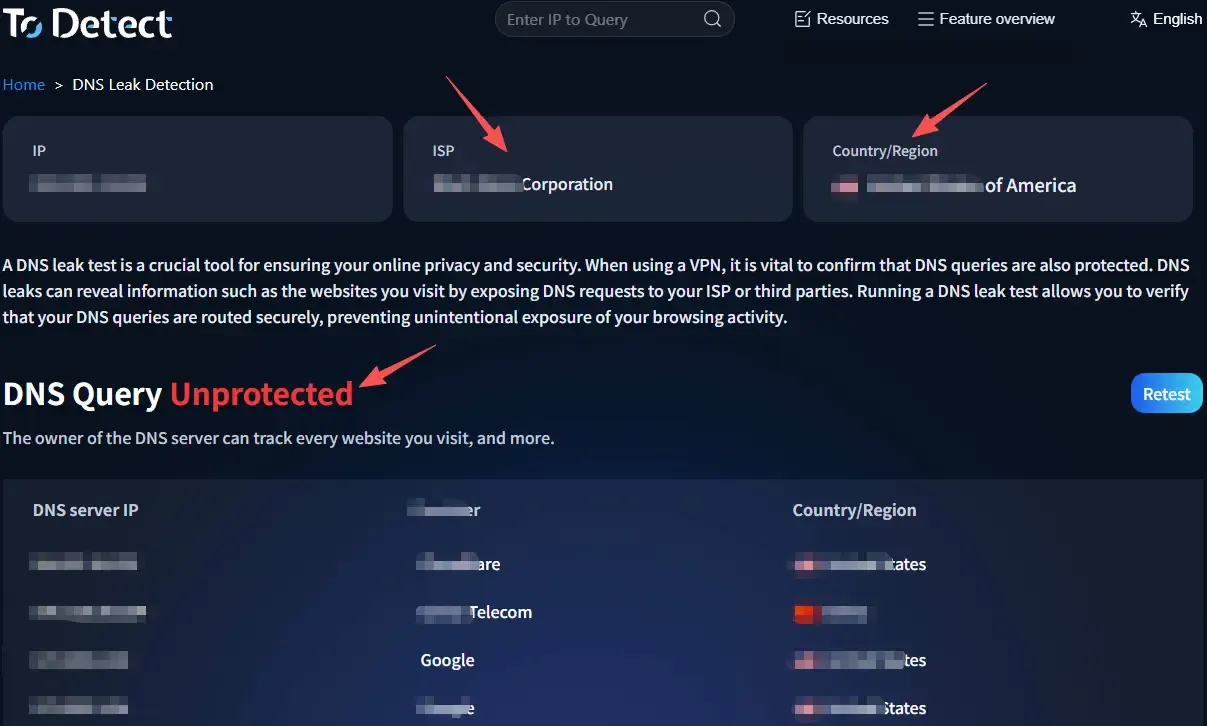
4. Start detecting DNS server information.
5. Check the DNS server location and ISP information shown in the results.
If the detection results show that the DNS server belongs to your local ISP, for example, you are located in China but still detect a domestic broadband DNS after using an overseas proxy, it can generally be considered a DNS leak.
If the detected DNS server comes from the proxy server's region or belongs to the proxy provider's DNS nodes, it usually indicates better DNS protection.
Among various detection tools, ToDetect is also a platform users can refer to when performing network security checks. Its detection features help users understand whether the current network environment has leakage risks.
Method 2: Test using different DNS environments
To improve the accuracy of DNS leak testing, you can perform multiple tests. For example: test after enabling the proxy IP; test after switching different proxy nodes; test again after restarting the network; or test using different browsers.
If every test shows DNS servers from the proxy route's corresponding region, it indicates that the proxy configuration is relatively stable. If DNS server locations frequently change or local DNS occasionally appears, you should further check your proxy software settings.
Method 3: Check system DNS settings
Some DNS leaks are not caused by proxy services but by the device's own configuration.
Windows users can open Command Prompt and enter: ipconfig /all to view the current DNS server address.
Mac users can check DNS configuration through network settings. If the system continues using the local ISP DNS and the proxy software does not take over DNS requests, leakage problems may occur.
4. Overview of DNS Leak Detection Items
| Detection Item | Normal Performance | Possible Risks | Recommended Solution |
|---|---|---|---|
| IP Address Ownership Detection | Shows the IP location of the proxy server and matches the selected proxy node | Shows the real local IP address or an IP from an abnormal region | Change the proxy node and check the proxy connection status |
| DNS Resolution Path Detection | DNS requests are completed through the proxy route or a secure DNS server | DNS requests are still processed through the local ISP | Enable the DNS protection feature in the proxy software |
| WebRTC Leak Detection | The browser cannot obtain the real internal network IP information | The device's real local network address is exposed | Disable WebRTC in the browser or adjust privacy settings |
| IPv6 Leak Detection | IPv6 requests are also transmitted through the proxy channel | IPv6 bypasses the proxy and connects directly to the internet | Disable IPv6 or configure IPv6 proxy support |
| Proxy Connection Stability Detection | IP and DNS status remain consistent during long-term usage | Frequent IP changes or DNS switching occur | Choose stable static proxies or high-quality proxy services |
| Multi-device Compatibility Detection | Mobile phones, computers, and other devices maintain secure access status | DNS abnormalities appear on some devices | Perform DNS leak tests separately and optimize configurations |
5. How to Read DNS Leak Test Results? Which Situations Indicate Security Risks?
Many users do not understand the meaning of DNS leak test results after completing the test. In reality, the following information should be the main focus:
1. Location of the DNS Server
This is the most direct evaluation method. If you use a Japan proxy IP and the test results show that the DNS server is located in Japan or the proxy provider's region, it is generally normal. If it shows your real local ISP, there may be a leak.
2. DNS Service Provider Name
Different DNS servers belong to different providers. For example, if the test result shows the name of your local broadband provider, it may indicate that DNS requests did not go through the proxy.
3. Whether Multiple Tests Remain Stable
A single successful test does not mean your connection will always remain secure. Some proxy routes may experience DNS leaks when switching nodes, reconnecting, or during network fluctuations. Therefore, regular DNS leak detection is recommended.
6. How to Prevent DNS Leaks and Improve Proxy IP Security?
First, choose a proxy service that supports DNS leak protection. High-quality proxy services usually provide DNS request protection to ensure user data requests do not bypass the proxy route.
Second, disable automatic system DNS resolution. Some operating systems prioritize default DNS servers, meaning they may continue using the original DNS method even after connecting to a proxy.
Third, use reliable network tools. Some free proxy services do not fully process DNS requests in order to reduce costs. Therefore, proxy IP security should not be judged only by price, but also by service stability and privacy protection capabilities.
Fourth, perform DNS leak tests regularly. Network environments change over time, and software upgrades, system updates, or proxy node adjustments may affect DNS security status.
7. Summary of the Relationship Between DNS Leak Detection and Proxy IP Security
Many users believe that hiding their IP address means their online identity is secure. However, truly reliable network privacy protection requires multiple security layers working together.
If you are using proxy IPs for cross-border access, data collection, overseas business operations, or privacy protection, it is recommended to develop the habit of regularly performing DNS leak detection and DNS leak testing.
When choosing a proxy IP, do not focus only on price, speed, and IP quantity. Pay more attention to connection stability, privacy protection capabilities, and whether the service provides a complete security detection mechanism.
