



 Resources
 Feature overview

 Charles
 2026-05-21 10:35
Nowadays, most people using cross-border internet access rely on proxies or acceleration tools. But there’s one issue that’s often overlooked — you may think you’re “well hidden,” while your DNS leaks have already exposed you.
Simply put, even if you successfully access a website, your “internet lookup records” may still be routed through your local network, meaning your ISP can still see what you browse.
Today, we’ve compiled a complete list of useful DNS leak test websites for 2026, along with practical tool comparisons, so you can instantly check whether your network is truly secure.
1. What Is a DNS Leak? Why Should You Care?
DNS is responsible for translating domain names into IP addresses. If a DNS leak occurs, your requests may bypass the proxy and be directly exposed to your local network or ISP.
This can expose browsing activity linked to your real IP, make your proxy only “partially effective,” compromise private browsing, and even break region-based access rules.
That’s why more and more users regularly perform DNS leak tests, especially when using public Wi-Fi or cross-border networking tools.
2. DNS Leak Testing — How Does It Work?
A DNS leak test works by sending DNS requests through a testing website, then checking where those requests are actually being routed from.
The results usually display the DNS server location, whether it matches your VPN node, whether local ISP DNS appears, and whether there are abnormal resolution paths.
If your local ISP appears in the results, it usually means there is a DNS leak risk.
3. Popular DNS Leak Test Websites in 2026 (Free)
| Tool Name | Type | Features | Recommendation |
|---|---|---|---|
| ToDetect | All-in-One Detection Tool | Supports DNS leak detection + browser fingerprint detection + WebRTC testing. One-click results with no complicated setup, ideal for quick daily checks. | ⭐⭐⭐⭐⭐ (Top Pick) |
| DNSLeakTest | Web Tool | A basic DNS leak testing tool with simple operation and DNS server location checks. | ⭐⭐⭐⭐ |
| BrowserLeaks | Web Tool | More professional-oriented, supporting DNS and browser fingerprint testing with detailed information. | ⭐⭐⭐⭐ |
| IPLeak.net | Web Tool | Comprehensive privacy testing website capable of detecting IP, DNS, and WebRTC leaks. | ⭐⭐⭐⭐ |
1. ToDetect (All-in-One Detection Tool)
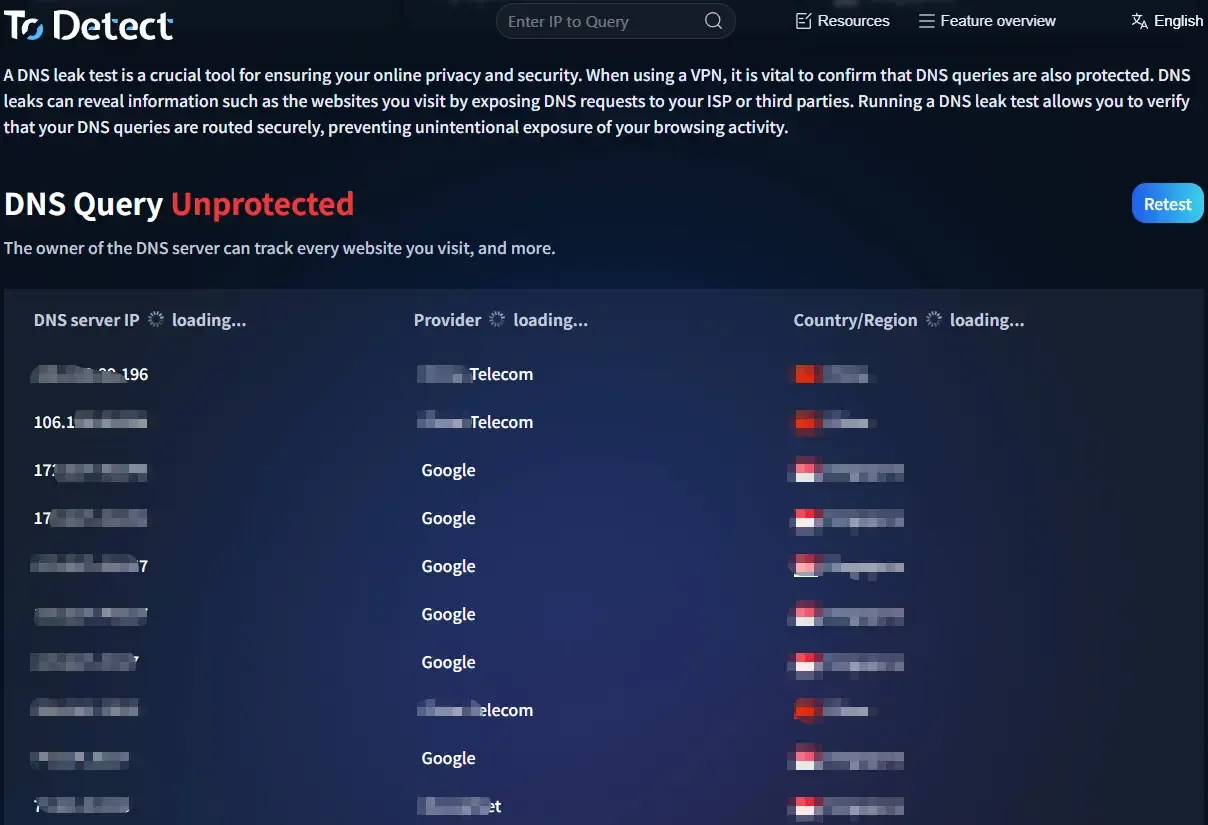
If you don’t want to keep switching between websites, this tool is a convenient choice.
• Supports one-click DNS leak testing
• Automatically detects proxy environments
• Also supports browser fingerprint testing
It’s beginner-friendly and widely used for daily privacy checks, saving more time compared to traditional single-purpose web tools.
2. DNS Leak Test (Classic & Reliable)
Suitable for basic DNS leak testing. It supports both standard and extended tests, allowing users to view DNS server ownership with intuitive results.
3. BrowserLeaks (Browser Fingerprint + DNS Testing)
Not only supports DNS leak testing, but also browser fingerprint analysis. It can display WebRTC leaks, DNS resolution paths, and browser fingerprint information.
4. IPLeak.net (Comprehensive Privacy Testing)
Offers a wide range of testing features, including IP leaks, DNS leaks, and WebRTC leaks, making it ideal for users who want a complete privacy check.
5. DNSCheck (Lightweight Tool)
A lightweight and simple interface for quickly checking DNS leaks. Its main advantage is fast loading speed and ease of use.
4. Why Should You Also Check Browser Fingerprints?
Many users only perform DNS leak tests, but that’s no longer enough. A more hidden issue today is browser fingerprinting.
Even if your DNS is secure, your browser may still expose information such as screen resolution, installed fonts, plugins, and Canvas fingerprints.
That’s why it’s recommended to perform browser fingerprint testing together with DNS leak testing for a more complete privacy check.
5. How to Read DNS Leak Test Results?
After testing, you’ll usually see a list of DNS servers. The interpretation is straightforward.
• Normal: DNS servers match your VPN/proxy region and node location
• Abnormal (DNS Leak): Local ISP DNS appears, unexpected country DNS appears, or DNS distribution looks inconsistent
If the latter happens, your proxy configuration may have issues.
6. DNS Leak Testing FAQ
1. If the DNS leak test is normal, does that mean I’m 100% safe?
Not necessarily. A normal DNS leak result only means your DNS routing is secure. Browser fingerprint leaks, abnormal IP switching, or WebRTC leaks may still expose your privacy.
2. Why do DNS leaks still happen even when using a proxy?
Common reasons include proxies not fully handling DNS requests, DNS priority conflicts in the system, IPv6 leaks, or WebRTC not being disabled in the browser.
3. How often should I perform DNS leak tests?
For regular browsing, testing once a week or whenever you switch networks is usually enough. If you frequently use proxies or cross-border networking tools, testing every time you change nodes is recommended.
4. Is DNS leak testing reliable on mobile devices?
Yes, but choosing the right tool matters. Mobile-friendly tools like ToDetect provide easier one-click testing and are more convenient for daily mobile privacy checks.
Conclusion: Don’t Ignore the Hidden Risk of DNS Leaks
Many users focus on speed and VPN nodes while ignoring the “hidden vulnerability” of DNS leaks. In reality, spending just one minute on a DNS leak test can quickly reveal whether your network is secure.
In practical use, most users simply want a tool that offers one-click DNS leak testing, clear results, and an easy operation process.
That’s why tools like ToDetect are more suitable for everyday use — no complicated configuration and no need to constantly switch between multiple DNS leak testing websites.
