



 Resources
 Feature overview

 Charles
 2026-04-17 12:12
In the modern internet environment, DNS leaks have become a privacy and security risk faced by many users and businesses.
Whether you are using a virtual network, a proxy, or browsing through public Wi-Fi, DNS leaks may expose your real location and browsing behavior to your ISP or even hackers.
This article will explain what DNS leaks are and provide some basic solutions for Windows, Mac, and mobile devices. Let’s take a look.
1. What Is a DNS Leak?
DNS (Domain Name System) is a service that converts website URLs into IP addresses and is the foundation of normal internet operation.
Under normal circumstances, when you use a virtual network or proxy, all traffic—including DNS requests—should be transmitted through an encrypted tunnel to prevent exposure of your real address.
A DNS leak occurs when DNS requests are not protected by the virtual network but are instead sent directly to your local ISP or third-party DNS servers, exposing your browsing activity and real IP address.
2. How to Detect DNS Leaks?
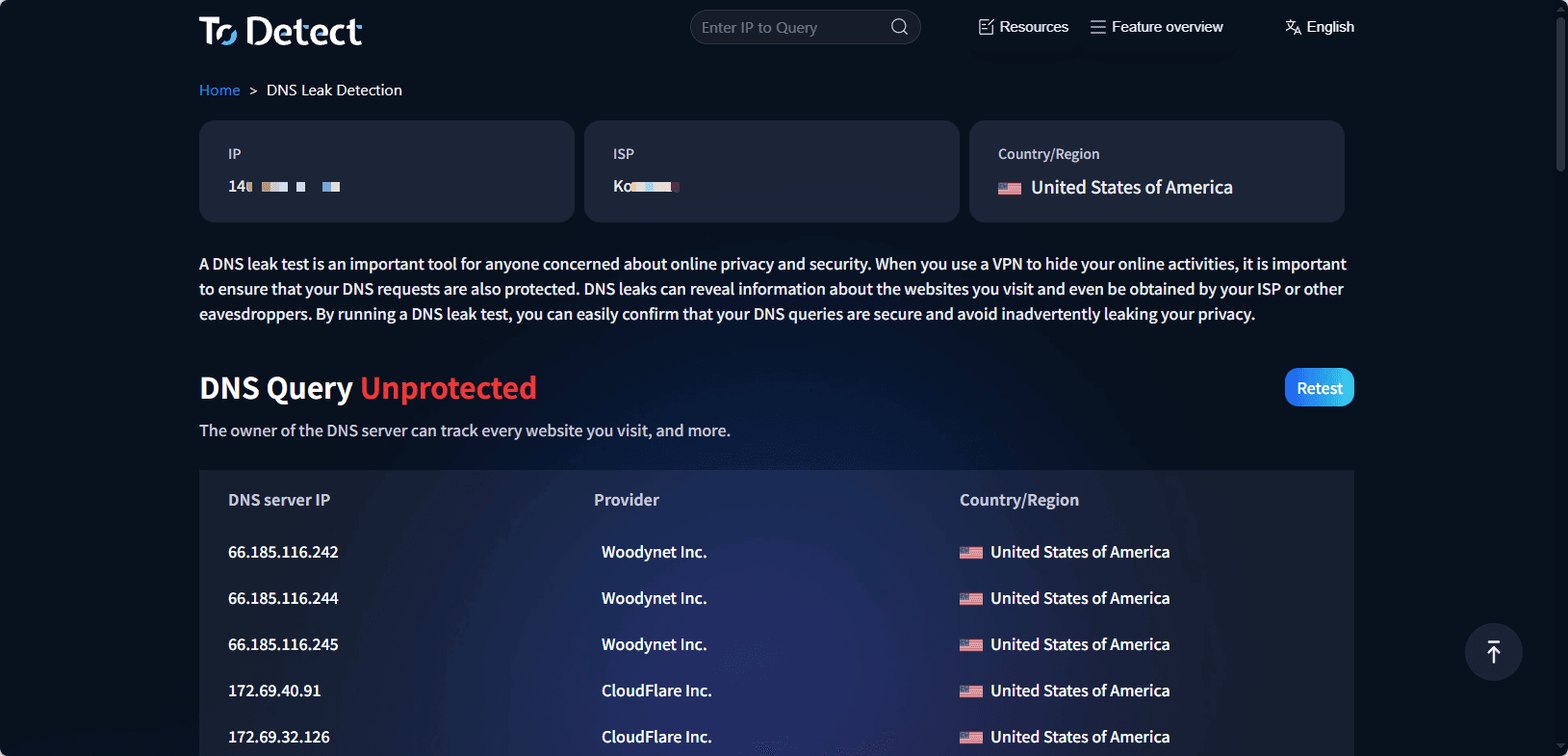
• Before fixing the issue, it is crucial to confirm whether a DNS leak exists. ToDetect provides a convenient and accurate DNS leak detection service.
• Simply visit the DNS leak test page, and the tool will identify your DNS servers, display their ownership, and indicate whether there is any leakage risk.
3. How to Fix DNS Leaks?
Fix DNS Leaks on Windows
Method 1: Change DNS Server Address
1. Open “Control Panel” → “Network and Internet” → “Network and Sharing Center”.
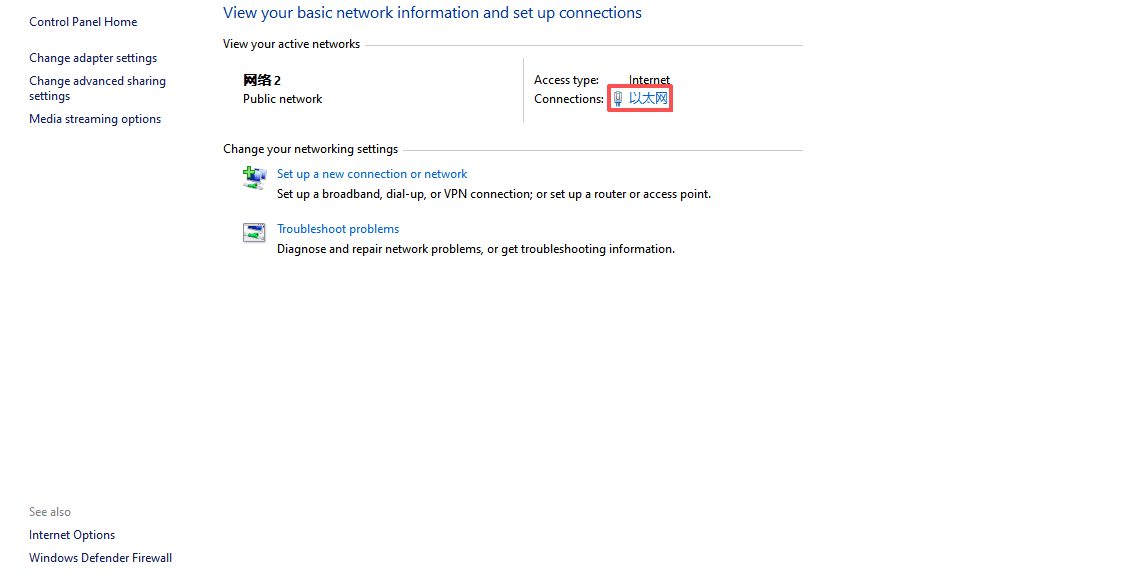
2. Click the currently connected network and select “Properties”.
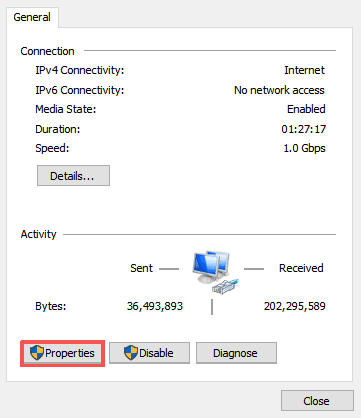
3. Double-click “Internet Protocol Version 4 (TCP/IPv4)”.
4. Select “Use the following DNS server addresses” and enter secure DNS servers, such as:
• Cloudflare DNS: 1.1.1.1 and 1.0.0.1
• Google DNS: 8.8.8.8 and 8.8.4.4
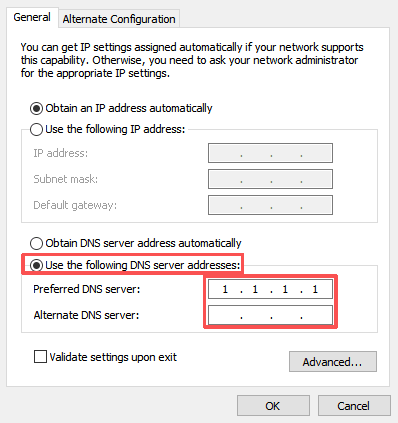
5. Save the settings and restart the network connection.
Method 2: Clear DNS Cache and Reset Network via Command Line
- Open Command Prompt (as administrator) and enter the following commands:
ipconfig /flushdns
netsh winsock reset
netsh int ip reset- After execution, restart your computer.
Fix DNS Leaks on Mac
Method 1: Set Custom DNS Servers
1. Go to “System Preferences” → “Network”.
2. Select the current network connection and click “Advanced”.
3. Switch to the “DNS” tab and click the “+” button to add the following DNS addresses:
• 1.1.1.1
• 8.8.8.8
4. Click “OK”, then “Apply” to save changes.
Method 2: Reset DNS Cache via Terminal
Open “Terminal” and enter the following command to reset DNS cache:
sudo dscacheutil -flushcache; sudo killall -HUP mDNSResponderAfter completion, restart the network.
Fix DNS Leaks on Mobile Devices (iOS & Android)
iOS
1. Open “Settings” → “Wi-Fi” and tap the connected network.
2. Scroll to “Configure DNS” and select “Manual”.
3. Remove existing DNS servers and add secure DNS:
• 1.1.1.1
• 8.8.8.8
4. Go back and save settings.
Android
1. Steps may vary depending on device and system version:
2. Open “Settings” → “Network & Internet” → “Wi-Fi”.
3. Long-press the connected network and select “Modify Network”.
4. In “Advanced options”, change IP settings to “Static”.
5. Enter secure DNS addresses in DNS 1 and DNS 2 fields:
• 1.1.1.1
• 8.8.8.8
6. Save and reconnect to the network.
4. Additional Tips and Notes
• Enable encrypted DNS: Modern systems support DNS over HTTPS (DoH) or DNS over TLS (DoT). Enabling these features can further prevent DNS leaks.
• Regularly test with ToDetect: Continuously monitor DNS security status and detect new risks in time.
• Choose high-quality virtual networks or proxy services: Ensure they have high-quality IP resources and stability to protect DNS.
5. DNS Leak Test FAQ
1. Will a DNS leak definitely expose my real IP?
Not necessarily, but the risk is high. DNS leaks mainly expose your browsing history and DNS request sources (usually your ISP). In some cases, your real IP or location can be inferred indirectly.
2. Can DNS leaks still occur when using IP tools?
Yes. If the VPN is misconfigured, DNS protection is not enabled, or the system still uses local DNS servers, DNS leaks may occur. It is recommended to choose services that support DNS leak protection and manually check DNS settings.
3. Is switching to public DNS (like 1.1.1.1) completely safe?
Not entirely. Public DNS (such as Cloudflare or Google) can improve privacy and resolution speed, but without encrypted DNS (DoH/DoT) or VPN, DNS requests may still be intercepted or monitored. It is recommended to use multiple measures together.
Summary
DNS leaks may seem subtle, but they are often the root cause of privacy exposure and risk control issues. Whether you are using a virtual network, proxy, or browsing on public Wi-Fi,
if DNS requests are not properly protected, your real browsing behavior may be exposed to ISPs or third parties.
Proper detection and configuration are essential to prevent privacy and security risks caused by DNS leaks at the source.
