



 Resources
 Feature overview

 Charles
 2026-05-26 10:28
Many people involved in overseas account operations tend to overlook an issue that seems “low-level but highly impactful” — DNS leaks.
Once a DNS leak occurs, the network traffic you thought was already “encrypted” may have already exposed your real network information. At best, it may trigger risk-control alerts; at worst, your account environment could be directly flagged as abnormal.
Next, we’ll explain clearly how to prevent DNS leaks, how to perform DNS leak detection, and the core DNS leak protection configurations so you can apply them directly in practice.

1. What Is a DNS Leak? Don’t Wait Until Problems Happen
DNS acts like the “translator” of the internet. If you use a proxy tool, DNS requests are supposed to go through the encrypted tunnel as well. But in reality, many people encounter this situation:
The browser traffic goes through the proxy, but DNS requests still use the local network or the system’s default DNS without being routed through the proxy. This is called a DNS leak.
The result is that even if you use a proxy, websites can still determine your real network source through DNS records. This is especially sensitive in overseas account operations and multi-account management.
2. How to Perform DNS Leak Detection ? Diagnose Before Protecting
Before making any configurations, you should first run a DNS leak test; otherwise, you won’t even know where the issue is.
1. Online Detection Tools
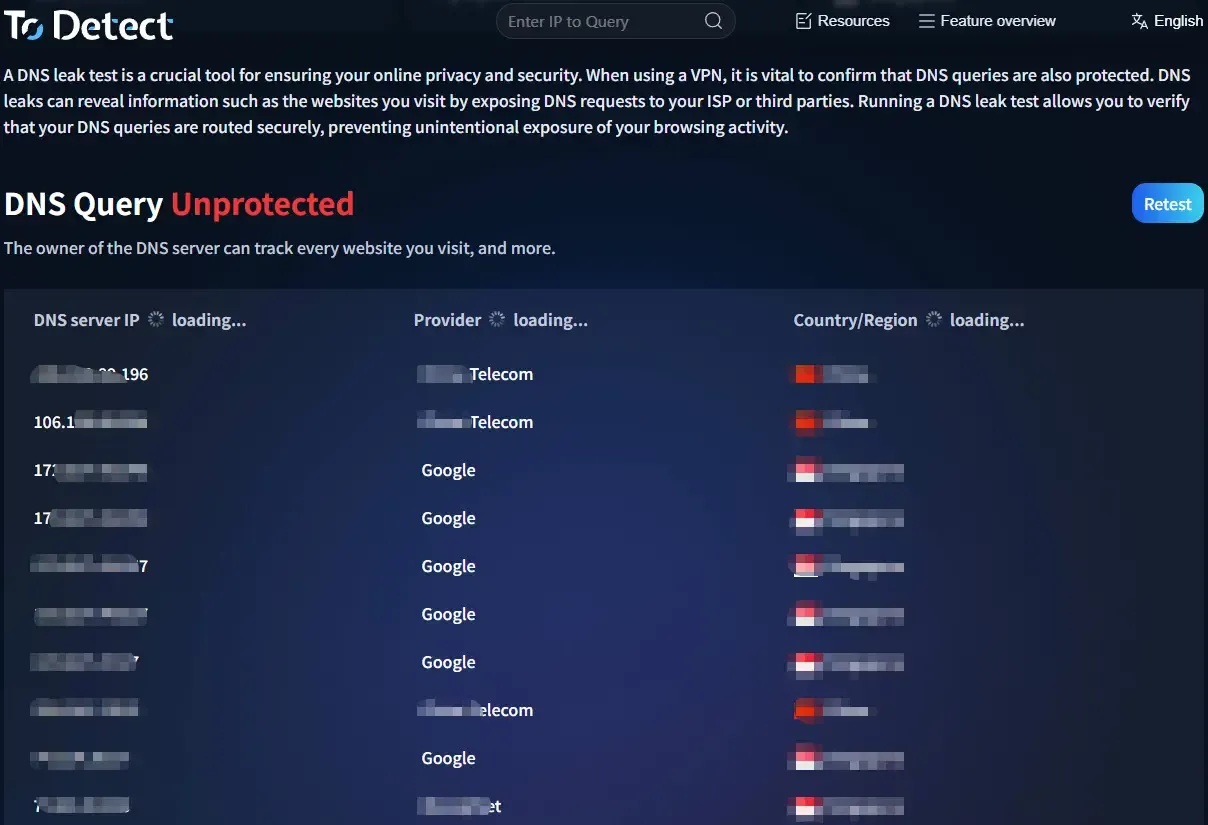
You can directly use DNS leak testing websites to check whether the DNS resolution comes from your local ISP.
2. Use ToDetect for Comprehensive Detection
Many people now use ToDetect because it not only performs DNS leak detection, but also checks whether your IP reveals your actual location, whether browser fingerprints are abnormal, whether WebRTC leaks exist, and whether the proxy environment is consistent.
Especially in large-scale overseas account operations, this kind of “all-in-one detection” saves a lot of time.
3. Browser Developer Tools
You can also inspect request resolution paths in the browser’s Network panel to help determine whether DNS behavior is abnormal.
3. Why Are DNS Leaks So Dangerous for Multi-Account Overseas Operations?
In multi-account management scenarios (such as cross-border e-commerce, overseas social media operations, and ad account management), platforms usually evaluate environment consistency through multiple dimensions:
• IP address
• DNS resolution source
• Browser fingerprint
• Time zone and language
• WebRTC information
If a DNS leak occurs, even after changing your IP, the system may still identify the setup as the “same device” or an abnormal environment. This is why many teams combine DNS leak protection, browser fingerprint detection, and isolated environment configurations together.
4. DNS Security Configuration & Detection Strategies for Different Scenarios
| Usage Scenario | DNS Risk Level | Recommended Protection | DNS Leak Detection Frequency | Additional Recommendations |
|---|---|---|---|---|
| Daily overseas account login | Medium | Enable DoH + proxy DNS protection | Once per week | Combine with browser fingerprint isolation |
| Bulk multi-account operations | High | Dedicated proxy + enforced encrypted DNS | Daily or whenever creating a new environment | Separate browser environment for each account |
| Cross-border advertising campaigns | High | Commercial proxy + DNS leak protection switch | Before every login | Bind fixed IPs to accounts |
| Cross-border e-commerce backend operations | Medium-high | Custom DNS + proxy dual protection | Every 3 days | Avoid switching networks frequently |
| Using public WiFi | Extremely high | Must use proxy + encrypted DNS | Before every connection | Avoid logging into sensitive accounts |
5. Core Methods to Prevent DNS Leaks in Overseas Multi-Account Operations
1. Force the Use of Encrypted DNS (DoH/DoT)
Enable DoH/DoT encrypted DNS in your browser or system so all DNS requests go through encrypted channels, preventing interception or leakage by local networks or ISPs.
2. Ensure the Proxy Has DNS Leak Protection Enabled
Choose proxies that include DNS Leak Protection and make sure the feature is enabled. This prevents fallback to local DNS even if the network switches or briefly disconnects.
3. Manually Configure Stable Public DNS
Configure stable public DNS servers such as 1.1.1.1 or 8.8.8.8 in your network settings to avoid automatically using untrusted local ISP DNS servers.
4. Disable Automatic DNS Fallback Mechanisms
Turn off automatic DNS assignment in advanced network settings to prevent the system from reverting to local DNS when proxies reconnect or fail.
5. Use Consistent Proxy and DNS Exit Points
Ensure that the proxy IP and DNS resolution originate from the same region to avoid inconsistencies such as “IP overseas but DNS local.”
6. Perform Regular DNS Leak Tests
Use DNS leak detection tools or platforms like ToDetect to regularly verify whether your current environment has DNS leak risks, especially after switching between multiple accounts.
7. Combine with Browser Fingerprint Isolation
Use browser fingerprint detection tools (such as ToDetect) to ensure that DNS, IP addresses, and fingerprint environments remain isolated and consistent across accounts.
6. Browser Fingerprint Detection : IP Alone Is Not Enough — Devices Matter More
Many people mistakenly believe that “changing IPs means safety,” but modern platforms care more about browser fingerprint detection.
Browser fingerprints include Canvas fingerprints, WebGL information, font lists, screen resolutions, system parameters, and plugin information.
If these details remain highly consistent or change abnormally, they can easily trigger platform risk controls.
This is where tools like ToDetect become useful for checking whether fingerprints are duplicated, environments appear unnaturally “clean,” or leakage risks exist.
7. A Relatively Safe Multi-Account Configuration Strategy
□ Separate browser environments for each account (do not mix them)
Each account should operate in its own isolated browser environment to avoid cross-contamination of cache, cookies, and LocalStorage data.
□ Independent DNS strategy for each environment (DNS leak prevention)
Ensure that every browser environment routes DNS requests through proxies or encrypted DNS channels to prevent local DNS fallback from exposing your real network.
□ Enable DNS protection when using proxies
DNS Leak Protection and similar features must be enabled to prevent DNS requests from exposing your real IP or ISP information during temporary proxy disconnections.
□ Regularly perform DNS leak detection
Use DNS leak detection tools or platforms like ToDetect to regularly verify whether there are DNS fallback or abnormal resolution issues.
□ Use ToDetect to check browser fingerprint consistency
Combine browser fingerprint detection (such as Canvas and WebGL analysis) to ensure environment information remains stable and logically consistent with the target region.
Conclusion
DNS leaks may seem like a small technical issue, but in overseas account operations and multi-account management, this exact vulnerability can significantly amplify your risks.
If you only use a proxy without performing DNS leak detection or checking environment consistency through tools like ToDetect, then your so-called “secure network environment” is actually incomplete.
For overseas bulk account operations and cross-border business activities, DNS leak protection should be implemented as early as possible — it is not an optional bonus, but a basic requirement.
