



 Resources
 Feature overview

 Alani
Alani 2026-06-04 11:27
```html
There is a highly concealed type of information leak that can expose your real network details without you even realizing it. This is known as a DNS Leak.
Unlike a direct IP exposure, a DNS leak occurs quietly during the domain name resolution process. As a result, many users remain vulnerable to IP leakage risks even after implementing basic privacy protections.
In this article, we'll explain what a DNS leak is, why it can lead to IP exposure, how to perform DNS leak detection and DNS leak testing, and how to completely eliminate the problem.

1. What Is a DNS Leak?
DNS (Domain Name System) act大战实i0jds like the internet's phonebook. Its job is to translate the website address you enter (such as google.com) into the IP address of the server hosting that website.
When using a proxy or VPN, your network traffic is supposed to travel through the encrypted tunnel. However, some devices or browsers may "bypass" the tunnel and send DNS requests directly to your ISP's DNS servers instead. This situation is known as a DNS Leak.
2. Why Can a DNS Leak Expose Your Real IP?
Many people assume that using a proxy or VPN completely hides their IP address. However, DNS leaks can reveal three types of sensitive information:
1. Real Location Exposure
DNS requests pass through your local ISP. If these requests are logged, your real IP address and geographic location may be inferred.
2. Browsing Activity Tracking
Every website you visit generates DNS lookups, leaving a record of your browsing activity.
3. Proxy or VPN Detection
Advanced detection systems can sometimes determine whether you're using a proxy or VPN by analyzing DNS request paths. In essence, DNS leaks are a hidden source of IP leak risks.
3. How to Perform DNS Leak Detection
Checking whether you're affected by a DNS leak is relatively simple. Many online tools can perform DNS leak tests instantly.
🔶 DNS Leak Test Websites
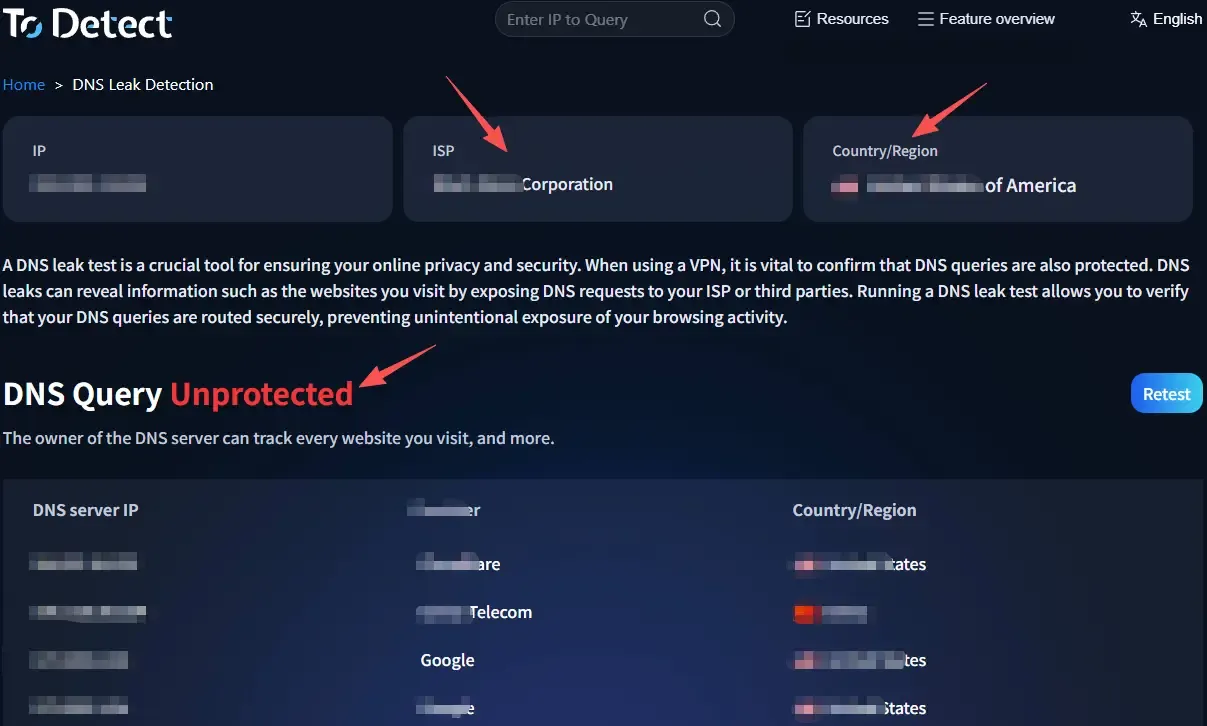
Once you open a testing page, it can automatically identify the location of your DNS servers, determine whether they match your VPN region, and detect whether local DNS responses are being used.
If the results show DNS servers belonging to your local ISP, there is a strong possibility that a DNS leak is occurring.
🔶 ToDetect Testing Tool (Recommended)
Many users choose the ToDetect tool for comprehensive privacy testing.
It can perform DNS leak testing, verify whether your real IP address is exposed, analyze whether your proxy is working correctly, and display network exit node information. It can also be used together with browser fingerprint testing.
The combination of DNS leak detection and browser fingerprint analysis provides a much more complete privacy assessment.
4. DNS Leak Risk Scenarios Reference Table
| Usage Scenario | DNS Leak Risk | Main Cause | Recommended Solution |
|---|---|---|---|
| Public Wi-Fi (Cafés / Airports) | Very High | Untrusted network environment and high DNS hijacking risk | Enable VPN/Proxy and perform DNS leak testing |
| Free Proxy Services | Very High | No DNS encryption or direct use of local DNS | Switch to a premium provider and enable DNS protection |
| Browser Split-Tunneling Mode | Medium | Some requests bypass the VPN/proxy tunnel | Use full-tunnel mode |
| Corporate or Campus Networks | Medium-High | Internal DNS policy restrictions | Use custom DNS together with a secure tunnel |
| Home Broadband | Medium | Default ISP DNS may be intercepted or monitored | Manually configure DNS and perform leak testing |
| Privacy-Focused VPNs (Leak Protection Enabled) | Low | DNS traffic travels through encrypted channels | Regularly perform DNS leak tests |
5. Common Causes of DNS Leaks
1. Incomplete VPN or Proxy Configuration
Many VPNs and proxies only route traffic by default and do not automatically handle DNS requests, allowing DNS traffic to use the local network.
2. System DNS Override
Operating systems may prioritize DNS servers assigned by your ISP, bypassing the encrypted tunnel.
3. IPv6 Not Disabled
Even if IPv4 traffic goes through a VPN, IPv6 requests may leak directly through the local network.
4. Browser Security or Acceleration Features
Some browsers implement DNS optimization features that may bypass VPNs or proxies and cause DNS leaks.
5. Improper Split Tunneling Configuration
If only certain traffic is routed through the VPN, DNS requests may accidentally be sent through the local network.
6. Unreliable VPNs or Free Tools
Some free services lack DNS leak protection altogether, making leaks more likely.
6. How to Fix a DNS Leak
Method 1: Enable DNS Leak Protection
Most reputable VPN providers offer DNS Leak Protection and Kill Switch features. Make sure both are enabled.
Method 2: Configure Secure DNS Servers
Consider using Cloudflare DNS (1.1.1.1) or Google DNS (8.8.8.8), but ensure DNS requests are still routed through your VPN or proxy tunnel.
Method 3: Disable IPv6
If your VPN does not support IPv6, disabling IPv6 at the system level can help prevent leaks.
Method 4: Use Full-Tunnel Mode
Full-tunnel mode is generally more secure than split-tunneling and minimizes DNS leak risks.
Method 5: Perform Regular DNS Leak Tests
Test your connection whenever you switch networks, use public Wi-Fi, or change VPN/proxy servers.
7. DNS Leak Test FAQ
1. Why Do I Still Have a DNS Leak When Using a VPN?
This usually happens because the VPN does not fully control system DNS requests, or your device prioritizes local ISP DNS servers. Enable DNS protection and run a DNS leak test to verify.
2. Can a DNS Leak Directly Reveal My Real IP Address?
Not necessarily. However, DNS requests can indirectly reveal your identity through ISP records, DNS request paths, and location data. Therefore, DNS leaks are still considered a significant privacy risk.
3. What's the Easiest Way to Check for a DNS Leak?
The easiest method is to use a DNS leak testing tool and check whether the detected DNS servers belong to your local ISP. Tools like ToDetect can also verify IP leaks and browser fingerprint exposure for a more comprehensive assessment.
Conclusion
Many people focus only on whether their IP address is hidden, while overlooking the fact that DNS requests can also serve as a tracking vector. If DNS traffic is not routed through an encrypted tunnel, your real network information may still be exposed even when your VPN or proxy appears to be working correctly.
If you want to improve your online privacy and security, you can use the ToDetect tool to quickly determine whether your current network connection is affected by DNS leaks or IP leaks. This makes potential risks easier to identify, understand, and control.
Ultimately, online security is not something that can be achieved with a single configuration. It is an ongoing process of monitoring, testing, and optimization. Only by paying attention to these details can you maintain a truly clean, secure, and private browsing environment.
