top
logo
custom iconResources
custom iconFeature overview
language-switch

DNS Leak Detected While Using a Proxy? Here’s How to Fix It

DNS Leak Detected While Using a Proxy? Here’s How to Fix ItCharlesdateTime2026-07-11 03:42
iconiconiconiconicon

Many people encounter a very easily overlooked issue when using overseas network proxies or setting up a proxy environment — DNS leakage.

When checking whether a proxy is secure, many only focus on IP detection results, but neglect the crucial step of DNS detection. As a result, many proxy environments appear normal on the surface but actually carry DNS leak risks.

Today, let’s walk through why overseas network proxies can cause DNS leaks, how to tell if your proxy environment has a DNS leak, and what methods you can use to fix it if a leak has already occurred.

ScreenShot_2026-07-11_112250_896.webp

1. What is DNS leakage and why does it happen even with a proxy?

If you are using an overseas network proxy, DNS requests should also be resolved through the DNS server provided by the proxy, so that your real network information stays hidden. However, if DNS requests bypass the proxy and are sent directly to your local ISP’s DNS server, a DNS leak occurs.

There are several causes of DNS leaks. Common situations include:

First, the system default DNS does not change with the proxy. Many proxy software only forward network traffic and do not automatically modify the system DNS configuration.

Second, browsers have their own independent DNS resolution mechanisms. For example, some browsers enable DoH (DNS over HTTPS), which bypasses the system DNS settings.

Third, incomplete proxy protocol configuration. Some HTTP proxies, SOCKS proxies, or self‑built proxy environments only proxy web traffic but do not handle DNS requests.

Fourth, network adapter priority issues in systems like Windows and macOS. This can cause DNS requests to be sent through other network interfaces. Therefore, even if the proxy IP has been successfully switched, it does not mean the network environment is completely safe.

2. How to determine if a proxy environment has a DNS leak?

The most direct way to confirm whether a proxy environment is secure is to perform a DNS leak test. Common DNS leak testing methods include:

Use a professional DNS leak test website

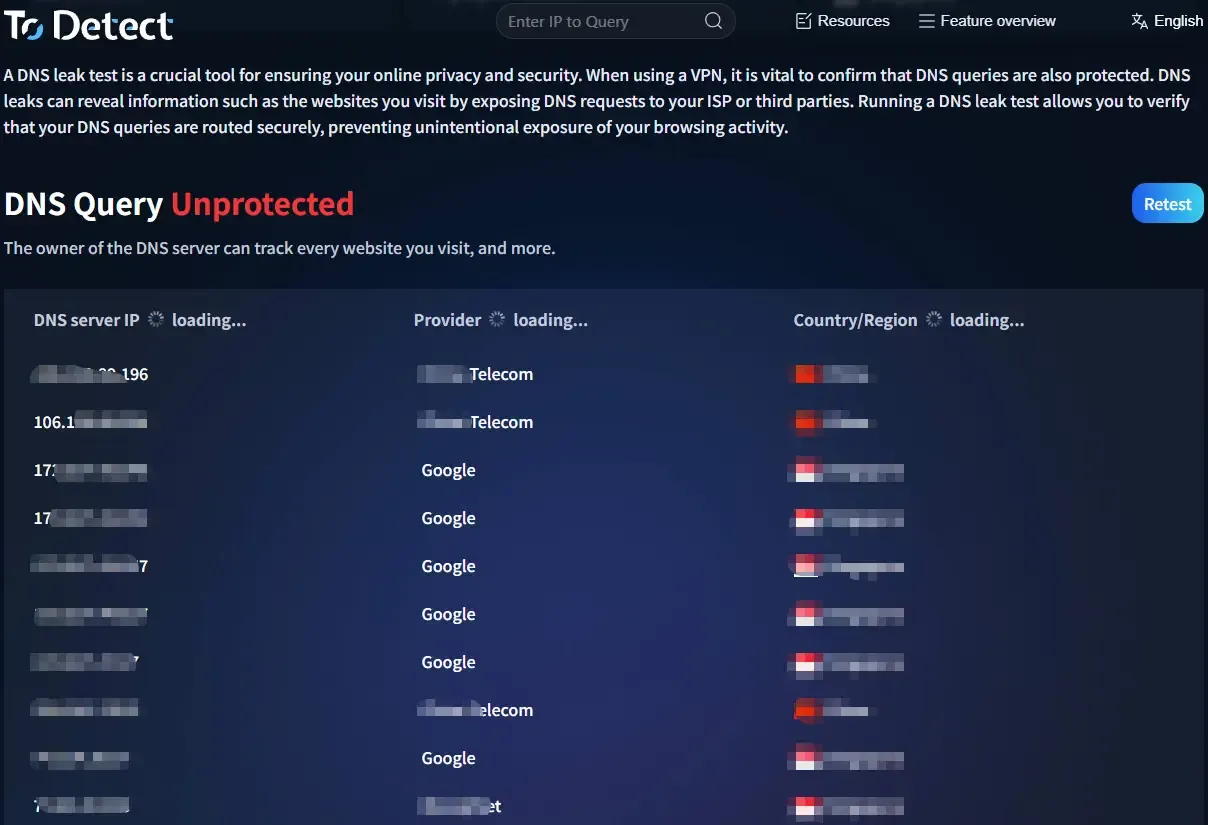
Open a DNS leak test tool and let it automatically query your current DNS server information. If the DNS server belongs to your local network provider rather than the proxy provider, it means a DNS leak still exists in your proxy environment.

Test with different network environments

Some DNS leaks only occur in specific network environments, such as home broadband, corporate networks, or mobile hotspots. Testing different network connections separately can help pinpoint the source of the problem.

Check your browser DNS settings

Some users only focus on proxy software settings but ignore the browser’s internal configuration. Go to your browser’s privacy and security settings and check whether Secure DNS is enabled.

Many users now use tools like ToDetect for DNS leak detection, which checks the DNS request path to identify anomalies in the proxy environment.

DNS英文.webp

3. Common solutions for DNS leaks in overseas proxy environments

After discovering a DNS leak, there is no need to panic. It can usually be resolved by adjusting settings.

Method 1: Enable the DNS proxy feature in your proxy software

Many professional proxy tools offer features like “DNS Proxy,” “Remote DNS Resolution,” or “Resolve DNS through Proxy.” Once enabled, DNS queries will be sent through the proxy tunnel rather than directly via the local network.

Method 2: Modify system DNS configuration

If your proxy software does not support DNS proxy, you can try manually changing the DNS server. For example, set your system DNS to a trusted public DNS server to avoid using your ISP’s default DNS.

Method 3: Disable independent DNS resolution in your browser

If your browser has DoH enabled, DNS requests may be sent directly to the browser’s designated server. Go to your browser settings, find the Secure DNS options, and turn it off or adjust the DNS provider as needed.

Method 4: Check for DNS leaks caused by IPv6

If your local network has IPv6 enabled but the proxy service does not cover IPv6 traffic, your device may access the internet directly via IPv6, causing DNS leaks and even IP leaks. Solutions include disabling IPv6, or ensuring that the proxy service fully supports IPv6 environments.

4. How to prevent DNS leaks from happening again?

DNS leaks are not a one‑time setting issue. System updates, proxy software upgrades, and network environment changes can all alter DNS configurations. It is recommended to:

First, run a DNS leak test again after changing proxy services or nodes.

Second, do not just test IP address changes; also check the DNS server location.

Third, for long‑term overseas proxy use, choose a proxy solution that supports DNS leak protection to reduce manual configuration issues.

Additionally, if you manage cross‑border e‑commerce accounts, social media accounts, ad accounts, or multiple overseas network environments, DNS leak testing should become part of your daily checklist.

Many account anomalies, login verification issues, and environment‑related problems are not necessarily caused by the IP address alone. Details like DNS, browser fingerprinting, and timezone can also affect system judgments.

5. What should you pay attention to in DNS leak test results?

When performing a DNS leak test, do not just look at the “leak or no leak” conclusion. Also pay attention to several key data points in the test report.

First, check the DNS server’s geographic location.

If your proxy node is in the US but the DNS server shows a China location, further investigation is needed.

Second, check the number of DNS servers.

Some proxy environments may expose multiple DNS servers at the same time. If one of them is from your local network, there may still be a risk.

Third, check for IPv6 DNS records.

IPv6‑related leaks are more subtle and many basic test tools may not highlight them, so special attention is needed during testing.

Fourth, run the test multiple times.

A single test result does not fully represent the long‑term state, especially in dynamic IP or dynamic DNS environments. Multiple tests are more likely to reveal hidden issues.

In conclusion

In the process of using overseas network proxies, IP proxy, DNS resolution, browser settings, and system network configuration all work together as a whole. A problem in any single link can expose your real network information.

By using ToDetect for regular DNS leak detection and testing, checking the DNS leak status of your proxy environment, and properly configuring DNS proxy features, you can effectively strengthen your online privacy protection.

The proxy solves the traffic egress problem, while DNS security determines whether your network requests actually run as intended. Only when both are stable can you build a more reliable overseas network access environment.

Table of Contents
1. What is DNS leakage and why does it happen even with a proxy?
2. How to determine if a proxy environment has a DNS leak?
3. Common solutions for DNS leaks in overseas proxy environments
4. How to prevent DNS leaks from happening again?
5. What should you pay attention to in DNS leak test results?
In conclusion