


 Resources
 Feature overview
IP Temporarily Blocked? How to Fix It in 2026
 browser
 2025-12-17 07:51


When accessing the internet, we often encounter such a situation: a website that was accessible the previous day prompts "Your IP has been temporarily blocked" the next day, which can be caused by various reasons.
This situation will still be prevalent in 2026, especially when accessing international websites, operating multiple accounts, or using anti-detection tools. This article will analyze common scenarios and provide targeted solutions to help everyone quickly resolve this issue.
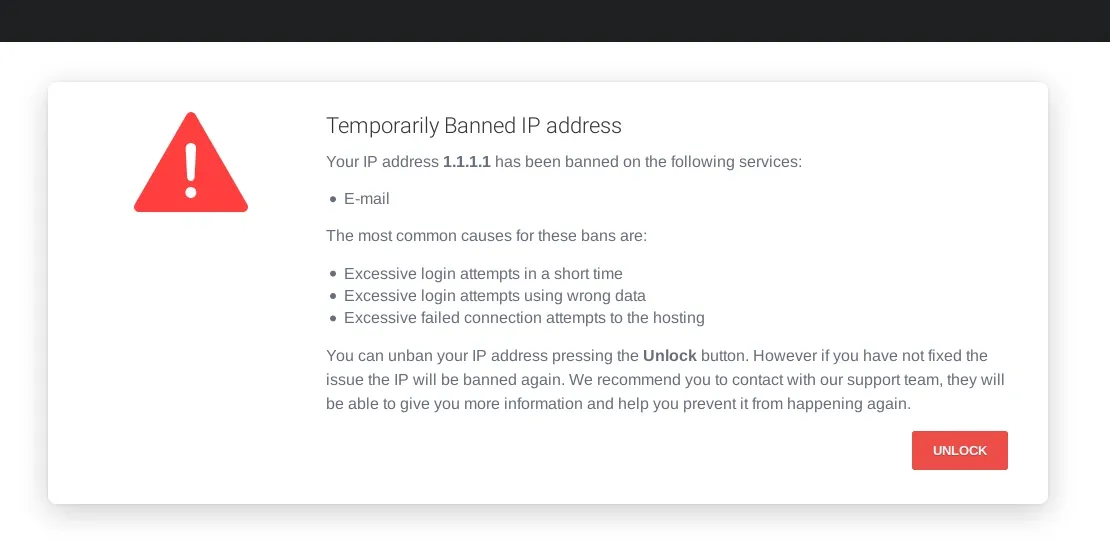
I. Common Scenarios Leading to IP Blocking
1. Accessing Blocked or Non-Compliant Content Websites
Websites may immediately block your IP when accessing illegal film and television resource sites or performing unauthorized operations with certain anti-detection browsers.
2. Accessing Major Foreign Media or Paid Websites
For example: Amazon Prime, Disney+, YouTube, etc. Some content is restricted to IP addresses in specific regions; accessing frequently or switching accounts rapidly in a short period may also trigger blocking.
3. Multi-Account or Crawler Activities
When operating multiple accounts on e-commerce platforms, social media, content websites, etc., the system may detect abnormal traffic and thus block your IP.
4. IP Blacklisting
If your IP address is listed on a blacklist (usually due to suspicion of participating in malicious activities), you are likely to be blocked by certain websites and services.
5. Internet Service Provider (ISP) Restrictions
If your ISP detects harmful traffic (such as malware) or you violate their service terms, they may block or restrict your IP address. Adhering to relevant regulations is crucial to avoid IP address blocking.
II. Common Methods to Unblock IP
1. Check if Your IP Address is Blacklisted
Even if you have done nothing wrong, your IP address may be blacklisted. This could be due to the actions of someone who previously used your IP address or others on the same network as you.
To check if your IP address is blacklisted, visit websites such as www.todetect.net/ip-info or WhatIsMyIPAddress.com and use their blacklist check features. If you find your IP address is blacklisted, contact your Internet Service Provider (ISP) for assistance.
2. Contact Website Customer Support
For legitimate websites such as e-commerce platforms, streaming services, forums, etc., you can provide your account information and contact the website's customer support to request unblocking.
3. Change Network or Restart Router
For users with dynamic IP addresses, restarting the router can obtain a new IP address, thereby bypassing temporary blocking.
4. Perform Malware Scan
Malware on your computer may not only leak your personal data but also lead to your IP address being blocked if your device is used for other services or malicious activities.
To prevent repeated IP address blocking, it is recommended to perform a thorough virus scan. On Windows systems, click "Windows Security" > "Virus & Threat Protection" > "Scan options" in sequence, then select "Full scan". After scanning and removing all threats, try accessing the website again.
5. Use a VPN or Proxy Service
Choosing a reliable VPN or proxy allows you to change your outbound IP address and access restricted content. Make sure to use a stable, no-log service to avoid triggering additional blocks or security flags.
III. Tips to Prevent IP Blocking
Regularly change outbound IP addresses or use high-quality proxy services
Control access frequency to avoid frequent operations on the same website in a short period
Use secure and reliable anti-detection browsers (such as Bitbrowser)
Maintain network stability to avoid triggering abnormal detection due to frequent disconnections and reconnections
IV. Conclusion
Although "Your IP has been temporarily blocked" is common, in most cases it is a temporary or strategic block. Users can safely unblock it by reasonably changing the network, using third-party network service tools, optimizing operations, etc.
Remember, understanding the status of your IP address is crucial to preventing future blocking. To easily monitor your IP address, you may consider using ToDetect, an online IP detection tool that allows you to check your IP status at any time.

 AD
AD


