



 Resources
 Feature overview

 Ganesh
 2026-04-16 12:13
Protecting your real IP address from being exposed is a crucial step in safeguarding personal privacy and account security.
Especially for cross-border e-commerce sellers, digital marketers, and even regular internet users, preventing IP exposure not only helps avoid privacy leaks but also effectively reduces the risk of being flagged or banned by platform risk control systems.
So, how can you quickly and accurately check whether your real IP has been exposed? Let’s walk through it together.
1. Why should you care about real IP exposure?
An IP address is like the identity of your device on the internet. Once your real IP is exposed, your online identity becomes visible and may lead to the following risks:
• Privacy leakage: Others can trace your geographic location and even your ISP through your IP.
• Account security risks: Especially in e-commerce and social media operations, multiple accounts using the same IP may be flagged as linked, leading to bans.
• Cyber attacks: Once hackers obtain your real IP, you may become a target of attacks such as DDoS.
• Platform risk control detection: Platforms use IP analysis to detect abnormal activity, increasing the risk of bans if your real IP is exposed.
Therefore, understanding whether your real IP is exposed and adjusting your network environment accordingly is the first step to protecting your accounts and privacy.
2. Common causes of real IP leaks
1. Low-quality proxy or IP tools
Some poorly designed VPNs or proxy services lack features like kill switch, DNS leak protection, and IPv6 blocking, making your real IP vulnerable during unstable connections.
2. WebRTC leaks
Browser WebRTC can sometimes bypass your proxy/VPN and directly expose your local IP address to websites.
3. DNS leaks
Even when using a VPN, DNS requests may still go through your local ISP, indirectly revealing your real IP information.
4. Cache not cleared when switching devices
When switching devices or browsers, cached data or cookies may still contain traces of your real IP.
3. How to quickly check your IP for leaks?
Use ToDetect to test IP leakage
1. Open the ToDetect homepage
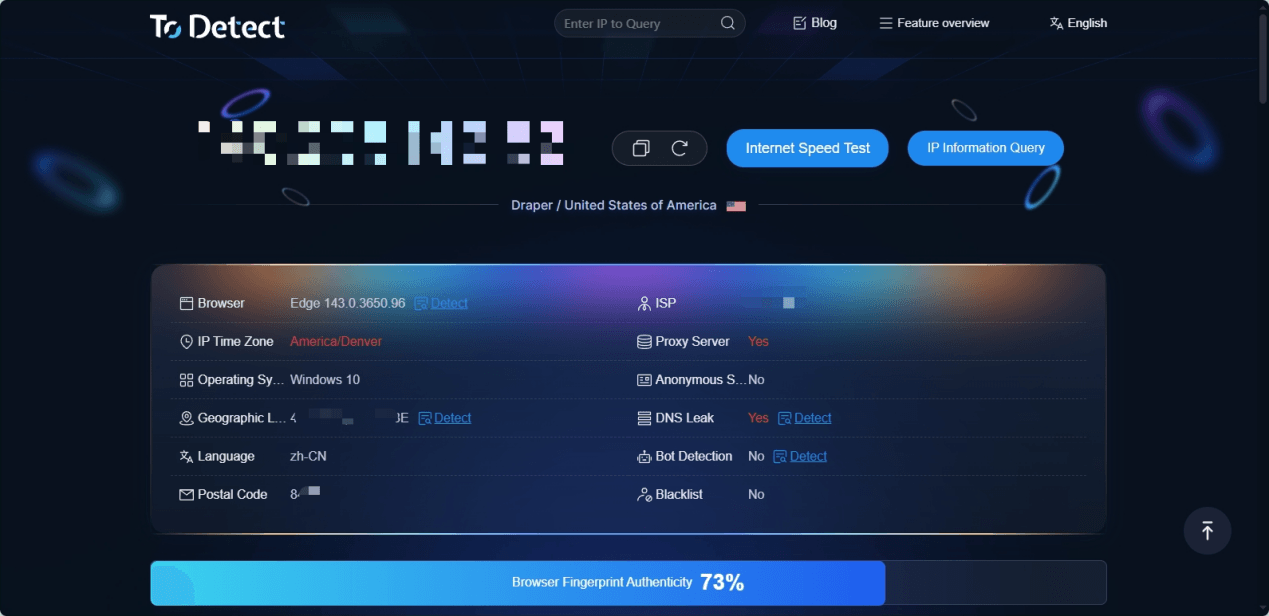
Visit the ToDetect browser fingerprint tool. The site will automatically collect your environment data.
2. Check your IP address
The homepage will clearly display your current public IP. Verify whether it matches your proxy IP or your real local IP.
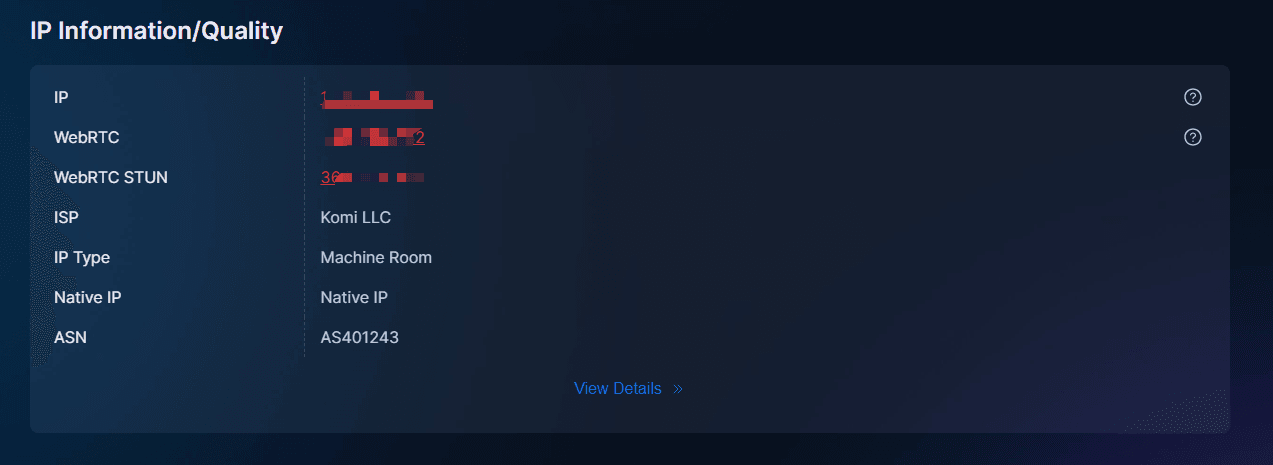
3. Check WebRTC leak indicators
ToDetect will show whether WebRTC is enabled and if your local IP is exposed. If your real IP appears, it indicates a leak risk.
4. Use the IP info lookup page
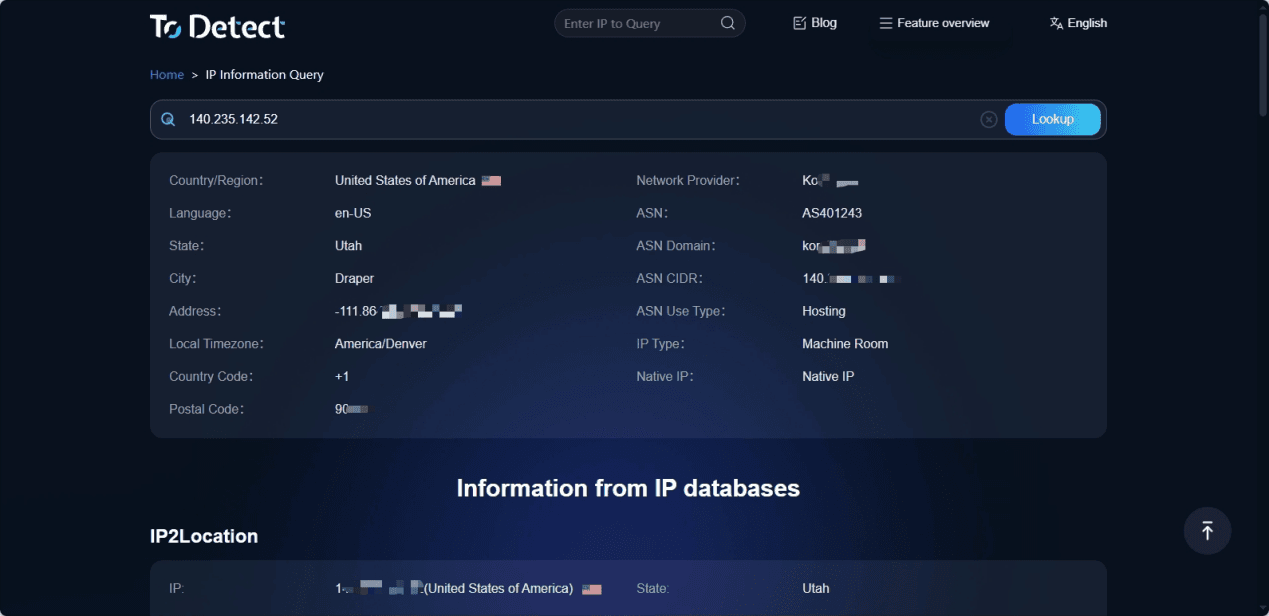
Open the ToDetect IP info page or paste an IP into the search bar to view its location, ISP, and type.
4. How to prevent IP leaks?
• Disable WebRTC: Turn it off in your browser or use anti-leak extensions.
• Regular checks: Use tools like ToDetect to monitor your setup.
• Multi-device management: Avoid running multiple accounts in the same network environment.
• Clear cache and cookies: Keep environments clean when switching networks or devices.
5. Online IP detection FAQ
1. Why is my real IP still detected after using a proxy/VPN?
This is one of the most common issues. Even with a VPN, WebRTC or DNS requests may bypass the proxy and expose your real IP.
👉 Recommendation: Disable WebRTC and use a VPN with DNS leak protection.
2. Is it normal for tools to show multiple IPs?
Yes. Detection tools often display public IP, private IP (e.g., 192.168.x.x), and WebRTC IP.
Key checks:
• Whether the public IP matches your proxy
• Whether your real IP is exposed
👉 If a non-proxy public IP appears, there is a leak risk.
3. Is frequently changing IP safer?
Not necessarily. Without synchronizing browser fingerprint and device environment, frequent IP changes may look suspicious.
👉 A safer approach is maintaining IP + device environment consistency.
Conclusion
With tools like ToDetect, you can clearly understand your IP and browser environment security status and take targeted measures to significantly reduce risks.
