


 Resources
 Feature overview
How to Tell if Your Proxy IP is Any Good?Here's What Actual Tests Show About the Key Metrics
 bonnie
 2026-01-06 03:59


Many people encounter issues where they buy proxy IPs, the price is not low, but they frequently disconnect, load slowly, or get blocked by websites.
In fact, the quality of a proxy IP cannot be judged solely by price or quantity; there are several key parameters you must understand.
Next, we’ll share how to evaluate the quality of an IP, along with some practical tools and tips to make the IPs you buy more efficient and easier to use.

1. Why Focus on Proxy IP Quality
• Stability: Poor-quality IPs often disconnect frequently or may be directly blocked by certain websites.
• Speed: Slow IPs reduce scraping and browsing efficiency, especially for batch operations.
• Anonymity: If an IP has poor anonymity, your real identity may be exposed, which is critical for web scraping or marketing.
• Usability: Some IPs appear usable but only work on certain websites, which is inefficient.
Therefore, judging IP quality is the first step to efficient proxy use.
2. Five Core Parameters forProxy IP Quality Testing
1. IP Response Speed
Response speed directly affects your efficiency when accessing websites or scraping data.
Generally, a response time within 300ms is considered good, while IPs over 1000ms are unsuitable for large-scale use.
Tip: Use online IP testing tools or write a small script to test ping values. Measure multiple times and take the average to avoid misjudgments due to fluctuations.
2. IP Stability and Availability
Many proxy IPs appear usable but disconnect within hours or are only available during certain times, which involves availability concerns.
Practical Tip: Monitor an IP over a week. If stability exceeds 90%, it is reliable for use.
3. Anonymity and Real IP Hiding
High-quality IPs are typically more anonymous and do not easily expose your real IP. Low-anonymity IPs are more likely to be blocked, especially during web scraping or bulk registrations.
This involves browser fingerprint detection.
Some websites identify proxy use through browser fingerprints.
If an IP leaks real information via browser fingerprints, it is easily blocked.
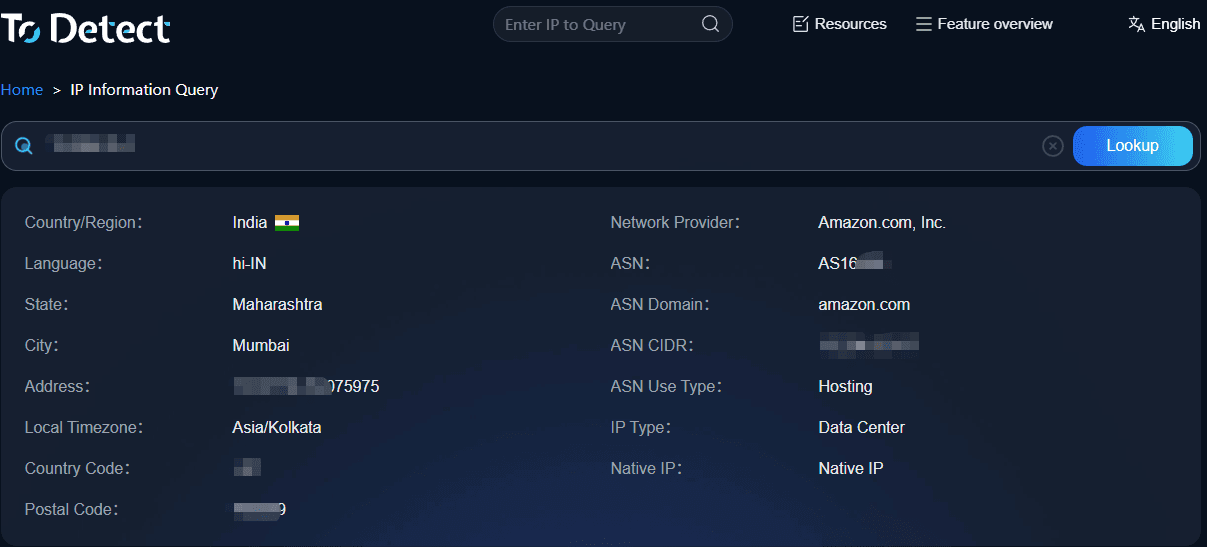
Recommendation: Use ToDetect fingerprint testing tools to see if your IP can be easily identified when visiting websites. Combine this with proxy IP testing for a more accurate anonymity assessment.
4. Geographic Location and IP Range Quality
Some websites are sensitive to IP ranges. IPs from blacklisted or foreign ranges may be denied access.
Check IP location, ISP, and range using IP quality queries and online tools to avoid issues in advance.
5. HTTP/HTTPS Support and Port Status
Websites have different protocol requirements. If an IP only supports HTTP but you need HTTPS, it may not work. Port stability also affects usability.
Tip: Use proxy IP testing tools to check multiple ports and protocols at once to quickly filter usable IPs.
3. Practical TestingFive Key Steps for Proxy IP Quality
1. Batch Test Response Speed and Availability
The response speed of proxy IPs directly determines your efficiency in scraping or visiting websites.
How to do it:
• Use Python scripts or online tools to test dozens to hundreds of IPs at once.
• Record each IP's response time and connection success rate.
• Test multiple times and take the average to avoid misjudgment due to fluctuations.
Tip: For large-scale scraping, keep IPs under 300ms and discard those above 1000ms.
2. Anonymity Testing
Some IPs appear usable but reveal your real IP when visiting a site, which is risky for scraping or bulk registrations.
How to do it:
• Use browser fingerprint detection or ToDetect tools to simulate visits and see if your IP is easily identifiable.
• Test across different browser configurations to ensure reliable anonymity.
Experience: High-anonymity IPs combined with clean browser fingerprints significantly reduce the chance of being blocked.
3. Test Access to Target Websites
A more precise method is to directly access your usual sites using the proxy IP. Focus on:
• Whether captchas appear or pages redirect abnormally
• Whether the IP gets blocked frequently
• Page loading speed
Tip: Simulate real user operations, such as logging in, browsing multiple pages, and submitting forms, to test actual usability.
4. Long-term Observation and Maintenance
A good IP should be usable now and remain stable over time. How to do it:
• Create a usable IP pool, retest weekly, and remove unstable IPs.
• Rotate IPs to avoid overuse and being blocked.
Tip: Set up a simple monitoring script to automatically check IP availability and response speed daily.
5. Use Comprehensive Tools
Relying on a single metric or tool is not precise enough. Recommended:
• IP Quality Lookup: Quickly check location and IP range to avoid blacklisted ranges
• Online IP / Proxy IP Testing: Test speed, stability, and availability in bulk
• Browser Fingerprint / ToDetect Tools: Assess anonymity and security
Using comprehensive evaluation, you can select truly stable, efficient, and highly anonymous IPs rather than blindly pursuing quantity or price.
Summary
To judge a proxy IP, relying on data is more reliable than blindly choosing expensive ones. Key points: fast response, high stability, strong anonymity, reliable IP location, and proper protocol/port support.
Combined with IP quality lookup, online IP testing, proxy IP testing, browser fingerprint detection, and ToDetect tools, you can quickly select truly usable IPs with fewer pitfalls.
The quality of a proxy IP is determined through use, but with methods and tools, you can make informed decisions, saving time and money. Efficient, secure, and stable—this is what a good IP truly is.
 AD
AD


