



 Resources
 Feature overview

 Ganesh
 2026-05-20 10:12
Many people encounter “IP address lookup” for the first time simply out of curiosity—entering an IP to see where it comes from.
However, for cross-border e-commerce or multi-account operations, basic IP geolocation lookup is no longer enough. It also requires IP quality detection and network environment analysis.
Why does the same IP sometimes show different locations? Can IP geolocation lookup really provide accurate positioning? And how can IP quality detection help determine whether a network environment is trustworthy?

1. What Is IP Address Lookup? It’s More Than Just “Checking a Location”
IP address lookup refers to using a string of network numbers (such as 192.168.x.x or a public IP) to identify the corresponding network ownership information behind it.
Common lookup results include:
• Country / Region / City
• ISP (China Telecom, China Unicom, China Mobile, or overseas ISPs)
• Network type (residential IP, datacenter IP, proxy IP, etc.)
Many people use “online IP lookup tools” only to see an approximate location, but in cross-border e-commerce or account operations, what matters more is whether the IP is “clean.”
2. Why Is IP Geolocation Lookup Sometimes Inaccurate?
Many users notice that although they are physically in Shenzhen, their IP geolocation may display Guangzhou or even somewhere farther away. This is mainly because:
• ISP node drift: IP allocation is not always strictly based on geographic location
• Mobile network exit changes: 4G/5G mobile traffic often routes through other cities
• Database update delays: IP geolocation databases are not updated in real time
Therefore, relying solely on IP lookup results is not enough. IP quality analysis must also be considered.
3. IP Quality Detection Is More Important Than “Checking the Address”
In risk control and marketing, IP quality detection is even more critical. A good IP is usually evaluated based on the following indicators:
• Whether it is a proxy IP or datacenter IP
• Whether it has been flagged as risky by platforms
• Whether there is abnormal bulk access behavior
• Whether it frequently switches regions
For example, e-commerce and social platforms are highly sensitive to “datacenter IPs,” which are easily identified as abnormal account environments.
That’s why many tools today not only provide IP geolocation lookup, but also offer IP risk scoring, which is extremely important.
4. IP Detection Dimensions and Use Cases (Practical Reference)
| Detection Dimension | Main Purpose | Output Information | Common Use Cases | Importance |
|---|---|---|---|---|
| IP Geolocation Lookup | Determine approximate geographic location | Country / City / ISP | User location analysis, basic risk control | ★★★★☆ |
| IP Network Type Identification | Determine the nature of the IP source | Residential broadband / Datacenter / VPN / Proxy | Account security, anti-fraud | ★★★★★ |
| IP Behavior Consistency Analysis | Detect abnormal usage behavior | Login frequency, access patterns | Risk control systems, anti-bot detection | ★★★★★ |
| DNS Resolution Matching | Verify network path authenticity | DNS records, resolution chains | Network security troubleshooting | ★★★☆☆ |
| TLS/HTTP Fingerprint Analysis | Evaluate request environment credibility | Protocol fingerprints, request header structures | Advanced anti-fraud systems | ★★★★★ |
| Device Environment Identification | Determine whether it is the same device | System information, browser parameters | Multi-account management, anti-association | ★★★★★ |
5. Browser Fingerprint Detection: A More Hidden Identification Method Than IP
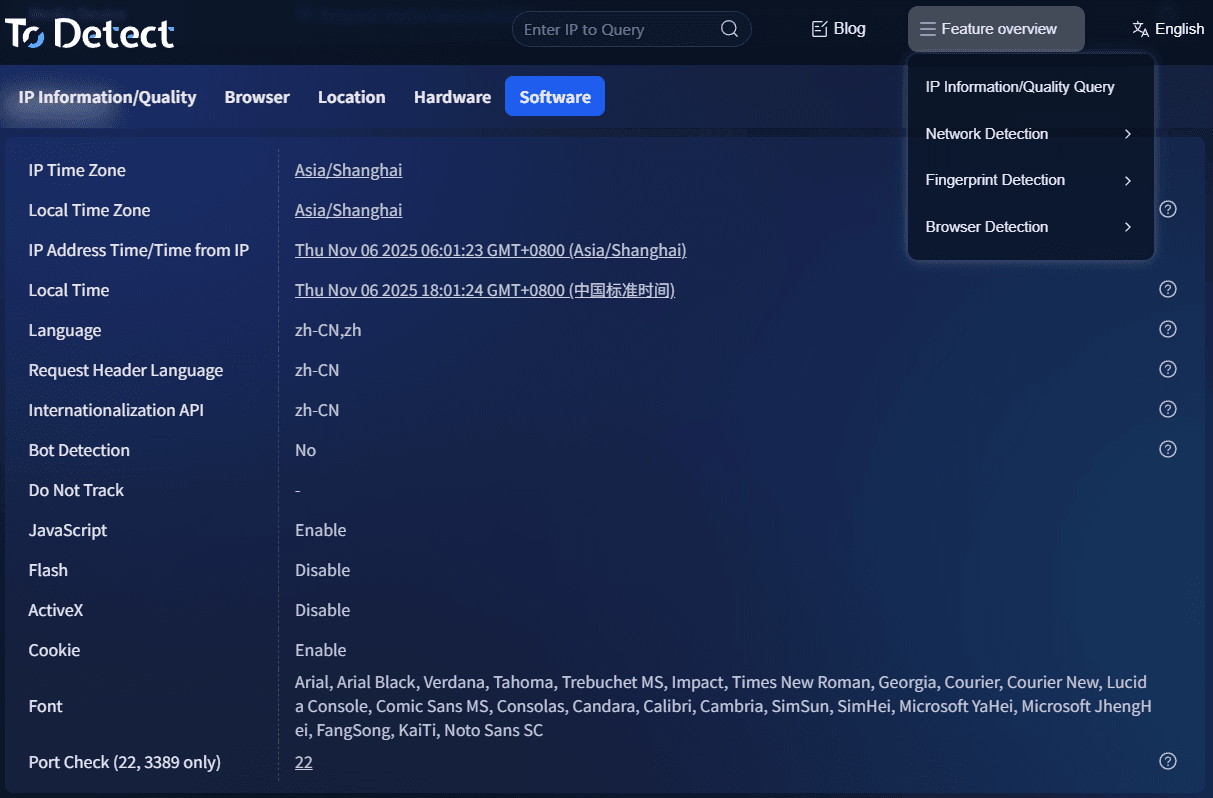
Platforms now also combine browser fingerprint detection to identify users, such as:
□ Browser version and operating system combination
□ Font list
□ Screen resolution
□ Canvas / WebGL fingerprints
□ Time zone and language environment
Even if you use different IPs, as long as the browser fingerprint remains the same, the system may still identify you as the same device.
This is why some users operating multiple accounts use both IP tools and fingerprint isolation tools simultaneously.
6. The Role of ToDetect and Similar Tools in Practice
Comprehensive detection platforms like ToDetect usually integrate multiple functions together:
□ Online IP lookup (quickly view geolocation)
□ IP address lookup (supports multi-node resolution)
□ IP geolocation lookup (accurate to city/ISP level)
□ IP quality detection (identify proxies/risk levels)
□ Browser fingerprint detection (environment consistency analysis)
For people involved in cross-border e-commerce, social media operations, or advertising campaigns, the value of such tools lies in “one-stop evaluation of whether a network environment is trustworthy.”
7. IP Tracking and Analysis Methods (Practical Workflow)
If you need deeper IP tracking, you can follow this approach:
• Basic Layer: IP geolocation lookup. First confirm the approximate region and ISP information.
• Risk Layer: IP quality detection. Determine whether it is a proxy IP, datacenter IP, or blacklisted IP.
• Behavior Layer: Access trajectory analysis. Combine access frequency and login timing to detect abnormalities.
• Device Layer: Browser fingerprint detection. Confirm whether it is the same device or a simulated environment.
Only by combining these four layers can you get closer to an accurate judgment instead of relying on a single IP lookup result.
8. Online IP Address Lookup FAQ
1. Can IP geolocation lookup identify an exact home address?
No. IP geolocation lookup can generally only identify the city or ISP level and cannot pinpoint an exact street or building address.
2. Why does my online IP lookup show a different location from where I actually am?
The main reasons are different ISP exit nodes, dynamically assigned mobile IPs, or delays in database updates. Therefore, IP lookup results should only be used as a reference, not as absolute positioning data.
3. What is the purpose of IP quality detection? Do ordinary users need it?
IP quality detection is mainly used to determine whether an IP is a proxy, datacenter IP, or risky IP. For cross-border e-commerce or multi-account operations, it helps avoid account abnormalities or risk-control issues.
4. Why am I still identified by platforms after changing my IP?
Because platforms do not rely solely on IP addresses. They also combine browser fingerprint detection. If the fingerprint remains the same, you may still be identified as the same device environment even after changing IPs.
Conclusion: IP Is Only the Entry Point — The Environment Is the Core
Whether using ordinary IP lookup tools or more advanced IP quality detection systems, the core goal is to determine whether a network identity is real, secure, and trustworthy.
If you only use it occasionally, a standard online IP lookup tool is sufficient. But if you are dealing with bulk operations or risk-control analysis, platforms like ToDetect that support multi-dimensional analysis are much closer to real-world needs.
In the end, an IP is just the “house number,” while the entire network environment is the actual “structure inside the house” that truly matters.
