


 Resources
 Feature overview
How to Tell if a Platform is Tracking Your IP Address: Common Signs + Detection Methods
 bonnie
 2026-01-12 06:15


With the widespread adoption of the internet, user privacy protection has become an increasingly important topic. In fields such as e-commerce, social media, and advertising delivery,
platforms identifying users and monitoring behavior by tracking IP addresses has become a common practice. So how can ordinary users determine whether a platform is tracking their IP address?
And what effective methods are available to detect such tracking behavior? Let’s take a look.

I. Common Signs of Platform IP Tracking
1. Abnormal Access Restrictions or Bans
When you frequently log in to multiple accounts on the same platform, or access it from different devices, repeated warnings such as “abnormal access detected” or login restrictions often indicate that the platform is monitoring and tracking your IP address.
2. Precise Content or Advertising Targeting
If you log in to the same platform using different devices or accounts but see similar advertisements or region-specific content, it suggests that the platform may be correlating and tracking data based on your IP address.
3. Accounts Being Linked and Banned
When multiple accounts are banned simultaneously within a short period, despite having no obvious connection, IP tracking is often the key factor behind it. Platforms can identify shared IPs to determine account linkage and apply risk control measures.
4. Access Speed or Frequency Limits
Some platforms enforce access rate limits based on IP addresses, such as restricting the number of requests from the same IP within a short time frame to prevent fraud, scraping, or malicious attacks. This is also a form of IP tracking.
II. How to Detect Whether a Platform Is Tracking Your IP?
Below are several practical and commonly used methods to help you determine whether a platform is tracking IP addresses.
Method 1: Compare Access Across Different Network Environments
Switch between mobile data, Wi-Fi, proxies, or other network environments when accessing the same platform, and observe whether account behavior differs significantly.
If your account frequently triggers risk controls or abnormal warnings under one network environment but works normally after switching to another, the platform is very likely tracking your IP. If the issue persists, it may be related to the account itself.
Method 2: Observe the Platform’s Sensitivity to IP Changes
Some platforms require additional identity verification—such as SMS codes or email verification—when a sudden IP change is detected.
• If switching IPs frequently triggers verification or restrictions, the platform is dynamically monitoring IP addresses.
• If switching IPs has no impact, the tracking intensity may be weak or nonexistent.
Method 3: Use Professional Tools to Detect IP Information and Fingerprints
By using professional detection tools, you can view the IP information and browser fingerprints exposed when accessing a platform in real time.
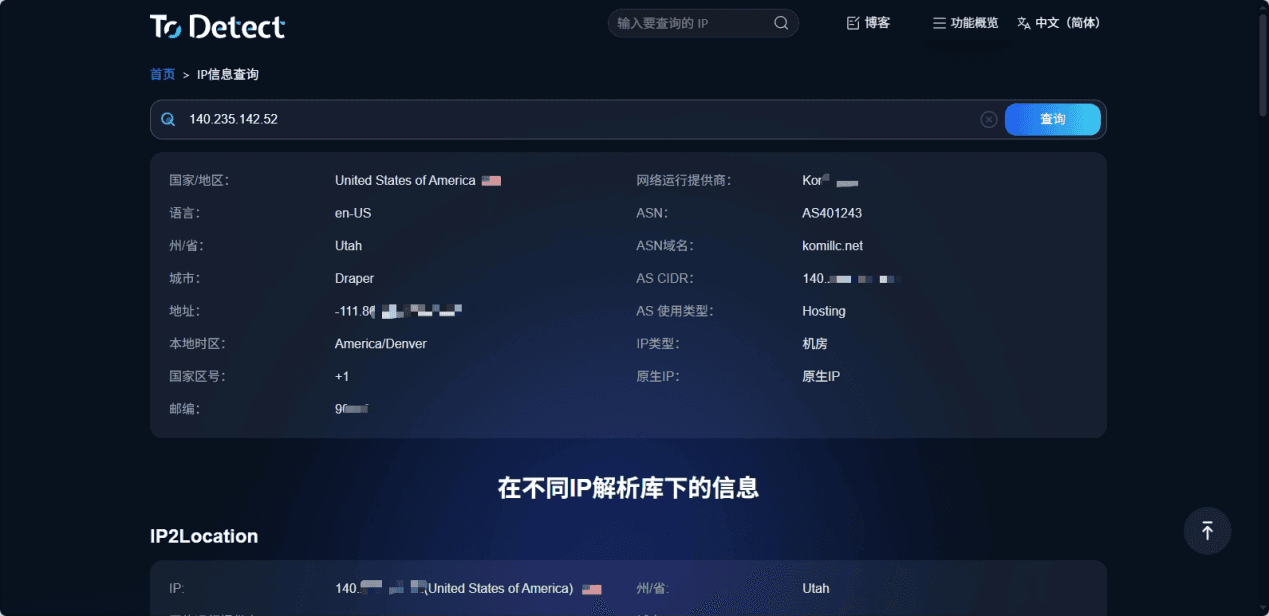
Here, we recommend using the ToDetect browser fingerprint detection tool:
Visit ToDetect’s IP address lookup page, where the platform will automatically identify your public IP address, network provider, geographic location, and other details. If your IP belongs to a common data center range, the likelihood of being tracked and restricted is higher.
Method 4: Correlate Account Bans with IP Usage
Analyze the timing of account bans or login restrictions in relation to the IP addresses used.
If multiple accounts are banned within the same IP range, or abnormal behavior increases when using a specific IP, it indicates that the platform is tracking activity based on IP addresses.
III. How to Prevent Platforms from Tracking Your IP?
1. Use High-Quality Proxies
Choose stable proxies with residential IPs and avoid public proxy IPs that are already blocked by platforms. ToDetect’s IP lookup tool can help you assess the quality and type of proxy IPs.
2. Avoid Sharing the Same IP Across Multiple Accounts
Especially for cross-border e-commerce sellers and marketing operators, distributing IP resources can reduce IP-based account linkage and lower the risk of triggering platform risk controls.
3. Disable or Limit Browser Fingerprint Leakage
IP tracking is often combined with browser fingerprinting techniques. It is recommended to disable WebRTC and limit JavaScript permissions.
4. Regularly Change Network Environments
Change IP environments in a planned manner when necessary—for example, periodically switching virtual network nodes—to reduce the likelihood of IP tracking. Be careful not to switch too frequently.
Conclusion
Platform IP tracking is a common user monitoring and risk control mechanism. By observing signs such as abnormal access, ad targeting, account bans, and access restrictions, you can make a preliminary judgment about whether a platform is paying attention to your IP information. Combining professional tools like ToDetect to analyze IPs and browser fingerprints is an effective way to identify and prevent IP tracking.
 AD
AD


