


 Resources
 Feature overview
IP & Browser Fingerprints: What Traces Do You Leave Online?
 Ganesh
 2025-11-27 03:47


In the digital world, every time you open a webpage, connect to a server, or log into an application, you quietly leave behind online traces that belong to you.
Many people think that as long as they do not actively disclose personal information, they can browse the internet “invisibly.” In reality, your device leaves more identifiers on the internet than you might imagine.
The two most important types are IP address (IP Address) and browser fingerprint (Browser Fingerprint). Together, they form a “digital business card” in the online world.
Some use them to provide normal services, some use them to optimize advertising, but they can also be used to track, analyze, or even locate your online behavior without your knowledge.

1. IP Address: Your Online “House Number”
Whether you use a phone, computer, or smart TV, any device that can connect to the internet must have an IP address. It’s like a house number in the real world. Its main functions are:
Determining your location in the network
Guiding data to find you
Letting servers know who you are (at least where you are from)
1. What information can your IP reveal?
A normal public IP may directly reveal:
Country / region / city
Internet service provider
Approximate geographic location (usually city-level)
Network type (data center / broadband / mobile network)
Whether it comes from a virtual network, proxy, or cloud server
Access behavior characteristics
For example, using ToDetect’s IP info query page, you can see the IP and related information your network environment exposes.
2. Can IP lead to privacy leakage?
By itself, an IP rarely identifies a person directly, but it can be used for:
Targeted advertising (e.g., recommending local services based on your frequent city)
Risk assessment (e.g., banks identifying abnormal login locations)
Content blocking or regional restrictions
Website security auditing
Tracking cyber attacks
Therefore, the IP itself is not considered “sensitive information,” but its associated behavior may build a relatively clear personal profile.
2. Browser Fingerprint: A More Powerful “Invisible Tracker”
If an IP is your network’s house number, a browser fingerprint is your “digital fingerprint,” far harder to disguise than an IP.
When you open a webpage, your browser sends a large amount of environment information to the server, including but not limited to:
Operating system version, browser type and version, screen resolution, time zone, language, fonts, plugins, CPU/memory information, Canvas fingerprint, WebGL fingerprint, audio fingerprint, and network characteristics.
These pieces of information combined can uniquely identify you without using cookies, accounts, or even IP addresses.
1. Why is the fingerprint so “accurate”?
Because each device's environment configuration is almost always unique.
For example: You may use the same phone model as someone else, but different fonts, installed apps, browser plugins, and system patch versions can make your fingerprint unique.
2. What can a browser fingerprint reveal?
It doesn’t directly tell others “who you are,” but it allows websites to:
Identify if it’s the same user
Track cross-site activity
Distinguish real devices from virtual machines
Perform risk assessments (e.g., detect abnormal logins)
Block bulk, scripted, or abnormal access
3. IP + Fingerprint: Almost Impossible to Stay “Invisible”
When a platform combines your public IP with your browser fingerprint, it can:
Determine if it’s really you (even if you change networks)
Identify if you are using a proxy or virtual network
Track your repeated visits
Confirm if the same device is used
Distinguish “real users” from “simulated behavior”
4. How to check what information is exposed?
ToDetect Browser Fingerprint Detection Tool

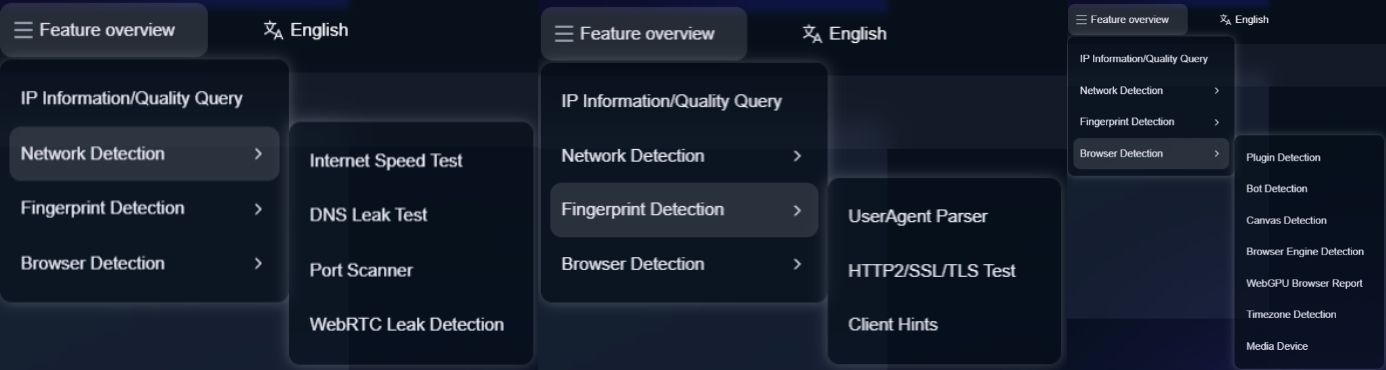
It is a comprehensive fingerprint detection platform that provides full inspection options, allowing you to see all the data you are exposing.
5. How to protect your privacy?
Although you cannot completely “disappear,” you can reduce the amount of exposure:
Use privacy-focused browsers
With built-in fingerprint randomization and anti-tracking features.Enable browser private mode
Reduces cookies, but fingerprints may still be identifiable.Disable unnecessary plugins and extensions
The more plugins, the more visible your fingerprint.Avoid using the same account across multiple platforms
For example, logging in with Google across multiple services increases cross-platform linking.
Conclusion
You have never truly been anonymous online. IP addresses let websites know where you are from; fingerprints let websites know that “you are you.”
In today’s data-driven age, “going invisible” is almost impossible, but you can reduce unnecessary exposure through proper tools and strategies to protect your privacy boundaries.
Understanding the traces you leave online is the first step in digital security. Protecting privacy starts with knowing what you are exposing.
 AD
AD


