


 Resources
 Feature overview
How to Check an IP Address for Violations? A Step-by-Step Guide to What Matters
 Charles
 2026-01-17 03:57


Nowadays, whether it's cross-border e-commerce, account management, or data collection, whether an IP is "clean" has become a major concern for many people.
Many accounts get restricted or banned immediately after logging in, or ad accounts frequently fail audits. The problem often lies in the IP having a history of violations.
Therefore, before you actually start operations, learning how to check an IP's historical usage and pre-screening for any violations is very necessary!
Next, let's explain whether it's possible to check an IP's historical usage and how to quickly determine if an IP was previously "clean".

1. Why Check an IP's Historical Usage?
If an IP has been used by many accounts before, or has been involved in bots, fake orders, or abnormal logins, it may be flagged as a high-risk IP by platforms.
Using it to log into new accounts can easily trigger risk control. Common scenarios include:
• Abnormal activity on cross-border e-commerce accounts
• Social media accounts restricted immediately after registration
• Ad accounts frequently triggering audits
• Multiple accounts being flagged as linked
Therefore, running an IP quality check before use essentially insures your accounts.
2. Online IP Lookup – What Information Can You Get?
Many people think online IP lookup only shows the location, but it provides much more. Professional IP lookup tools can provide:
• Country, city, and ISP of the IP
• Whether it is a data center IP, proxy IP, or residential IP
• Whether it is blacklisted
• Risk score and usage frequency
• Whether it has been used by multiple accounts
Combining this information can basically indicate if an IP has any past issues.
3. How to Check for Historical IP Violations
1. Perform a Basic IP Quality Check to Filter Out High-Risk IPs
The first step in checking an IP for historical violations is IP quality assessment; this is the most basic and crucial step.
Using professional online IP lookup tools, focus on these indicators:
• Whether the IP is marked as a proxy
• Whether it belongs to a data center
• Whether the risk score is high
• Whether there are abnormal access records
If an IP has a significantly high risk score or is identified as a high-frequency proxy, it can be assumed that multiple users have used it before and that it has a history of activity.
Even if you use it normally, such IPs are prone to being flagged by platforms.
2. Check if the IP Is on Blacklists or Risk Databases
Many large platforms and security organizations maintain IP risk databases. When checking for historical IP violations, pay attention to:
• Whether it appears in anti-cheat systems
• Whether there are malicious requests or abnormal access records
• Whether it has been flagged by ad or social media platforms
Some IP quality tools can directly indicate if there are risk records. Although not 100% accurate, this information is highly valuable as a reference.
If an IP has been involved in fake traffic, bots, or bulk registrations, traces may remain even after a long time.
3. Combine Browser Fingerprint Checks to Detect Multi-Account Abuse
Checking the IP alone is not enough. Many violations are recorded as IP + fingerprint. Using browser fingerprint detection, you can check:
• Whether this IP corresponds to multiple similar fingerprints
• Whether fingerprints are highly repetitive
• Whether the environment looks like a bulk automation tool
If the results show:
• The IP itself is fine
• But fingerprint repetition is very high
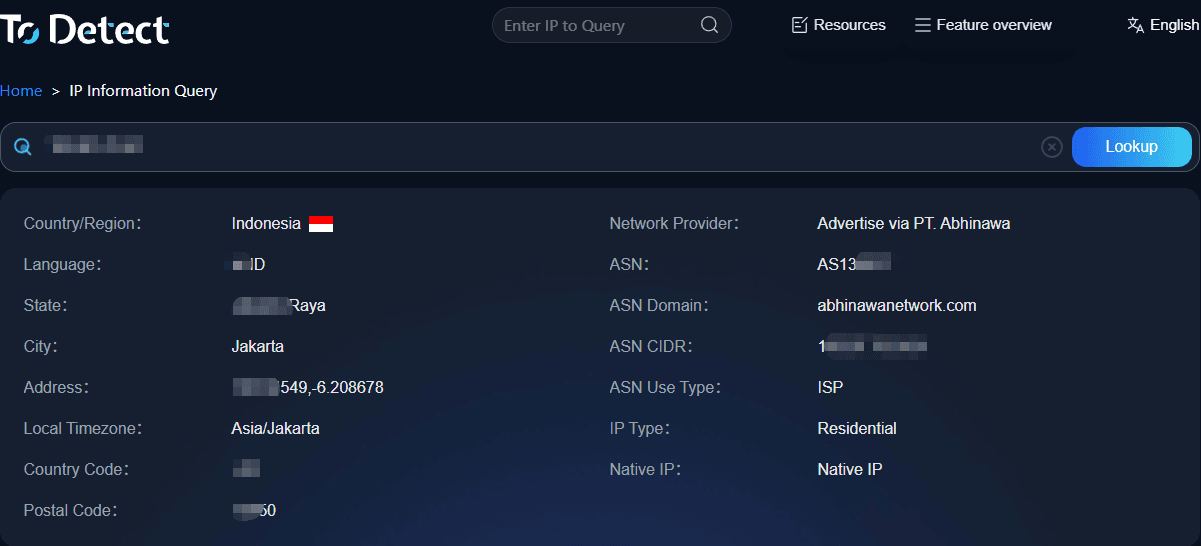
It indicates that this IP may have been used in bulk setups over time. Tools like ToDetect show both IP and fingerprint risk together, making the assessment clearer.
4. Observe IP Usage Density and Switching Frequency
A normal, real-user IP usually has these characteristics:
• Stable usage frequency
• No frequent location switching in a short period
• No high-intensity consecutive logins on multiple platforms
If online IP lookup shows:
• The same IP is used frequently
• High volume of activity in a short time
• Abnormal location jumps
Then the IP is likely shared, rotated, or abused, and historical violation risk is high.
5. Test IP Response Speed on Different Platforms
This is a practical tip. You can use the same IP to:
• Log into a new platform
• Register or log into a low-risk account
If you notice:
• Excessive CAPTCHA prompts
• Immediate security verifications
• Features restricted before doing much
You can assume the IP is monitored by platforms. This "platform reaction speed" is the truest feedback of the IP's historical issues.
6. Check if the IP Belongs to a "High-Risk IP Range"
Many violating IPs are not isolated; entire ranges may be monitored. When checking IPs, consider:
• Whether the IP range is often used for proxies
• Whether it comes from cheap cloud servers
• Whether multiple platforms flag it as an "abnormal source"
If it's a high-risk range, even a clean IP within it may face higher risk of platform restrictions.
4. Why Combine Browser Fingerprint Checks?
Checking the IP alone is not enough. Platforms now consider more than just IP. Browser fingerprint detection evaluates:
• Browser version
• Operating system
• Screen resolution, timezone
• Canvas, WebGL, and other fingerprint parameters
Even if your IP is clean, abnormal or repetitive fingerprints may still trigger risk detection. The safest approach is: IP + browser fingerprint checks together.
5. How to Use ToDetect Fingerprint Tool
In practice, the ToDetect fingerprint tool is recommended. It can help you:
• Perform online IP lookup + IP quality check
• Determine if an IP is a proxy or shared
• Check if browser fingerprints are unique
• Provide a combined risk assessment
Usage process: Open ToDetect → run fingerprint check → view IP risk score and fingerprint repetition. In minutes, you can see if the environment is suitable for logging in or registering accounts.
6. Practical Tips to Reduce IP Risk Using ToDetect
• Avoid using unknown free proxies for extended periods
• Bind one IP to a fixed account whenever possible
• Regularly perform IP lookup and fingerprint checks
• Replace IP immediately if risk is high
• Separate environments when using multiple accounts
Remember: A clean IP is the first step to account security.
Summary
Ultimately, an IP doesn’t speak for itself. By combining online IP lookup, IP quality checks, and ToDetect browser fingerprint checks, you can basically determine whether an IP is suitable for long-term use.
Remember: Checking IPs makes a huge difference; a pre-check can save countless troubles later.
If you don’t want to rely on guesswork every time, using the ToDetect fingerprint tool as an all-in-one solution provides a clear view of IP risk and environment, helping you avoid most hidden pitfalls in advance.
 AD
AD


