



 Resources
 Feature overview

 Alani
Alani 2026-04-16 11:38
When doing cross-border e-commerce or managing social media account matrices, why do accounts still get banned one after another even after paying for “advanced” multi-account anti-detection tools?
Many people’s first reaction is that platform risk control is too strict, but in reality, a bigger possibility is — the tool you’re using never truly achieved anti-detection in the first place.
Instead of listening to marketing claims, it’s better to verify it yourself. Today, I’ll show you how to intuitively evaluate whether your account anti-detection setup actually works. Let’s go through some practical insights to help you judge whether your current tool is reliable.

1. Multi-account anti-detection — what is it really preventing?
The core logic used by platforms is actually: browser fingerprint detection + behavior analysis. In simple terms, your device, browser environment, network, and other factors are used to generate an “identity profile.”
If multiple accounts share highly similar or identical fingerprints (identity profiles), that’s basically self-exposure.
So, the essence of multi-account anti-detection is: making each account look like it’s operated by a different person on a different device.
2. What’s wrong with most anti-detection tools on the market?
1. Unrealistic fingerprint spoofing
Some tools only modify basic parameters like UA or IP. It may look different on the surface, but the underlying fingerprint remains the same. Modern detection systems don’t just check surface values — they evaluate overall consistency.
2. High similarity between fingerprints
Some tools can generate multiple environments, but they are essentially “batch copies with slight tweaks,” such as only changing IP or resolution. These are still easily clustered and identified by detection systems.
3. Unstable environments
If a fingerprint changes over time — or parameters fluctuate randomly — it’s even more dangerous. Platforms may classify you as an abnormal device.
3. Test with ToDetect: Is your tool actually reliable?
Instead of trusting claims, test it yourself. ToDetect is a practical browser fingerprint testing tool. It’s very easy to use:
1. Open your fingerprint browser environment
2. Visit the ToDetect website
3. Check the fingerprint score and risk indicators
ToDetect will provide: fingerprint uniqueness score, abnormal parameter detection, and whether your environment is easily identified as automated.
Key metrics to focus on:
• Uniqueness: The closer to real user distribution, the better
• Consistency: Whether parameters logically match each other
• Risk Flags: Whether there are obvious anomalies
If your result shows “high risk” or “highly identifiable,” then your tool is likely ineffective.
4. Why recommend fingerprint browsers? The key is “environment isolation”
Tools like Bit Fingerprint Browser are not simply “parameter modifiers,” but instead create a fully independent browser environment for each account:
• Each account has an independent fingerprint (not random noise)
• Fingerprint parameters are logically consistent (like real devices)
• Long-term stability (no frequent changes)
• Proxy IP binding (network isolation)
This is critical, because true anti-detection relies on environment-level isolation, not parameter-level spoofing.
5. Practical criteria to avoid bad tools
1. Can it pass fingerprint detection? (Test it!)
Don’t skip this — run a test on ToDetect. But don’t just check if it works; look deeper:
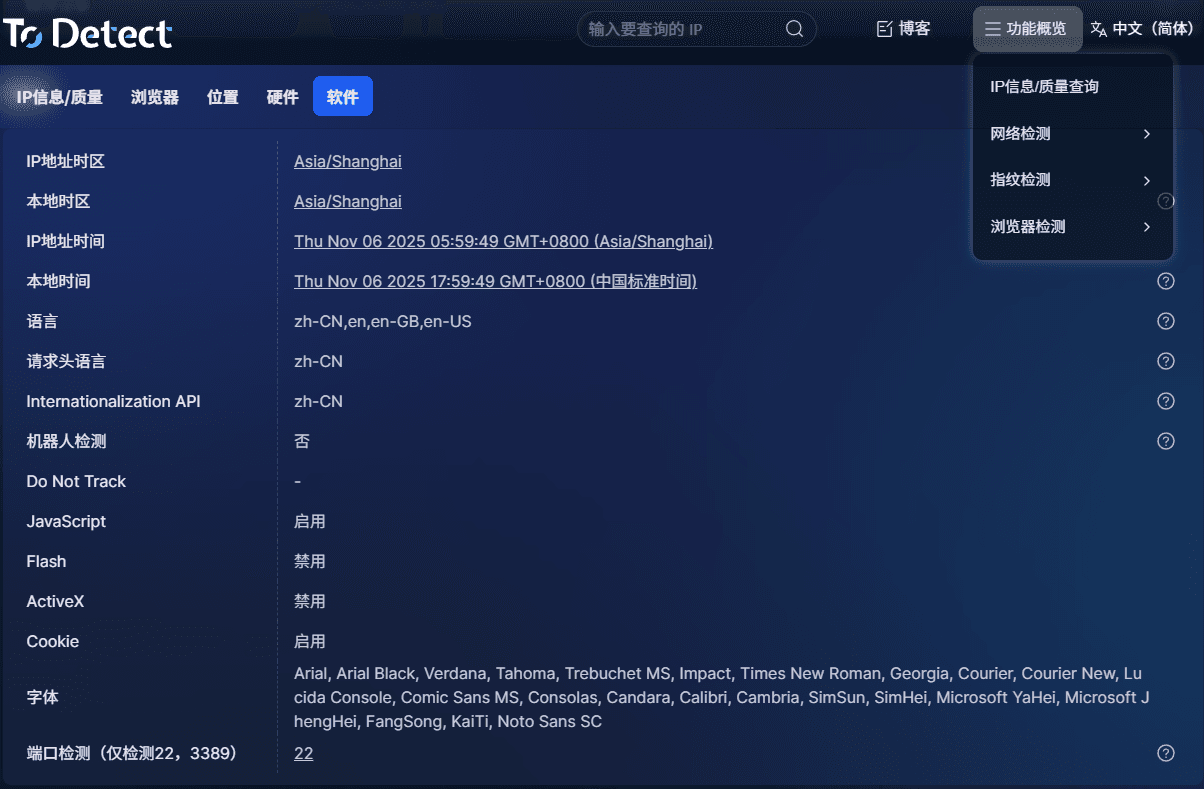
Uniqueness score:
If multiple environments produce very similar or identical results, your fingerprints are likely batch-generated templates — high risk.
Anomaly flags (Risk / Suspicious):
If you see Canvas or WebGL anomalies, it usually means poor spoofing quality.
Fingerprint composition:
Too few fonts, zero plugins, or missing hardware info can all signal “non-real user.”
👉 Tip: Test at least 3–5 different environments and check if they appear natural and distinct.
2. Is the fingerprint stable over time?
Anti-detection isn’t just about “looking real” — it must look like the same user over time. Test like this:
• Record data today using ToDetect
• Re-test the same environment after 1–2 days
If parameters change (e.g., Canvas hash, browser version, resolution, fonts), that’s a problem.
👉 “Drifting fingerprints” are suspicious — real devices don’t change constantly.
Good tools lock fingerprints into a stable state instead of randomizing them each session.
3. Is the fingerprint logically consistent?
This is increasingly important. Common mistakes include:
• Windows system + Safari browser (illogical combination)
• Low resolution + high-end GPU (hardware mismatch)
• English system + Chinese timezone + Thai IP (geo inconsistency)
These are not isolated errors — they indicate overall inconsistency.
👉 Check whether the entire setup looks like a real device, not just individual scores.
4. True environment isolation vs. superficial isolation
Many tools claim “multi-account anti-detection,” but only change IP, UA, or clear cookies — far from enough.
Real solutions provide: independent browser environments, cookies, cache, LocalStorage, fingerprints, and bound proxy IPs.
Simple test:
• Log into two accounts and export cookies — check for overlap
• Check if local cache is isolated
• Compare fingerprints using detection tools
True tools treat “one account = one virtual device,” not “one browser with multiple tabs.”
5. Does it support advanced configuration?
If you operate on platforms like TikTok, Facebook, or Amazon, choose a reliable fingerprint browser.
• Should support: timezone, language, geolocation, fixed proxy binding, browser version control, account grouping
• Different platforms require different consistency models: e-commerce emphasizes device stability, social media emphasizes behavior + environment
Without these features, you’re passively avoiding detection instead of actively optimizing your setup.
Conclusion
Paid anti-detection tools are not useless — but you must verify them. The easiest way is to run a fingerprint test using ToDetect.
Tools like Bit Fingerprint Browser, which offer strong isolation and realistic fingerprints, are better suited for long-term multi-account operations.
If your accounts are still safe, test early. If you’ve already been banned, you should thoroughly audit your fingerprint and environment setup.
