



 Resources
 Feature overview

 Charles
 2026-06-01 10:45
Why can a platform know my IP address the moment I simply open a webpage, and even determine whether I'm a "real user"?
What's even more puzzling is this: you're just browsing a website or logging into an account normally, yet the platform seems to have already figured everything out—where you're located, whether you're using a proxy, and even details about your device environment.
Today, let's take a closer look at how platforms identify your IP address and device environment through port scanning, and what you can do to better protect your privacy.

1. What Is Port Scanning? Let's Start with the Basics
Port scanning is essentially the process of detecting which communication channels (ports) are open on a device.
• Every internet-connected device has an IP address, and each IP address can have many ports, such as Port 80 (HTTP web access), Port 443 (HTTPS encrypted access), and Port 21 (FTP transfers).
• There are also various custom ports used by operating systems and applications. Platforms can use port scanning tools to attempt connections to these ports.
Think of it as "knocking on every door": Which doors are open? Which respond? Which return specific information? By combining these responses, platforms can infer network characteristics of a device and even help identify the authenticity of its IP environment.
2. How Do Platforms Use Port Scanning to Identify Your IP?
Many people assume that hiding their IP address guarantees anonymity. In reality, as long as you access a website, your IP address is already exposed during the communication process.
1. Direct Collection of Connection IP
Whenever you visit a website, the server automatically records your public IP address. This is the most basic step, but platforms often perform deeper analysis beyond that.
2. Using Port Scanning to Analyze Network Environment
Some platforms and security systems perform port scans on your IP address to detect characteristics such as proxy-related ports, commonly exposed proxy services, or unusual open service ports.
If the scan reveals an abnormal combination of open ports, the system may infer that:
• You are using a proxy or relay service.
• Your network environment is shared or unstable.
• The IP address may belong to a data center or cloud server.
3. Combining Results with IP Databases
Platforms often combine port scan results with IP intelligence databases to classify IPs as residential, mobile, or data-center addresses. This helps determine whether the IP resembles that of a genuine user.
3. Comparison of Platform Identification Technologies (Port Scanning vs. IP vs. Fingerprinting)
| Detection Method | How It Works | Information Obtained | Difficulty to Bypass | Common Use Cases |
|---|---|---|---|---|
| Port Scanning | Detects open ports and response signatures | Proxy usage, unusual services, port status | Medium | Risk control, server detection, proxy identification |
| IP Identification | Records the source IP from requests | Public IP, ISP, geolocation | Low | User location, access logs, security audits |
| Browser Fingerprinting | Combines browser and system attributes into a unique identifier | Device environment, fonts, Canvas/WebGL data | High | Fraud prevention, account linking, advertising analysis |
| WebRTC Detection | Browser communication mechanisms may expose real IPs | Local IP, potentially real public IP | Medium | IP leak detection, privacy auditing |
| DNS Behavior Analysis | Analyzes DNS resolution paths for anomalies | Proxy usage, DNS source path | Medium to High | VPN detection, traffic auditing |
4. What Role Does a Port Scanning Tool Play?
Port scanning is not a mysterious technology—it is a standard cybersecurity practice. Common tools include:
• Network security testing tools
• Online port detection services
• Automated risk-control modules
These tools quickly scan open ports on an IP address and are used for risk assessment, intrusion detection, proxy identification, and network environment analysis. In many security systems, port scanning is a fundamental operation.
5. Browser Fingerprinting: A More Subtle Tracking Method Than IP Addresses
Beyond IP addresses and port scanning, many platforms now rely heavily on browser fingerprinting.
Browser fingerprints are generated from factors such as browser version, operating system, installed fonts, screen resolution, plugins, Canvas rendering, and more.
Even if you change your IP address, platforms may still recognize you as the same user if your browser fingerprint remains unchanged. Therefore, many risk-control systems combine IP analysis, port scanning, and browser fingerprinting for comprehensive identification.
6. How Can You Reduce the Risk of Being Identified?
1. Disable WebRTC Leaks
Disable WebRTC in your browser settings or through extensions to prevent your real IP address from being exposed when using proxies.
2. Use High-Quality Network Services
Choose reputable and stable VPN or proxy providers and avoid shared IP ranges that are frequently flagged.
3. Reduce Browser Fingerprint Uniqueness
Avoid excessive browser extensions and uncommon fonts or resolutions that make your setup highly distinctive.
4. Avoid Exposing Unusual Port Signatures
Disable unnecessary local services and sharing features to reduce the chance of being flagged by port scanning systems.
5. Perform Regular Privacy Audits
Use tools like ToDetect to check for IP leaks and browser fingerprint exposure, and adjust your settings when necessary.
7. The Role of ToDetect in Privacy Analysis
In security testing and privacy analysis, ToDetect can help users evaluate:
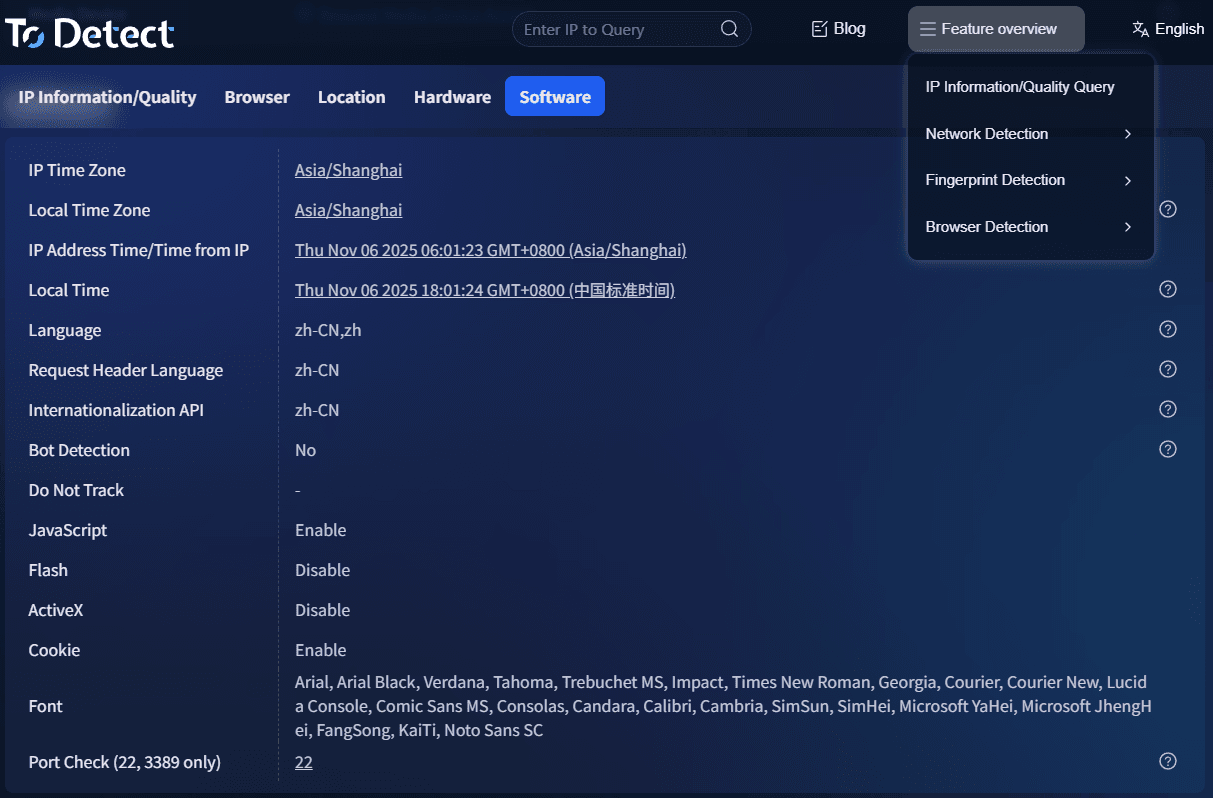
• Whether your current IP address presents leakage risks
• Whether your browser fingerprint is overly unique
• Whether WebRTC leaks are present
• Whether your network environment exposes unusual port signatures
It functions as a self-diagnostic tool, allowing users to evaluate their environment from the platform's perspective. This helps identify IP leaks, understand digital fingerprint exposure, and optimize browser privacy settings.
8. Frequently Asked Questions About Port Scanning Tools
1. Can Port Scanning Directly Discover My Real IP Address?
No. It cannot "discover" your IP because the IP is already visible when you connect to a website. Port scanning simply analyzes that IP further to determine whether it resembles a proxy, residential user, or data-center environment.
2. Why Am I Still Detected Even When Using a Proxy?
In many cases, the issue is not your IP address but other signals such as DNS leaks, WebRTC leaks, or a highly distinctive browser fingerprint. Platforms typically evaluate multiple factors simultaneously rather than relying solely on IP addresses.
3. Does Port Scanning Pose Security Risks to My Device?
Under normal circumstances, no. Most platforms perform only lightweight detection rather than attempting intrusion. However, devices exposing vulnerable services or unusual open ports may be classified as higher-risk environments.
4. Is It Possible to Completely Avoid Port Scanning and Identification?
Strictly speaking, complete anonymity is extremely difficult. You can reduce identification risks by preventing IP leaks, disabling WebRTC, using VPNs properly, and regularly checking your exposure with tools such as ToDetect, but absolute anonymity is unrealistic.
Conclusion: Platform Identification Is More Sophisticated Than Most People Realize
From basic IP logging to network analysis through port scanning and cross-validation using browser fingerprints, modern identification systems have become highly sophisticated.
Understanding these mechanisms is not about "fighting the platform" but about knowing where your privacy boundaries lie. Tools such as ToDetect can help you regularly assess IP leaks and browser fingerprint exposure.
In today's data-driven internet environment, the real question is no longer whether you can remain completely hidden, but rather how much information you are willing to expose and how effectively you manage that exposure.
