



 Resources
 Feature overview

 browser
 2026-05-15 10:25
In many platform risk-control systems, time zones have already become an important part of browser fingerprint detection.
What's even more troublesome is that this usually won't trigger an immediate error. Instead, it quietly affects account weight, lowers trust scores, and may even directly trigger verification in certain scenarios.
Next, let’s talk about how you can reduce exposure risks through simple browser timezone settings, and how a few easy tricks can help reduce up to 70% of timezone exposure risks.

1. Why Has Timezone Become an Invisible “Fingerprint Tag”?
Modern website tracking technologies no longer rely only on IP addresses. Instead, they combine multiple dimensions for browser fingerprint detection.
When your browser timezone and IP location are obviously inconsistent, it can trigger the attention of risk-control systems.
Especially in advertising, cross-border e-commerce, and social media account matrix operations, these inconsistencies can directly affect account trust scores and may even trigger verification or restrictions.
2. Can One Simple Setting Reduce 70% of the Risk?
The core logic is to keep your browser timezone consistent with your IP location. Most browsers automatically read the system timezone by default, but the problem is:
• The proxy changes the IP, but the timezone remains the same
• Accounts are operated across multiple regions, but the system environment is not synchronized
• Remote environments are used, but local configurations are not adjusted
• As long as you make one key adjustment—changing your browser timezone settings to match the current network environment—you can significantly reduce abnormal fingerprint signals.
Many people experienced in risk-control environment setup know that although this step is simple, the effect is extremely noticeable. It’s considered a “low-cost, high-return” optimization.
3. Comparison of Timezone Configuration Methods in Different Environments (Risk Reference)
| Usage Method | Timezone Status | Consistency with IP | Risk Level | Common Issues | Suitable Scenarios |
|---|---|---|---|---|---|
| Default system automatic timezone | Follows the real local location | High consistency (but fixed) | Medium | Cannot match cross-region IPs | Daily single-device use |
| VPN changes IP without changing timezone | Keeps original system timezone | Low consistency | High | Triggers browser fingerprint anomalies | Common beginner mistake in cross-border operations |
| Manually adjust browser timezone settings | Adjustable based on IP region | High consistency | Low | Almost no conflicting signals | Cross-border operations / advertising |
| Fingerprint browser unified environment setup | Unified timezone + IP + language | Extremely high consistency | Extremely low | Rarely triggers risk control | Multi-account matrix management |
| Mixed environments (switching between multiple devices) | Unfixed | Unstable | Very high | Frequent environment changes get detected | Not recommended |
4. How to Properly Configure Browser Timezones (Practical Guide)
Here’s a general approach that works similarly across most browsers:
1. Chrome / Edge Browsers
Browser timezones usually follow the system timezone:
• Windows: Control Panel → Time & Language → Set Timezone
• Mac: System Settings → Date & Time → Automatically Set Timezone
If you manage multiple environments, it’s recommended to disable automatic synchronization and manually specify the target region timezone.
2. Use with Fingerprint Browsers
If you’re managing account matrices or multiple accounts, using a fingerprint browser is highly recommended. Configure the following consistently when creating environments:
• Timezone
• IP location
• System language
This can reduce conflicts in browser fingerprint detection. Many tools and environment management platforms already provide timezone binding features directly.
5. How to Check Whether Your Timezone Is Exposed?
After configuration, don’t rely on assumptions—always run a test. You can check using the following methods:
1. Timezone Detection Tools
Search for keywords like “timezone checker” or browser timezone detection tools.
These tools can quickly show the timezone information exposed by your current browser.
2. Browser Fingerprint Detection Tools
A more comprehensive method is to perform full browser fingerprint detection using online testing platforms that can display IP addresses, timezone data, WebRTC information, Canvas fingerprints, and more.
3. Recommended Tool: ToDetect
Many users rely on ToDetect for comprehensive checks. It can quickly help you identify:
• Whether the browser timezone is abnormal
• Whether there are timezone exposure risks
• Whether fingerprint information is consistent
• Whether environment conflicts exist
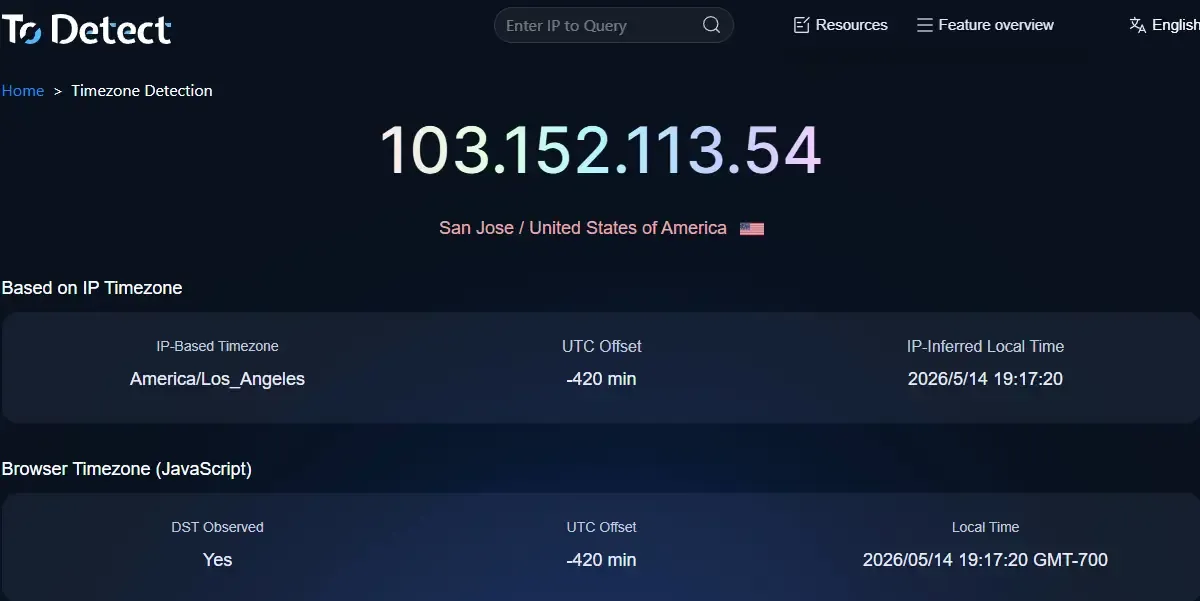
For people managing accounts in bulk, this step is extremely important because it helps identify issues early instead of troubleshooting only after accounts get suspended.
6. Common Mistakes: Where Most People “Fail”
Mistake 1: Changing Only the IP but Not the Timezone
This is the most common issue. The IP is in the United States, but the timezone is still set to Asia, making it easy to detect.
Mistake 2: System Language and Timezone Don’t Match
For example, using an English system with an Asian timezone is often flagged as an abnormal combination in browser fingerprint detection.
Mistake 3: Ignoring Mobile Environments
Mobile devices also expose timezone information, and this is even easier to overlook.
Mistake 4: Not Verifying with Timezone Detection
Many people start using the setup immediately after changing settings without running timezone checks, causing problems to persist unnoticed.
7. Browser Timezone Detection FAQ
1. Can I Only Change the Browser Timezone Without Changing the IP?
It’s generally not recommended. Browser timezone settings are only one part of the environment. If the IP and timezone are inconsistent, browser fingerprint detection systems may still classify the environment as abnormal.
A safer approach is to keep the IP, timezone, and language consistent so the environment appears more natural during timezone checks and risk-control analysis.
2. Why Am I Still Seeing Timezone Exposure Warnings After Changing the Timezone?
This is very common. Usually, the issue is not that the timezone change failed, but that other information remains inconsistent, such as system timezone settings or WebRTC information.
It’s recommended to use tools like ToDetect for a complete browser fingerprint scan to identify any hidden conflicts.
3. Do I Always Need to Change the Timezone When Using a Proxy?
In most cases, yes. A proxy only changes the IP location, but browsers do not automatically synchronize the timezone.
If inconsistencies remain for a long time, abnormal behavior can easily be detected through timezone exposure checks, especially in cross-border e-commerce and advertising scenarios.
4. ToDetect What Problems Can Tools Like This Solve?
Tools like ToDetect help perform browser fingerprint detection and environment consistency checks, allowing you to quickly determine whether the timezone is abnormal, whether browser fingerprint conflicts exist, and whether the overall environment is secure.
Conclusion: One Small Setting Can Determine Environment Security
Many account-related issues are not caused by operational mistakes, but by environmental details that are not aligned. Browser timezone settings often become the invisible dividing line.
Fortunately, browser timezone configuration doesn’t require complicated operations. Simply keep the IP and timezone consistent, and regularly use tools like ToDetect to check browser fingerprint detection results.
Once your core environment variables are properly aligned, you’ll notice improvements in account stability, reduced risk-control triggers, and even better overall operational efficiency.
