


 Resources
 Feature overview
How to Detect Malicious Traffic Using HTTP2/TLS Fingerprinting
 browser
 2026-02-11 03:43


In daily risk control and anti-scraping practices, teams often encounter a problem: traditional IP blocking and UA identification are no longer sufficient.
This is why, over the past two years, more and more security teams have started paying attention to a technical direction—HTTP2/TLS fingerprint identification.
Next, let’s talk about how to use TLS fingerprints to identify abnormal traffic and automated crawlers, and how to implement this approach in real business scenarios.

1. The role of HTTP2/TLS fingerprint detection in anti-scraping
Many automation tools can disguise themselves well at the HTTP layer, but they are easily exposed by HTTP2/TLS fingerprint detection.
The reason is simple: simulating a browser is easy, but simulating the underlying network stack is difficult. Real browsers in HTTP/2 typically have:
• Specific frame sequences
• Fixed priority settings
• Specific header ordering
Automation tools, on the other hand, often use default libraries, abnormal frame sequences, or header orders that do not match real browsers—these all create abnormal HTTP2 fingerprints.
In real business scenarios, many teams combine TLS fingerprinting with HTTP2 fingerprint detection, then add browser fingerprint checks and behavior analysis to form a multi-layer identification system.
2. How to use TLS fingerprints to identify automated crawlers
Step 1: Collect TLS fingerprints of normal users
First, collect access data from real users—for example, JA3 fingerprints of the latest Chrome versions, TLS characteristics of Safari, and differences across operating systems—to build a baseline fingerprint database.
Step 2: Identify abnormal TLS fingerprints
When a new request arrives: extract the TLS fingerprint, match it against the fingerprint database, and determine whether it is an abnormal client.
Common anomalies include:
• Non-browser TLS fingerprints
• Known crawler framework fingerprints
• Requests with frequently changing fingerprints
These can all be placed directly into a risk queue.
Step 3: Combine with browser fingerprint detection
TLS fingerprinting alone is powerful, but it is recommended to combine it with browser fingerprint detection. For example:
• Real users vs. automated crawlers
• TLS fingerprint: Chrome vs. Python requests
• Canvas fingerprint: normal, abnormal, or fixed
• WebGL: normal, missing, or abnormal
When multiple dimensions appear abnormal, it is usually safe to classify the traffic as automated.
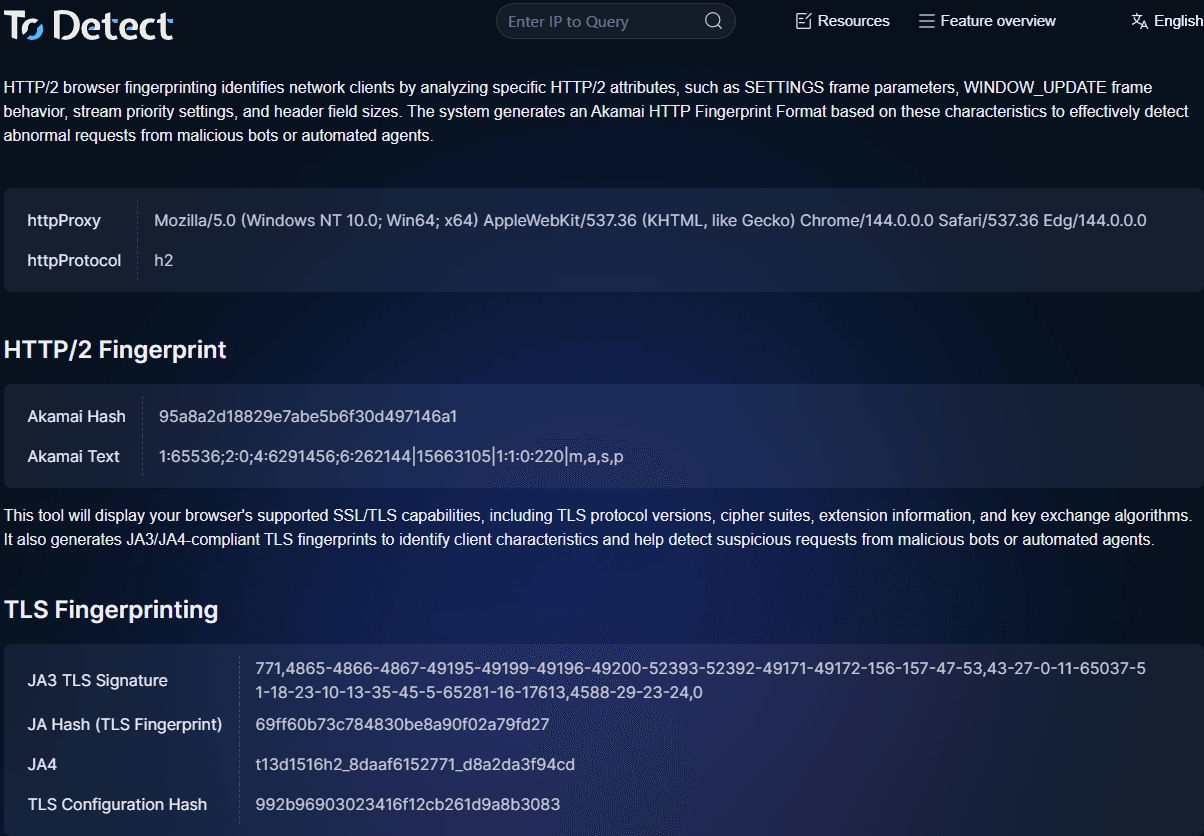
3. How to quickly check TLS fingerprints
When debugging or analyzing traffic, you can use the ToDetect fingerprint checking tool to:
• View TLS fingerprints
• Analyze HTTP2 fingerprints
• Detect browser fingerprint characteristics
• Determine whether the environment is automated
This is very useful during troubleshooting, for example:
• Why certain requests are blocked by risk control
• Where the automation script is exposed
• Whether the fingerprint matches a real browser
4. Practical advice: how to build an effective fingerprint-based risk control system
Layer 1: Basic traffic identification (fast filtering)
The goal of this layer is not precise identification, but to quickly filter obviously abnormal traffic and reduce the load on downstream systems. Common strategies include:
1) IP and request frequency control
Single-IP rate limiting, detection of high concurrency within the same subnet, and data center IP tagging. For example:
Normal users: 10–30 requests per minute
Abnormal scripts: hundreds or even thousands of requests per minute
In such cases, you can directly trigger rate limiting, slider verification, or temporary bans.
2) User-Agent and basic header checks
Check for obviously unreasonable situations, such as empty UA strings, UA not matching the platform, or missing critical headers.
For example: if the UA claims to be Chrome but lacks key headers like sec-ch-ua or accept-language, the request is likely from a script.
This layer is characterized by simple implementation, low performance overhead, and serves as the first filtering barrier.
Layer 2: Fingerprint-level identification (core risk control layer)
1) TLS fingerprinting: verifying client authenticity
Use JA3, JA4, and similar methods to build a TLS fingerprint database of real browsers and tag common automation framework fingerprints.
Common anomalies: UA claims to be Chrome but the TLS fingerprint matches Python requests; the same account frequently changes TLS fingerprints; or large volumes of requests share the same abnormal fingerprint.
Such traffic can be downgraded, challenged with additional verification, or placed into a risk queue.
2) HTTP2/TLS fingerprint detection: identifying fake browsers
Many automation tools reveal flaws at the HTTP2 layer, such as frame sequences that do not match real browsers, abnormal header ordering, or missing priority settings—these are typical automation characteristics.
This layer can usually identify:
• Headless browsers
• Automation frameworks
• Crawlers that simulate browser protocol stacks
Layer 3: Behavior analysis (final decision layer)
Even if the fingerprint looks normal, it does not necessarily mean the user is real.
Many automation tools can now simulate browser fingerprints, TLS fingerprints, or use residential proxies.
Therefore, the final layer must include behavior analysis. Common dimensions include:
1) Access path
Real users: homepage → list page → detail page → login
Crawlers: directly access large numbers of detail pages without a navigation path.
2) Dwell time and operation rhythm
Real users: dwell time fluctuates, operations are irregular.
Scripts: fixed intervals, excessively fast actions.
For example: clicking a button every 2 seconds for 100 consecutive requests without pauses can generally be classified as automation.
Summary
Anti-scraping and risk control are no longer as simple as blocking IPs or changing captchas. Automation tools may look like real users at the surface level, but they still leave traces in underlying protocols and environment consistency.
In real projects, you don’t have to build a complex system all at once. A more practical approach is to start with basic rules and browser fingerprinting, then introduce TLS fingerprinting as the core identification layer.
You can also use tools like the ToDetect fingerprint checker to quickly view the current environment’s TLS fingerprint and browser characteristics, making troubleshooting much easier.
 AD
AD


