


 Resources
 Feature overview
Hands-On HTTP/2 & SSL Fingerprinting: A 3-Minute Crash Course
 bonnie
 2026-03-18 03:57


In the field of internet security and traffic analysis, more and more people are paying attention to HTTP2/SSL fingerprint detection.
This technology analyzes the HTTPS handshake information of a website to determine characteristics of both the client and server, such as browser type, operating system, and even the usage of TLS cipher suites.
However, many people still don’t know how to get started. Next, we’ll share a quick beginner-friendly guide to help you master and use HTTP2/SSL fingerprint detection in the shortest time possible.

1. What is HTTP2/SSL Fingerprint Detection ?
HTTP/2 is an upgraded version of the HTTP protocol, supporting features like multiplexing and header compression, while SSL/TLS is an encryption protocol that ensures secure data transmission.
When we visit a website, the browser and server exchange encrypted information during the handshake process. This information can be used to generate a “fingerprint.”
HTTP2/SSL fingerprint detection analyzes handshake data in HTTPS connections to identify characteristics of clients, servers, or network devices.
2. What Can HTTP2/SSL Fingerprint Detection Do?
1. Enhance Security Protection
Fingerprint detection helps identify abnormal clients or potential attacks, such as detecting non-standard browsers or bot traffic.
2. Optimize Website Compatibility
By detecting HTTP2/SSL features, websites can optimize for different browsers and improve user experience.
3. Data Analysis & Penetration Testing
In penetration testing, analyzing fingerprints can reveal server versions, cipher suites, and even operating systems, helping identify potential vulnerabilities.
3. Common HTTP2/SSL Fingerprint Detection Methods
In practice, there are mainly two ways to perform HTTP2/SSL fingerprint detection:
1. Passive Packet Analysis
Use packet capture tools (such as Wireshark or Fiddler) to analyze TLS/HTTP2 handshake packets and extract client/server information. This method is suitable for lab practice but is relatively complex for beginners.
2. Online or Tool-Based Detection
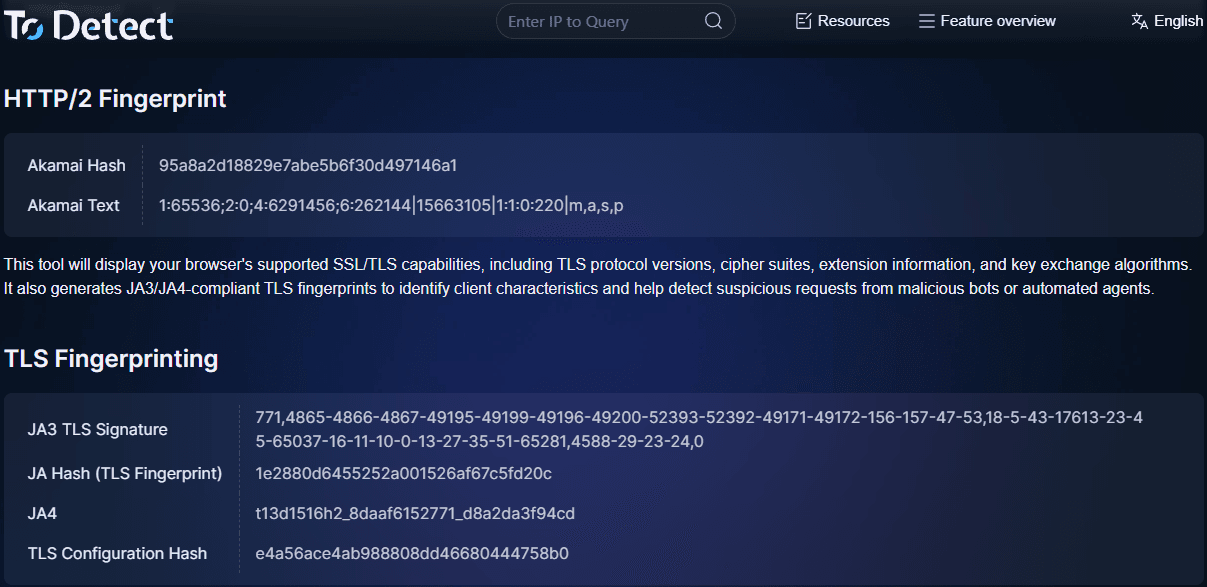
This is the easiest way to get started. By using the ToDetect fingerprint tool, you simply enter a target website URL and it automatically generates an HTTP2/SSL fingerprint report.
The report includes supported protocol versions, cipher suites, and browser characteristics. This method is efficient, simple, and ideal for daily analysis.
4. Quickly Detect Using ToDetect
1. Open the ToDetect fingerprint tool website.
2. Once entered, it automatically captures HTTP2/SSL handshake data.
3. Results include protocol versions, TLS cipher suites, server type, and browser fingerprint characteristics.
You can obtain a complete report within minutes.
The tool also highlights potential security issues and optimization suggestions, making it ideal for beginners and analysts.
5. Practical Tips for HTTP2/SSL Fingerprint Detection
| Technique | Use Case | Notes |
|---|---|---|
| Check TLS handshake latency | Evaluate server performance and network delay | High latency is not always a security issue; analyze with other metrics |
| Analyze ALPN support | Determine supported protocols (HTTP/2, HTTP/1.1) | Proxies/CDNs may modify ALPN info |
| Verify certificate chain | Prevent MITM attacks or fake certificates | Distinguish between self-signed and expired certificates |
| Check compression support | Optimize data transmission | Some algorithms have security risks |
| Compare browser fingerprints | Detect bots or abnormal traffic | Consider privacy compliance |
1. Combine with Browser Fingerprinting
Combining HTTP2/SSL with browser fingerprinting provides more accurate client identification.
2. Focus on TLS Cipher Suites
Outdated or weak cipher suites should be fixed promptly as they affect security.
3. Perform Regular Checks
Regular detection ensures security and compatibility stay up to date.
4. Analyze Long-Tail Metrics
Look beyond main versions—analyze ALPN, SNI, and multiplexing for deeper insights.
6. HTTP2/SSL Fingerprint Detection FAQ & Notes
False Positives:
CDNs or proxies may alter handshake data, causing misjudgment.
Privacy:
Ensure compliance when collecting fingerprint data.
Tool Selection:
Choose tools that are simple, complete, and frequently updated.
Summary
HTTP2/SSL fingerprint detection is highly useful for security, optimization, and traffic analysis.
If you're new, try ToDetect to quickly generate reports in minutes.
 AD
AD


