



 Resources
 Feature overview

 bonnie
 2026-05-13 10:33
Nowadays, all major platforms, cross-border e-commerce systems, and even search engines use UA information to determine your browser environment.
Even now, many people still only know how to copy a UA string, without understanding what it actually does or the real logic behind User-Agent parsing.
Today, this article will explain User-Agent parsing from beginner to advanced level in one go, including its relationship with browser fingerprint detection and risk-control systems.

1. What is User-Agent ?
User-Agent (UA for short) is a piece of “identity information” that a browser actively sends to the server when visiting a website. It can reveal:
• Your browser type, such as Chrome or Edge
• Whether your operating system is Windows or Mac
• Whether the device is mobile or desktop
• Your browser version
• Whether the request comes from a mobile device
Many websites use UA parsing to identify user devices and determine how pages should be displayed.
For example: mobile users may see a mobile version of the site, desktop users see the full version, different browsers receive different CSS adaptations, and risk-control systems identify suspicious environments.
2. Why Is UA Parsing Becoming More Important?
In the past, UA was simply a “browser identifier.” Today, it has become an important part of website risk-control systems.
1. Advertising Platforms
Platforms like Google Ads and Facebook Ads combine UA parsing with device verification. Abnormal UA data can easily trigger reviews or restrictions.
2. Cross-Border E-Commerce
Platforms such as Amazon, TikTok Shop, and Shopee detect browser environments. If the UA does not match the actual system environment, it may be considered suspicious.
3. Web Crawling
Many websites restrict crawlers based on UA. For example, default Python request UAs may get blocked, Headless browser UAs can trigger anti-bot systems, and repeated UA requests may be rate-limited.
That is why many developers perform UA spoofing.
4. Account Security & Risk Control
Modern platforms no longer rely only on IP addresses. They also combine UA parsing, browser fingerprint detection, Canvas fingerprints, and WebGL parameters to determine whether a user environment is genuine.
3. What Exactly Does UA Parsing Analyze?
Many beginners assume UA parsing is just simple string splitting, but complete User-Agent analysis actually includes several dimensions:
• Browser detection: Chrome, Edge, Firefox, Safari, Opera, and their specific versions.
• Operating system detection: Windows, macOS, Linux, Android, iOS, and sometimes system versions.
• Device type detection: smartphones, tablets, PCs, smart TVs, and crawler devices.
• Rendering engine detection: Blink, WebKit, Gecko, etc. Many compatibility issues are related to rendering engines.
• Automation environment detection: identifying Selenium, Playwright, Headless Chrome, and automated scripts through UA analysis.
4. What Is the Difference Between UA Parsing and Browser Fingerprinting?
This is one of the most common misconceptions among beginners. UA parsing is simply “self-reported identity,” while browser fingerprinting is actual environment verification.
For example, you can change a Windows browser UA into: Mozilla/5.0 (Macintosh; Intel Mac OS X 10_15_7)
But websites can still detect inconsistencies through browser fingerprinting:
• Your fonts do not match
• Your GPU does not match
• Your Canvas fingerprint is inconsistent
• Your WebGL parameters are abnormal
• Your timezone does not match
As a result, the system can determine that “this UA is fake.” That is why many platforms now use “UA + fingerprint combined detection.”
5. Why Is Changing UA Alone No Longer Enough?
In the early days, modifying UA worked well. But modern platform risk-control systems have evolved because UA strings are too easy to fake.
Changing only the UA often creates logical inconsistencies:
| UA Display | Actual Environment |
|---|---|
| macOS | Windows Fonts |
| iPhone | PC Resolution |
| Android | Apple GPU |
| Chrome 137 | Old Rendering Engine |
Such inconsistencies are easily identified by modern risk-control systems. That is why the truly effective solution today is maintaining overall environment consistency.
6. Why Are More People Talking About ToDetect ?
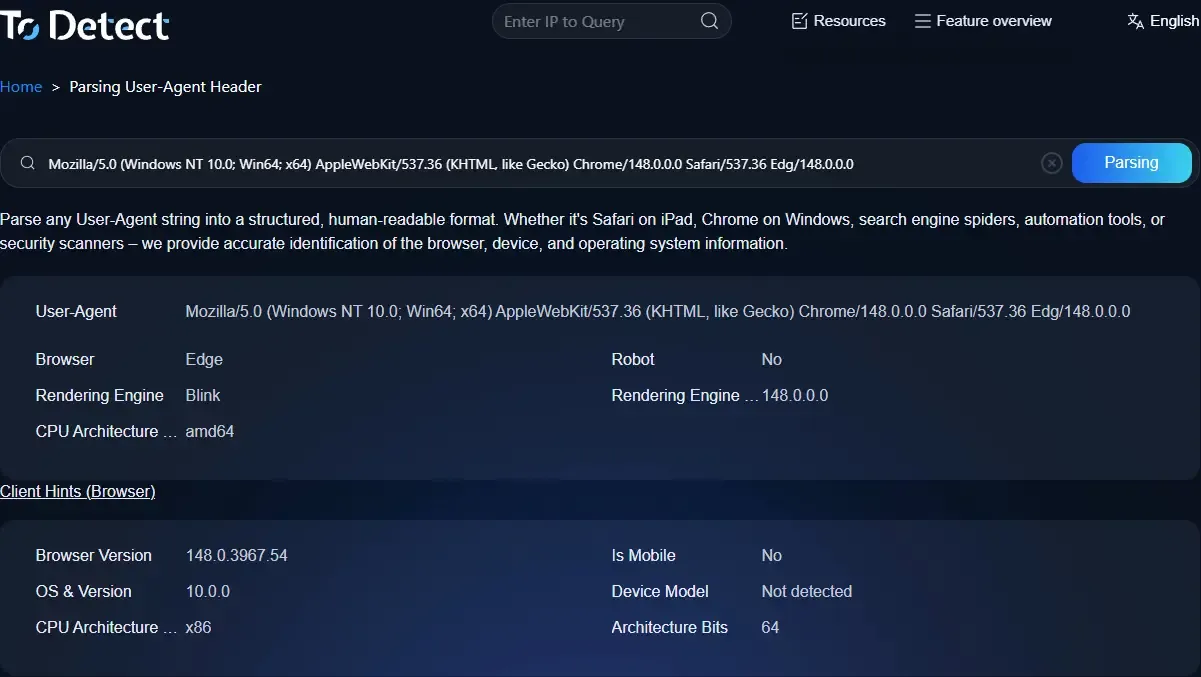
In the field of browser environment detection, ToDetect has gained significant popularity in recent years because it does far more than just detect UA information.
• It can comprehensively analyze browser fingerprints, Canvas, WebRTC, AudioContext, GPU parameters, timezone, and language settings.
• Many people involved in cross-border business, e-commerce, and multi-account operations use ToDetect to verify whether their browser environment appears genuine.
• Especially in TikTok matrix operations, Facebook advertising, Google account warming, Amazon store management, and overseas social media marketing, ToDetect has become one of the most commonly used browser environment detection tools.
7. How Should You Properly Perform User-Agent Parsing ?
1. Optimize Device Adaptation
Use UA recognition to identify mobile devices, desktops, and tablets, then optimize the user experience accordingly.
2. Do Not Rely Entirely on UA
Because UA can be spoofed, it is recommended to combine it with screen resolution, JavaScript features, and browser capability detection.
3. Pay Attention to SEO Crawlers
Search engine crawlers also use their own UAs, such as Googlebot and Bingbot. Incorrect blocking may negatively affect indexing.
4. Avoid Over-Reliance on UA-Based Blocking
Some websites mistakenly block legitimate users, especially those using domestic browsers, Edge, or mobile devices. Avoid banning users based solely on UA.
8. The Future Trend of UA Parsing in 2026
The industry is currently undergoing a major shift: the era of relying solely on UA is ending.
Future risk-control systems will rely more heavily on browser fingerprint detection, behavioral analysis, environment consistency verification, and AI-based risk models, while UA parsing will gradually become just a foundational identification layer.
In addition, Google has been promoting User-Agent Reduction in recent years, meaning Chrome will gradually expose less information through UA strings.
Conclusion
User-Agent is no longer just a simple request header. In 2026, UA parsing has become the first layer of “browser identity recognition.”
What platforms truly care about today is not what UA you claim to use, but whether your UA matches your real browser environment.
Over the next few years, the era of simply “changing UA” will continue to fade, which is why more and more people are paying attention to platforms like ToDetect for browser fingerprint detection.
