



 Resources
 Feature overview

 browser
 2026-05-12 11:19
In recent years, Canvas fingerprint detection has become increasingly common. Even if you enable incognito mode, use proxies, or reinstall your browser, you may still continue to be tracked.
Especially in cross-border e-commerce, social media platforms, advertising networks, and payment systems, platforms often use Canvas, WebGL, timezone, and other information to identify user environments.
Today, we’ll combine the latest settings of mainstream browsers and discuss methods for Canvas fingerprint protection, as well as how Chrome, Edge, and Firefox can effectively prevent tracking.
1. What Is Canvas Fingerprint Detection ?
Canvas is a browser drawing feature originally designed for rendering graphics and animations on web pages.
• Because different computers, GPUs, drivers, fonts, and operating systems render the same Canvas image slightly differently, subtle differences are generated.
• Platforms use these differences to generate a “unique ID.” This is what is known as Canvas fingerprint detection.
• Many websites now use Canvas fingerprints as one of their core risk-control mechanisms.
Especially social platforms, cross-border e-commerce sites, payment systems, and overseas account platforms rely heavily on it.
2. Why Are More People Paying Attention to Canvas Fingerprint Protection?
Many people believe that “Incognito mode keeps me safe.” In reality, incognito mode only prevents local caching, while browser fingerprint detection still works.
Especially now that many platforms integrate detection systems like ToDetect, they can quickly identify:
• Abnormal browser environments
• Duplicate fingerprints
• Fingerprint drift
• Virtual machine traces
• Automation traces
If your Canvas fingerprint appears abnormal, it can easily trigger platform risk controls — ranging from frequent CAPTCHA prompts to account restrictions, login limitations, or even bans.
Therefore, people involved in overseas social media operations, cross-border e-commerce, multi-account management, and data scraping all focus heavily on handling Canvas fingerprint issues.
3. Comparison Table of Canvas Fingerprint Protection Across Browsers
| Browser / Solution | Canvas Fingerprint Protection | Fingerprint Detection Risk | Suitable for Multi-Account Use | Difficulty Level | Recommendation |
|---|---|---|---|---|---|
| Chrome Default Mode | Weak | High | Not Ideal | Easy | ★★☆☆☆ |
| Chrome + Canvas Extension | Moderate | Moderate | Suitable for Basic Scenarios | Easy | ★★★☆☆ |
| Edge Strict Protection Mode | Moderate | Moderately High | Average | Easy | ★★★☆☆ |
| Firefox with resistFingerprinting Enabled | Strong | Low | Quite Suitable | Medium | ★★★★☆ |
| Fingerprint Browser + Isolated Environment | Very Strong | Very Low | Highly Suitable | Advanced | ★★★★★ |
4. How to Prevent Canvas Fingerprint Detection in Chrome?
Chrome is currently the most widely used browser, but its default privacy protection is not very strong.
If you want better Canvas fingerprint protection in Chrome, you can start with the following methods.
Method 1: Disable Third-Party Cookies (Basic Protection)
Although this cannot directly stop Canvas fingerprint detection, it can reduce some tracking associations.
Go to: Settings → Privacy and Security → Third-Party Cookies.
Recommendation: Block third-party cookies and enable “Send a Do Not Track request.”
Method 2: Install Canvas Protection Extensions
• Common options include: Canvas Blocker, Trace, and ScriptSafe.
• These extensions can randomize Canvas output, block fingerprint reads, and spoof detection results.
• Many extensions also provide protection for WebGL, AudioContext, and font detection.
Be careful not to randomize too aggressively, because some platforms detect “fingerprint drift.” If your fingerprint changes completely on every visit, it may appear even more suspicious.
Method 3: Use Privacy-Focused Browsers
If browser fingerprint protection matters to you, using a privacy-focused browser is often a better choice than standard Chrome.
5. How Does Edge Prevent Canvas Fingerprint Detection ?
Many people assume Edge is safer, but Edge and Chrome are both based on the Chromium engine.
• Recommended path in Edge: Settings → Privacy, Search, and Services
• Tracking prevention should be set to: Strict
• Also disable: Website tracking, personalized ads, and site data sharing
While this cannot completely solve Canvas fingerprint detection, it can reduce data exposure.
The most important thing in Edge is not to install too many extensions. Many users install dozens of “privacy extensions,” which results in:
• Extension conflicts
• More obvious fingerprint characteristics
• Abnormal browser environments
This can actually make platforms like ToDetect flag your browser more easily. Keeping the environment closer to a real user setup is generally better.
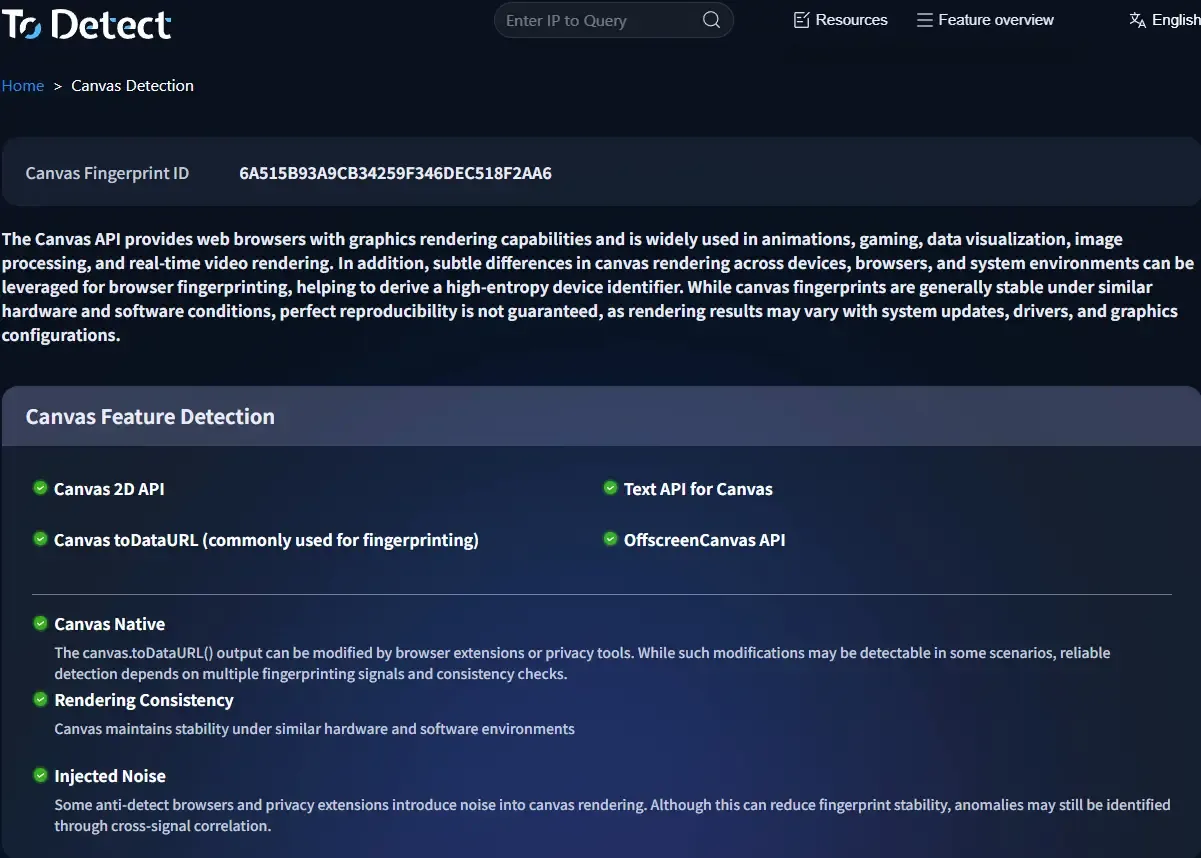
6. How Does Firefox Prevent Browser Fingerprinting?
Firefox is actually stronger than Chromium-based browsers in terms of privacy. Advanced settings already include built-in anti-fingerprinting features.
🔶 Enable Firefox Anti-Fingerprinting Protection
• Enter in the address bar: about:config
• Search for: privacy.resistFingerprinting
• Change it to: true
• After enabling it, Firefox will unify timezone settings, limit font detection, block parts of Canvas fingerprint detection, and reduce browser uniqueness.
This is currently Firefox’s core Canvas fingerprint protection feature.
🔶 Firefox + CanvasBlocker Combination
Many advanced users use this combination because Firefox already has strong privacy protection, and extensions make the setup even more stable.
Compared with Chrome, Firefox also provides finer control over browser fingerprint compatibility.
7. How to Check Whether Your Canvas Fingerprint Is Exposed?
Many people think installing an extension is enough, but that’s not always true. It’s recommended to regularly test your browser on fingerprint detection platforms.
Platforms like ToDetect can help you check:
• Whether your Canvas fingerprint is unique
• Whether WebGL appears abnormal
• Fingerprint stability
• Browser consistency
One important misconception is that “more randomness means more security.” Good Canvas fingerprint protection is not about constant changes.
Instead, it should appear stable, natural, and realistic — otherwise platforms can still identify abnormalities.
Final Summary
Truly effective Canvas fingerprint protection is not simply about installing one extension. It’s about making the entire browser environment look more natural, stable, and realistic.
Properly adjusting the privacy settings of Chrome, Edge, and Firefox can help, while cross-border business and multi-account scenarios may require professional privacy browsers or isolated environments.
Browser fingerprinting technology will only continue to become more advanced. Understanding it early and implementing proper protection is the best way to safeguard your accounts and online privacy.
