



 Resources
 Feature overview
 Charles
 2026-04-28 10:30
As the number of cross-border e-commerce accounts increases, risk control becomes stricter. A slight mistake may lead to accounts being flagged as related—resulting in reduced traffic at best, or account suspension at worst.
Among these risks, DNS leaks are often overlooked. This is why some accounts appear properly configured but are still identified as linked.
Today, we’ll walk you through how DNS leaks happen in cross-border e-commerce, how to test for them, and how to minimize DNS leak risks effectively.

1. What is a DNS Leak? Why Does It Expose Your Real Environment?
DNS stands for "Domain Name System." When you visit a website, your browser uses DNS to convert domain names into IP addresses.
If a DNS leak occurs, requests bypass the proxy and are resolved through your local network. This means:
• The platform can see your real network location
• Your IP and DNS locations don’t match (e.g., IP in the US, DNS in China)
• Multiple accounts may share the same real DNS exit
In cross-border e-commerce, this is a very typical “account linking signal.”
2. What Scenarios Are Most Prone to DNS Leaks?
Many people assume using a proxy is enough—but that’s not always true:
1. System Default DNS Not Modified
If your computer still uses your ISP’s local DNS (e.g., domestic broadband DNS), it may leak even when using a proxy.
2. Browser Not Isolated
Standard browsers (especially those without environment isolation) reuse system network settings, causing DNS requests to bypass the proxy.
3. Proxy Type Doesn’t Support DNS Forwarding
Some HTTP proxies don’t handle DNS requests, causing them to resolve locally.
4. Incomplete Fingerprint Browser Configuration
Some users use fingerprint browsers but neglect DNS settings—so fingerprint detection passes, but DNS still leaks.
3. How to Perform DNS Leak Test and Detection?
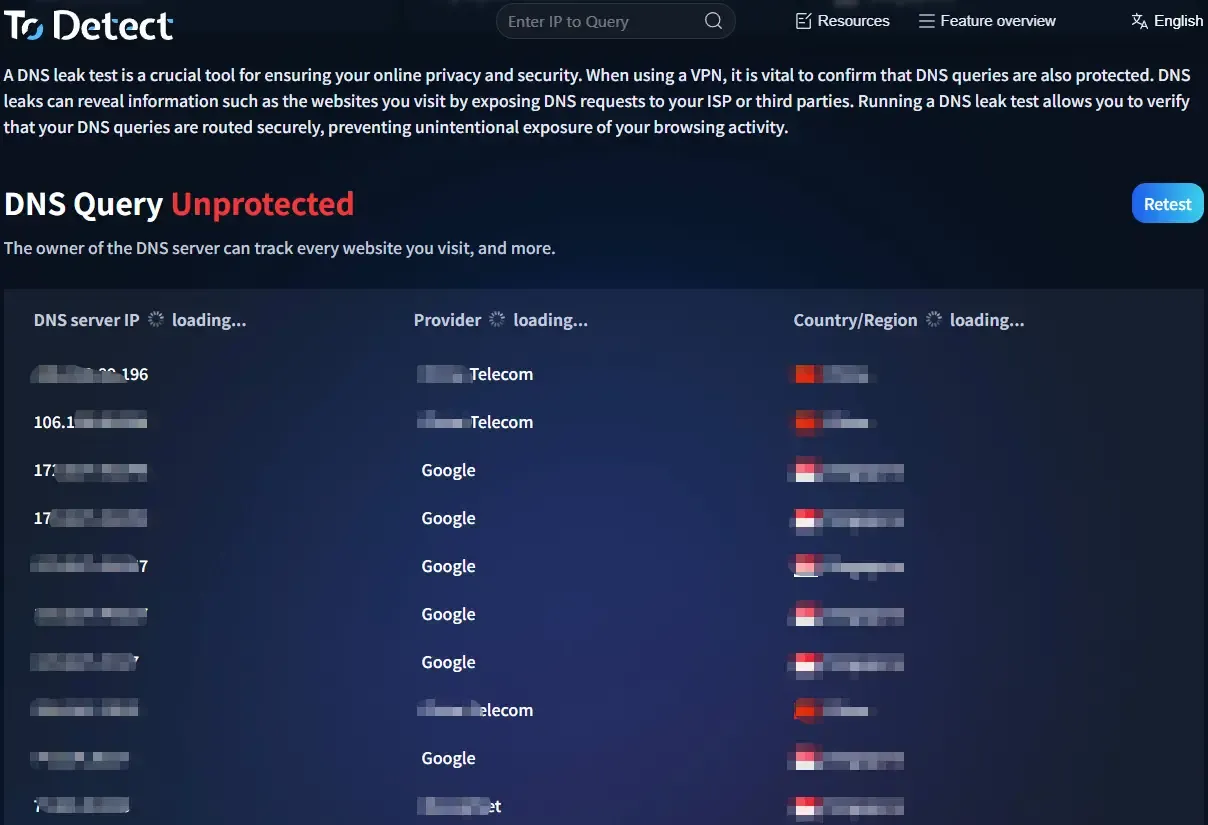
DNS leak testing mainly checks two things: whether the DNS server location matches the proxy IP, and whether local ISP DNS appears.
Key things to watch:
• Whether China Telecom/Unicom DNS appears
• Whether multiple DNS regions are mixed
• Whether there are unauthorized DNS requests
If DNS and IP locations don’t match, a DNS leak is very likely present.
4. Common DNS Configurations and Risk Comparison
| Scenario | DNS Resolution Path | DNS Leak Risk | Risk Level | Suitable Users | Optimization Advice |
|---|---|---|---|---|---|
| Local network + no proxy | Local ISP DNS | ❌ No leak (but fully exposed) | 🔴 Very High | Testing beginners | Not recommended for any business use |
| HTTP proxy (no DNS forwarding) | Local DNS resolution | ✅ High leak probability | 🔴 Very High | Low-budget users | Switch to proxy with remote DNS support |
| SOCKS5 proxy (remote DNS off) | Partial local resolution | ⚠️ Medium risk | 🟠 High | Beginner users | Enable Remote DNS |
| SOCKS5 proxy + remote DNS | Proxy server resolution | ✅ Minimal leak risk | 🟢 Low | Advanced users | Perform regular DNS tests |
| Fingerprint browser + standard proxy | Mixed (unstable) | ⚠️ Potential risk | 🟠 High | Fingerprint-only users | Optimize DNS settings as well |
| Fingerprint browser + high-quality proxy + DNS isolation (e.g., ToDetect) | Fully via proxy DNS | ✅ No leak | 🟢 Very Low | Multi-account operators | Recommended solution |
| IP tools (no DNS protection) | Local + tool mixed | ⚠️ Common leaks | 🟠 High | Individual users | Use tools with DNS protection |
| IP tools + DNS protection (DoH/DoT) | Encrypted remote DNS | ✅ Low risk | 🟢 Low | Light users | Combine with environment isolation |
5. How to Completely Avoid DNS Leaks (Practical Guide)
1. Use Proxies That Support DNS Forwarding
Prioritize SOCKS5 proxies (with remote DNS), high-quality residential IPs, and avoid low-quality HTTP-only proxies.
2. Force Remote DNS
Enable “Remote DNS” in proxy tools → Use DNS over HTTPS (DoH) → Disable system default DNS.
This ensures all DNS requests go through the proxy.
3. Use Isolated Environments (Critical)
Each account must have its own IP, browser environment, and DNS path.
Tools like ToDetect can detect browser fingerprints, network environment, and DNS requests—fully isolating them to prevent cross-contamination.
4. Regular DNS Leak Testing
Don’t configure once and forget. Test weekly, retest after proxy changes, and always test before deploying new environments.
5. Avoid System-Level Interference
Disable system DNS optimization, avoid local accelerators or network boosters, and prevent browser extensions from modifying requests.
6. DNS Leak + Browser Fingerprint Detection: Dual Protection Strategy
IP masking alone is no longer enough—you need a combined approach:
• No DNS leaks (network layer)
• Fingerprint detection resistance (device layer)
• Human-like behavior (interaction layer)
Tools like ToDetect simulate real browser environments, isolate fingerprint parameters, and integrate with proxies for full-chain anonymity.
Solving DNS issues alone is not enough—ignoring fingerprint detection still leaves risk.
Summary: Treat DNS Leak Prevention as a “Baseline Defense”
DNS leaks in cross-border e-commerce are a classic example—they’re simple but often overlooked, and the consequences are direct.
Instead of troubleshooting after problems arise, it’s better to establish DNS testing and detection from the start, combined with fingerprint protection tools like ToDetect.