



 Resources
 Feature overview
 Charles
 2026-04-24 11:02
Many people assume that as long as their phone is connected to WiFi, it is safe. However, what most don’t realize is that even when you can browse normally, DNS leaks may still be happening.
If you run a DNS leak test or a mobile DNS leak check at that moment, you may discover that what you thought was a secure network environment is actually not safe at all.
Today, we’ll talk about whether connecting to WiFi can cause DNS leaks, and most importantly, show you one effective way to truly solve this hidden risk.

1. What is a DNS Leak ? Why don’t you notice it at all?
DNS works like the “phonebook of the internet.” When you enter a website, DNS helps translate it into an IP address so the page can load.
The problem is: if your DNS requests are not encrypted, your ISP, public WiFi provider, or even intermediate nodes may see which websites you visit.
More importantly, this usually happens silently—you won’t see any pop-ups or errors, but your browsing data is already exposed.
2. Why can DNS leaks happen even on WiFi?
Many people think mobile data is unsafe while WiFi is secure, but WiFi can be just as risky, sometimes even more complex:
• Router default DNS may be provided by your ISP
• Public WiFi may force specific DNS servers
• Some phones revert to default DNS when switching networks
• Improper IP tool configuration may cause DNS bypass
Especially on Android devices, DNS requests may fail to go through encrypted channels when switching networks. So “WiFi = safe” is not true.
3. Comparison of Common Network Privacy Risks
| Privacy Risk Type | Easy to Overlook | Detectable by Users | Main Impact | Common Solutions |
|---|---|---|---|---|
| DNS Leak | Easily overlooked | Can be detected via DNS leak testing tools | Browsing history may be exposed | Enable DoH/DoT encrypted DNS, use reliable VPN |
| Browser Fingerprinting | Highly hidden | Hard for average users to interpret | User identity can be tracked long-term | Use private mode, reduce plugins, anti-fingerprint browsers |
| IP Address Exposure | Moderate | Easy to detect | Real location may be exposed | Use VPN or proxy to hide IP |
| WiFi Sniffing Risk | Low (many unaware) | Not easily visible | Data may be intercepted | Avoid public WiFi, use HTTPS/VPN |
4. How to check if you have a DNS leak?
1. Online DNS Leak Test Tools
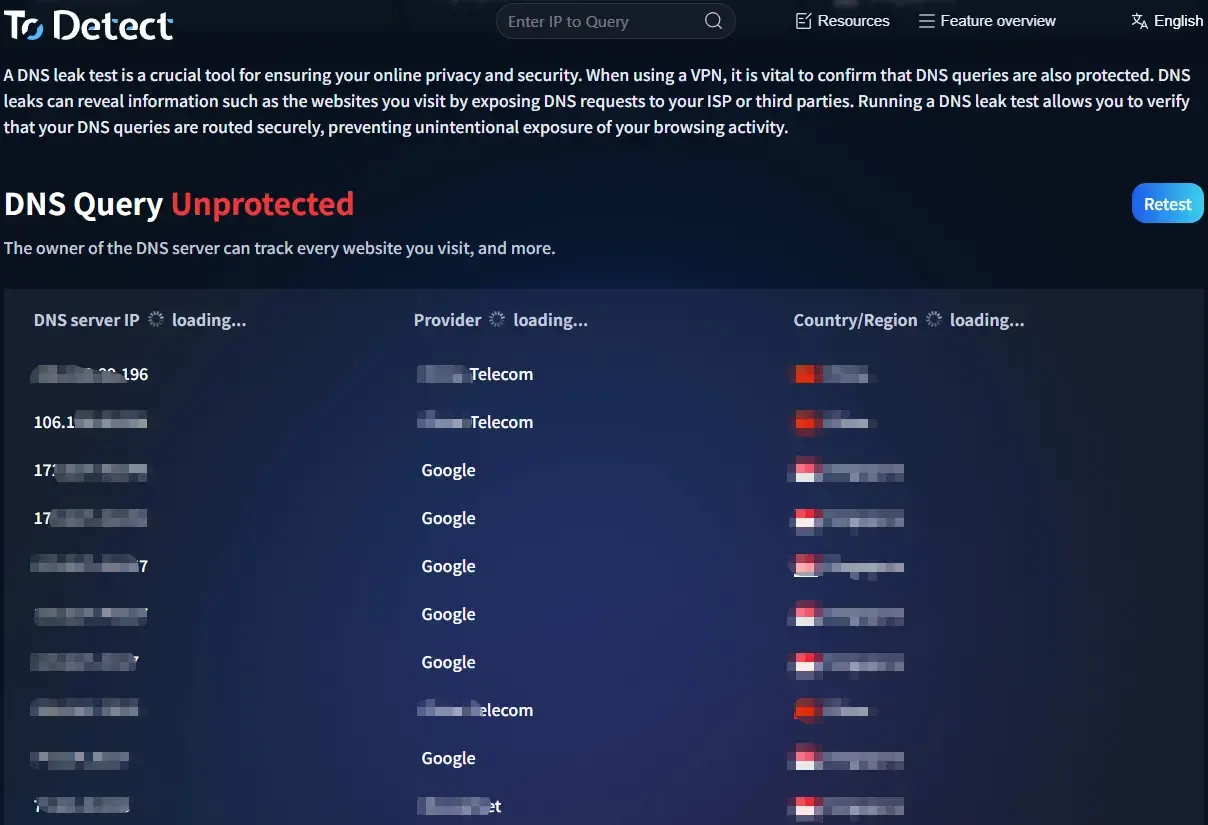
These tools show your current DNS server location. If it matches your ISP instead of your VPN or encrypted DNS, there may be a leak.
2. Mobile DNS Leak Test
Run a DNS leak test directly on your phone browser to check if DNS is exposed or hijacked.
3. ToDetect Tool
Tools like ToDetect provide a more comprehensive check:
• Whether your IP is exposed
• Whether DNS is replaced
• Whether your network path is secure
Many users only realize they’ve been “browsing exposed” after running such tests.
5. It’s not just DNS: Browser fingerprinting matters too
• Besides DNS leaks, browser fingerprinting is another overlooked issue. Even with VPN or incognito mode, you can still be identified.
• In many cases, privacy risks are “double exposure”: DNS reveals where you go, fingerprinting reveals who you are.
6. How to completely fix DNS leaks? One key solution
The key is to encrypt DNS requests so they are not transmitted in plain text.
□ Use encrypted DNS (Recommended)
Examples: DNS over HTTPS (DoH), DNS over TLS (DoT)
These encrypt DNS traffic so outsiders cannot see your browsing requests. Setup is simple:
Android: Use “Private DNS” settings
iPhone: Use encrypted DNS profiles or apps
□ Or use a reliable VPN (with DNS protection)
Not all VPNs prevent DNS leaks. Choose one that supports DNS Leak Protection and blocks DNS bypass.
7. A commonly overlooked detail: Don’t just change DNS
Many people think switching DNS to 8.8.8.8 or 114.114.114.114 is enough, but what really matters is:
👉 Whether DNS is encrypted
👉 Whether system bypass is prevented
👉 Whether it works globally
Otherwise, DNS leaks can still occur.
8. Mobile DNS Leak Testing FAQ
1️⃣ Why do DNS leaks happen even with a VPN?
Some VPNs only encrypt traffic but do not handle DNS requests.
Result: Your IP changes, but DNS still goes through your ISP.
Solution: Use VPNs with DNS Leak Protection and enable global mode.
2️⃣ Is DNS leak more likely on public WiFi?
Yes. Public WiFi may force DNS servers, hijack requests, or log domains.
You think you’re just using WiFi, but your DNS may already be controlled.
Advice: Avoid sensitive activity on public WiFi or enable encrypted DNS/VPN.
3️⃣ If test shows “no leak”, is it fully safe?
Not necessarily. DNS tests only reflect the current state:
• Network switching may change results
• Apps may use separate DNS
• System updates may reset settings
“No leak now ≠ always safe.” Regular checks are recommended.
Conclusion
DNS leaks are often ignored because they are invisible, but they are one of the most fundamental privacy risks.
Connecting to WiFi does not guarantee safety—the real question is whether your DNS is protected.
Try a DNS leak test now or run a full check—you might discover something unexpected.