



 Resources
 Feature overview

 Charles
 2026-05-11 10:37
DNS leaks are not as obvious as pop-up ads, but they are far more hidden. Every request you make online could be exposed without you even noticing.
That’s why learning reliable DNS leak detection methods and regularly performing a DNS leak test has become extremely important.
In this article, we’ll walk you through what a DNS leak is, how to detect it, and which practical tools can quickly help identify potential risks.

1. What Is a DNS Leak? Most People Actually Misunderstand It
Simply put, a DNS leak happens when your DNS requests do not go through an encrypted or secure channel and are instead exposed directly to your internet service provider or local network.
The websites you visit may become visible to others, and your online behavior is no longer truly “private.” Even if you are using a proxy or VPN, it may become almost useless.
Many people think encrypted internet traffic automatically means they are safe, but DNS leaks are often the hidden weak point.
2. Why Should You Care About DNS Leaks?
If you work in cross-border eCommerce or social media account management, DNS leaks can significantly increase your risks. Common impacts include:
• Your browsing activity being recorded (which websites you visited)
• Exposure of your real network exit point
• Regional restrictions potentially becoming ineffective
• Privacy protection becoming meaningless
Especially during DNS leak detection, many users discover that what “looks secure” may actually not be secure at all.
3. What Are the Common DNS Leak Detection Methods?
1. Online DNS Leak Test (Most Common)
This is the easiest method. You simply open a webpage and the detection process starts automatically.
Some tools can automatically perform DNS leak tests, IP checks, and node resolution verification.
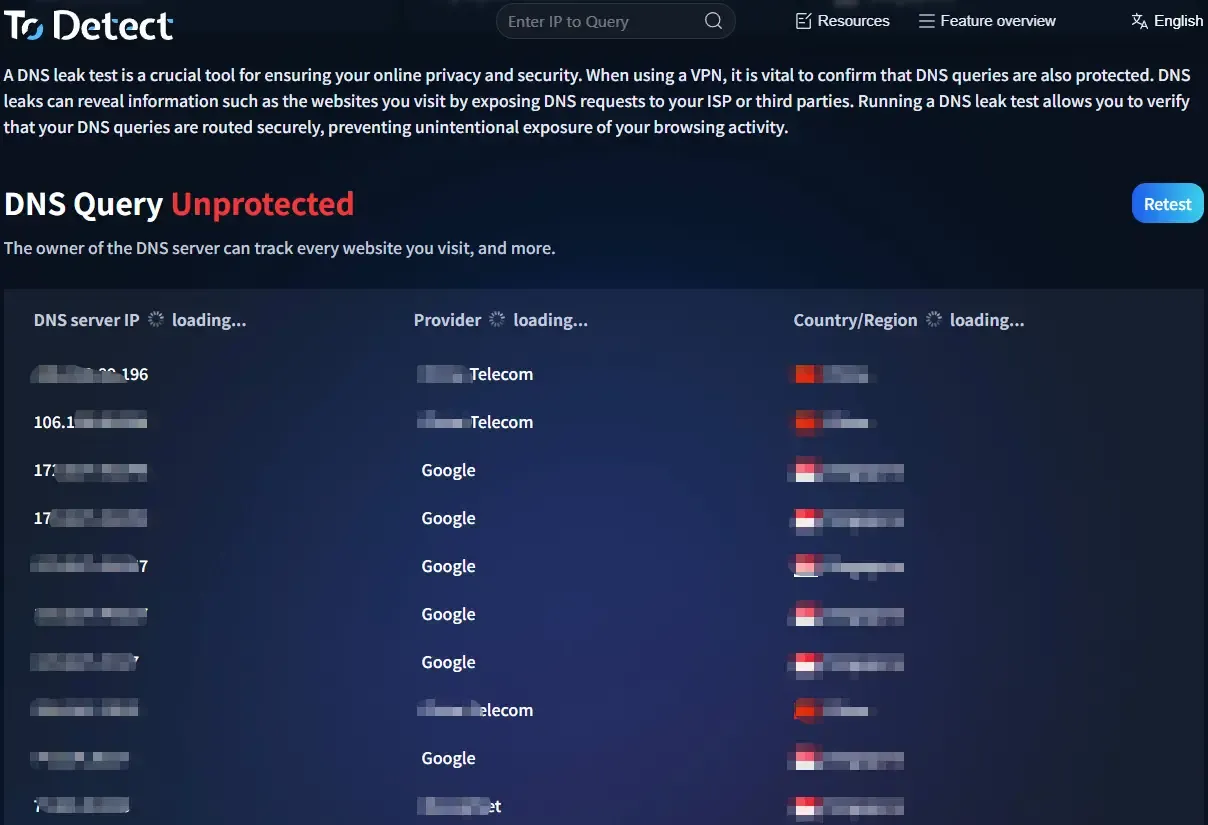
For example, the ToDetect online testing tool supports one-click DNS leak detection and can also combine browser fingerprint detection to evaluate whether your network environment has privacy risks.
2. Multi-Node DNS Resolution Detection (Advanced Method)
This method is slightly more technical and works by testing DNS resolution through multiple regional nodes. The basic principle is:
• Initiating DNS requests from different regions
• Comparing the returned DNS servers
• Checking for abnormal DNS routing paths
If the DNS source does not match the expected result, there may be a DNS leak issue.
This method is often used for more detailed DNS leak detection scenarios, such as cybersecurity investigations or technical debugging.
3. Browser Fingerprint + DNS Combined Detection (More Comprehensive)
More and more tools are now combining browser fingerprint detection with DNS testing, including Canvas fingerprinting, font information, and WebRTC data.
If both DNS leaks and browser fingerprint exposure exist simultaneously, protecting your privacy becomes extremely difficult.
Therefore, some tools (such as ToDetect) provide integrated detection solutions that allow you to simultaneously check DNS leak status, IP abnormalities, and browser fingerprint risk scores.
4. How Can You Tell If You Have a DNS Leak?
✔ Abnormal DNS server display
Unknown or unexpected DNS servers appear in the test results.
✔ IP and DNS regions do not match
For example, your IP is located in Region A while the DNS server appears in Region B.
✔ Large differences between multiple test results
The test results vary significantly at different times.
If you notice any of these situations, there is a strong possibility of a DNS leak risk.
5. Recommended DNS Leak Test Tools (Practical Picks)
There are many DNS leak testing tools available today, but the user experience can vary greatly. Here are a few common categories:
🔶 One-click online detection tools
Suitable for all users: DNS leak tests, IP + DNS checks, and risk scoring features, such as ToDetect (supports multi-dimensional analysis).
🔶 Technical detection tools
Suitable for users with technical knowledge: multi-node DNS resolution analysis, network route tracing, and DNS request monitoring.
🔶 Browser detection extensions
Mainly used for real-time monitoring: DNS request tracking, WebRTC leak alerts, and browser fingerprint detection.
6. Common DNS Leak Detection Questions (FAQ)
1. Can DNS leaks affect ordinary users?
As long as your DNS requests are not properly protected, your browsing behavior may be recorded by your network provider. That’s why regular DNS leak detection is recommended.
2. Do you need technical knowledge to run a DNS leak test?
Not at all. Most DNS leak testing tools today are “one-click detection” systems that automatically complete the analysis once you open the webpage.
Some online platforms (such as ToDetect) can even simultaneously check DNS status, IP consistency, and browser fingerprint risks, making the results easy for ordinary users to understand.
3. If a DNS leak test shows abnormalities, does it automatically mean it’s unsafe?
Not necessarily “completely unsafe,” but it is definitely a warning sign. For example, inconsistent DNS server locations or unusual regional results may indicate a problem.
It could suggest a DNS leak issue, so it’s recommended to evaluate multiple test results instead of relying on a single scan.
4. What is the relationship between browser fingerprint detection and DNS leaks?
DNS leaks mainly involve network request routing issues, while browser fingerprint detection identifies your device and browser characteristics.
When combined together, they provide a much more comprehensive picture of privacy exposure risks, which is why many tools now test both at the same time.
Conclusion
Whether it’s a basic online check or a more advanced multi-node DNS leak test, these methods can help you clearly understand whether your current network environment is secure.
Tools like ToDetect combine DNS leak detection with browser fingerprint analysis, making it easier for ordinary users to quickly identify potential privacy risks.
If you frequently use public networks or place a high priority on privacy protection, don’t wait until problems appear before taking action. Make DNS leak detection a regular habit instead.
