



 Resources
 Feature overview

 Charles
 2026-05-19 11:04
There is a type of online privacy leak that usually does not affect your normal internet usage, yet quietly exposes your browsing activity in the background — this is called a DNS Leak.
That’s why more and more people are becoming concerned about how DNS leaks happen, how to detect them, and how to fix them.
In this article, we’ll walk you through DNS leak detection, DNS leak repair methods, and practical DNS leak fix tutorials you can apply immediately.

1. What Is a DNS Leak ? What Happens If DNS Leaks?
DNS can be understood as the “phonebook of the internet.” Under normal circumstances, if you are using a proxy or VPN, your DNS requests should also go through the proxy tunnel.
However, when a DNS leak occurs, your DNS requests bypass the proxy and are sent directly to your local ISP’s DNS servers.
The result is:
• Your ISP can still see which websites you visit
• Your real network environment may be exposed
Many people ask whether a DNS leak exposes their real IP address. The answer is: not necessarily your IP directly, but it can expose your browsing behavior and network origin.
2. Common Causes of DNS Leaks
To fix the problem, you first need to understand how it happens. Common DNS leak causes include:
1. Incomplete Proxy Configuration
Some proxy tools only route traffic but do not force DNS requests through the tunnel, which can lead to leaks.
2. Default System DNS Not Changed
Windows, macOS, or mobile devices may still be using your ISP’s default DNS servers.
3. IPv6 Leak Issues
Many VPNs only support IPv4, while your system may still have IPv6 enabled by default, causing DNS requests to bypass the proxy.
4. Insufficient Browser Security Settings
Browsers may use their own DNS resolution mechanisms, such as improperly configured Secure DNS / DoH settings.
5. Router-Level DNS Not Modified
Your entire network may still be using local DNS servers at the router level.
3. DNS Leak Detection Methods (Practical Focus)
Many people don’t even realize whether they have a DNS leak, so the first step is always to perform a DNS leak test.
Method 1: Online DNS Leak Test Tools
Visit a DNS leak testing website and check whether the returned DNS servers belong to your proxy or VPN provider.
Method 2: Use Professional Detection Platforms
Some security platforms can simultaneously test:
• DNS leaks
• WebRTC leaks
• IP address exposure
• Browser fingerprinting
Platforms like ToDetect can not only detect DNS leaks, but also analyze browser fingerprints to identify deeper privacy exposure risks.
Method 3: Compare IP and DNS Locations
If your IP address appears overseas while your DNS server still belongs to your local ISP, there is likely a DNS leak risk.
4. What Is the Relationship Between Browser Fingerprinting and DNS Leaks?
Many users focus only on DNS leaks while overlooking another hidden issue: browser fingerprint tracking.
Even if your DNS does not leak, highly unique browser fingerprint data — such as fonts, screen resolution, plugins, and OS version — can still identify you.
That’s why many users test all of the following together:
• DNS leak detection
• Browser fingerprint detection
• WebRTC testing
- IP consistency checks
This is also why tools like ToDetect are widely used — they allow users to scan all these risks in one place.
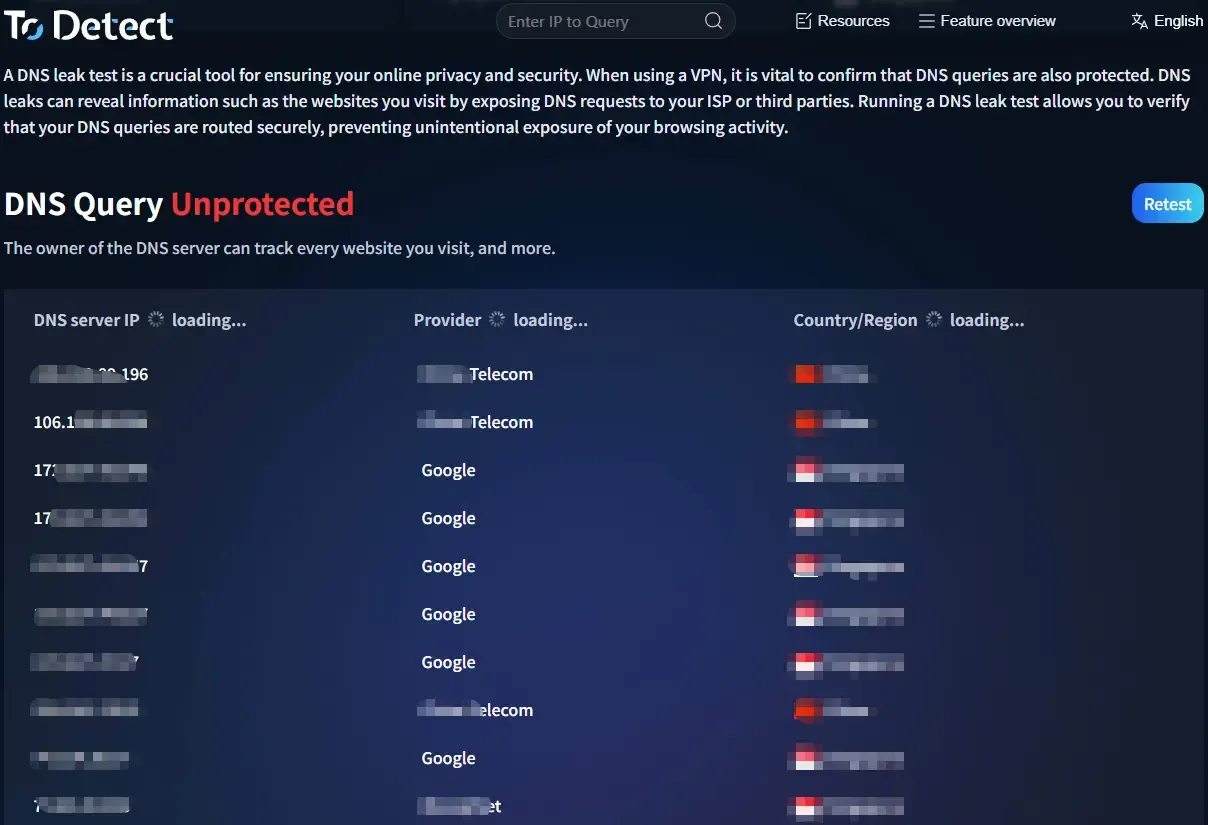
5. DNS Leak Fix Methods (Key Practical Steps)
After testing, if you discover a problem, it’s time to fix it.
1. Enable DNS Leak Protection in Your Proxy/VPN (Highest Priority)
Many people overlook this, but it is actually the most important step. Look for settings such as:
• DNS Leak Protection
• Use VPN DNS
• Kill Switch + DNS Protection
Once enabled, the proxy or VPN forces all DNS requests through the encrypted tunnel to prevent system bypassing.
2. Manually Change System DNS (Simple but Effective)
If your proxy is unstable or you want additional protection, manually change your DNS settings to:
• Cloudflare: 1.1.1.1
• Google: 8.8.8.8
• Backup options: 1.0.0.1 ; 8.8.4.4
• After changing DNS, disconnect and reconnect your network, then run another DNS leak test. Many minor leaks can be fixed with this step alone.
3. Disable IPv6 (Often Overlooked but Critical)
Many DNS leaks are not caused by IPv4, but by IPv6 bypassing the proxy.
Fix methods:
• Windows: Network Adapter → Uncheck IPv6
• Mac: Network Settings → TCP/IP → Disable IPv6 (or set to Link-Local Only)
• Router: Disable IPv6 directly if supported.
4. Check Browser “Secure DNS / DoH” Settings
Chrome, Edge, and Firefox may enable Secure DNS (DNS over HTTPS).
If misconfigured, DNS traffic may go through the browser instead of your proxy.
It’s recommended to either disable DoH or configure it consistently with a trusted DNS provider like Cloudflare, especially when using a VPN or proxy.
5. Restart Your Network and Perform a Second Verification
Always verify after making changes:
• Disconnect the proxy/VPN → Clear network cache (optional but recommended) → Reconnect
• Run another DNS leak test. If the DNS server now shows your VPN provider or overseas nodes, the fix was successful.
6. Always Retest After Fixing DNS Leaks
Many people assume they are done after applying fixes, but that’s not enough.
The correct workflow should be:
• Modify DNS or proxy settings
• Reconnect your network
• Run another DNS leak test
• Check browser fingerprinting results as well
Only when the DNS server has changed to your VPN or secure DNS provider can you confirm the leak has truly been fixed.
7. Frequently Asked Questions About DNS Leaks
Q1: What are the common DNS leak detection methods?
A: Online testing tools, VPN self-checks, and IP/DNS comparison are the most common methods.
Q2: How can I fix a DNS leak?
A: Enable DNS protection in your VPN, change system DNS settings, and disable IPv6.
Q3: Can DNS leaks happen again after fixing them?
A: Yes. System updates or network changes may cause leaks to reappear, so regular testing is recommended.
Q4: Which is more important: browser fingerprint detection or DNS leak detection?
A: Both are important. One relates to the network layer, while the other relates to the device layer. Ideally, you should test both together.
Conclusion
Although DNS leaks are not considered a “critical vulnerability,” they are highly stealthy and can continuously expose your privacy. Many users think they are safe, but are only “encrypted on the surface.”
Fortunately, modern tools make detection much easier. Platforms like ToDetect can scan DNS leaks, IP exposure, and browser fingerprint risks all at once, saving far more time than manual troubleshooting.
Don’t wait until something goes wrong before checking. Make it a habit — every time you change your VPN, network environment, or system version, perform a DNS leak test again.
