



 Resources
 Feature overview

 Charles
 2026-05-20 10:56
In daily cybersecurity troubleshooting, DNS leak detection is actually a frequently overlooked but extremely critical step.
Many DNS-related anomalies cannot be identified from the surface alone. Only by combining DNS leak detection with DNS log analysis can the root cause truly be located.
Next, we’ll focus on “how to detect DNS leaks” and “how DNS log analysis can quickly identify suspicious requests,” using practical methods so everyone can directly apply them during troubleshooting.

1. What Is a DNS Leak? Why Is Detection Important?
DNS works like the “phonebook of the internet,” converting domain names into IP addresses. When your DNS requests do not follow the intended path, what’s known as a DNS leak may occur.
In actual troubleshooting scenarios, DNS leak detection usually focuses on whether DNS requests are being abnormally forwarded and whether unexpected resolution nodes appear.
It also checks for overseas or unfamiliar DNS server records, and whether DNS query behavior matches actual browsing activity.
In many cases, DNS leak testing is not only important for technical professionals, but also highly valuable for ordinary users performing privacy and security checks.
2. Common Methods for DNS Leak Detection (Practical Perspective)
1. Online DNS Leak Testing Tools
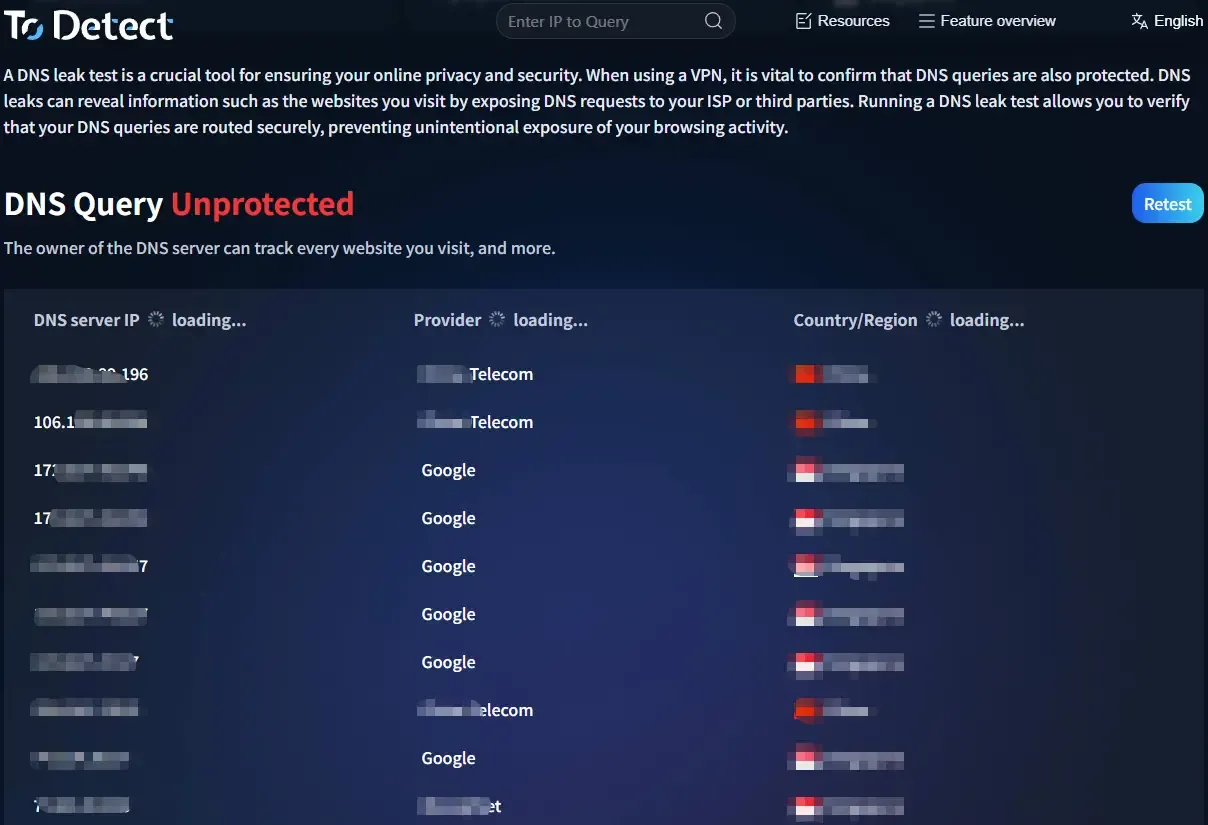
The most direct approach is to perform a DNS leak test using tools that simulate access and inspect the DNS resolution path. Common detection methods include:
• Record DNS resolution nodes after visiting the test page
• Compare local DNS settings with actual resolution results
• Check for “unexpected DNS servers”
If you use tools like ToDetect, you can also view more detailed resolution paths and risk alerts, which are very helpful for initial analysis.
2. Local DNS Configuration Verification
Many DNS issues actually come from local configuration errors, such as automatic DNS switching by the operating system, router-enforced DNS modification, or browsers using their own secure DNS.
During DNS leak detection, it is recommended to first check current system DNS settings, network adapter DNS assignments, and whether multi-layer DNS resolution exists.
3. Browser Fingerprint Detection for Auxiliary Analysis
Many people don’t realize that browser fingerprint detection can also indirectly help determine whether DNS behavior is abnormal. For example:
• Different browsers returning inconsistent resolution results
• Significant DNS behavior differences across network environments on the same device
• Fingerprint information not matching DNS resolution regions
Browser fingerprint detection tools can further verify whether the browsing environment has been “interfered with” or “redirected.”
3. DNS Log Analysis : The Core Method for Identifying Problems
If DNS leak detection is like a “health check,” then DNS log analysis is like a “CT scan,” directly revealing where the problem occurs.
1. What Can Be Seen in DNS Logs?
Under normal conditions, DNS logs record query domains (Query Name), resolution types (A records / AAAA records, etc.).
Returned IP addresses and source IP requests can help quickly determine whether abnormal access behavior exists.
2. How to Find Suspicious Requests Through DNS Log Analysis?
(1) High-frequency abnormal domain requests
If a domain is requested heavily within a short period, such as random-character subdomains, uncommon new domains, or repeated failed resolution requests, these situations usually require close attention.
(2) Abnormal resolution geolocation
In DNS log analysis, if request sources do not match resolution node regions, DNS servers switch frequently, or unfamiliar countries/regions appear in records, these may indicate abnormal DNS routing.
(3) Non-standard ports or protocol behavior
Although DNS typically uses standard ports, logs showing unusual DNS request behavior, abnormal encrypted DNS switching, or inconsistent request protocols may indicate abnormal redirection.
4. How to Combine DNS Leak Testing and Log Analysis?
Professional troubleshooting rarely relies on a single method. Instead, multiple approaches are combined. A standard workflow usually looks like this:
□ Perform a DNS leak test first (confirm whether obvious leaks exist)
□ Use DNS log analysis to identify specific request behavior
□ Compare browser fingerprint detection results (determine whether the environment is abnormal)
□ Use tools like ToDetect for cross-verification
This approach can quickly narrow down the issue, moving from “whether there is a problem” to “where exactly the problem exists.”
5. Common DNS Anomaly Scenarios (Practical Summary)
In real-world troubleshooting, the following situations are very common:
1. DNS Resolution Path Detouring
This appears as requests not using the expected DNS path, intermediate forwarding nodes appearing, or significantly increased query latency.
2. Browser and System DNS Inconsistency
Browser fingerprint detection may reveal browsers using independent DNS, ineffective system DNS settings, or multiple resolution results coexisting.
3. Abnormal Increase in DNS Request Behavior
DNS log analysis commonly reveals sudden spikes in subdomain requests, repeated access to certain domains, or highly irregular query intervals.
6. Common Questions About DNS Leak Detection
1. If DNS Leak Detection Results Are Normal, Does That Mean Everything Is Safe?
Not necessarily. A normal DNS leak test only indicates that no obvious DNS routing anomalies were detected in the current testing environment. It does not guarantee long-term stability or security.
Many DNS issues are intermittent, such as anomalies triggered only during network switching or transitions between WiFi and mobile networks.
2. Why Do Different DNS Leak Testing Tools Produce Different Results?
This is a common source of confusion. The main reasons include different testing nodes (different detection servers), real-time DNS routing changes, local cache differences, or browser policy variations.
3. If Unfamiliar Domain Requests Appear in DNS Logs, Are They Always Malicious?
Not necessarily. For example, system updates or browser preloading may generate unfamiliar domain requests. However, you should be cautious if the following situations occur:
High-frequency random subdomain requests, repeated failed resolutions for the same domain in a short period, or domains completely unrelated to normal business activity appearing in clusters.
4. What Is the Relationship Between Browser Fingerprinting and DNS Leaks?
In fact, they can validate each other. Browser fingerprint detection reflects the characteristics of your network environment.
If the region or network characteristics shown in the fingerprint do not match DNS resolution results, there may be abnormal DNS routing or redirection occurring.
Conclusion
DNS leaks usually do not cause “explosive” problems immediately. Instead, they gradually affect your network behavior and judgment. DNS leaks themselves are not the scariest part — the real danger is not realizing they are happening at all.
Once you perform a thorough DNS leak detection process and combine it with DNS log analysis, you’ll often discover the issue is much more complex than expected.
If you want a stable privacy environment, you should at least regularly use tools like ToDetect to perform a complete DNS inspection workflow. This is far more effective than trying to fix problems afterward.
