



 Resources
 Feature overview

 Alani
Alani 2026-06-05 11:52
Discussions about whether the cross-border e-commerce store cluster model is still viable have attracted significant attention recently. Some people claim it is already outdated, while others are still quietly making profits from it.
Many sellers have spent money on software and tools, yet their stores still get linked together or suspended. As a result, they begin to wonder: is the business model no longer working, or is the problem with their operational approach?
In this article, we'll walk you through the current state of the store cluster model, the real role of fingerprint browsers, and the key operational details that determine success or failure.

1. Cross-Border E-commerce Store Cluster Model — Is It Still Worth Doing Today?
Let's start with the conclusion: yes, it still works, but the entry barrier is much higher than before, and the way it operates has fundamentally changed. As platform algorithms continue to evolve, they increasingly target behaviors such as duplicate listings across multiple accounts, account linkage, homogeneous operations, and low-quality bulk product uploads.
The store cluster strategies that still work today typically focus on:
• Refined product selection + small-scale store cluster testing
• Diversified deployment across multiple country markets
• Fine-grained operations + differentiated content
• Risk control rather than unlimited store expansion
In short, store clusters still exist, but the focus has shifted from quantity to risk control and operational precision.
2. Why Is Everyone Talking About Account Linkage Prevention? The Core Issue Is Browser Fingerprinting
If you're involved in cross-border e-commerce, you've probably heard the term "account linkage." How do platforms determine whether multiple stores are being operated by the same person? It's not just about IP addresses—it's also about browser fingerprint environments.
• A browser fingerprint environment is essentially a collection of unique characteristics your device leaves online.
• These characteristics include, but are not limited to, operating system version, browser version, installed fonts, screen resolution, Canvas fingerprint, WebRTC information, time zone, and language settings. Together, they form a unique digital identity.
• Therefore, even if you change your IP address, platforms can still identify you as the same operator if the browser fingerprint remains identical.
3. Common Store Cluster Tools and Their Use Cases
| Tool Type | Primary Purpose | Applicable Stage | Key Usage Notes | Common Misconceptions |
|---|---|---|---|---|
| Fingerprint Browser | Create isolated browser fingerprint environments for multiple accounts | Initial multi-store setup and scaling stage | Each account must have an independent browser fingerprint profile | Assuming installation alone guarantees safety while ignoring operational behavior |
| Proxy IP Tool | Mask real network identity and simulate different geographic locations | Registration, login, and daily operations | Use high-quality residential IPs or stable static IPs whenever possible | Using free or low-quality IPs that may already be flagged |
| Store Management System | Manage orders, inventory, and customer messages in bulk | After store cluster expansion | Centralize management but avoid identical operational patterns | Operating all stores with exactly the same workflow and schedule |
| Environment Detection Tool (e.g., ToDetect) | Check whether browser fingerprint environments contain leaks or anomalies | Before account login and during environment setup | Every fingerprint browser profile should be tested before use | Skipping environment checks before launching a store |
| ERP System | Order, logistics, and supply chain management | Mid-to-late stage scaling | Integrate with store management systems to improve efficiency | Focusing only on product listing while ignoring supply chain optimization |
4. Fingerprint Browsers — Do They Actually Work?
The answer is yes—but they are not a magic solution. A fingerprint browser essentially allows you to create multiple independent browser fingerprint profiles, making each account appear as though it is operated from a different device and user environment.
1. Multi-Account Isolation
Each store can operate within its own isolated environment, preventing cookies, cache files, and login information from mixing together.
2. Reduced Account Linkage Risk
When combined with quality proxy IPs, platforms are more likely to perceive these accounts as separate real users rather than a single operator managing them in bulk.
3. Improved Operational Efficiency
For store cluster operators, fingerprint browsers make it possible to manage dozens or even hundreds of stores from a centralized dashboard. However, fingerprint browsers only reduce risk—they do not make you invisible.
If your operational behavior is overly consistent, such as uploading identical product images, operating stores at the same time, using the same pricing strategy, or creating highly similar storefront content, platforms can still identify abnormal patterns through behavioral analysis.
5. Why Do Some Sellers Still Get Suspended Even After Using Fingerprint Browsers?
1. Environment Isolation Without Operational Isolation
Many people assume that installing a fingerprint browser is enough. In reality, it's only the first step.
2. Poor IP Quality
Many low-quality proxy IPs have already been flagged by platforms. In such cases, switching browsers won't help.
3. Overly Standardized Fingerprint Configurations
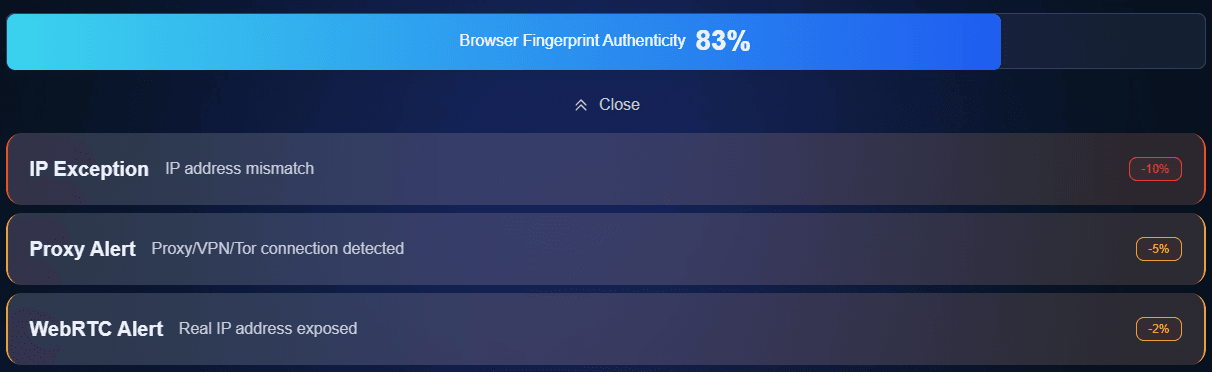
If all browser profiles look too similar, they can still be identified as part of a bulk operation. Tools like ToDetect can help evaluate whether your environment is clean and whether fingerprint exposure risks exist.
6. The Right Way to Run a Store Cluster in 2026
1. Start Small Instead of Scaling Blindly
Rather than launching dozens or hundreds of stores immediately, start with 3–10 stores. Validate your product selection, conversion rates, and platform feedback before scaling.
2. One Store, One Environment
Every store should maintain an independent browser fingerprint environment and be managed through separate fingerprint browser profiles. Combine this with stable IPs to reduce linkage risks.
3. Differentiate Your Content
Even when selling similar products, make sure images, titles, descriptions, and pricing differ. Otherwise, platforms may classify them as duplicate listings.
4. Let Data Drive Decisions
Don't simply copy trending products. Analyze CTR, conversion rates, advertising data, and customer behavior to refine your product strategy.
5. Maintain Long-Term Stability
Stability matters beyond account registration. Frequent IP changes or inconsistent login environments can trigger risk-control systems and reduce store performance.
6. Mimic Natural User Behavior
Spread login times and operational actions naturally. Avoid synchronized activities across multiple accounts, as platforms increasingly rely on behavioral analysis.
7. Use Tools as Support, Not as a Crutch
Fingerprint browsers, proxy IPs, and tools like ToDetect are only risk-reduction tools. Ultimately, success depends on operational skills and product selection strategies.
7. Frequently Asked Questions About Fingerprint Browsers
1. Is the Store Cluster Model Still Suitable for Beginners?
It's not too late, but it's no longer a "list products and make money" model. Beginners should focus on building a profitable single-store model first before expanding.
2. Why Am I Still Being Linked After Using a Fingerprint Browser?
Platforms analyze more than just environments. They also evaluate behavioral signals. If multiple stores share similar IPs, login schedules, content, and operating patterns, they may still be linked together.
3. ToDetect — What Role Does It Play in Preventing Account Linkage?
Tools such as ToDetect help identify browser fingerprint leaks, abnormal configurations, and potential environment risks before accounts go live, reducing the likelihood of being linked from the beginning.
Conclusion
Some sellers operate successfully with fingerprint browsers, while others still encounter issues despite using every available tool. The difference usually lies not in the tools themselves, but in the overall operational strategy.
The cross-border e-commerce sellers who succeed in the long run are not necessarily those with the most tools, but those who understand platform rules and manage risks effectively.
Today's store cluster model is no longer about opening as many stores as possible. The focus has shifted from quantity-driven growth to quality-driven operations.
