



 Resources
 Feature overview
 Ganesh
 2026-04-23 10:23
Nowadays, many platforms and advertising systems can easily obtain your approximate location and network information through methods such as IP address lookup, online IP queries, and IP detection.
Once your IP is exposed, it can not only reveal your real geographic location, but may also be used for ad tracking, behavior analysis, and even lead to privacy risks in some extreme cases.
Today, let’s walk through practical steps and show you how to solve IP address leaks with these 5 simple steps, as well as how to hide your real IP to reduce the chances of being tracked.
1. First, find out: Has your IP been exposed?
Many people overlook the first step—you need to know whether you are “exposed.” You can use some common tools to check:
• Online IP lookup
• IP address lookup tools
• IP detection websites
After opening these tools, you’ll see your current public IP, ISP, and even approximate city location. This information is often quite “transparent.”
If you want to go deeper, you can also perform a full IP detection + browser fingerprint test to see if there are multiple exposure sources.
2. How does an IP get leaked? Many people don’t notice
Let’s first go over the sources of leakage—otherwise, many people just “patch issues without knowing where the problem is.” Common situations include:
• Using public WiFi (cafes, airports)
• Directly exposing your public IP when visiting websites
• WebRTC leaks (a common browser issue)
• Unencrypted DNS requests
• Overly unique browser fingerprints
Browser fingerprinting is especially overlooked. You might think changing your IP is enough, but websites can still identify you through fonts, resolution, plugins, and other data.
3. Common IP address leaks and solutions comparison table
| Leak Source | Symptoms | Risk Level | Recommended Solution |
|---|---|---|---|
| Public WiFi (cafes/airports) | Frequent IP changes, abnormal login behavior | Medium–High | Use IP tools + avoid logging into sensitive accounts |
| Browser WebRTC leaks | Real IP still visible even with IP tools | High | Disable WebRTC or use anti-leak plugins |
| Unencrypted DNS | Browsing records may be logged via DNS resolution | Medium | Switch to encrypted DNS (e.g., 1.1.1.1) |
| Highly unique browser fingerprint | Still identifiable even after changing IP | High | Perform fingerprint detection (e.g., ToDetect) and reduce uniqueness |
| Direct connection to websites | Online IP lookup shows real address | Medium | Use proxies to hide exit IP |
| Multiple accounts on same device | Platforms detect account associations | High | Isolate browser environments / use different network exits |
Step 1: Use IP tools or proxies to hide your real IP (basic but critical)
If you’re asking “how to hide your real IP address,” the most direct method is to use IP tools or reliable proxy services.
The function is simple: replace your real IP with a relay server IP. However, keep in mind:
• Avoid unknown free IP tools (they may leak your data)
• Choose services with clear privacy policies
• Avoid frequently switching country nodes (may trigger risk controls)
Step 2: Disable WebRTC to prevent “hidden leaks”
Many people don’t realize that even with IP tools enabled, browsers may still expose your real IP through WebRTC. The fix is simple:
• Chrome / Edge: install anti-WebRTC plugins or restrict it in settings
• Firefox: disable WebRTC in about:config
This step is “invisible but crucial,” and many IP leak detection tools specifically test for it.
Step 3: Use secure DNS to avoid resolution leaks
DNS is like the “navigation system” of the internet. Without encryption, your ISP can see every site you visit. It’s recommended to enable:
• Cloudflare DNS (1.1.1.1)
• Google DNS (8.8.8.8)
Or directly use browsers/systems that support encrypted DNS. This is very important to prevent “hidden IP correlation analysis.”
Step 4: Protect against browser fingerprinting (often overlooked)
Modern tracking doesn’t rely only on IP—it also uses browser fingerprints. Even if your IP changes, websites can still “recognize” you. You should:
1. Use browser fingerprint detection tools
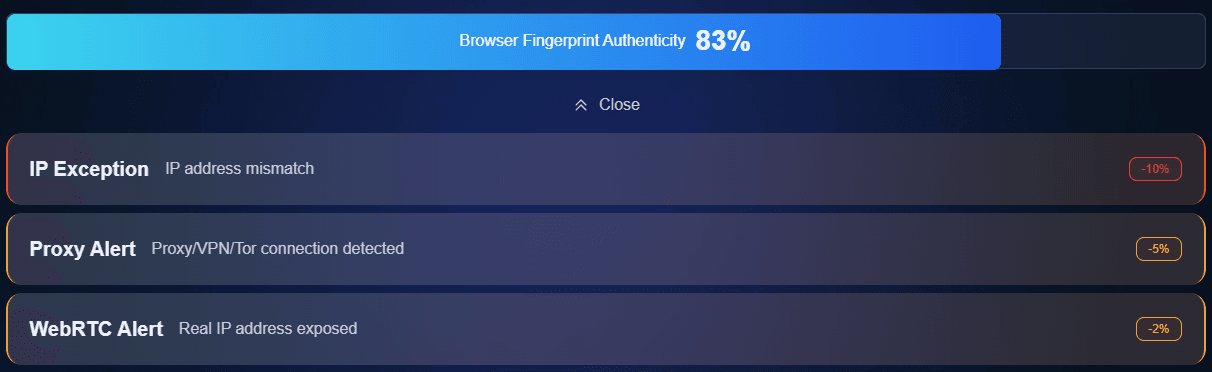
Use ToDetect to check how much of your fingerprint is exposed, including fonts, resolution, system version, plugins, etc.
2. Reduce “unique characteristics”
For example, avoid installing too many plugins, use private/incognito mode, and disable unnecessary permissions (location, camera, etc.).
Step 5: Regular IP detection + habit building
Many people stop after the first four steps, but real privacy protection requires “continuous checking.” It is recommended to:
• Regularly perform IP address lookup + IP detection
• Regularly recheck with browser fingerprint tools (e.g., ToDetect)
Especially after switching network environments (office/WiFi/mobile hotspot), it’s best to test again.
Summary:
What truly impacts privacy security is rarely a single factor, but multiple layers: whether you’ve done IP detection, whether you’ve considered browser fingerprinting, and whether your DNS settings are secure.
It’s recommended to perform a full check regularly—for example, use an online IP lookup tool to confirm your exit IP, and then use ToDetect to see whether your browser fingerprint is too distinctive.