



 Resources
 Feature overview

 Ganesh
 2026-05-13 11:12
Many people running cross-border e-commerce businesses or overseas independent websites often encounter issues like slow website loading, laggy image rendering, or pages taking forever to display — even when the server itself is not bad.
In reality, slow cross-border website performance is not simply caused by a “poor server.” More often, it results from a combination of IP routing, access nodes, and even browser environments.
Today, we’ll talk about how to use tools like online IP lookup, IP address lookup, and online IP detection to identify problems and optimize cross-border website access speed.

1. Slow Cross-Border Website Speed Is Often Not the Website Itself
Common causes of slow cross-border access include routing detours (for example, users in China accessing servers in the United States), unstable DNS resolution, and CDN nodes not covering target regions.
IP throttling, false risk detection, and browser environment differences can also lead to different loading strategies. This is especially common for cross-border e-commerce websites, where “the same website can be twice as fast in one region compared to another.”
2. Use Online IP Lookup to Understand Where Users Are Coming From
The first step is always to perform an online IP lookup to confirm the visitor’s real network location. IP lookup tools can provide:
• User country/city
• Internet Service Provider (ISP)
• Whether the IP is a data center IP or residential IP
• Whether proxy usage or abnormal routing exists
For example, many cross-border websites receive traffic from multiple countries. Without regional optimization, you may experience situations where “the U.S. is fast, but Asia is slow.”
3. Use IP Address Lookup to Analyze Network Quality and Routing Differences
The second step is performing a deeper IP address lookup. Focus on route quality rather than just geographical location. Pay attention to:
• Whether the ISP is high quality (such as Cloudflare, Google, or AWS routes)
• Whether it belongs to a shared IP segment
• Whether it has been listed in risk IP databases
• Whether there are too many routing hops
Many slow cross-border websites are actually caused by visitors being assigned to “low-quality outbound IPs,” resulting in significantly increased latency.
4. Online IP Detection Helps Measure Real Latency and Access Routes
Besides locating issues, you also need to “measure speed.” This is where online IP detection tools become useful. They can show:
• Current IP access latency (Ping)
• Routing hops
• Packet loss rate
• Speed comparison across different nodes
For example, accessing the same website from Shanghai to a U.S. node may take 200ms, while routing through a Hong Kong node may only take 80ms. This difference directly impacts user experience.
Many people ignore this step and only optimize servers instead of optimizing routes, which greatly reduces the effectiveness of optimization efforts.
5. Browser Fingerprint Detection: The Hidden Factor
Besides IPs, browser environments also affect cross-border access experiences. Browser fingerprint detection can help identify:
• Whether the User-Agent is recognized as a bot or suspicious device
• Whether timezone and language match the target region
• Whether WebRTC leaks the real IP address
• Whether the Canvas fingerprint appears abnormal
If fingerprint information appears abnormal, some CDNs or protection systems may throttle or even block access.
In cross-border business operations, this step is often overlooked, but it can affect advertising performance, SEO indexing, and even payment redirects.
6. ToDetect : A One-Stop Tool for Troubleshooting Cross-Border Issues
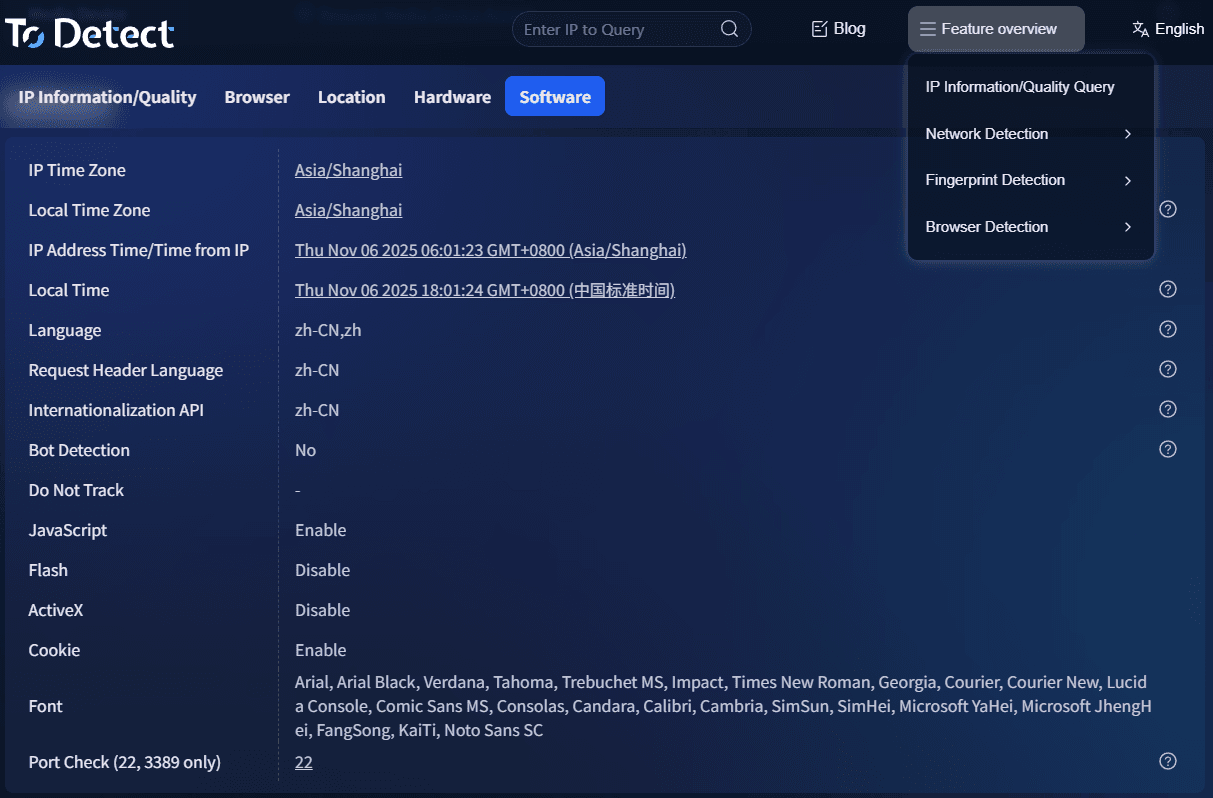
The advantage of ToDetect is that it combines the following functions into one platform:
• IP address lookup and location analysis
• Online IP detection and latency testing
• Browser fingerprint detection and risk identification
• Multi-node access performance comparison
For cross-border e-commerce operators, independent website owners, or SEO professionals, this type of tool can save significant troubleshooting time and quickly determine whether the issue comes from IPs or network routing.
7. Practical IP Address Optimization Tips (Worth Bookmarking)
If you have already identified issues through IP lookup and testing, you can optimize from the following directions:
1. Choose CDN Nodes Closer to Your Users
Prioritize coverage in target user regions. For example, Southeast Asian users should preferably connect through Singapore nodes.
2. Use High-Quality Proxy or Acceleration Routes
Avoid low-quality shared IPs, as they can negatively impact overall access speed.
3. Optimize DNS Resolution
Use faster DNS services to improve first-screen loading speed.
4. Deploy Servers by Region
Separate server deployments for European/American users and Asian users can reduce intercontinental access latency.
5. Regularly Perform IP Detection and Health Checks
Monitor node status using online IP detection tools and replace abnormal IPs in time.
8. Online IP Lookup FAQ
1. Why Does the Same Cross-Border Website Have Different Speeds in Different Countries?
This is extremely common. The root cause is usually not the website itself, but differences in routing paths and IP lines.
It is recommended to compare latency across different regions using online IP detection tools and then optimize CDN distribution routes accordingly to significantly improve user experience.
2. Can Online IP Lookup Directly Improve Website Speed?
Many people misunderstand this point. Online IP lookup itself does not improve speed, but its value lies in “problem identification.”
Through IP lookup, you can determine where users come from and evaluate network quality, helping identify whether the issue is related to routing, DNS, or insufficient CDN coverage.
3. What Does Browser Fingerprint Detection Have to Do with Website Loading Speed?
If browser fingerprints appear abnormal (such as mismatched language, timezone, or proxy characteristics), some CDNs or risk-control systems may lower request priority or trigger additional verification, indirectly slowing down loading speed.
Using the ToDetect browser fingerprint detection tool can help identify these issues in advance. Combining IP detection with fingerprint analysis makes troubleshooting much more efficient.
Conclusion:
When cross-border websites load slowly, many people immediately think about upgrading servers or increasing bandwidth, while overlooking the three most fundamental factors: IP routing, node quality, and access environment.
You can use ToDetect to perform a complete online IP lookup + IP address lookup + online IP detection process, combined with browser fingerprint detection to analyze the real user access environment.
Finally, here’s a practical piece of advice: optimizing cross-border websites is not about “how many features you build,” but whether “you truly understand how users are accessing your website.”
