



 Resources
 Feature overview

 Alani
Alani 2026-04-30 10:46
In the past, you could simply switch IPs, use a fingerprint browser, and run multiple accounts easily. But now, before your accounts even generate data, they get flagged by risk control systems.
In other words, before it was about “how to avoid being detected by the platform,” but now it’s about “whether you look like a real, stable, and trustworthy user.”
Next, let’s start from this shift and analyze the underlying logic behind today’s multi-account systems, and how to make your accounts more stable and sustainable under the new rules.

1. Why is the “anti-linking” mindset becoming outdated?
In the past, the goal of running multiple cross-border accounts was simple: avoid being identified as the same operator.
• People focused on IP isolation, clearing cookies, switching browser environments, and device spoofing.
• These methods worked, but the problem is clear—the platform algorithms evolve too fast.
Today, mainstream platforms (whether e-commerce or social media) no longer rely only on IP, but use more complex dimensions to determine user identity.
2. The real upgrade: from “anti-linking” to “digital identity management”
In 2026, the core concept in cross-border operations is Digital Identity.
Every account should behave like a “real independent person,” not just technically isolated, but human-like overall.
1. The environment is not about being “clean,” but “stable”
Previously, frequent environment switching was common. Now, stability matters more. Keeping a consistent browser environment long-term is safer than frequent changes.
2. Fingerprints are not hidden, but “reasonably present”
Platforms are not afraid of fingerprints—they are afraid of anomalies. For example, an account being Windows + US IP today, and Mac + Asia IP tomorrow is a major risk signal.
3. Multi-account operations: Tool combination comparison (practical perspective)
| Tool Type | Core Function | Applicable Stage | Advantages | Common Usage | Target Users |
|---|---|---|---|---|---|
| Fingerprint Browser | Create independent browser environments for account isolation | Account creation & daily operation | Strong isolation, supports batch account management | One account per environment (long-term binding) | Cross-border e-commerce teams |
| Proxy IP Services | Provide different regional network exits | Full lifecycle (registration → operation) | Flexible region switching, reduces IP risk | Used with fixed browser environments | Overseas marketing operators |
| Fingerprint Detection Tools (e.g., ToDetect) | Check if environment resembles real users | Pre-launch inspection | Detect anomalies early | Test after environment creation | Technical/risk-control teams |
| Automation Tools | Batch actions (likes, browsing, posting) | Scaling phase | Improve efficiency, reduce labor | Operate with human-like pacing | Content/social growth teams |
4. Fingerprint browsers: Infrastructure for multi-account operations
A fingerprint browser essentially simulates different environments so each account has its own “digital device.”
It isolates browser fingerprints (Canvas, WebGL, User-Agent), enables independent operation, and separates cookies/cache.
However, it’s only a foundational tool. If account behavior patterns are too similar, risk control can still be triggered.
5. Browser fingerprint detection: A must in 2026
Many people only build environments but ignore a key step: testing.
Whether your setup “looks human” must be verified with data, not intuition. Key checks include:
• Current fingerprint uniqueness
• Canvas / WebGL anomalies
• Timezone, language, system matching IP
• Environmental conflicts
Workflow: create environment → test with ToDetect → adjust parameters → launch account.
6. ToDetect’s role
ToDetect helps determine whether your “digital identity” appears natural.
It checks Canvas consistency, WebGL rendering, fonts, system language/timezone match, and hardware plausibility.
“Consistency” matters more than “complexity.” More parameters ≠ better.
7. Practical strategy: Build systems, not just use tools
1. Stability over quantity
Many aim to run 10–20 environments at once.
A better approach: stabilize 1–3 accounts first, then scale gradually.
2. Build growth paths
Don’t monetize immediately after account creation.
• Day 1–3: browsing behavior
• Day 3–7: light interactions
• After Day 7: add commercial actions
3. Keep fingerprint consistency
Avoid frequent changes to UA, timezone, resolution.
One account = one fixed environment.
4. Regular fingerprint checks
Don’t test only once.
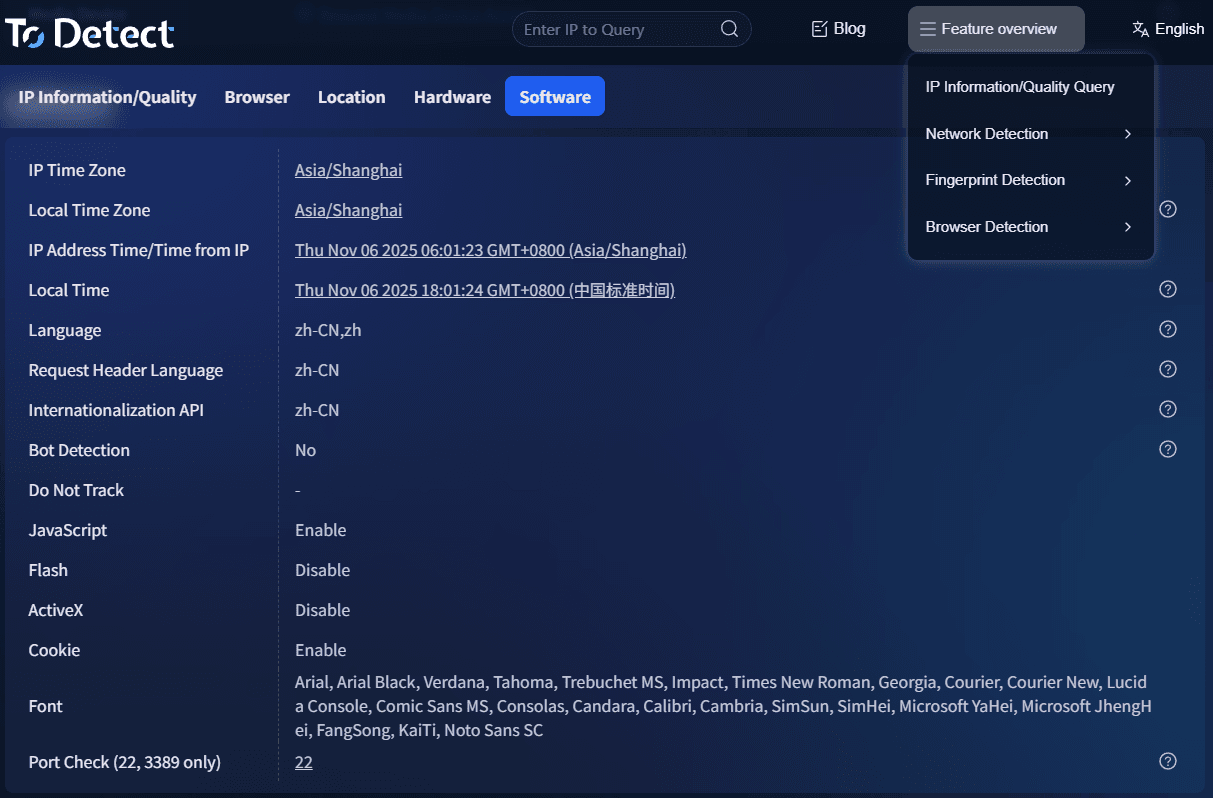
Check weekly (Canvas/WebGL/fonts/timezone).
5. Match IP with fingerprint
Example:
□ US IP + Chinese system → High risk
□ EU IP + local settings → Natural
6. Assign roles to accounts
Mature systems assign roles:
• Content accounts
• Conversion accounts
• Traffic accounts
• Testing accounts
Conclusion
Multi-account operations in 2026 have evolved from “technical evasion” to “simulating real user ecosystems.”
It’s no longer about avoiding detection, but about appearing authentic.
Whether using fingerprint browsers or tools like ToDetect, the core goal is the same: make your accounts look like real people.
