



 Resources
 Feature overview

 bonnie
 2026-05-20 10:33
Many people feel confused the first time they encounter these two concepts — they both seem like “user information,” but they actually serve completely different purposes.
In fact, understanding them is not complicated at all. The key is knowing that one represents “what device you are using,” while the other represents “which network you are coming from.”
Today, we’ll help you clearly understand what User-Agent can reveal, what information an IP address can expose, and the core differences between the two.

1. First, What Exactly Are User-Agent and IP Address?
1. What Is User-Agent?
User-Agent (UA) is basically an “introduction card” that your browser sends to a website. It tells the server:
• What browser you are using (Chrome, Edge, Safari)
• What device you are using (phone, desktop, tablet)
• What operating system you are using (Windows, iOS, Android)
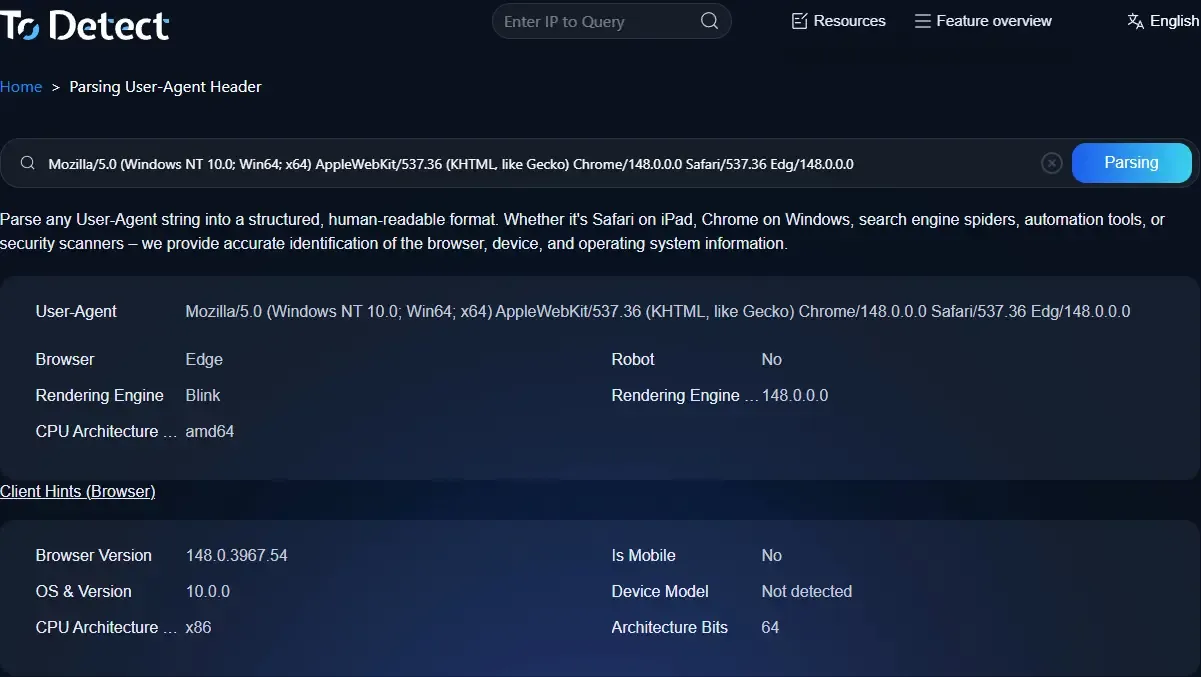
• A common UA string may look like this:
• Mozilla/5.0 (Windows NT 10.0; Win64; x64) Chrome/122...
So when performing User-Agent parsing, the essence is simply converting this long string into readable data in order to identify the visitor’s device type.
2. What Is an IP Address?
An IP address is like your address on the internet. It identifies roughly where you are located, which network provider you are using, and whether you may be using a proxy.
Through IP lookup tools, you can typically see city-level location data (such as Guangzhou, Shanghai, or Shenzhen), network type (China Mobile, China Unicom, China Telecom), and whether the IP belongs to a data center.
2. User-Agent vs IP Address: The Core Differences at a Glance
| Comparison Dimension | User-Agent (UA) | IP Address |
|---|---|---|
| Definition | A browser/device identity string sent by the client | A unique communication address on the network |
| Main Purpose | Identify device type, browser, and operating system | Identify user network location and source |
| Information Layer | Device-level information | Network-level information |
| Can It Be Modified? | Very easy to modify (UA spoofing is common) | Can be hidden or changed via proxies/VPNs |
| Accuracy | Can identify device type but not a person | Can locate city and ISP level information |
| Stability | Relatively stable but can be manipulated by scripts | May change frequently in mobile network environments |
| Common Uses | Device recognition, mobile adaptation, traffic analytics | Geo-detection, risk control, anti-bot protection |
| SEO Applications | Identify Baidu spiders, Googlebot, mobile traffic | Detect regional traffic, abnormal visits, fake traffic |
| Security Value | Medium (easy to spoof) | Relatively high (useful for basic risk control) |
| Common Tools | User-Agent parsers, browser detection tools | IP lookup tools, IP geolocation services |
3. Why Do Websites Analyze Both UA and IP Together?
If you only look at IPs, it’s easy to make mistakes. If you only look at UAs, security is still insufficient. For example:
• The same IP accesses frequently, but the UA keeps changing → possibly a bot
• UA looks normal, but the IP comes from an unusual region → possibly proxy traffic
• Both IP and UA look suspicious → high-risk access
That’s why many modern systems combine browser fingerprint detection as well.
4. Browser Fingerprinting: Going Beyond UA and IP
If UA and IP are considered “basic information,” browser fingerprinting is an upgraded identification method.
It combines multiple types of data, including installed fonts, screen resolution, timezone/language settings, Canvas rendering characteristics, and WebGL information.
Many risk-control systems and advertising platforms now use this approach to compensate for the weaknesses of UA and IP analysis and improve identification accuracy.
5. Real-World Applications: Not Just for Technical Experts
1. SEO Analysis and Traffic Identification
SEO professionals often use UA analysis to identify search engine crawlers (such as Baidu Spider and Googlebot) and analyze mobile vs desktop traffic distribution.
Combined with IP lookup, it can also help detect abnormal traffic or click fraud behavior.
2. Website Security and Risk Control
E-commerce platforms and login systems often use IP blacklists, UA anomaly detection, and browser fingerprint matching together to reduce fraud and credential stuffing risks.
3. Data Analytics and User Insights
For example, if you want to know what devices users mainly use, which regions generate the most traffic, or whether proxy traffic is affecting your data, UA parsing and IP analysis are essential.
6. The Practical Role of ToDetect and Similar Tools
In real-world operations, manually parsing UA strings or checking IPs every time is unrealistic. That’s where tools become extremely valuable.
Browser fingerprinting platforms (such as ToDetect) can help you quickly complete:
• User-Agent parsing
• IP address lookup and geolocation detection
• Browser fingerprint analysis
• Risk scoring evaluation
For website operators, advertisers, or anti-fraud teams, these tools can significantly improve efficiency.
7. Important Details People Often Ignore
Many people think “IP + UA = complete user information,” but that’s far from enough. In reality, there are several important limitations:
1. Mobile Network IPs Change Frequently
A mobile user’s IP may change multiple times a day, which can easily cause misjudgments.
2. UA Does Not Equal a Real Device
Some bots can easily disguise themselves as Chrome or Safari browsers.
3. Proxies Are Becoming More Common
This makes IP geolocation increasingly inaccurate. That’s why relying solely on IP or UA is no longer sufficient — browser fingerprinting must also be included.
8. Common Questions About User-Agent and IP Address (FAQ)
1. Which Is Better for Identifying Real Users: User-Agent or IP Address?
Generally speaking, neither can independently identify a real user. User-Agent can be spoofed easily, and IP addresses can change through proxies or VPNs.
The more reliable approach today is combining User-Agent parsing, IP address analysis, and browser fingerprint detection together.
2. Can an IP Address Precisely Locate an Individual?
No. IP address lookup usually only provides city-level or ISP-level information, such as “Shenzhen Telecom” or “Shanghai Mobile.”
It cannot directly identify a person’s exact physical address, so it is mainly used for risk control, regional analysis, and traffic evaluation.
3. Can User-Agent Be Modified? Will It Affect Website Analytics?
Yes, and it’s very easy. Browser extensions or scripts can spoof UA strings effortlessly.
This can indeed interfere with website analytics, especially device recognition and mobile traffic statistics. That’s why many platforms now use additional verification dimensions.
4. Why Do Many Websites Analyze Both IP and User-Agent Parsing Together?
Because relying on a single dimension is easy to bypass. IP addresses help determine geographic origin, while User-Agent helps identify device type. Together, they are much more effective for detecting abnormal traffic, bots, and suspicious behaviors.
Conclusion: Understanding the Essence Matters More Than Memorizing Concepts
Although IP and UA may seem simple, the amount of information they can reveal is far greater than most people imagine. In today’s internet environment, relying on a single data point is no longer enough.
A truly reliable approach combines IP address lookup, User-Agent parsing, and browser fingerprint detection together for comprehensive analysis.
Tools like ToDetect are designed to integrate these fragmented pieces of information, perform multi-dimensional cross-verification, and improve identification accuracy instead of relying on just one signal.
