



 Resources
 Feature overview

 Charles
 2026-06-26 11:36
You may have already hidden your IP address without realizing that your DNS requests are still leaking. Or you may have been browsing the web normally while your DNS traffic has already been hijacked, causing you to access servers that are not even the official ones.
These issues are difficult to detect in everyday use. They usually provide no obvious warnings and don't affect normal browsing, so many users never realize that their online privacy is already at risk. By the time you notice account issues, inaccessible websites, or exposed personal information, it is often too late to investigate.
In this guide, we'll show you how to check for DNS leaks in just three simple steps. Even if you've never heard of DNS before, you can easily determine whether your network connection is secure.

Step 1: What Is a DNS Leak and Why Should You Test for It?
DNS (Domain Name System) can be thought of as the Internet's "phone book." When you use a VPN or proxy, your DNS requests should also be routed through the proxy server. However, due to improper browser, operating system, or proxy configurations, DNS requests may still be sent directly to your local ISP instead. This is what is commonly known as a DNS leak.
A DNS leak can allow websites to identify your real location, enable your ISP to log the domains you visit, cause access restrictions in certain regions, and expose information that reduces your online anonymity.
Whether you're an everyday internet user or someone working across borders, performing regular DNS leak tests is an essential part of protecting your online privacy.
Step 2: Use a Professional Tool for DNS Leak Testing
We recommend using ToDetect, which not only checks for DNS leaks but also tests:
• Whether your DNS servers are leaking;
• Whether your public IP address is properly hidden;
• Browser fingerprint information;
• WebRTC leaks;
• IPv6 leaks;
• Browser environment details such as time zone, language, and fonts.
Unlike websites that only perform DNS leak tests, ToDetect provides a complete privacy assessment in a single scan. It's especially useful for cross-border work, account management, and users who prioritize online privacy.
Simply open the testing page in your browser—no software installation is required. Within a few seconds, you'll receive a complete diagnostic report.
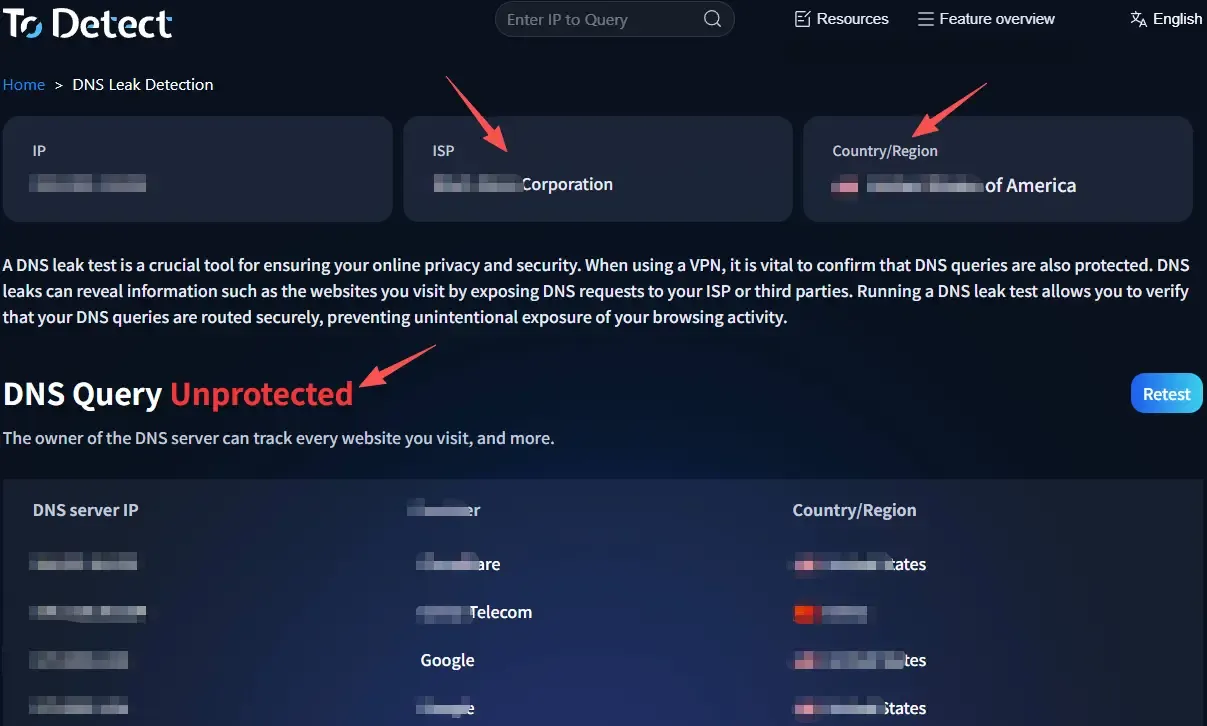
If your DNS servers are still provided by your local ISP (such as China Telecom, China Unicom, or China Mobile) while your VPN endpoint is located overseas, you can generally conclude that a DNS leak exists.
Step 3: Check Whether Your DNS Server Matches Your VPN Location
After completing a DNS leak test, don't focus only on your IP address. Many people assume everything is fine when their IP shows the United States, Japan, or Singapore, but the real indicator is the DNS server.
For example, if your VPN is connected to a U.S. server, your DNS server should ideally also be located in the United States or be provided by your VPN provider.
If the results show "IP: United States" but "DNS: Local ISP," it means your DNS requests are bypassing the VPN and being sent directly to your local DNS server—a classic DNS leak.
You should also review your browser fingerprint information. Even if your DNS configuration is correct, inconsistencies in browser language, time zone, Canvas fingerprint, WebGL, or similar attributes may still increase the risk of account detection.
Step 4: Check for DNS Hijacking
Besides DNS leaks, another serious security issue is DNS hijacking. DNS hijacking occurs when DNS resolution results are altered, causing legitimate domain names to resolve to unauthorized servers instead of the official ones.
Common signs include unexpected advertising redirects, websites failing to load, entering the correct URL but landing on an unfamiliar page, frequent HTTPS certificate warnings, or login pages displaying unusual layouts.
If you experience any of these symptoms, perform another DNS test using a trusted tool. If the DNS server source appears abnormal or the resolution results differ from official records, DNS hijacking may be occurring.
You can also compare results by switching to a public DNS service. If the issue disappears immediately after changing DNS servers, it is a strong indication that your previous DNS configuration was compromised.
5. How to Prevent DNS Leaks and DNS Hijacking
Testing is only the first step—prevention is even more important.
First, choose a VPN or proxy service that includes DNS Leak Protection. Many reputable VPN providers offer this feature to ensure DNS requests are securely routed through the VPN tunnel.
Second, enable Secure DNS in your browser or use DoH (DNS over HTTPS) to encrypt DNS traffic and improve privacy and security.
Additionally, consider disabling WebRTC or configuring it properly to prevent your real IP address from being exposed.
Finally, remember that changing your VPN, browser, or operating system may alter your network configuration. Performing regular DNS leak and browser fingerprint tests can help you identify issues before they become serious problems.
6. DNS Leak Test FAQ
1. What's the difference between a DNS leak and an IP leak?
An IP leak exposes your real IP address directly, while a DNS leak reveals the domains you visit. Even if your IP address is hidden, a DNS leak may still allow websites and your ISP to identify your actual location, making both equally important to test.
2. Why do DNS leaks still occur even when I'm using a VPN?
Some VPNs or proxies do not enable DNS leak protection by default. In addition, your browser or operating system may continue using your local DNS resolver, allowing DNS requests to bypass the VPN. A DNS leak test can quickly verify whether your DNS server has been switched correctly.
3. What are the signs of DNS hijacking?
If you frequently encounter unwanted redirects, cannot access official websites, receive HTTPS certificate warnings, or arrive at unfamiliar pages after entering the correct URL, DNS hijacking may be the cause. Run a DNS leak test immediately to verify your DNS server and resolution results.
4. Should I perform browser fingerprint testing together with DNS leak testing?
Yes. A normal DNS configuration does not guarantee complete online privacy. Browser fingerprints, WebRTC, language, time zone, and other browser attributes can also expose your identity or trigger account security checks. A comprehensive tool like ToDetect can evaluate all of these factors in a single scan.
Conclusion
Whether you're browsing the web casually, working remotely across borders, or managing international e-commerce accounts, regular DNS leak testing should become part of your online security routine.
With a comprehensive tool like ToDetect, you can assess your entire network environment in just a few minutes, identify potential privacy risks, and take action before DNS leaks or DNS hijacking lead to more serious consequences.
If you haven't checked your network privacy recently, now is a great time to spend a few minutes testing your DNS, browser fingerprint, and other privacy-related information to ensure your online environment remains secure.
