



 Resources
 Feature overview

 Alani
Alani 2026-06-30 11:36
Many people who do cross-border e-commerce or overseas social media often encounter the problem of high browser fingerprint duplication. At first, you may not notice it, but as the number of accounts grows, it becomes easier to get associated, flagged, or even banned.
Many think that changing IP or clearing cookies is enough. In fact, what truly determines whether accounts are easily linked is whether the browser fingerprint is sufficiently authentic. If the browser environment setup has obvious flaws, even the cleanest proxy IP will struggle to evade the platform's risk control detection.
Today, we'll teach you how to solve the problem of high browser fingerprint duplication, how to avoid overly obvious environmental camouflage traces, and give you one trick to fix the issues above!

1. Why does browser fingerprint duplication keep getting higher?
Browser fingerprint is not a single piece of data, but is composed of dozens or even hundreds of parameters. Many ordinary browsers or low‑quality environment modification tools only change the User‑Agent or screen resolution, while leaving other underlying parameters unchanged.
After creating dozens of such environments, a large number of duplicate data combinations appear. Platforms can easily identify that these accounts come from the same device through algorithms. Therefore, the real problem is not the IP, but the browser environment itself.
2. Browser environment setup – the most easily overlooked aspects
Many beginners tend to make several mistakes when setting up browser environments.
First, only changing the proxy IP. Many think that residential IPs are safe enough, but if the browser fingerprint does not change accordingly, a high‑quality IP can still be identified.
Second, mass‑copying existing environments. To save time, some directly duplicate existing browser profiles, only changing cookies or proxies. While convenient, the environment parameters are almost identical, so fingerprint duplication naturally keeps rising.
Third, disabling some fingerprint APIs. Some browsers disable Canvas, WebGL and other interfaces to hide information. However, in real user environments, these features are normally enabled, so disabling them actually makes anomalies more obvious.
Therefore, a high‑quality browser environment setup is not about hiding everything, but about mimicking real devices as closely as possible.
3. How to check if your browser fingerprint has problems?
Many people don't know whether their environment is safe. In fact, the simplest way is to run a fingerprint browser detection.
It is recommended that every time you set up a new browser environment, you check: fingerprint uniqueness, Canvas normality, WebGL consistency, Audio Fingerprint anomalies, font count reasonableness, time zone and IP matching, WebRTC real IP leakage, and DNS anomalies.
If the detection results show many red risk warnings, or if multiple environments appear highly similar, it means your browser fingerprint duplication is already high. Many people skip this step, but in reality, it is more important than blindly creating accounts.
4. One trick to solve the problem of obvious environmental camouflage traces
Currently, a more effective method is to directly use a professional fingerprint browser to regenerate independent environments. The big advantage of Bit Browser is not just simply modifying browser parameters, but being able to generate unique device information for each browser profile, for example:
• Independent Canvas
• Independent WebGL
• Independent font set
• Independent hardware parameters
• Independent browser configuration
• Independent cookie storage
This makes each browser environment much closer to a real user device, rather than being a batch‑copied template. Compared to the traditional method of just modifying the User‑Agent, this approach significantly reduces fingerprint duplication and makes it easier to pass platform risk controls.
Many cross‑border teams managing multiple accounts on Facebook, Google, TikTok, Amazon, etc., also prefer this method for browser environment setup.
5. How to further reduce browser fingerprint duplication?
First, do not use the same browser template for a long time. Mixing different OS versions, browser versions, and screen resolutions appropriately makes the overall environment more natural.
Second, keep the proxy IP consistent with environment information. For example, a US residential IP should be paired with US time zone and English language settings, rather than a US IP with a Chinese system and Asia time zone.
In addition, avoid changing environment parameters frequently. A real user's computer configuration usually does not change every day. If today it's Windows 11, tomorrow macOS, and the day after Linux, such behaviour is itself highly anomalous.
Finally, it is best to stick to the same browser environment for each account. Do not log into multiple accounts on the same environment alternately, nor switch one account between different devices frequently – these are all key risk behaviours that platforms monitor.
6. Proper multi‑environment isolation is more important than frequent IP changes
Many people, after account association occurs, immediately start changing proxy IPs repeatedly.
In fact, more and more platforms nowadays no longer rely solely on IP for identification, but instead analyse multiple dimensions: browser fingerprint, device parameters, network behaviour, cookies, local cache, and more.
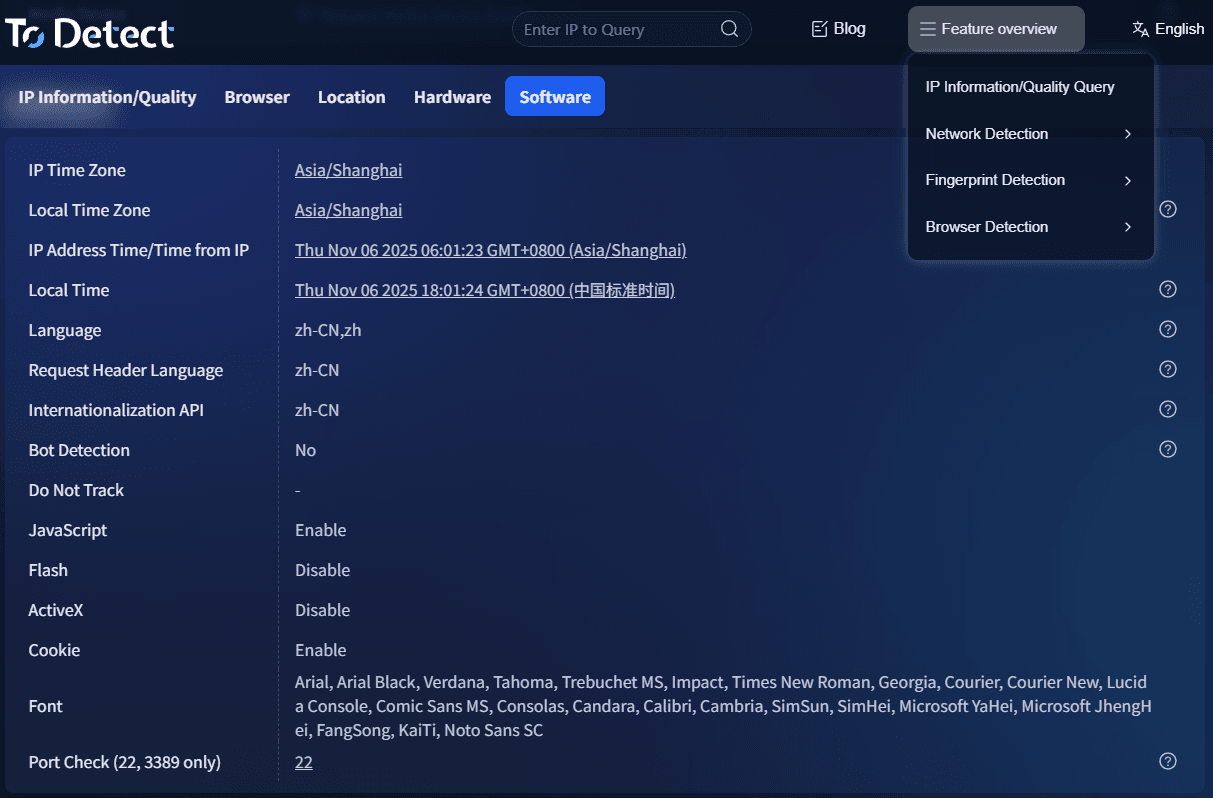
Therefore, a truly stable solution is:
• Use a professional fingerprint browser to create independent environments;
• Set up browser environments properly, ensuring each environment's parameters are authentic and unique;
• Perform regular fingerprint browser detection to catch high duplication issues in time;
• Combine with stable residential proxy IPs to achieve complete isolation between accounts.
Only when environment, IP, and behavioural habits are all aligned can you effectively reduce account association risks and improve the long‑term stability and success rate of your accounts.
7. Fingerprint browser detection – FAQ
1. Why are accounts still associated even when using a fingerprint browser?
Many think that using a fingerprint browser is foolproof. In fact, account association also relates to proxy IP quality, how the browser environment is set up, login behaviour, and other factors. If multiple accounts share the same IP, have repeated environment parameters, or frequently switch devices, they may still trigger platform risk controls.
2. How to tell whether a browser fingerprint is authentic and whether duplication is too high?
The most direct way is to use professional fingerprint browser detection tools – for example, check Canvas, WebGL, Audio, fonts, time zone, and other core parameters. If multiple browser environments show highly similar results, the duplication is high and you need to regenerate independent environments.
3. Which business scenarios is ToDetect suitable for?
ToDetect is well‑suited for cross‑border e‑commerce, Facebook operations, TikTok matrix, Google account management, affiliate marketing, and overseas social media management – basically any multi‑account management scenario. Through independent browser environment setup, it effectively reduces account association risks and improves the long‑term stability and security of your accounts.
Summary
High browser fingerprint duplication cannot be solved simply by changing IP. The real core lies in whether the browser environment is authentic and independent. If environmental camouflage traces are too obvious, even premium proxies will not bypass platform risk controls.
To reduce fingerprint duplication from the source, we recommend starting with fingerprint browser detection to identify abnormal parameters in your environments, and then using a professional fingerprint browser (like ToDetect) to regenerate independent browser profiles.
Only by starting from the underlying device environment and lowering browser fingerprint duplication can you make your accounts safer and more stable, reduce association and ban risks, and provide a more reliable foundation for your ongoing operations.
