



 Resources
 Feature overview

 Ganesh
 2026-09-30 10:43
Most account bans I've investigated over the years were not caused by the account itself. The creatives were fine, the warm-up was fine, the behavior was fine. The problem sat one layer lower. The IP had been abused by someone else a week earlier. The DNS resolver was leaking the real ISP. Or the browser was reporting a Kyiv timezone while the proxy exited in Texas. Platforms don't need a single smoking gun. They add up small inconsistencies until your risk score crosses a threshold.
I see this from both sides. I work at SotaProxy, and a good share of the "your proxies got my accounts banned" tickets we receive end the same way: the IP was clean, but the browser around it was leaking. Sometimes it's the other way around, and the exit really was bad. Either way, nobody can fix anything until you know which layer failed.
So I stopped trusting "it connects" as a quality check. Every new proxy batch, every new anti-detect profile template, and every new geo goes through the same short audit before a single real account touches it. In this article I'll walk through that audit using ToDetect, a free checker that combines IP purity scoring, leak tests, and fingerprint consistency in one place. I'll run it on our own SotaProxy residential, mobile, and ISP pools, so you can see what a clean result looks like and what to do when a result isn't clean.
Table of Contents
1. Why "working proxy" and "clean proxy" are different things
2. What ToDetect actually checks
3. Proxy types: what purity score to expect and which to pick
4. How we keep SotaProxy pools clean (and why you should still verify)
5. My pre-launch audit: step by step
6. Reading the IP Quality Score without overreacting
7. Leaks that kill setups quietly: DNS, WebRTC, timezone
8. How I structure the stack for multi-accounting
9. FAQ and troubleshooting
1. Why "Working Proxy" and "Clean Proxy" Are Different Things
A proxy has three layers of reputation that matter to an anti-fraud system.
1. IP history. Has this address been flagged for spam, scraping, credential stuffing, or abuse? Residential pools are shared, so the IP you get today may have been used by someone careless yesterday.
2. Network classification. Is the IP registered to a hosting provider (datacenter ASN), a home ISP, or a mobile carrier? Platforms treat these very differently.
3. Environment consistency. Does everything around the IP match it? That means DNS resolver location, WebRTC-exposed addresses, browser timezone, language headers, and the fingerprint as a whole.
A proxy provider controls the first two. You control the third. A good audit tells you which side the problem is on, and that alone saves hours of guessing.
Practical Rule: Never debug an account ban until you've ruled out the environment. If the IP scores clean and there are no leaks, the problem is almost always behavioral or account-level.
2. What ToDetect Actually Checks
I use ToDetect because it puts the network side and the browser side on one screen. The modules I rely on:
● IP Quality Check. A purity score on a scale from Extreme Risk to Extremely Clean, plus ISP, ASN, ASN organization, CIDR prefix, IP type, IP origin, and an abuse flag.
● Cross-database lookup. The same IP checked against IP2Location, MaxMind, DB-IP, and IP-API, with flags for proxy, Tor exit node, datacenter, and mobile. Different platforms buy different databases, so agreement between them matters.
● ASN / location history. When the IP block was first seen, and whether its location or owner changed recently.
● DNS Leak Test and WebRTC Leak Detection.
● Timezone Detection. IP timezone vs. local browser timezone.
● Browser Fingerprint Consistency. An aggregate score covering Canvas, WebGL, audio, fonts, Client Hints, and bot detection signals.
3. Proxy Types: What Purity Score to Expect and Which to Pick
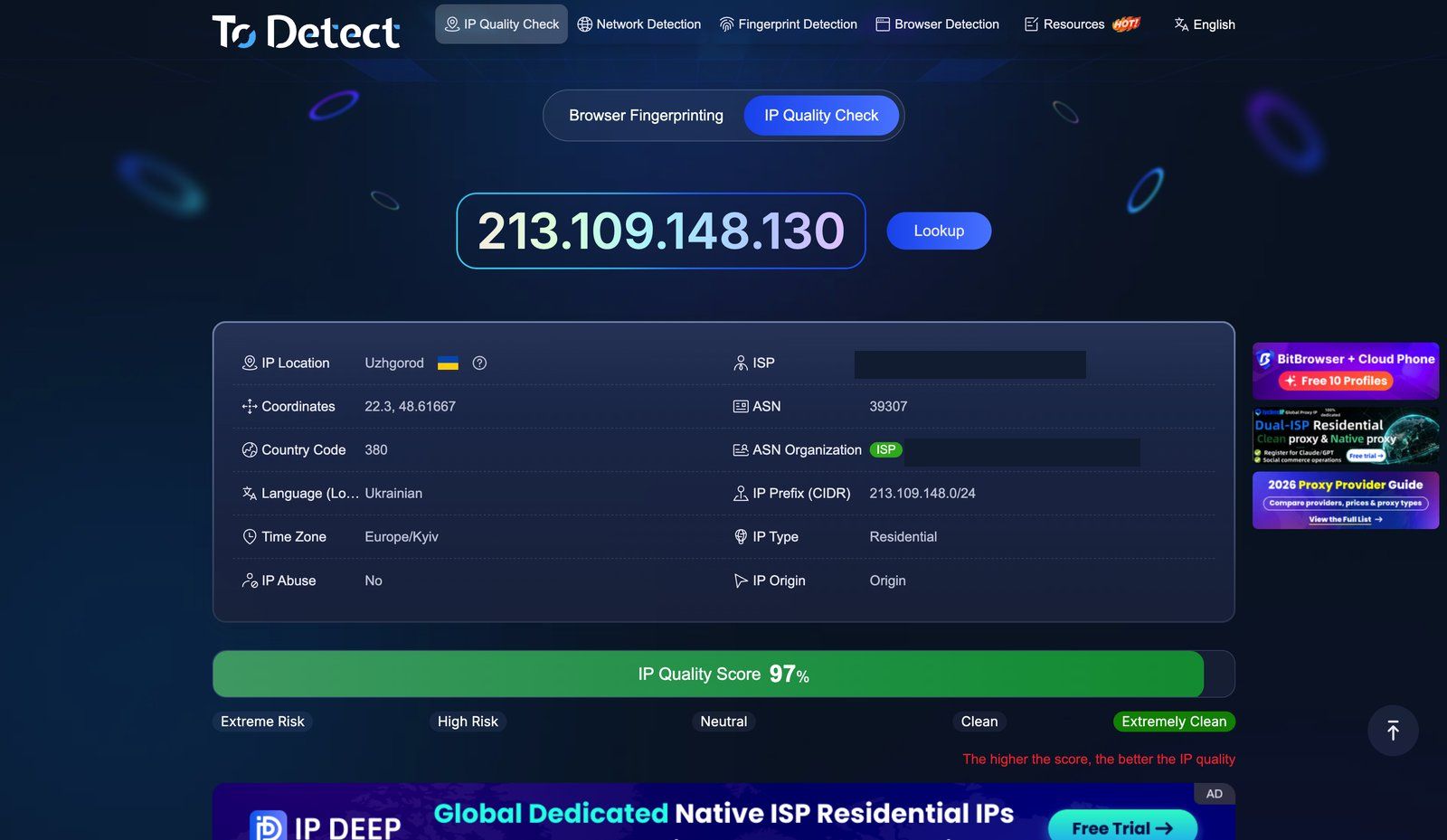
A question I get a lot: "My datacenter proxy shows as a proxy. Is it bad?" Not necessarily. Expectations depend on the proxy type. This is how I read results by category, and which SotaProxy product I'd use for each job:
Here is the same check on a SotaProxy ISP proxy, and it shows why the score alone is not the whole story:
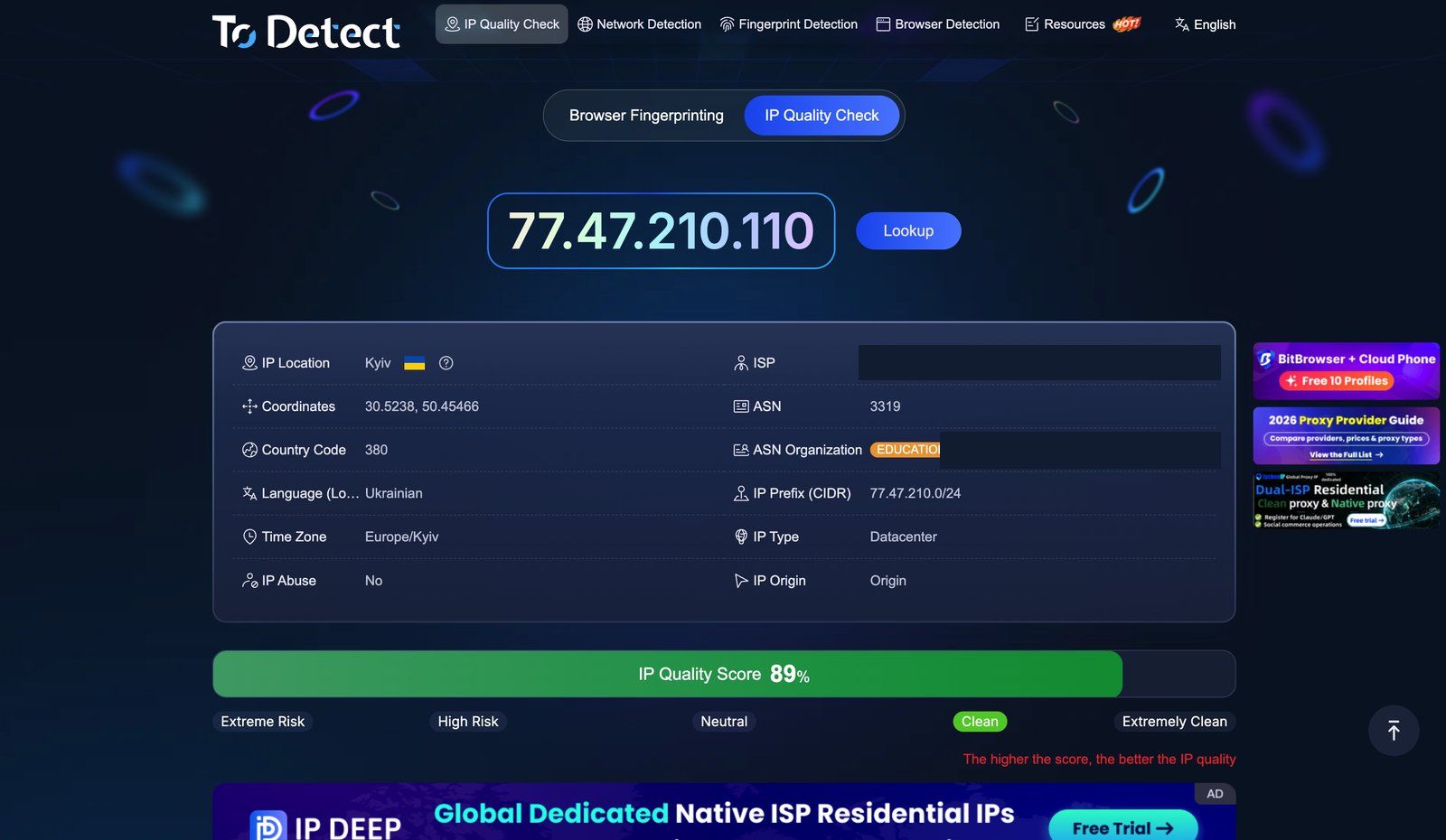
That Datacenter label on an ISP proxy looks alarming until you scroll down to the databases, which we'll do in Step 4. This is exactly the category effect from the rule below: an ISP proxy lives on a residential ASN but sits in a datacenter, so different sources describe it differently.
Mobile exits sit at the other end of the same spectrum. Run the databases check on a 4G/LTE address and you get Is Mobile IP — Yes with Is Data Center — No, because the address really does belong to a carrier. That combination is the highest-trust signal you can hand a platform, and it's the reason mobile is the default choice for social media work.
Practical Rule: Judge an IP against its own category. A datacenter IP rated "Neutral" is doing its job. A residential IP rated "Neutral" deserves a second look.
4. How We Keep SotaProxy Pools Clean (and Why You Should Still Verify)
Purity isn't something a provider sets once. Residential and mobile IPs are shared, and their reputation changes daily. At SotaProxy, we handle this with two systems that run in the background without any configuration on the client's side:
● Pool Manager. It continuously tracks which IPs are getting flagged or banned, and removes compromised addresses from rotation before they reach your requests. In practice this is why a rotation rarely lands you on a High Risk exit twice in a row.
● Route Optimizer. For residential and mobile traffic, it picks the lowest-latency node and switches routes when a network segment gets congested. This isn't directly about purity, but timeouts and half-loaded pages create their own suspicious patterns.
On top of that, we run a strict fair usage policy. The fastest way to ruin a residential pool is to let a few customers hammer the same targets with abusive traffic, and every other customer pays for it in reputation.
Still, I'd never ask anyone to take a provider's word for it, ours included. Internal filtering is measured from our side. ToDetect measures from yours, through the same databases the platforms use. That's why this audit is the first thing I recommend to new SotaProxy clients before they move a whole campaign onto a new geo.
Practical Rule: Test the provider, not the individual IP. Fifteen samples from one geo tell you more about a pool than one perfect result.
5. My Pre-Launch Audit: Step by Step
I run this for every new geo or proxy batch, and again whenever I change the anti-detect profile template. It takes about ten minutes.
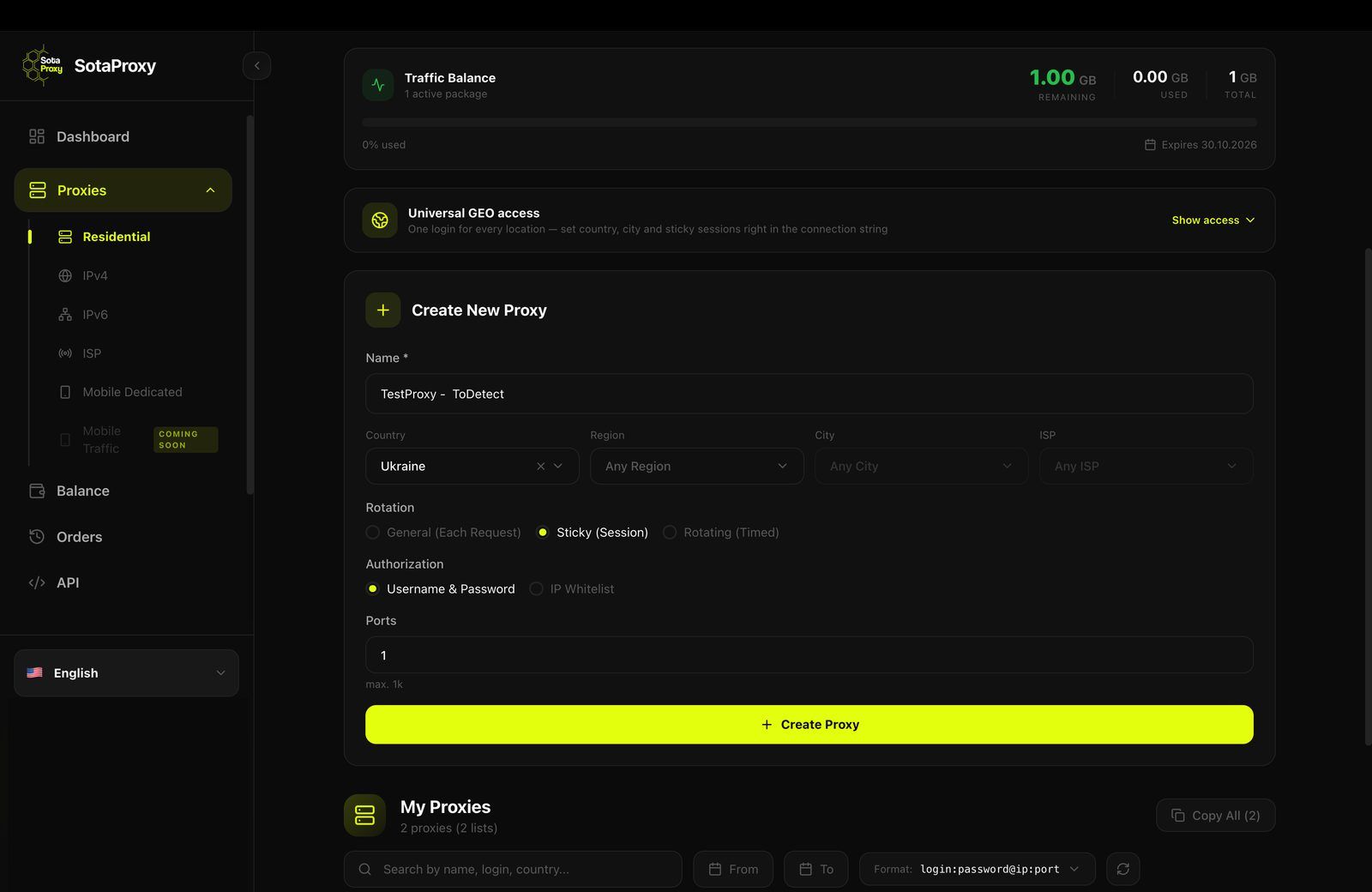
Step 1. Generate credentials for the exact setup you'll use. In the SotaProxy dashboard, pick the product and geo you'll actually run: country, city, and ISP for residential, or country and carrier for mobile. Testing a US-wide pool and then launching on a single city is not the same test. For account work I also set Rotation to Sticky (Session) right here, so the same identity holds through login and the steps after it.
Step 2. Check the raw IP first, without the browser profile. Connect the proxy in a clean browser, or query the exit IP directly in the ToDetect IP Quality Check. This isolates proxy reputation from fingerprint problems.
Step 3. Sample, don't spot-check. With rotating residential proxies, one good IP proves nothing. I rotate and check 10–15 exits from the same geo and write down the score for each. What I'm looking for is the distribution: how many land in Clean or better, and whether any fall into High Risk.
Here is the sample I ran on 1 October 2026, rotating through the Ukrainian residential pool. Fifteen consecutive exits, each one checked in ToDetect’s IP Quality Check:
All fifteen landed in the Extremely Clean band, between 97% and 100%, averaging 98.2%. Every one came back as IP Type — Residential with IP Abuse — No, and they were spread across twelve cities and eleven different ISP networks, from national carriers like Kyivstar and Vodafone down to regional providers. (One exit was captured while the database fields were still loading, so its ISP is missing from the table; its score was 100%.)
Two things to keep in mind when you run your own sample. The last octet is masked here because publishing live exit addresses only helps the platforms you’re trying to work with. And a result this uniform is a snapshot of one pool on one day, not a guarantee: on another geo, or three months from now, you may well see a Neutral or two in the sample, which is exactly why you re-run the check instead of trusting an old screenshot.
Step 4. Compare the four databases. Open "Information from IP databases." If all four agree on country, ISP type, and "not a proxy," you're in good shape. If one database disagrees on the country, that's usually tolerable. If two flag the IP as datacenter or proxy, drop that exit and rotate.
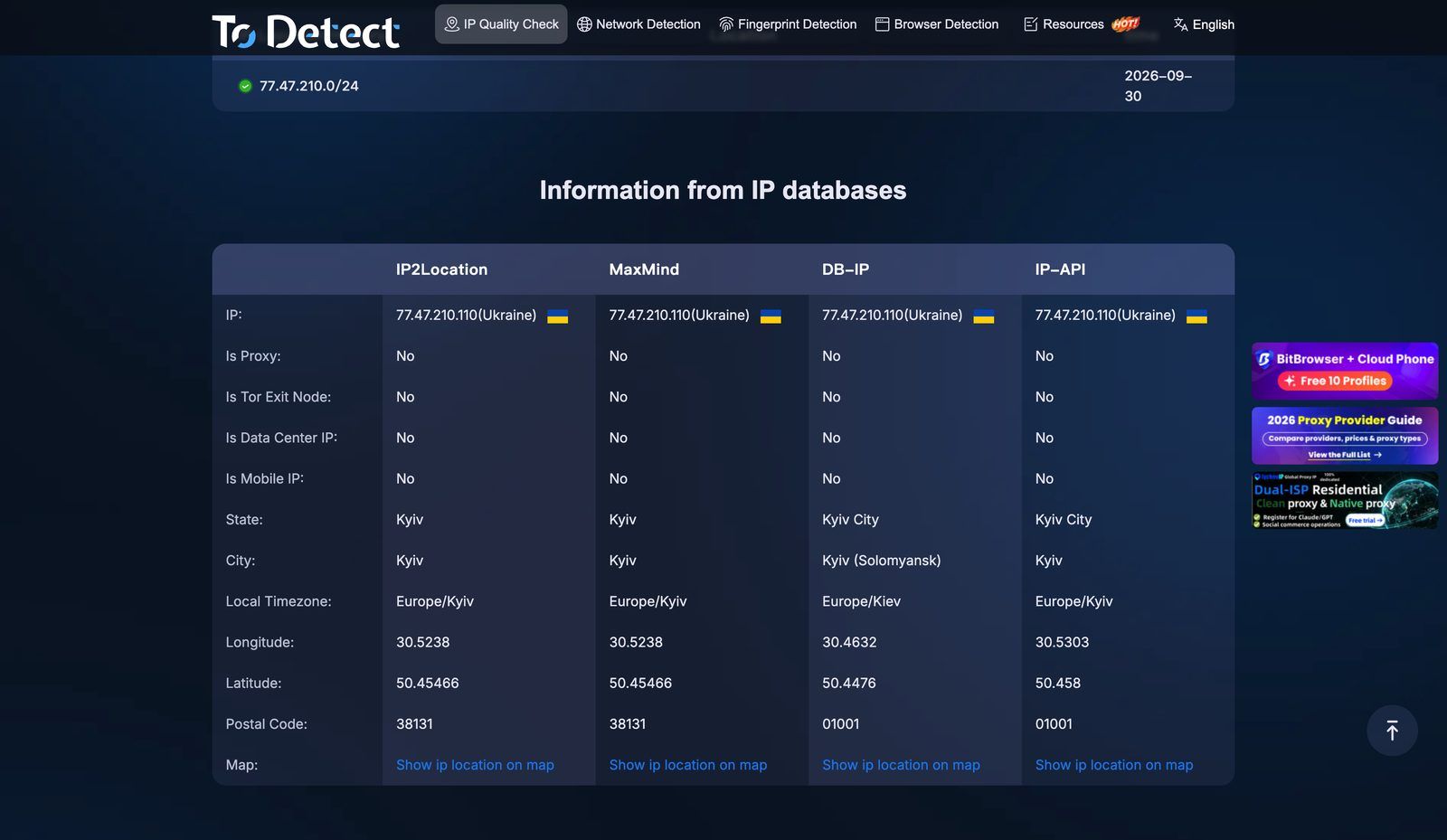
This is the answer to the Datacenter label above. ToDetect classifies by hosting location, while IP2Location, MaxMind, DB-IP and IP-API all read the registration and say this is not a datacenter address. Platforms query databases like these, which is why the ISP proxy still behaves like a residential one. City-level disagreement, as in the screenshot, is normal and not worth acting on.
Step 5. Look at history. Check ASN history and IP location history. A block that changed owner or country in the last few weeks is often a re-sold range, and platforms tend to distrust fresh reassignments.
Step 6. Switch to a sticky session and launch the anti-detect profile. Accounts need a stable identity, so for the real run I switch the SotaProxy endpoint to a sticky session and plug it into the profile (Dolphin{anty}, AdsPower, or whatever you use). Then load the ToDetect main page inside that profile.
Step 7. Run the leak tests. Run the DNS Leak Test and WebRTC Leak Detection. Both must show only addresses consistent with the proxy geo. Section 7 covers this in detail.
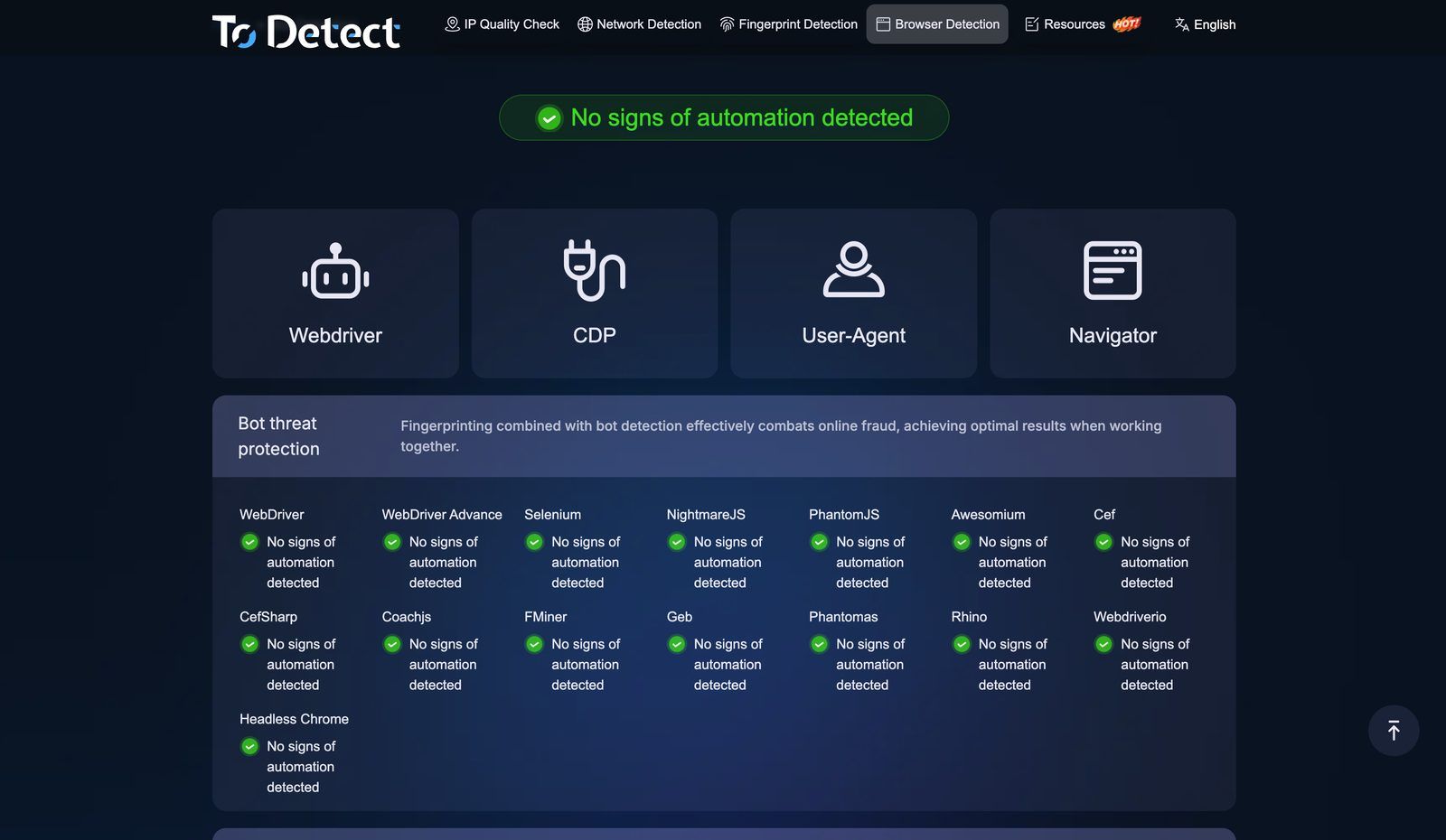
Step 8. Check the consistency score and timezone, then save a reference. IP timezone must match local timezone, and the locale should make sense for the geo. I screenshot the passing result for each geo and profile template. When something breaks later, I compare against the reference instead of guessing. The Browser Detection tab is part of that reference: through a correctly configured profile every automation probe should come back clean.
6. Reading the IP Quality Score Without Overreacting
The score is a signal, not a verdict. A few things I've learned:
● Don't chase 100% on every single IP. In any rotating residential pool, a small share of exits will score lower. What matters is that you can rotate away from them, which is exactly what a provider-side filter like Pool Manager is for.
● An abuse flag matters more than a slightly lower score. A Clean IP with an abuse record is worse than a Neutral IP without one.
● Mobile IPs are a special case. Carrier addresses sit behind CGNAT and are shared by thousands of real phones. Platforms can't ban them aggressively without hitting real users. A good mobile exit should show a mobile carrier ASN and nothing that says "hosting."
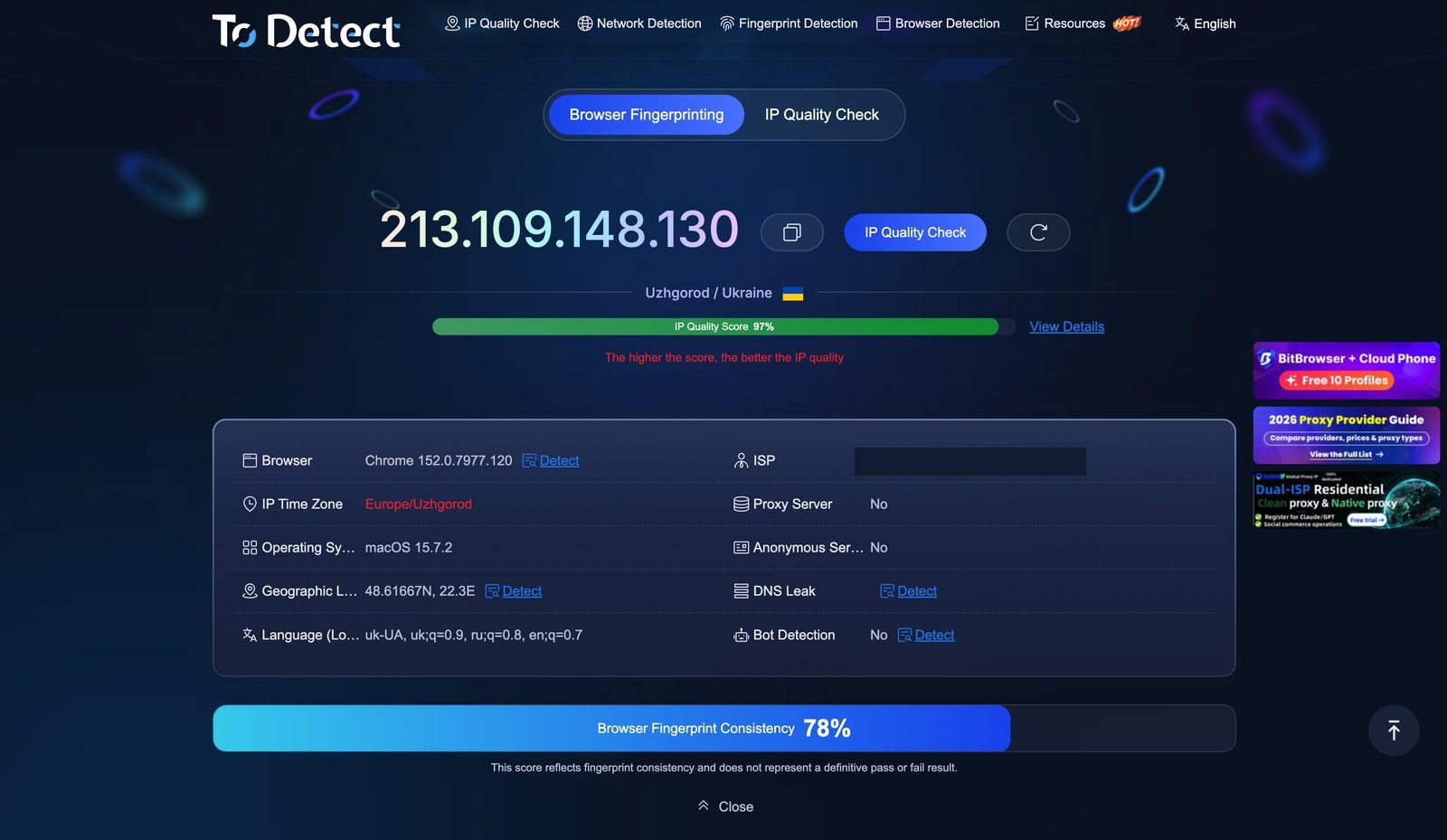
● Don't read the fingerprint score as a grade. Both screenshots above show 78% on a stock Chrome under macOS, and that is an ordinary value, not a problem: the score reflects consistency, and ToDetect states outright that it is not a definitive pass or fail. What matters is the trend. If the same profile template suddenly drops well below its usual value, look at Client Hints against the User-Agent, and at fonts against the claimed OS.
7. Leaks That Kill Setups Quietly: DNS, WebRTC, Timezone
A clean IP means nothing if the browser leaks your real network around it. These three leaks cause most of the "clean proxy, banned account" tickets I see.
DNS leaks
Your traffic exits through the proxy, but DNS queries go to your home ISP's resolver. To a platform, that looks like a user in Texas whose DNS lives in Ukraine. The ToDetect DNS Leak Test lists every resolver it sees. The test for a proxy setup is simple: none of those resolvers may belong to your own home ISP.
Fix: Use SOCKS5 with remote DNS resolution where your proxy type supports it, or make sure your anti-detect browser resolves DNS through the proxy. Double-check after every browser update.
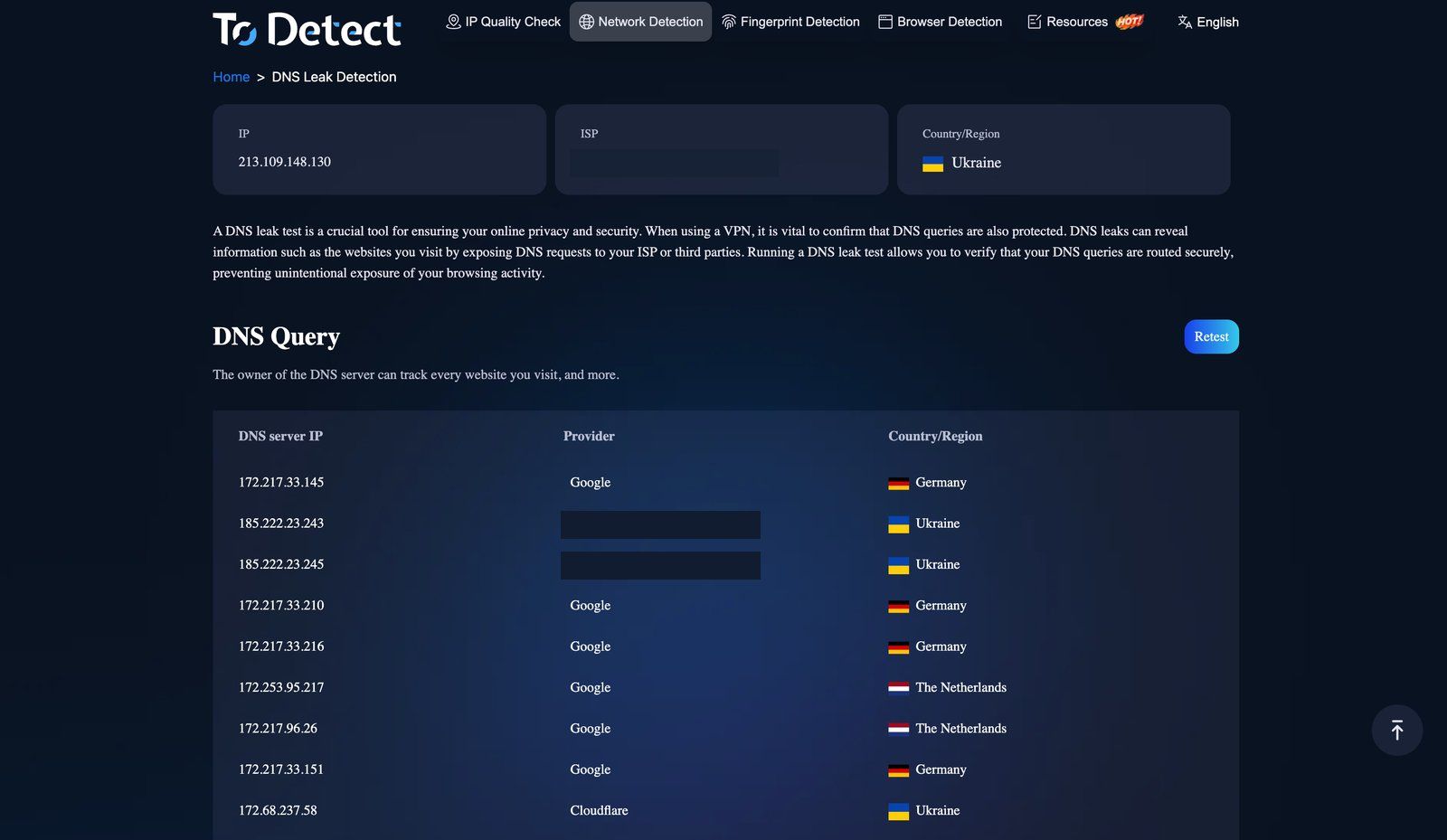
One nuance worth knowing, because it trips people up: public resolvers are anycast, so Google's nodes can be reported in Germany or the Netherlands while the exit sits in Ukraine. That is not a leak. A leak is a resolver that belongs to your provider, the one you'd see with the proxy switched off. In the screenshot the only ISP-owned resolvers are the exit's own, which is exactly what you want.
WebRTC leaks
WebRTC can expose your local or real public IP even when HTTP traffic is proxied. This is the classic "the proxy works but the account still got linked" scenario.
Fix: In your anti-detect profile, set WebRTC to "replace" (substituting the proxy IP) rather than fully disabling it, since a fully disabled WebRTC is unusual for a normal user. Then confirm in ToDetect that only the proxy IP appears.
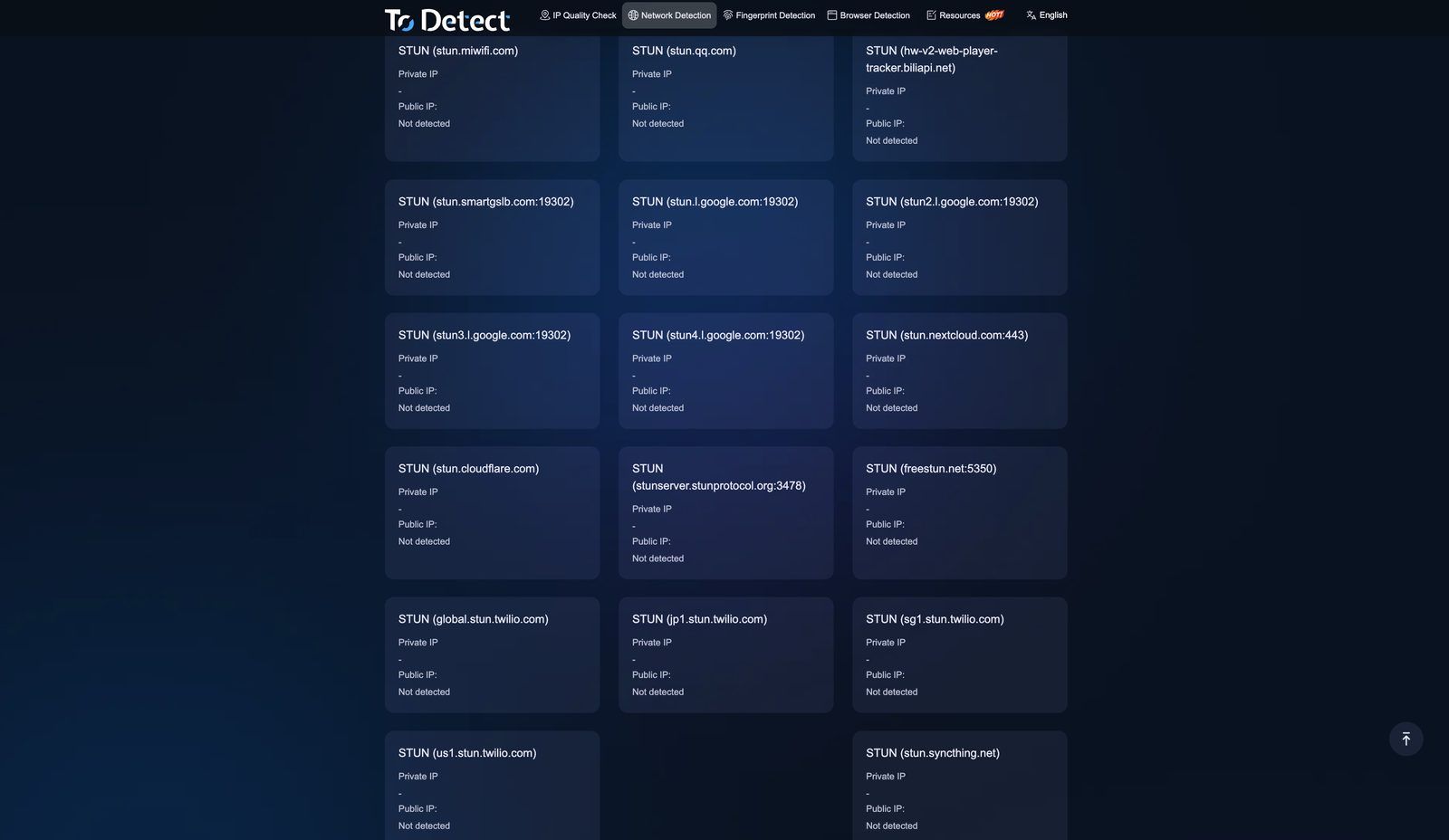
Two dozen STUN servers, and every one of them comes back with nothing. That's the result to screenshot and keep as your reference.
Timezone and locale mismatch
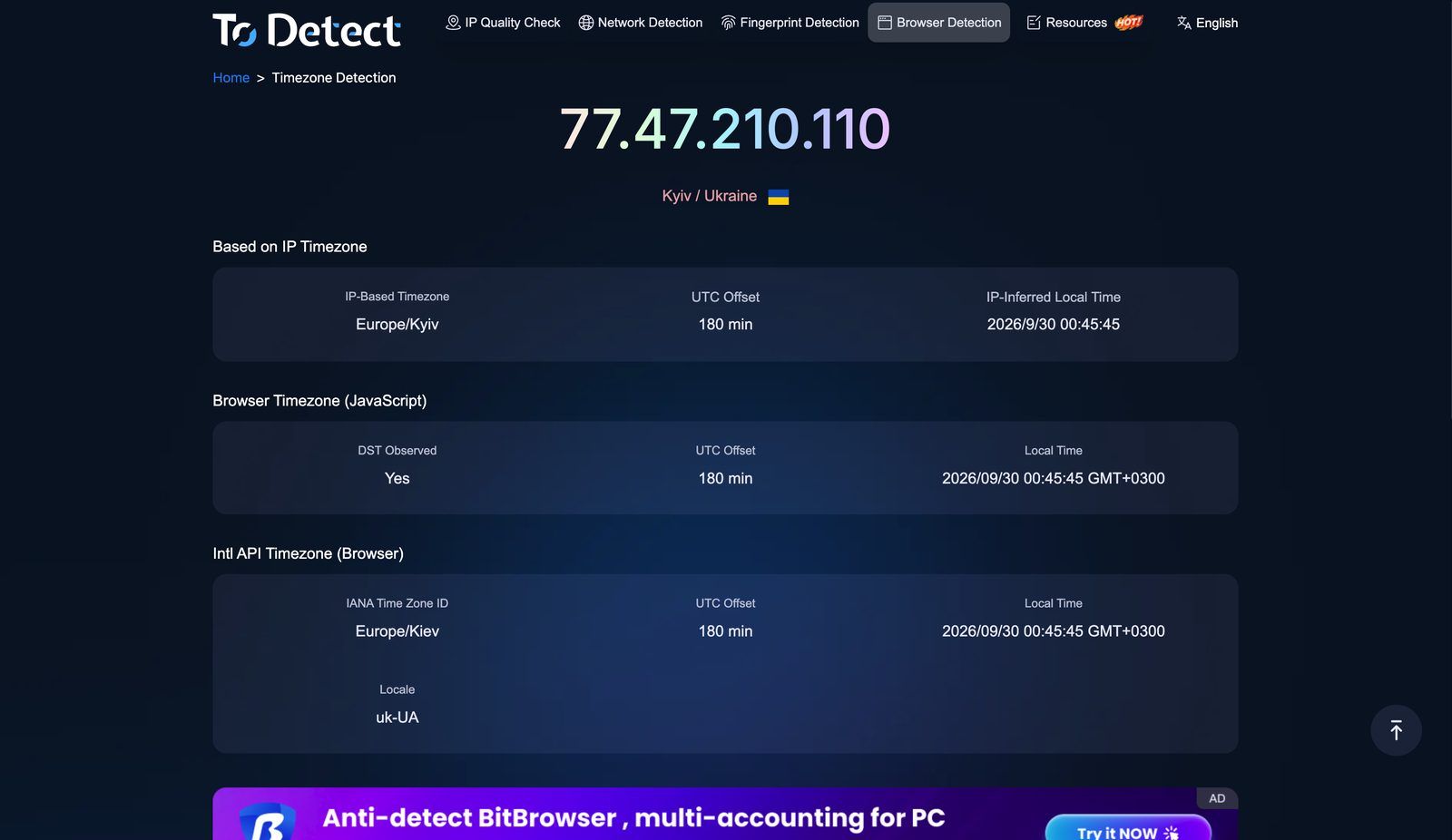
The IP exits in New York, but the browser reports Europe/Kyiv and ru-RU headers. ToDetect shows IP timezone and local timezone side by side, so the mismatch is obvious.
Fix: Let the anti-detect browser set timezone, geolocation, and language automatically from the proxy IP, then verify it. "Auto" sometimes caches the previous proxy's values, especially when you switch SotaProxy geos inside the same profile.
8. How I Structure the Stack for Multi-Accounting
This is the setup I usually run, from bottom to top:
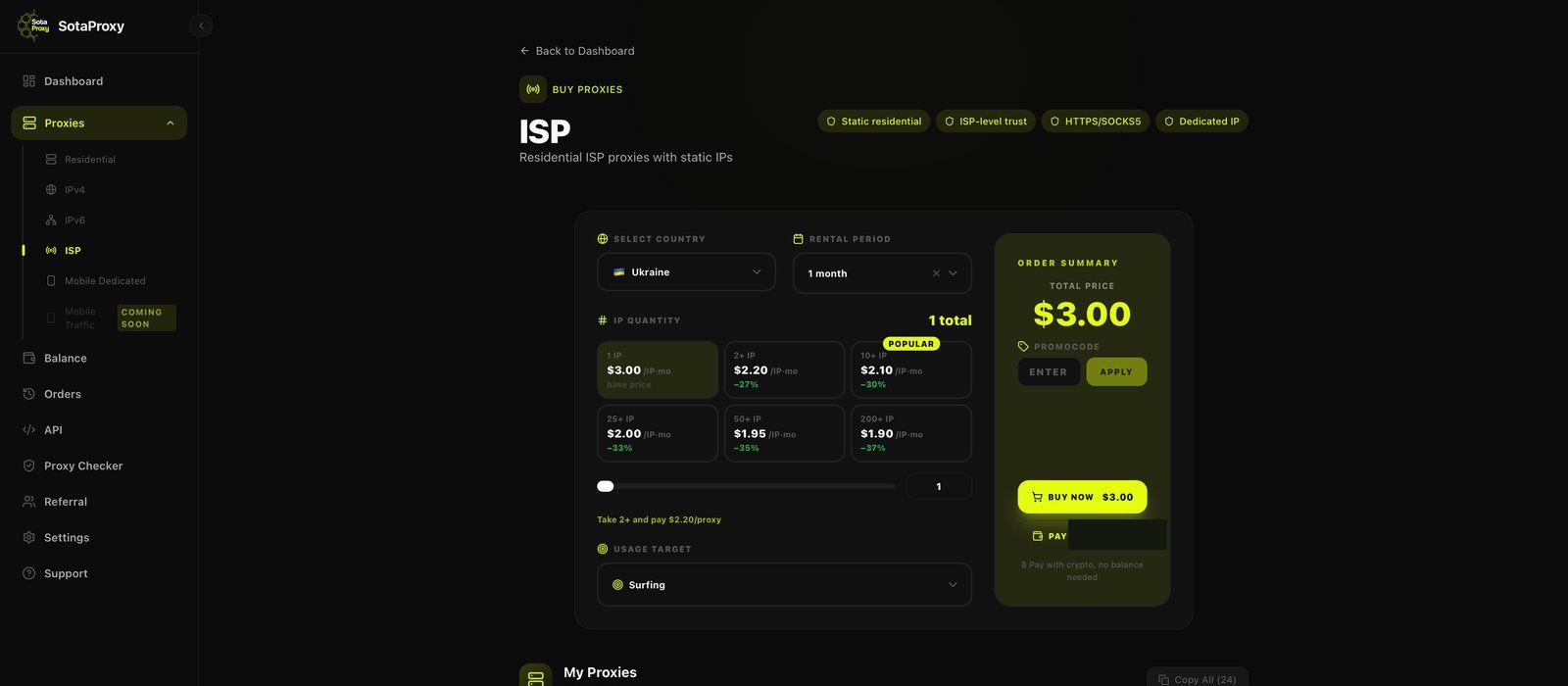
1. Proxy layer. For long-lived accounts, one sticky residential or mobile IP per account, or a static ISP proxy when the account needs to live for months. Rotating residential only for registration bursts and scraping. At SotaProxy all four proxy types run on one balance, with pay-as-you-go pricing and no subscription. That makes it easy to test a geo on a few GB before scaling, or to rent a single static ISP address for a month and see how it behaves before you buy a block of them.
2. Anti-detect layer. One profile per account, fingerprint generated to match the proxy's OS and geo, WebRTC set to replace.
3. Verification layer. ToDetect audit on the first launch of every new profile template, plus spot checks after proxy or browser updates.
4. Behavior layer. Warm-up, realistic session lengths, no mass actions on day one.
For larger farms, I automate the proxy layer. SotaProxy has a REST API and a hosted MCP server, so orders, renewals, and exports in ip:port:login:password format can be scripted or handled from an AI assistant. The ToDetect check stays manual on purpose. It's the one step where I want a human looking at the result.
Most teams I've worked with skip the verification layer. They find out about a leak only after losing a batch of accounts. Ten minutes of checking is much cheaper than rebuilding a farm.
9. FAQ and Troubleshooting
The IP score is clean, but the fingerprint consistency score is low. What's wrong? The problem is in the browser profile, not the proxy. Check for Canvas/WebGL noise that's too aggressive, Client Hints that don't match the User-Agent, or fonts that don't match the claimed OS.
A SotaProxy residential exit scored High Risk. What should I do? Rotate and re-check. One bad exit in a sample is normal for any shared pool. If several exits in the same geo score low, message SotaProxy support on Telegram with the product, country, and session parameters. That's enough for us to look at the specific segment.
ToDetect says IP Type: Datacenter on my ISP proxy. Is that a problem? For static residential (ISP) proxies it's expected. The address is registered to an ISP but hosted in a datacenter, so ToDetect reports the hosting side. Check the four databases instead: if they all answer Is Data Center — No, as in Step 4, the classification platforms see is the residential one.
One database says the IP is in a different city. Should I drop it? Usually not. City-level disagreement between databases is common, especially for mobile IPs. A country mismatch, or a datacenter flag on a supposedly residential IP, is the real warning sign.
DNS leak test shows my home ISP even though I use a proxy. You're probably on an HTTP proxy with local DNS resolution. Switch to SOCKS5 with remote DNS, or enable proxy DNS in your anti-detect browser.
The target site returns 403 on the very first request. That's usually address class, not purity: the site filters hosting ranges. Move that task from datacenter to residential or ISP proxies.
Can a perfect ToDetect result guarantee my accounts won't be banned? No. It removes environment risk, which is the part you can measure. Account behavior, payment methods, and content still matter. But once the environment is clean, you know you're debugging the right thing.
A clean proxy is not a feature you take on faith. It's something you verify, and keep verifying. If you want to run this audit on your own geos, SotaProxy lets you start with a small residential or mobile package, or a single static ISP address, and put it through ToDetect before you commit a single account.
Readers of this blog get 15% off any order with the promo code Todetect at checkout.
